

Edge for Business

The enterprise browser for secure AI at work

AI at work backed by Microsoft’s commitment to security, controls, and enterprise data protection.

none
NEW

Introducing agentic browsing, safe for work

Discover how Edge for Business brings agentic browsing into a secure enterprise browser, with a system of controls IT can manage from day one. And explore additional AI features that improve browsing—from a smarter new tab page to AI across tabs.

Introducing browsing with Copilot

Browsing with Copilot turns Edge for Business into a proactive, agentic partner.

*Available worldwide with Microsoft 365 Copilot license, excluding European Economic Area.

Stay in control when users browse with Copilot

IT sets the rules

It is in control of when to enable browse with Copilot and which sites it works on. And when it's running, users will see visual cues and are able to stop it anytime.


Honors your policies

Existing data protection policies like DLP and usage rights continue to be enforced while Copilot is in action.

Personal data stays private

Access to passwords, payment methods or other sensitive information is blocked. If that data is needed, Copilot pauses and asks users to intervene.

Permission required

Browsing with Copilot is enabled by the user. It won't proceed with sensitive actions without explicit user permission.

none

Enterprise data protection in Microsoft 365 Copilot

Copilot is built on a comprehensive approach to enterprise-grade security and responsible AI—so you can move faster without compromising the safeguards your business depends on.

One place to search, chat, and get things done

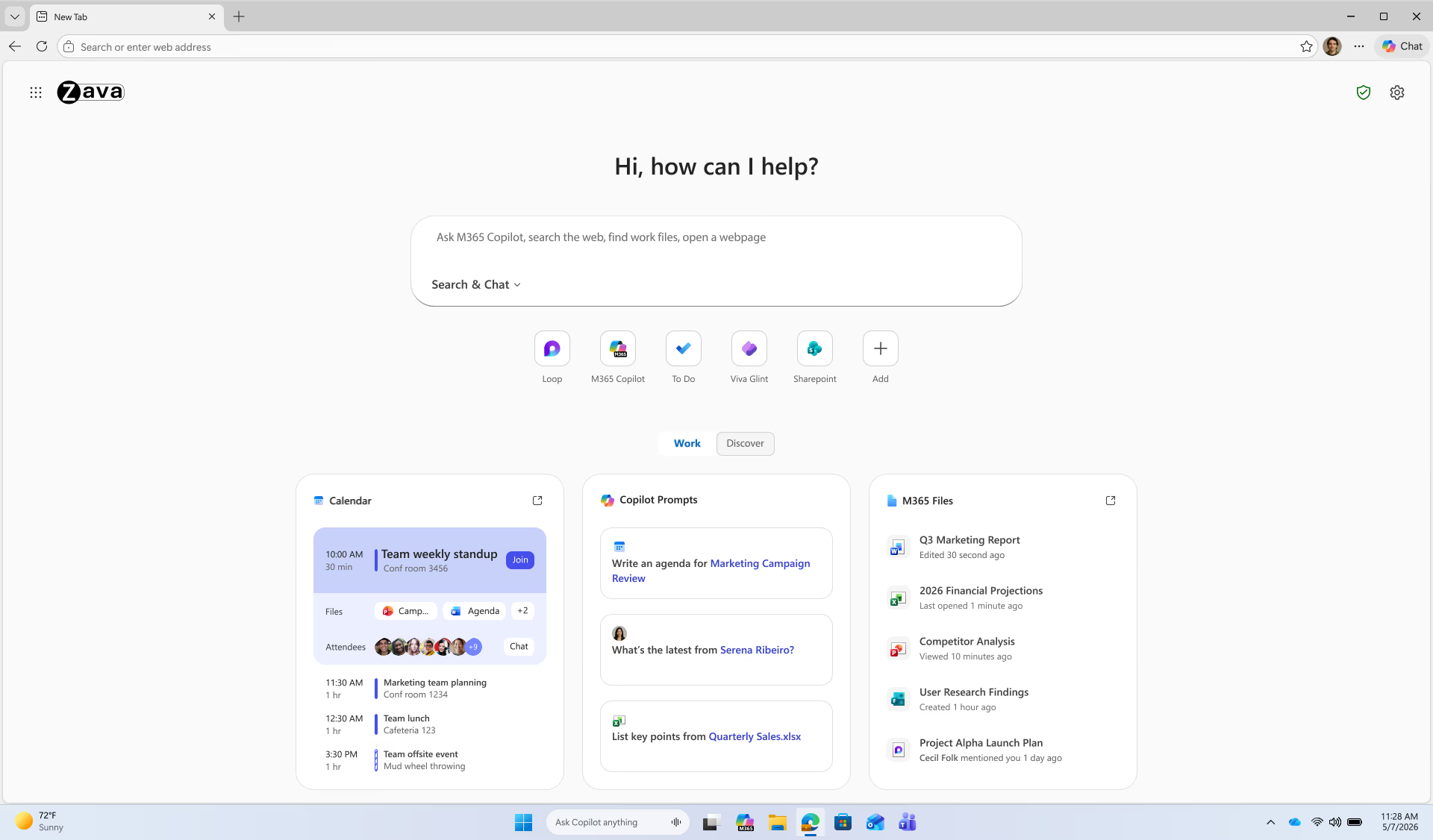
Your new tab page, reimagined.

Available now

Copilot-inspired new tab page

Combines search and chat in one intelligent box, with easy access to files and more, and personalized Copilot prompt suggestions.

*Certain features require a Microsoft 365 Copilot license.
Coming Soon

Daily Briefing

Gives you highlights of your meetings, tasks, and priorities using Microsoft Graph and browser history. Focus on the right things at the right time.

*Requires Microsoft 365 Copilot license.

Smarter browsing, powered by AI

New AI features leverage context to make everyday browsing smarter.

Available now

Answers across all open tabs

Copilot can analyze content across up to 30 open tabs and give nuanced, context-rich answers without switching tabs, while enforcing existing data protection policies. This means better comparisons, faster decisions, and less tab switching.

Available now

Turn videos into quick insights

Copilot can summarize YouTube videos and answer questions—skip the watch and get straight to what matters.

Coming Soon

No more retracing steps

Stop wasting time searching for that page you saw days ago. With Copilot in Edge for Business, your workforce can easily find what they need—just ask in natural language or by date. Get the right page, fast, and keep work moving.

Productivity built-in

Edge for Business comes packed with productivity features to help your workforce stay organized and in the flow.

Get started today with three simple steps

Configure Edge for Business

Set up security, AI controls, extensions, and more based on your organization’s preferences.

Run a pilot

Set Edge for Business as the default browser for a segment of your workforce and gather feedback.

Drive adoption

Ready to make Edge for Business the standard? Take advantage of the adoption kit to help your workforce get the most out of Edge for Business.

  • * Feature availability and functionality may vary by device type, market, and browser version.