
Shop online with participating retailers and earn cashback—free for eligible Microsoft account users in 36 countries. As you browse in Microsoft Edge, you can find and activate cashback offers, then shop as usual. Once your purchase is confirmed, cashback is credited to your account and can be transferred to PayPal.
Microsoft Cashback
Shop online with participating retailers and earn cashback—free for eligible Microsoft account users in 36 countries. As you browse in Microsoft Edge, you can find and activate cashback offers, then shop as usual. Once your purchase is confirmed, cashback is credited to your account and can be transferred to PayPal.
Tips and Tricks
Frequently asked questions
Microsoft Cashback (formerly Bing Rebates) is a free program that allows eligible Microsoft account users to earn cashback when they shop with participating retailers using certain Microsoft products and services, such as Bing.com, Microsoft Edge, MSN, Copilot, and the corresponding mobile apps. Microsoft may receive compensation for clicks on or purchases made through these offer links, but such compensation has no effect on the ranking or relevance of results.
You can enroll in Microsoft Cashback by signing up directly on the Microsoft Cashback Dashboard or activating a Microsoft Cashback offer while logged in with your Microsoft Account. From time to time, we might provide special offers or other ways to join the Microsoft Cashback program through other Microsoft products and services.
Yes. Microsoft Cashback is a real, free Microsoft program—no fees and no credit card required. Official emails only come from maccount@microsoft.com. Microsoft will never ask you to pay to access your cashback.
To participate in Microsoft Cashback, you must have an active personal (non-work/non-school) Microsoft Account and you must be continuously enrolled in the Microsoft Rewards program. You must also be at least 18 years old and a lawful resident of one of the following Participating Territories:
Asia:
Japan, Singapore
Americas:
Canada, Ecuador, El Salvador, French Guiana, Martinique, Mexico, Puerto Rico, United States
Europe:
Andorra, Austria, Belgium, Cyprus, France, Germany, Greece, Hungary, Ireland, Italy, Liechtenstein, Lithuania, Luxembourg, Monaco, Netherlands, Portugal, San Marino, Slovakia, Spain, Sweden, Switzerland, United Kingdom, Vatican
Oceania:
Australia, Guam, New Zealand
- Sign in with your personal (non-work) Microsoft account using the Microsoft product or service you are using to shop (e.g. on Bing.com, or if you are using Microsoft Edge, through the browser).
- On Bing.com, search for retailers or products and look for search results with Microsoft Cashback shopping tags. Similarly, on Microsoft Start (MSN.com) or Outlook.com, look for Cashback offers with the blue shopping tag.
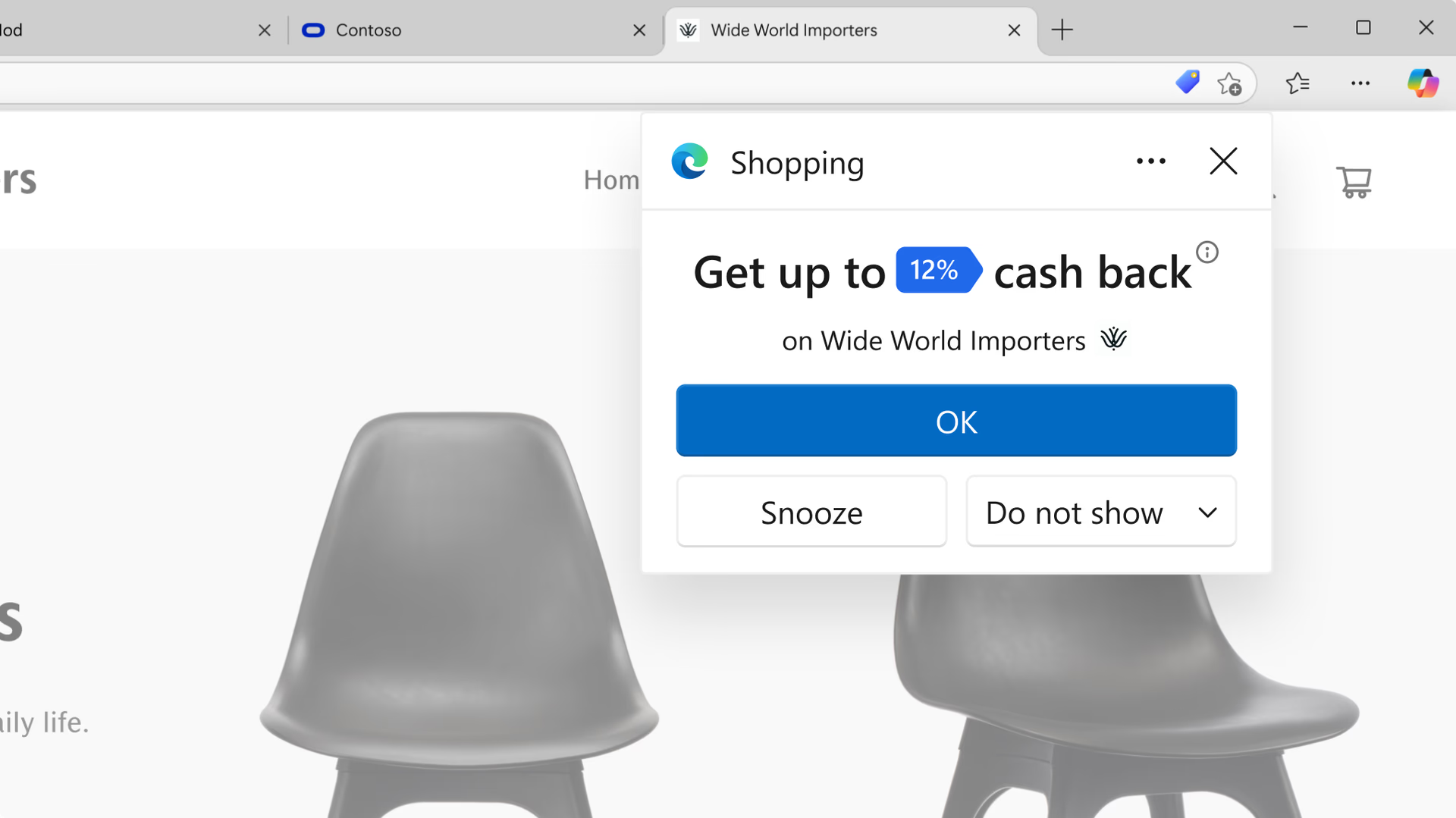
- On Microsoft Edge or on certain mobile apps from Microsoft (such as Microsoft Bing, Microsoft Edge, or Microsoft Start on iPhones or Android devices), you may also be presented with cashback offers from Microsoft when you visit participating retailers’ websites. If you are signed in with a Microsoft account that's enrolled in the Microsoft Cashback program, click or tap where indicated to Activate the offer during that shopping visit.
- Shop as you normally would on the retailer website. You must complete your purchase in a single browsing session without leaving the retailer's site and without using a coupon code or other browser extension, as these can interfere in your ability to earn Microsoft Cashback for that shopping visit. You must also enable third-party cookies on your browser. This is the default setting on most browsers, but if you have modified settings or installed special privacy software, you may need to return to a standard configuration. Please refer to the Program Terms for additional earning requirements.
- Once you complete an eligible purchase, the Cashback award will be credited to your Microsoft Cashback account.
There are several reasons why you may not have earned a Cashback reward for a certain purchase:
- Your purchase or the item you purchased wasn't eligible for a Cashback reward under the offer terms for that particular retailer.
- You haven’t enrolled in Microsoft Cashback, or you didn’t sign in with a Cashback-enrolled Microsoft account before making your purchase.
- You didn't activate the Cashback offer when it was presented to you (see "How do I earn Cashback rewards?" for more details)
- You used a coupon code that made your purchase ineligible to receive Microsoft Cashback.
- Too much time elapsed between the time you activated the Cashback offer and the time you completed your purchase.
- You clicked another offer link (from another online ad or offer, from an email, or from a browser extension or shopping tool) for that product or retailer that prevented you from earning Microsoft Cashback for your purchase.
- Third-party cookies are disabled on your browser, or a browser plug-in, virus, malware, or other interference blocked activation of a particular Cashback offer.
- You're using an ad blocker. Pause the ad blocker or add a filter to disable it while shopping.
- Your account has been flagged for suspected fraudulent activity or other compliance reasons.
You can access your Microsoft Cashback account to view your Cashback activity, purchase details, and current Cashback Account balance. Once a Cashback reward is marked as Complete, it will be credited to your account balance. You can redeem your balance at any time by transferring your entire balance to your linked PayPal account, in accordance with PayPal policies.
You can access or use your Cashback reward after its status changes from Pending to Complete. There is a short waiting period before your Cashback reward will be available to you, to allow us to confirm your purchase is eligible and that it hasn’t been returned to the retailer. This waiting period is usually between 30 to 90 days, but it may be longer for certain types of purchases, including travel-related purchases.
You may earn up to US$200 per calendar month, and up to US$1,000 per year in Microsoft Cashback rewards. If you think you will exceed that cap, please contact Cashback Support and tell us more. We'll review your submission and consider a higher cap.
You can review the full Microsoft Cashback terms and conditions at https://www.bing.com/shop/deals/cashback
- * Feature availability and functionality may vary by device type, market, and browser version.