
overview
Shopping in Edge
Save time and money with Shopping in Microsoft Edge. Compare prices across retailers, check price history, track price drops, and earn cashback—all in one place, built right into your browser.
features
Compare prices without switching tabs
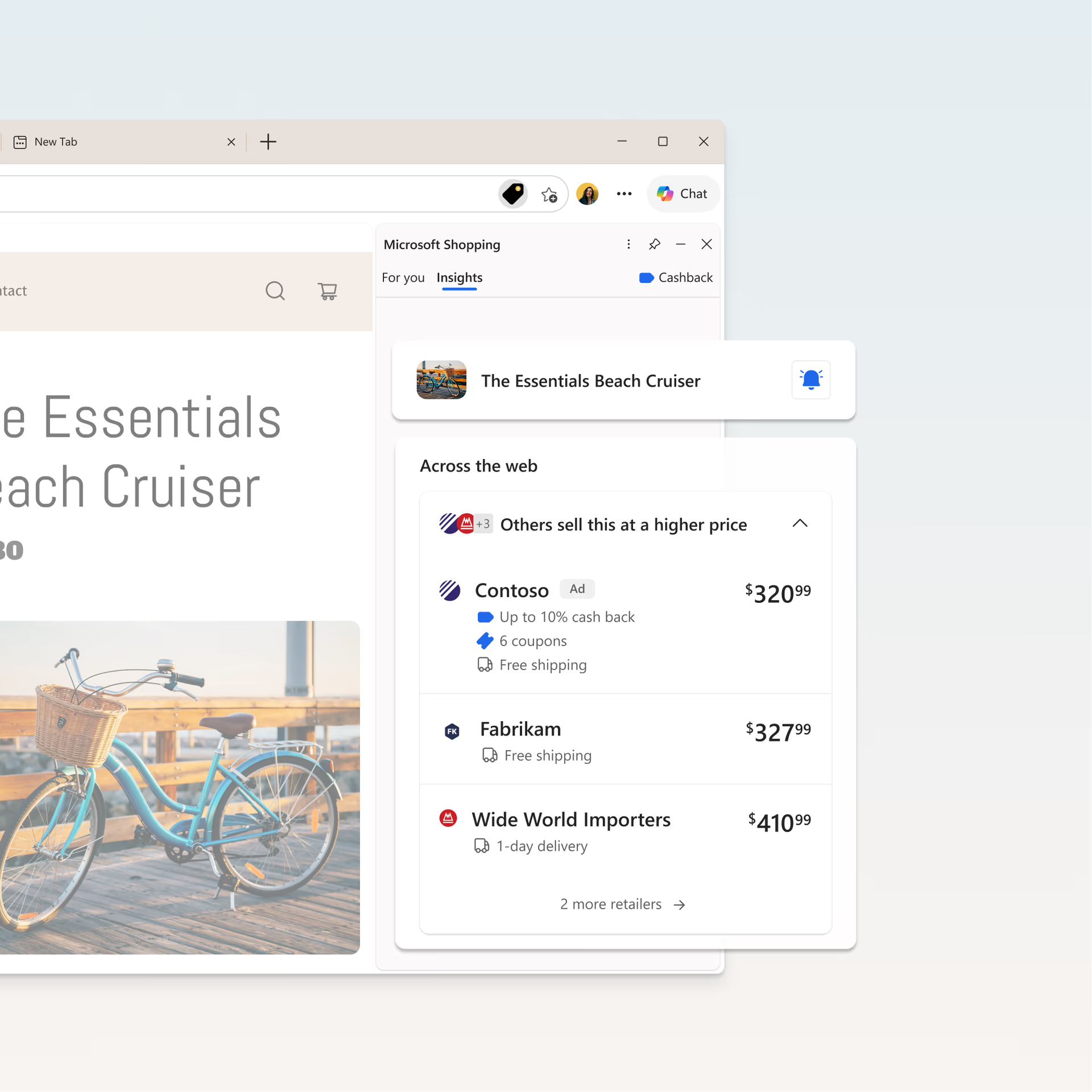
Use Shopping in Edge to compare prices across retailers on items you’re already browsing. If a better price is available elsewhere, the Shopping tag in the address bar can surface options from multiple retailers.
Need help deciding? Copilot in Edge icon can summarize reviews or compare products on request.
Check price history before you buy
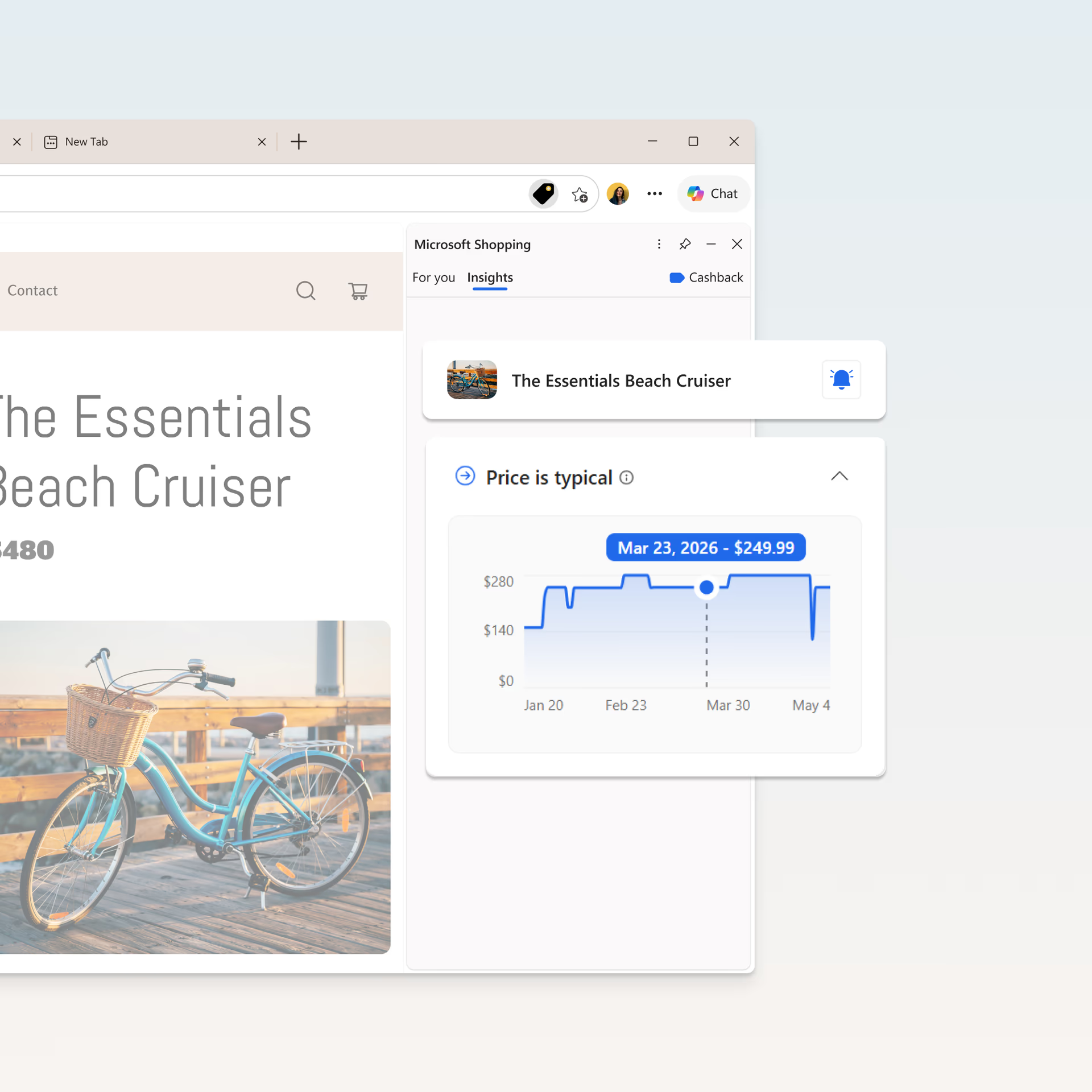
Check price history directly from the Shopping tag in the address bar. This makes it easy to see how prices have changed over time and decide whether now is a good time to buy.
Track price drops on your favorite products
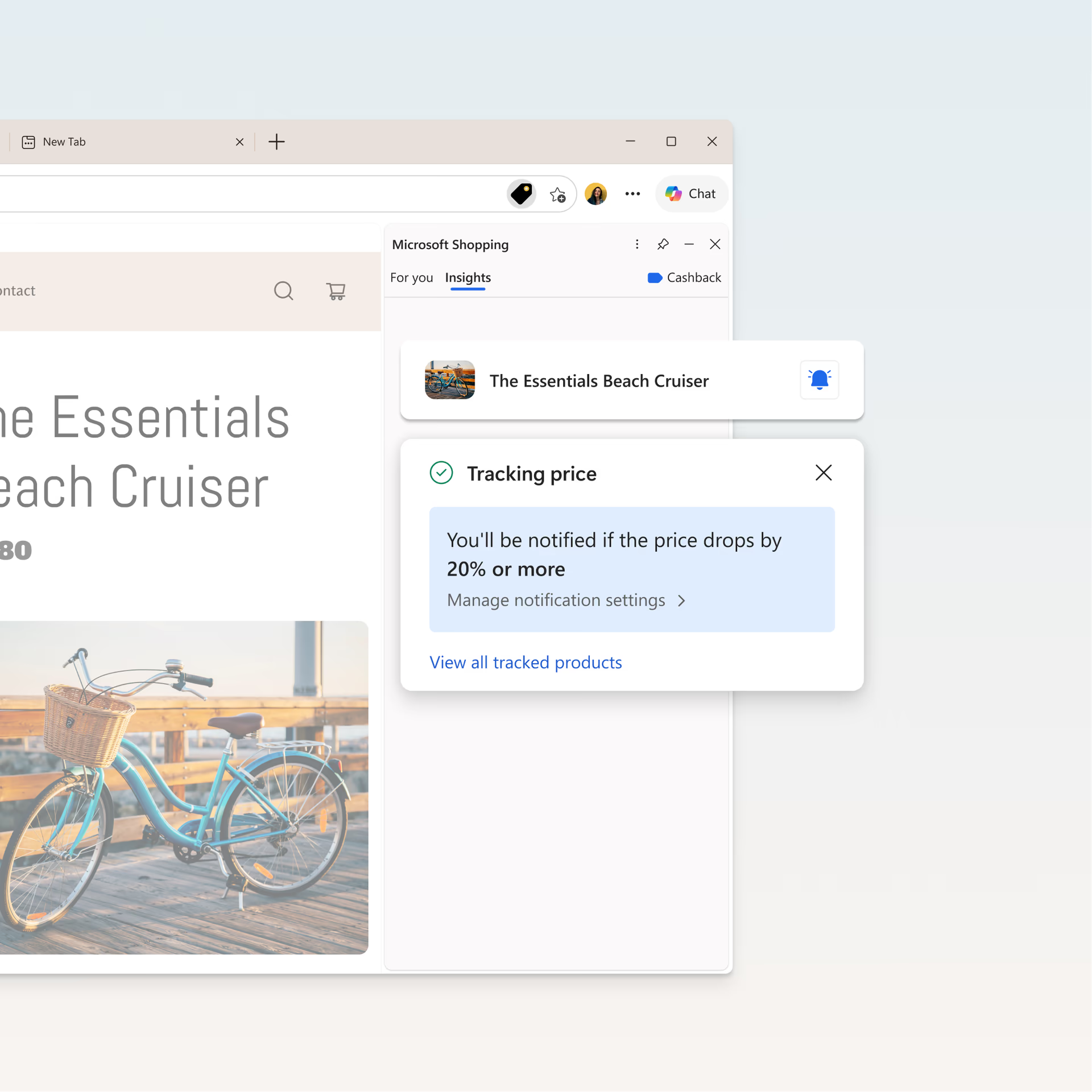
Click the Shopping tag to start tracking a product’s price. You’ll receive notifications via email and your browser when it drops by your chosen threshold, such as 20% or more.
Get cashback on your purchases
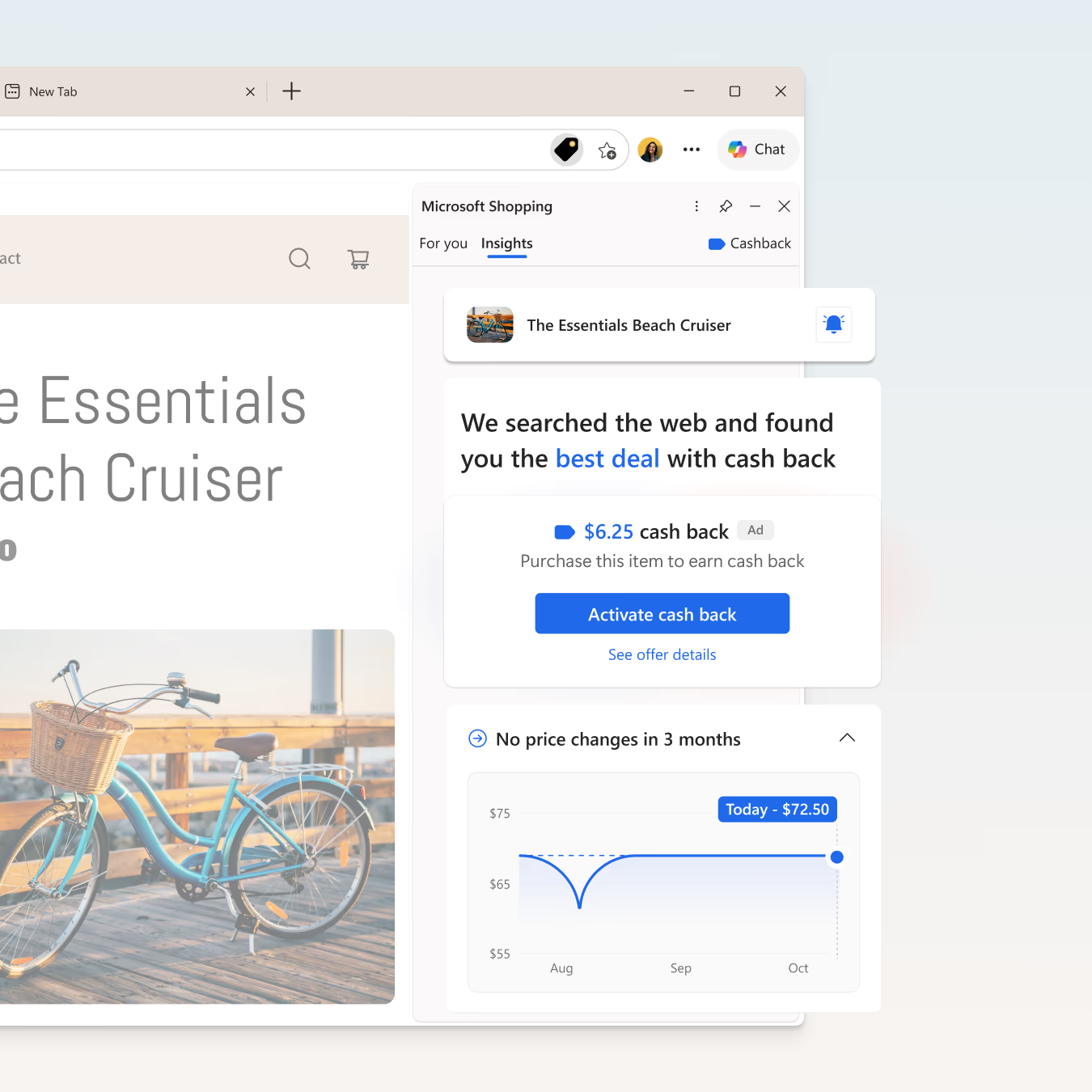
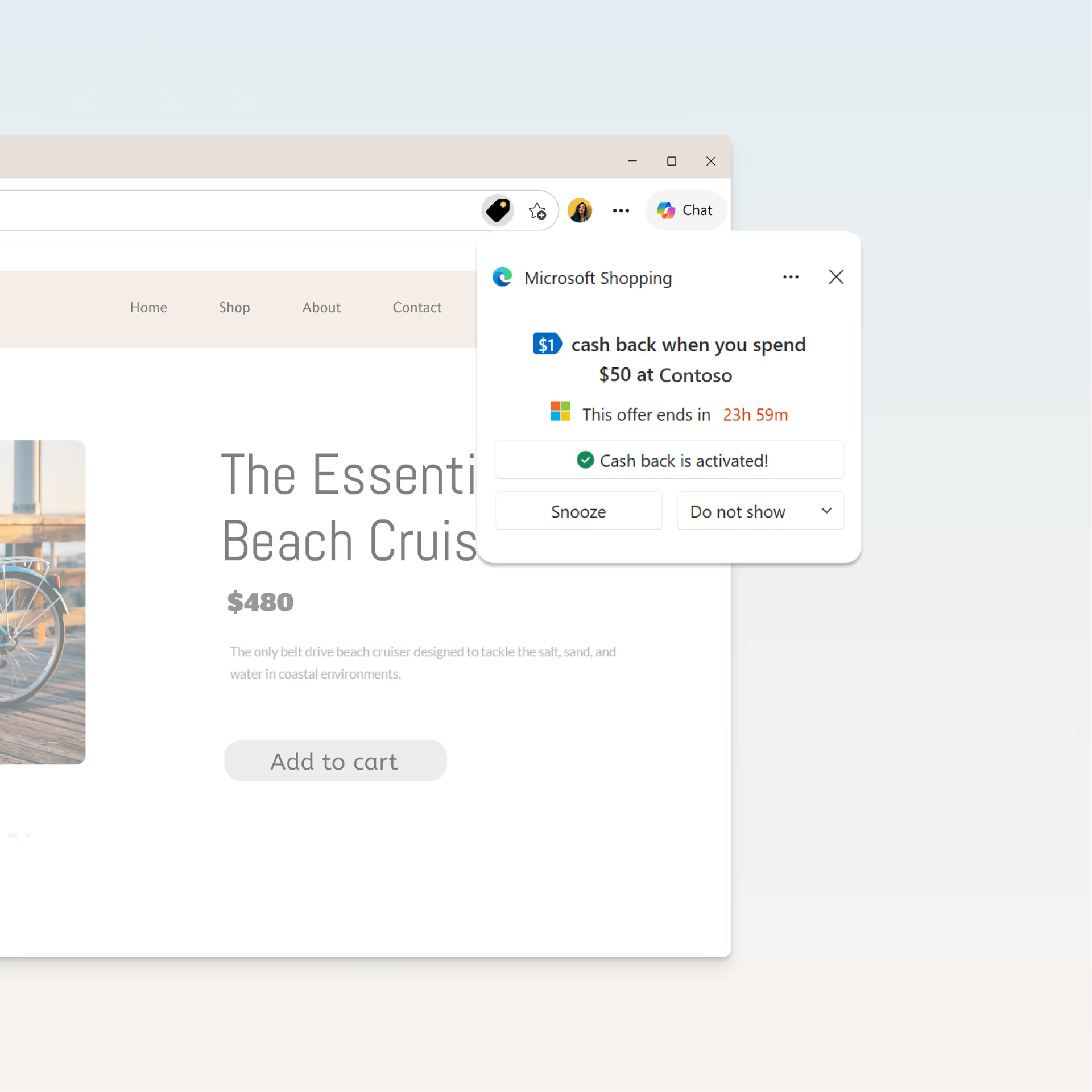
Earn cashback from participating retailers when you shop online—no extensions required. When available, click the Shopping tag in the address bar to activate the offer and receive cashback through PayPal.
faqs
header
Frequently Asked Questions
shopping-in-edge
Learn more about Shopping in Edge
Learn more about Shopping in Edge
Shopping in Edge is a collection of shopping features built right into your browser—no extensions required. It includes price tracking, price history, price comparison, and cashback—all accessible through the Shopping tag icon in the address bar when viewing a retailer site in Edge.
With your permission, Microsoft Edge collects information related to your shopping activity and experience to provide and improve this service. Data collected includes information about your usage and the performance of the Microsoft Edge Shopping feature, information about your browsing history on shopping sites, and information extracted from page content including product information, cart, and transaction details. We’re transparent about what data is collected and give you controls to manage it. Learn more about Microsoft Edge, browsing data, and privacy.
price-comparison
Learn more about price comparison
Shopping in Edge searches the web for price comparisons on products you're already browsing and lets you know if a better price is available elsewhere.
When you want extra help—like summarizing reviews or comparing products—you can ask Copilot in Edge icon for assistance. Copilot supports these scenarios only when explicitly prompted.
Price comparison is currently available in 29 countries:
- North America: United States, Canada
- Europe: United Kingdom, Germany, France, Netherlands, Italy, Austria, Switzerland, Spain, Sweden, Denmark, Poland, Norway, Finland, Portugal, Belgium, Czech Republic, Slovakia, Ireland, Romania, Hungary, Greece
- Latin America: Brazil, Mexico
- Asia‑Pacific: Australia, India, Singapore, Malaysia
price-history
Learn more about price history
Price history shows you recent price changes to help you determine if now is the right time to buy. This includes details on if the price has increased, decreased, or remained the same.
Price history is available in 211 different countries and territories:
- North America & Caribbean: United States, Canada, Mexico, Bahamas, Montserrat, Barbados, Aruba, Jamaica, Trinidad and Tobago, Cayman Islands, Bermuda, Dominican Republic, Haiti, Puerto Rico, Antigua and Barbuda, Saint Vincent and the Grenadines, Saint Lucia, Guadeloupe, British Virgin Islands
- South America: Argentina, Brazil, Colombia, Chile, Ecuador, Guyana, Paraguay, Peru, Venezuela, Bolivia, Uruguay, Suriname
- Europe: Denmark, Andorra, Slovakia, Austria, Belgium, Bulgaria, Slovenia, Finland, Cyprus, Jersey, Croatia, Czech Republic, Brunei, Greece, France, Georgia, Germany, Hungary, Iceland, Ireland, Italy, Latvia, Liechtenstein, Lithuania, Luxembourg, Malta, Moldova, Monaco, Montenegro, Bosnia and Herzegovina, Netherlands, Norway, Poland, Portugal, Romania, Russia, San Marino, Serbia, Spain, Sweden, Switzerland, United Kingdom, Ukraine, Estonia, Guernsey, Albania, Gibraltar
- Asia: Myanmar, Singapore, Bangladesh, Belarus, Bahrain, Iran, China, Hong Kong, Indonesia, Israel, Uzbekistan, Kazakhstan, Kyrgyzstan, Taiwan, Laos, Thailand, Lebanon, Yemen, Malaysia, Vietnam, India, Nepal, Japan, Jordan, Tajikistan, Pakistan, Armenia, Palestine, Philippines, South Korea, Sri Lanka, Syria, Macau
- Middle East & North Africa: Algeria, Tunisia, Egypt, United Arab Emirates, Saudi Arabia, Morocco, Kuwait, Oman, Libya, Iraq, Qatar
- Sub‑Saharan Africa: Uganda, Zambia, Zimbabwe, Tanzania, Somalia, Sierra Leone, Mali, Ethiopia, Kenya, Ghana, Liberia, Cameroon, Chad, Guinea, Burundi, Mozambique, Nigeria, Namibia, Senegal, Gabon, Niger, Malawi, Rwanda, South Sudan, Benin, Togo, Congo, Gambia, Ivory Coast, Burkina Faso, Djibouti
- Oceania: Australia, Fiji, New Zealand, Papua New Guinea, Solomon Islands, French Polynesia, New Caledonia
- Other territories: Faroe Islands, Greenland, Cape Verde, Curaçao, French Guiana, Maldives, Reunion, Martinique
price-tracking
Learn more about price tracking
When viewing a retailer site, click on the Shopping tag icon in the address bar to start tracking a product's price. You'll receive notifications via email and your browser when it drops by your chosen threshold. You can view all the items you're currently tracking by clicking View tracked products.
Price tracking is available in 211 different countries and territories:
- North America & Caribbean: United States, Canada, Mexico, Bahamas, Montserrat, Barbados, Aruba, Jamaica, Trinidad and Tobago, Cayman Islands, Bermuda, Dominican Republic, Haiti, Puerto Rico, Antigua and Barbuda, Saint Vincent and the Grenadines, Saint Lucia, Guadeloupe, British Virgin Islands
- South America: Argentina, Brazil, Colombia, Chile, Ecuador, Guyana, Paraguay, Peru, Venezuela, Bolivia, Uruguay, Suriname
- Europe: Denmark, Andorra, Slovakia, Austria, Belgium, Bulgaria, Slovenia, Finland, Cyprus, Jersey, Croatia, Czech Republic, Brunei, Greece, France, Georgia, Germany, Hungary, Iceland, Ireland, Italy, Latvia, Liechtenstein, Lithuania, Luxembourg, Malta, Moldova, Monaco, Montenegro, Bosnia and Herzegovina, Netherlands, Norway, Poland, Portugal, Romania, Russia, San Marino, Serbia, Spain, Sweden, Switzerland, United Kingdom, Ukraine, Estonia, Guernsey, Albania, Gibraltar
- Asia: Myanmar, Singapore, Bangladesh, Belarus, Bahrain, Iran, China, Hong Kong, Indonesia, Israel, Uzbekistan, Kazakhstan, Kyrgyzstan, Taiwan, Laos, Thailand, Lebanon, Yemen, Malaysia, Vietnam, India, Nepal, Japan, Jordan, Tajikistan, Pakistan, Armenia, Palestine, Philippines, South Korea, Sri Lanka, Syria, Macau
- Middle East & North Africa: Algeria, Tunisia, Egypt, United Arab Emirates, Saudi Arabia, Morocco, Kuwait, Oman, Libya, Iraq, Qatar
- Sub‑Saharan Africa: Uganda, Zambia, Zimbabwe, Tanzania, Somalia, Sierra Leone, Mali, Ethiopia, Kenya, Ghana, Liberia, Cameroon, Chad, Guinea, Burundi, Mozambique, Nigeria, Namibia, Senegal, Gabon, Niger, Malawi, Rwanda, South Sudan, Benin, Togo, Congo, Gambia, Ivory Coast, Burkina Faso, Djibouti
- Oceania: Australia, Fiji, New Zealand, Papua New Guinea, Solomon Islands, French Polynesia, New Caledonia
- Other territories: Faroe Islands, Greenland, Cape Verde, Curaçao, French Guiana, Maldives, Reunion, Martinique
cashback
Learn more about cashback
Learn more about cashback
Microsoft Cashback (formerly Bing Rebates) is a free program that gives eligible Microsoft account members cash back when they shop with participating retailers through Microsoft Edge and other Microsoft products and services. Cashback is paid out via PayPal after your purchase is confirmed. You can earn up to $200 per month and $1,000 per year. For full details on how to enroll, earn, redeem, and check your balance, visit the Microsoft Cashback page.
You can review the full Microsoft Cashback terms and conditions by visiting your Microsoft Cashback account.
- * Feature availability and functionality may vary by device type, market, and browser version.