This is the Trace Id: a923288ba0dce3140ea8d387e8fa365a
3/13/2026

Teijin Frontier transforms its device management with Intune and Windows 365

As remote work expanded, device management grew increasingly complex.
During its migration from Windows 10 to Windows 11, Teijin Frontier streamlined on-premises tools and Group Policy settings, enabling a shift to efficient, cloud-based device management.


Teijin Frontier improved device lifecycle and security via Intune, Entra ID, Autopilot, and Windows Hello. With FastTrack and Microsoft Unified, Teijin Frontier shifted to cloud-based device management and now provides Windows 365 to subcontractors.

Automated configuration via Autopilot reduced Teijin Frontier’s workload regarding multiple device setup and updates, eliminating the need for outsourcing and resulting in tremendous cost savings and fewer post-setup inquiries.

Teijin Frontier

Switchover to Windows 11 Enterprise provides opportunity for cloud-based device management

Teijin Frontier, whose motto is “Life Evolves with Fibers.” is an integrated fiber company with both manufacturing and trading capabilities, creating fiber with new value and discerning global trends, driving new possibilities of textile fiber and industrial materials while opening new frontiers in fiber through recycling technology

Teijin Frontier is both a manufacturer and a trading company, requiring a variety of working styles. “We first introduced mobile devices and working from home in 2005, with an eye to boosting our sales performance,” says Nobuo Nishiyama, General Manager of the System Development Department, TEIJIN FRONTIER CO., LTD. “Later, when COVID-19 struck, we took this company-wide. After COVID died down, we continued a hybrid working style that also values face-to-face communication.”

As the number of people working from home increased, so did the complexity of device management. The transition from Windows 10 to Windows 11 provided the opportunity to resolve this issue. Nishiyama explains, “The move to Windows 11 drove a shift away from our previous Microsoft Deployment Toolkit (MDT)-based deployment process, creating an opportunity to modernize our deployment strategy and simplify Group Policy configurations that were no longer serving us well. As a trading company, we often need to connect with our business partners’ ordering systems, and the number of Group Policy settings had multiplied before we knew it. As our business and sales representatives change, it’s uncertain what settings will be necessary, making efficient device management impossible. We discovered over 300 settings our department had no hand in and other unspecified settings, and we were able to eliminate 30% of those.”

After reevaluating the Group Policy settings, Teijin Frontier focused on streamlining device management and operation through the cloud. Yoshiki Hirata, Manager of the IT Operation Section of the System Development Department, talks about their reasons for doing so.

“Our systems section is quite busy promoting digital transformation and providing systems support. We need to create more time in order to meet the needs of both the management side and the operation side. As we reevaluated the roles our department needed to serve, we came to the decision that a cloud-based device management domain that required little effort was indeed possible in this day and age.”

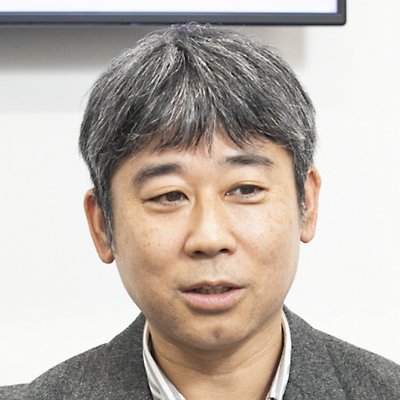
Nobuo Nishiyama, General Manager System Development Department, Teijin Frontier Co., Ltd.

“Here at Teijin Frontier, our action guidelines are based on the concept of 3C1H (change, challenge, create, harmony), and we encourage every employee to cultivate their sensitivity and creativity to put 3C1H into action. I want our cloud-based device management to evolve and help that process to unfold.”

Nobuo Nishiyama, General Manager System Development Department, Teijin Frontier Co., Ltd.

Automated configuration and internalized automated large-scale OS upgrades

A key consideration in choosing a product was an efficient product life cycle, ranging from device configuration to integrated management. Hirata explains, “What met our company’s needs was a combination of Windows Autopilot (hereafter “Autopilot”) for automated configuration, and Microsoft Intune (hereafter “Intune”) for cloud-based endpoint management. These products allow seamless integration with Windows 11, simplifying device management.”

Autopilot, used in concert with Intune and Microsoft Entra ID (hereafter “Entra ID”), a cloud-based ID and access management service, can automate device registration, default settings, work-related applications, and security policies when a device is first launched. Compared to previous master settings rollouts, required labor hours are drastically reduced, and users can begin working more quickly.

Teijin Frontier had previously used a subcontractor onsite to kit out approximately 500 devices per year. Rie Hibino of the System Development Department says, “The configuration operation required considerable financial and human resources on an ongoing basis. Autopilot has allowed for automated configuration, which has greatly reduced the amount we have spent on outsourcing. Additionally, the number of operations required to kit out new employees’ devices, which was done with in-house resources, has been reduced to a third.”

To streamline the deployment process with Autopilot, Teijin Frontier collaborated with Microsoft Unified Support Technology Advisors (STA). Hibino adds, “The STA evaluated the feasibility of our vision and then provided us with the proposals that would best suit our corporate environment. Thanks to the STA, configuration automation was carried out very smoothly.”

The real merit of Intune lies in its ability to provide large-scale OS updates, as well as centralized device management, app distribution, adoption of security policies, and setting automation. Hanae Tsujimoto of the System Development Department talks about previous issues. 

“One of our biggest projects is our annual massive update of 1,500 Windows PCs, with one of the greatest challenges being the complexity of updating all the apps. We previously outsourced this in a sort of semi-automated process, but program development was time- and cost-prohibitive. Additionally, users would often handle the updates themselves, resulting in rollout delays.”

Teijin Frontier also contemplated the use of FastTrack for Microsoft 365 for data transfer and cloud usage support, which guarantees viability when used with Intune for large-scale automated updates. After careful consideration of the feasibility of the project, they used Microsoft technical support, Support Request (SR), to actualize internalization. 

Tsujimoto stated, “By using Microsoft support, the development process went very smoothly. Additionally, by internalizing programs previously outsourced to vendors, we reduced both development time and costs. Furthermore, automated development lightens the burden on the user and allows for timely updates. The number of post-update questions was also reduced.”

Hirata commented, “Internalization has helped free us from the need to depend on an external vendor.”

Not only did this allow for a radical change in device management, but it also created stronger security. Hirata talks about previous issues and their solutions. “Biometric ID tools from other companies had more inaccuracies, requiring greater technical support. Changing to devices with Entra ID and Windows Hello for Business for passwordless sign-ins provided us with smooth, highly accurate biometric authentication. Also, by unifying Microsoft products with the security infrastructure for remote work, remote staff can receive consistent support.”

Tsujimoto discusses the merits of maintaining security in conjunction with flexible implementation. “Thanks to Intune account protection, we don’t have to grant users admin privileges but rather can determine ourselves whether it’s necessary to install certain apps, or apply time limits or other restrictions depending on the user’s needs and requests.”

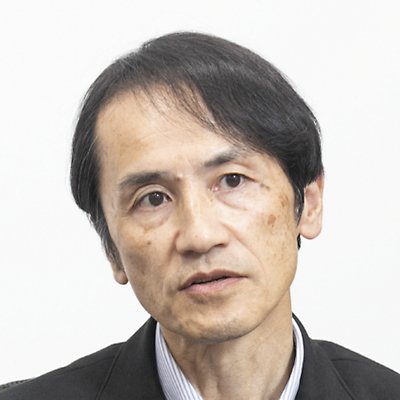
Yoshiki Hirata, Manager IT Operation Section System Development Department, Teijin Frontier Co., Ltd.

“With Autopilot, we can also send new devices to users, and all they need to do is power up and connect to the internet to have a standardized device. That’s our goal. Settings are all automated, which obviates the need for configuration.”

Yoshiki Hirata, Manager IT Operation Section System Development Department, Teijin Frontier Co., Ltd.

Providing virtual desktop environments to subcontractors using Windows 365

After streamlining device management using Intune and Autopilot, the next step was rethinking how they created virtual desktops for subcontractors using Windows 365 Cloud PCs. Hirata describes the former process. “Previously, we would supply our subcontractors with physical devices. But there was a fundamental question of whether the outsourcer had to manage subcontractors’ devices.”

Hirata continues, “Windows 365 provided a solution in that location and device were no longer an issue. We could construct a framework allowing subcontractors to access a Cloud PC, a Windows virtual desktop, on their own device, which reduces device management burden and costs and also allows data to be stored in the cloud, and not on the device itself, reducing the risk of leaks. Using Intune, we can also easily apply policies equivalent to our internal policies. Furthermore, Microsoft Hosted Network ensures stable connectivity. We hope to expand our use of Windows 365 with our subcontractors in the future.”

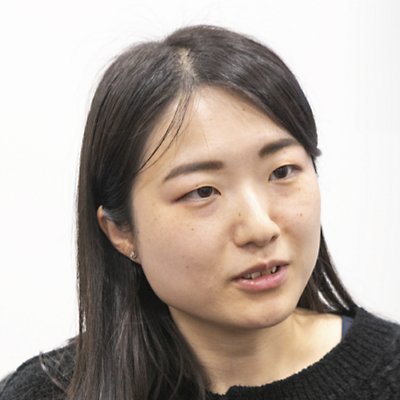
Hanae Tsujimoto, System Development Department, Teijin Frontier Co., Ltd.

“By using Microsoft support, the development process went very smoothly. Additionally, by internalizing programs previously outsourced to vendors, we reduced both development time and costs. Furthermore, automated development lightens the burden on the user and allows for timely updates. The number of post-update questions was also reduced.”

Hanae Tsujimoto, System Development Department, Teijin Frontier Co., Ltd.

Expanding use of Intune in overseas affiliates, reducing configuration workload with Autopilot

Teijin Frontier, which is cultivating a global presence, is also expanding its use of Intune in its overseas locations. Tsujimoto says, “Our Thai affiliate has asked to use Intune, and we’re looking into single-tenant segmented expansion.”

Hirata discusses future device management. “With Autopilot, we can also send new devices to users, and all they need to do is power up and connect to the internet to have a standardized device. That’s our goal. Settings are all automated, which obviates the need for configuration.”

Hirata continues, “We can roll out the use of Windows 365 Cloud PCs internally once we determine the in-house rules. Then, we will not need to supply as many devices, which will further streamline operational management. This will enable the System Development Department to use their time more wisely and put more effort into digital transformation to better contribute to corporate management.”

Nishiyama says, “Here at Teijin Frontier, our action guidelines are based on the concept of 3C1H (change, challenge, create, harmony), and we encourage every employee to cultivate their sensitivity and creativity to put 3C1H into action. I want our cloud-based device management to evolve and help that process to unfold.” 

Teijin Frontier continues to push the boundaries of what is possible with textiles. With Microsoft providing products and support, their daily tasks related to device management become more convenient and more secure, therefore reducing employee workload and contributing to the growth of the company.

Rie Hibino, System Development Department, Teijin Frontier Co., Ltd.

“The STA evaluated the feasibility of our vision and then provided us with the proposals that would best suit our corporate environment. Thanks to the STA, configuration automation was carried out very smoothly.”

Rie Hibino, System Development Department, Teijin Frontier Co., Ltd.

Take the next step

Fuel innovation with Microsoft

Explore more customer stories

Find out how customers are achieving more with Microsoft products and solutions.
A man wearing headphones and smiling.

Talk to an expert about custom solutions

Let us help you create customized solutions and achieve your unique business goals.
Three people in a meeting room.

Transform work with Microsoft AI

Bring intelligence into the flow of work and help your organization achieve its goals with secure, scalable AI solutions.

Follow Microsoft