As we had announced earlier and demoed at Ignite, the ability to create custom forms for your SharePoint lists is now available for SharePoint First Release tenants. In addition, we are also enabling support for multi-value choice, lookup, and person column types, and read-only support for attachments in PowerApps.
Note: These changes are rolling out incrementally for SharePoint First Release tenants and are not generally available from SharePoint yet. So, if your tenant is already on first release, you should already have them and if your tenant is not on first release, to enroll please follow the instructions here.
Custom SharePoint list forms with PowerApps
You can now use PowerApps to build customized SharePoint forms. PowerApps supports many of the scenarios that organizations addressed with InfoPath, and lets you take advantage of new cloud-first, mobile-first, connected capabilities to create custom forms and digital experiences to transform business processes.
Almost any user can use PowerApps to customize the default forms for viewing and editing SharePoint data. The customized SharePoint forms can take advantage of the full capabilities of PowerApps – no code connectivity to over 160 data services such as Office 365, Dynamics, Salesforce, Box, Twilio, and Mail Chimp. These forms run embedded directly in SharePoint, providing a native and friction-free experience for users
Learn more about custom forms and how to customize your list in our documentation.

Multi-select support for Choice, Lookup & People columns
You can now also use choice, lookup & people columns in SharePoint lists that have multi-select enabled on them. If you are dependent on managed metadata, we will have support for that as well soon.
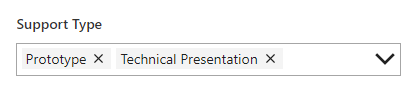
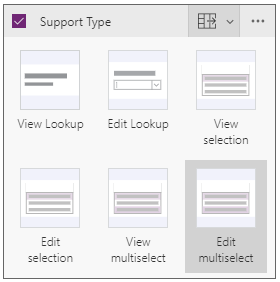
If you create new forms or apps connected to a SharePoint list, they will detect and automatically enable multi-select for supported fields. For existing forms or apps, just select the multiselect cards for your fields on the form.
Read-only attachments support
You can now also display attachments connected to your SharePoint list item in PowerApps by simply enabling the attachments field on your form/app. We know that upload of attachments from PowerApps is an important scenario and are working on enabling it soon.

Please join the conversation in the PowerApps community as we would love to hear from you about how you are using these capabilities and what you would like to see added in the future.