We’re pleased to introduce the public preview of the Power Pages plugin for GitHub Copilot CLI and Claude Code. With this plugin, you simply describe the site you want in natural language. The plugin takes care of everything else, from project scaffolding and Dataverse setup to API integrations, permissions, and deployment.
This plugin is purpose-built for Power Pages. It understands table permissions, web roles, site settings, setting up authentication and Web API patterns. The code it generates is platform-aware, so you spend less time on manual configuration and more time building your site.
How it works
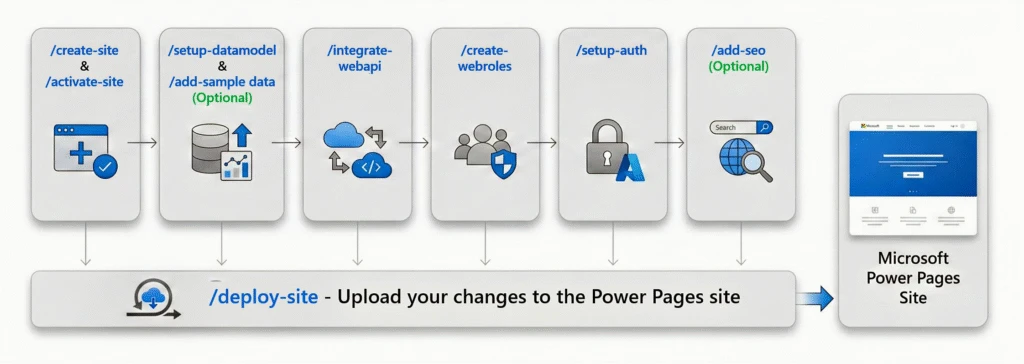
The plugin provides nine conversational skills covering the full lifecycle of a Power Pages single-page application (SPA) site. Here’s a typical end-to-end flow:
- Create your site (
/create-site). Describe what you’re building, the pages you need, and your design preferences. The plugin scaffolds the project with your choice of framework (React, Vue, Angular, or Astro), installs dependencies, and opens a live browser preview. - Deploy and activate (
/deploy-site,/activate-site). The plugin builds your project, uploads it to Power Pages, and provisions a public URL. - Set up your data model (
/setup-datamodel). A specialized Data Model Architect agent analyzes your site’s code, checks your Dataverse environment for existing tables, and proposes a schema with an ER diagram. The plugin doesn’t create anything until you approve. - Connect to live data (
/integrate-webapi,/add-sample-data). The plugin scans your components for mock data and replaces it with production-ready API code, including typed clients, CRUD services, and framework-specific patterns. A Permissions Architect agent proposes table permissions and site settings for your review. You can also populate your tables with realistic test records. - Add authentication and SEO (
/setup-auth,/create-webroles,/add-seo). The plugin generates sign-in and sign-out functionality with Microsoft Entra ID, role-based access control, web role definitions, sitemaps, and meta tags. - Deploy the final site (
/deploy-site). A final deployment pushes your code, permissions, web roles, and site settings to your Power Pages environment.
Each skill works independently and checks its own prerequisites, so you can run them in any order. At every critical step, the plugin proposes changes and waits for your approval before it acts.
A typical end-to-end workflow
Get started
You need the following:
- Node.js 18 or later
- Power Platform CLI (PAC CLI) – latest version
- Azure CLI – latest version
- GitHub Copilot CLI or Claude Code
You also need a Power Platform environment with Power Pages and authenticated sessions for both PAC CLI and Azure CLI.
To install the plugin, open GitHub Copilot CLI or Claude Code and run the following commands:
/plugin marketplace add microsoft/power-platform-skills
/plugin install power-pages@power-platform-skills
After installation, run /create-site and describe what you want to build.
For the full walkthrough, see Get started with the Power Pages plugin for GitHub Copilot CLI and Claude Code.
Tip: New to GitHub Copilot CLI or Claude Code agentic coding tools?
Read Tips and best practices for guidance on writing effective prompts, sharing errors with context, building incrementally, and getting the most out of the plugin.
We are looking for your feedback
Your feedback helps us improve the developer experience on Power Pages. Share your thoughts and reach out on the Power Pages Community Forum. You can also submit ideas through the Power Pages Ideas portal.