We are introducing two important enhancements to Web Application Firewall (WAF) in Microsoft Power Pages that make it easier to protect your sites and ensure production environments start secure by default.
With these enhancements:
- WAF no longer requires a separate prerequisite configuration step
- WAF is automatically enabled when converting trial sites to production
- Admins can opt out during the conversion process
- Improved security by default
Removing the WAF Prerequisite Dependency
Previously, administrators had to complete the Content Delivery Network (CDN) enablement step before they could enable WAF for a site. This prerequisite created friction and, in some cases, compliance challenges.
Now, WAF can be enabled directly without first enabling or configuring CDN.
WAF Enabled by Default During Trial to Production Conversion
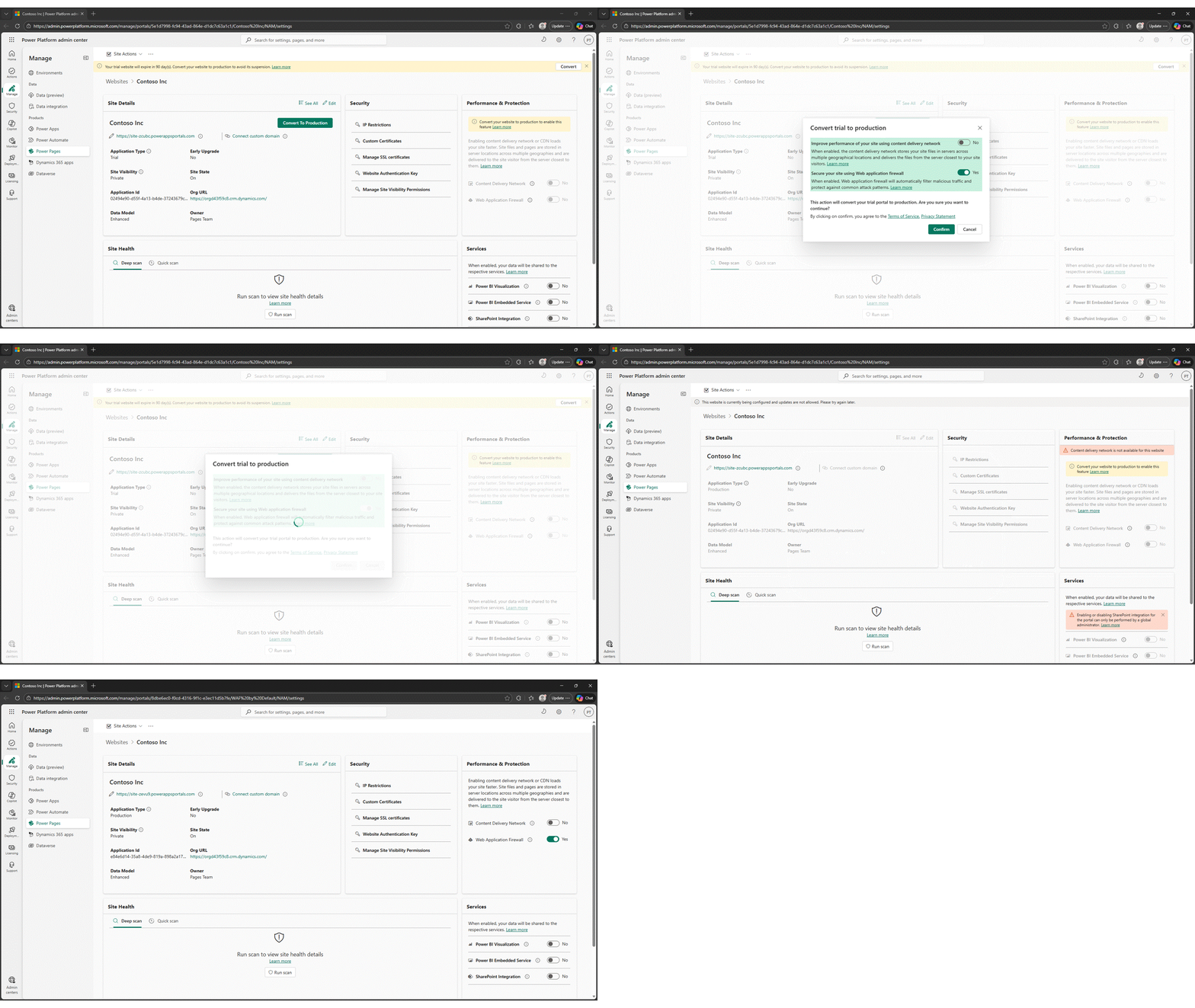
Production environments should not rely on manual security activation. When a trial site is converted to a production site, WAF will now be enabled automatically as part of the conversion flow.
During the conversion process, administrators will see that WAF is being enabled and will have the option to opt out if they prefer to enable it later.
We are looking forward to your feedback
Your feedback is crucial in shaping the future of this feature.
We want to hear from you!