Skip to main content What is Dynamics 365? Guided tours Customer stories Try our products CRM ERP Sales Service Sales Customer Insights Customer Service Contact Center Field Service Supply Chain Management Commerce Finance Project Operations Human Resources Business Central Pricing Business application topics Training & certifications Migrate to the cloud Documentation Events Dynamics 365 Blog Product updates Onboarding and implementation Community Find a partner Software Development Companies Partner resources Microsoft Marketplace Product documentation Technical support On-premises product support Contact us Try for free Sign in
  • 1 min read

CLRObject could not be created error when entering Tools/Options in Microsoft Dynamics AX 2012


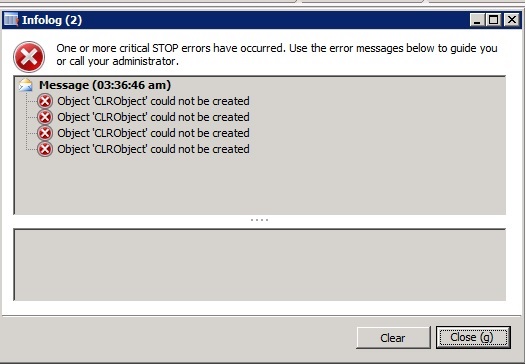
If you get the error ‘CLRObject could not be created’ when entering Tools/Options from the AOT in Microsoft Dynamics AX 2012
Try to go to the Control Panel/Administrative Tools and check the Microsoft Dynamics AX 2012 Server Configuration and note if you have ‘Enable the hot-swapping of assemblies for each development session’ activated.
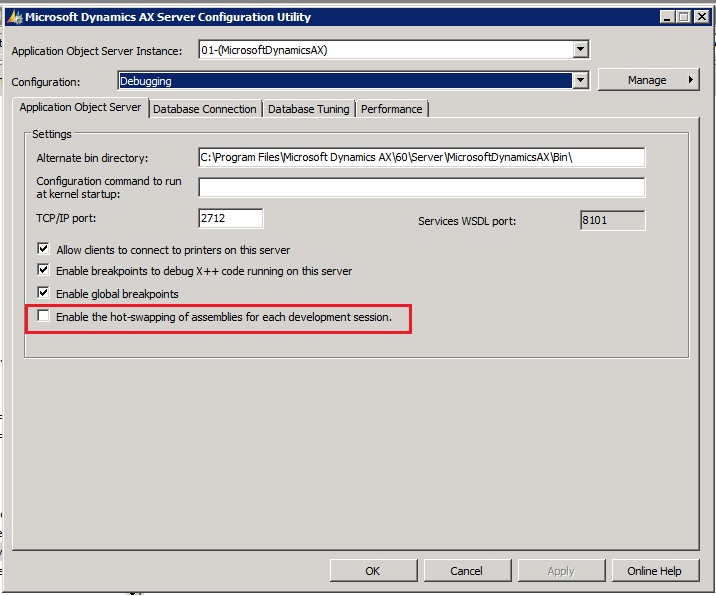
If the ‘Enable the hot-swapping of assemblies for each development session’ parameter is activated, try to deactivate it, press Apply and say Yes to restarting the AOS Service. Then try to go to the AOT/Tools/Options and see if you are not able to enter the Options screen without any error

Get started with Dynamics 365

Drive more efficiency, reduce costs, and create a hyperconnected business that links people, data, and processes across your organization—enabling every team to quickly adapt and innovate.