You may have noticed that in addition to the latest release of features in Visual Studio Team Services (VSTS), VSTS has rebranded the service to Azure DevOps. Here’s how this affects Lifecycle Services (LCS), Microsoft Dynamics 365 for Finance and Operations, and Microsoft Dynamics 365 for Retail.
In general, all functionality and processes requiring Azure DevOps do not change. This includes work item tracking, support requests, code upgrade service, build and test automation, source code version control, and Business Process Modeler (BPM). However, note the following changes that may affect you:
-
- When you create a new organization, for this example let’s call it <myorg>, the URL of your organization and all projects under it will start with https://dev.azure.com/<myorg>. The legacy URL https://<myorg>.visualstudio.com will still work. When you connect an LCS project to a VSTS project, you will need to use the URL https://<myorg>.visualstudio.com.
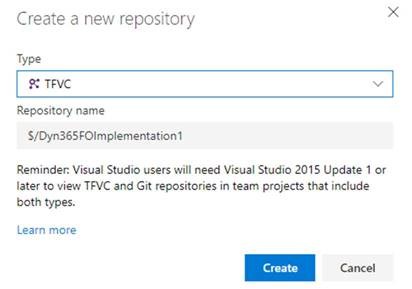
- When you create a new Azure DevOps project, by default there is Git version control. You will need to add a Team Foundation Version Control repository to the Azure DevOps project.
- Go to Project settings > Repositories.
- Select New repository.
- In the Type field, select TFVC, and then click Create.
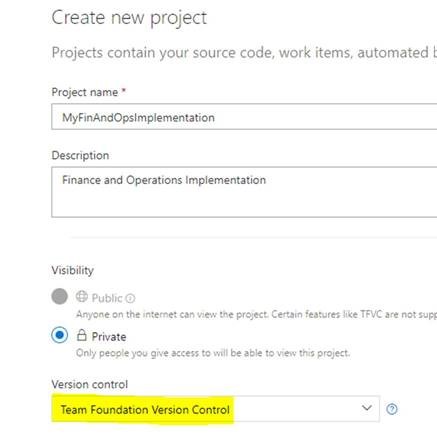
- When you create a new project in a legacy organization (an organization that was created before Azure DevOps was released), you need to select Team Foundation Version Control. The default is Git. This has not changed.