CRM workflows can be used to do simple calculations. I have come across many users who are not aware of this feature and thought it would be a good topic for a blog. In this example, the workflow is doing a simple calculation.
Before you build this workflow, add an attribute called Weighted Revenue of type money to the opportunity form.
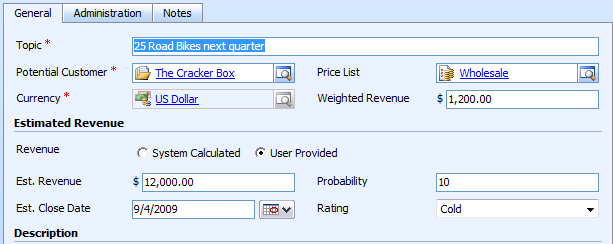
Now Create a workflow that calculates the weighted revenue value from Est. Revenue and Probability. In CRM we capture probability as a whole number so Weighted Revenue = Est. Revenue * (Probability*0.01).
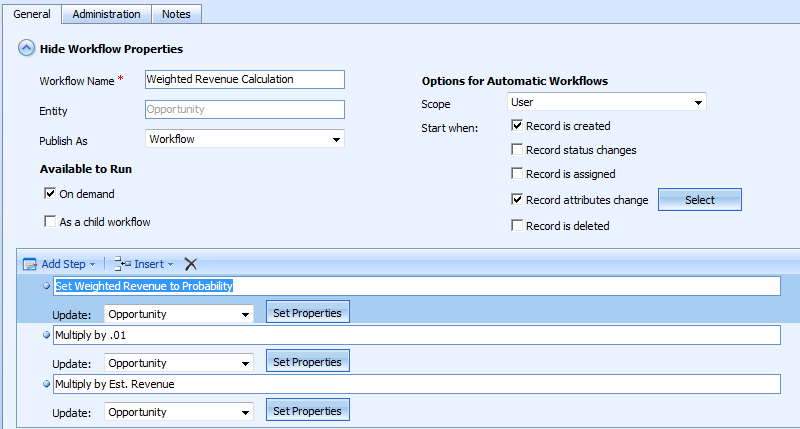
Set Weighted Revenue to Probability:
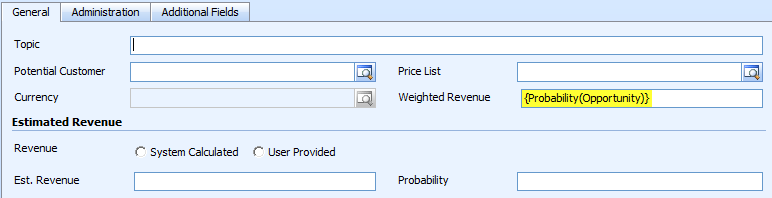
Multiply the value in Weighted Revenue field by 0.01. This is done using Operator “Multiply by”:

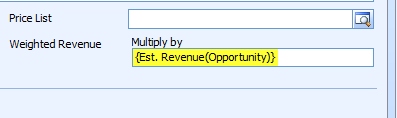
Now Multiply Weighted Revenue field by Est. Revenue:
<Editor note> This is so simple and an awesome way of calculating the weighted revenue. I absolutely love this. For the kicks, we actually tried this out and it took us just 4 minutes to implement this solution.