Low-latency sync for Link to Fabric brings significantly faster data replication from Dynamics 365 customer engagement apps and finance and operations apps to Microsoft Fabric. With the Dataverse Link to Fabric, your business data flows directly into Microsoft OneLake — no ETL pipelines, no data duplication, no extra engineering lift. Here’s what makes this a game-changer for AI:
- Fresh, grounded data. Fabric gives your Copilot and AI agents direct access to live Dataverse records — no stale exports, no sync delays.
- Insight to action. Fabric analyzes the data; Dataverse acts on it — powering agents that don’t just answer questions, they complete workflows.
- Unified governance. The same data powering your reports powers your AI with consistent security and compliance across Power Platform and Fabric.
Whether you run customer engagement or finance and operations workloads, low-latency sync delivers a single, unified sync experience with dramatically improved throughput and reduced data freshness latency.
The challenge: data freshness matters
Organizations running Dynamics 365 and Power Platform rely on timely, accurate data to drive analytics, reporting, and downstream processes. Until now, syncing data from Dataverse to your analytics layer involved variable latency depending on the link type, workload size, and table configuration. For teams building dashboards, running operational reports, or feeding AI models, every hour of delay translates to decisions made on stale data.
We heard this feedback clearly: you need your Dataverse data in Fabric faster, with less complexity, and with a consistent experience regardless of whether you’re running Dynamics 365 customer engagement apps, finance and operations apps, or custom Dataverse apps.
What is Low-latency sync?
Low-latency sync is the next generation of the Dataverse sync engine. It replaces the existing sync pipeline with a redesigned data path that reduces end-to-end latency for both initial sync and ongoing incremental (delta) sync operations.
Key improvements:
- Faster initial sync: Full table replication completes significantly faster, getting your historical data into Fabric sooner.
- Blazing fast delta sync: Incremental changes flow from Dataverse to Fabric with significant improvements over traditional Fabric Link. Actual sync times depend on initial load, data churn, table sizes, and number of columns, but the performance gains are substantial across the board.
- Higher throughput for finance and operations apps: Throughput increases to upwards of 1M+ records per hour per table*, up from the previous 100K to 700K range.
*Performance observed in lab environments and simulated conditions. Actual throughput may vary depending on table size, region, data churn, and customer environment characteristics.
Under the hood: fewer hops, better reliability

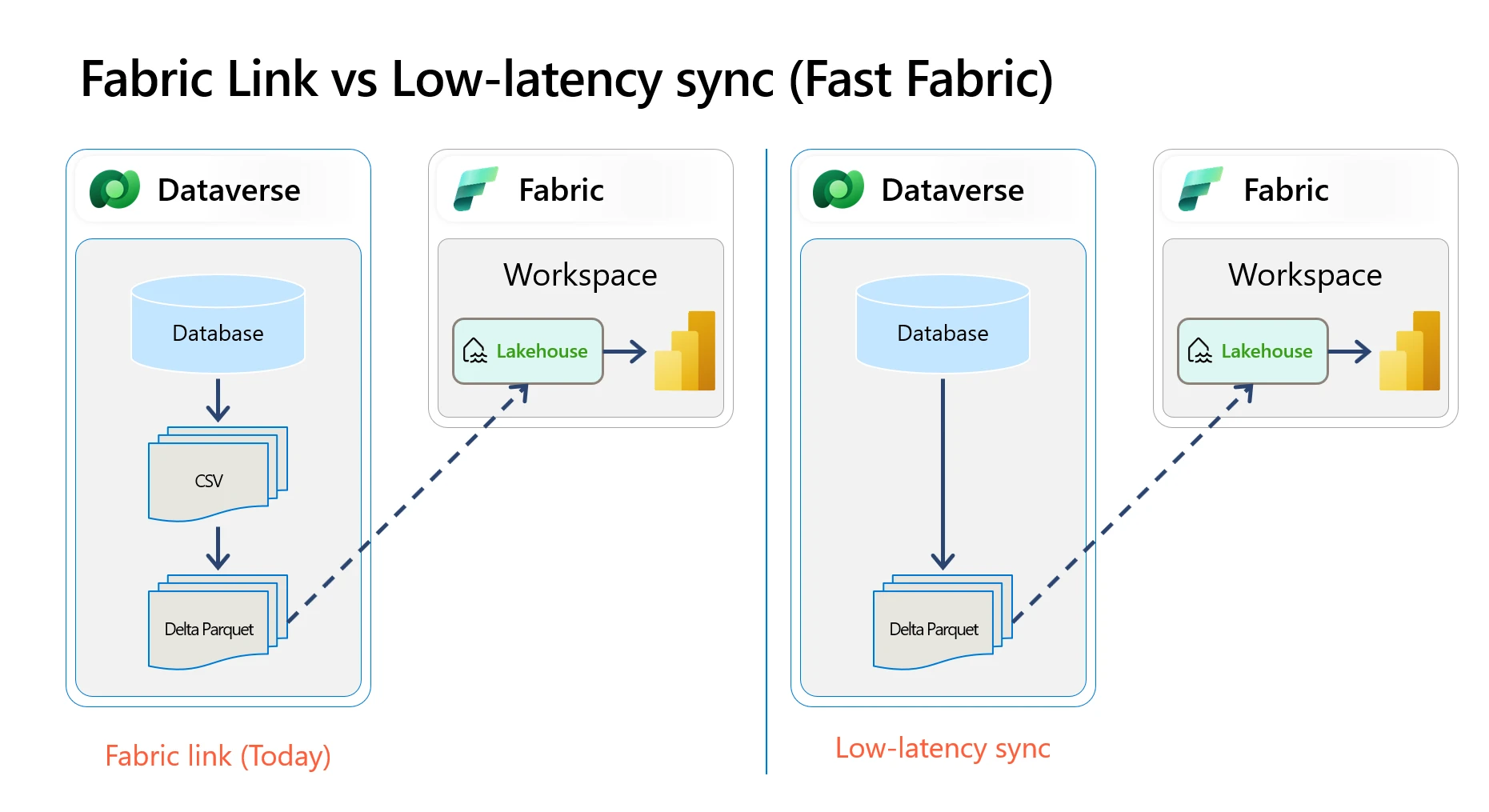
Fabric Link vs Low-latency sync architecture. The diagram above illustrates the architectural change at the core of low-latency sync.
Fabric Link (today) follows a three-step path: data is read from the Dataverse database, serialized to an intermediate CSV format, and then converted to Delta Parquet before being made available in your Fabric Lakehouse via a shortcut.
Low-latency sync eliminates the intermediate CSV step entirely (see diagram above). Data flows directly from the Dataverse database to Delta Parquet, removing one full hop from the pipeline.
This is not just a latency improvement. Removing the CSV serialization and deserialization step has a direct impact on reliability:
- Fewer failure points. Each hop in a data pipeline is a potential point of failure. The CSV stage involves serialization, temporary storage writes, and reads before the Delta conversion can begin. Eliminating this step removes an entire class of transient errors (I/O failures, serialization bugs, storage throttling on intermediate files).
- Reduced resource contention. The CSV stage consumes compute and storage resources that are no longer needed. This frees capacity for the operations that matter: reading from the source database and writing the final Delta Parquet output.
- Simpler retry and recovery. With fewer stages, the sync engine has a shorter, more predictable pipeline to manage. When issues do occur, recovery is faster because there is less intermediate state to reconcile.
- Consistent data format. Going directly to Delta Parquet means data is written once in its final format. This eliminates edge cases where CSV encoding differences or schema mismatches between the CSV and Delta stages could cause data quality issues.
The result: faster sync times and a more reliable pipeline, with fewer operations that can go wrong between your Dataverse database and your Fabric Lakehouse.
What this means for your team
- For data analytics and reporting teams. Your Fabric Lakehouse, dashboards, and Power BI reports get refreshed data faster. Reduced sync latency means the gap between a transaction in Dynamics 365 and its availability in your analytics layer shrinks significantly. This directly improves the accuracy and timeliness of operational and executive reporting.
- For system administrators. Low-latency sync is designed as a drop-in improvement. We are releasing it in a controlled manner across stations, starting with early release stations and then expanding one station at a time on a weekly cadence. There is no separate opt-in experience. Once your station is enabled, new Fabric Link configurations can use the new sync engine through the same familiar setup experience in the Power Platform admin center.
- For leadership and business stakeholders. Faster data replication means faster insights. Whether your organization tracks revenue, inventory, case resolution times, or customer engagement metrics, low-latency sync closes the gap between operational systems and the analytics that drive decisions.
Performance at a glance
- Customer engagement apps: Significant improvement in delta sync latency over traditional Fabric Link.
- Finance and operations apps: Throughput upwards of 1M+ records per hour per table*.
*Performance observed in lab environments and simulated conditions. Actual throughput may vary depending on table size, region, data churn, and customer environment characteristics.
Tentative timelines
| Milestone | Timeline | What it means for you |
| Early release stations | Rolled Out | The rollout begins with early release stations across all geographies. |
| Europe, Canada, and India expansion | Late June 2026 | Availability expands to additional European regions, Canada, and India-based stations |
| Asia Pacific and UK expansion | Early July 2026 | Availability extends across more Asia Pacific regions, including Japan, UAE, Australia, and the UK |
| Broader Europe expansion | Early – Mid July 2026 | Rollout continues across additional North Europe and West Europe stations |
| Americas and final global expansion | Mid July – End of July 2026 | The remaining rollout waves complete across the Americas and other remaining stations |
| General Availability (GA) | Mid July – End of July 2026 | Production-grade release. Every new Fabric Link defaults to low-latency sync from the backend |
These rollout windows are approximate and may change as we monitor health and progress through each deployment wave.
Prerequisites for Finance and Operations
If you are running Finance and Operations (FnO) apps, verify prerequisites and minimum supported build requirements in the public documentation before enabling low-latency sync.
See: Low latency sync Link to Fabric Documentation
How to get started
New Fabric Link customers
- Navigate to the Power Platform admin center.
- Set up a new Fabric Link for your Dataverse environment.
- If your station is part of the current rollout wave, low-latency sync is made available as part of the standard setup experience. There is no separate enrollment step or preview sign-up.
- If your station has not yet been enabled, no action is required beyond watching for rollout availability. Once enabled, you can complete setup and start syncing through the new engine.
Existing Fabric Link customers (early access)
If you want to start using low-latency sync, watch for availability in your station as the controlled rollout progresses:
- Unlink your existing Fabric Link profile.
- Relink and follow the same setup flow once your station is enabled for low-latency sync.
- Your profile will run on the new sync engine without a separate preview opt-in step once the rollout reaches your station.
Note: Unlinking and relinking will trigger a full initial sync for all configured tables.
How to confirm low-latency sync is enabled
To confirm that your environment is running in low-latency mode, open the experience and select Azure Synapse Link from the navigation. On the link list page, if you see the Low-latency mode flag on your Fabric link, low-latency sync is enabled for that profile.
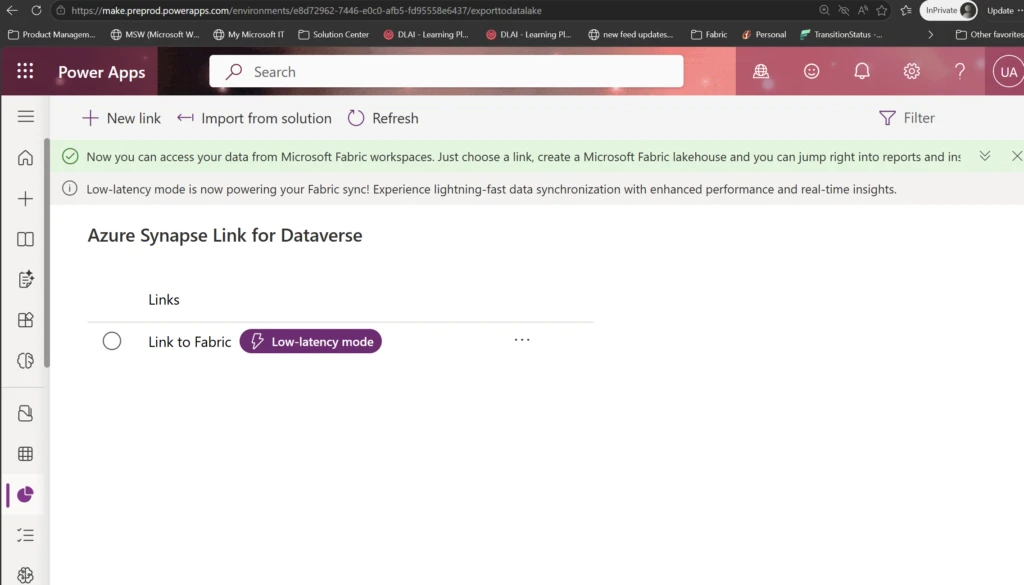
Low-latency mode flag in Azure Synapse Link. Azure Synapse Link experience showing the Low-latency mode flag on the Fabric link profile.
What about Synapse Link and Export to Data Lake?
Low-latency sync applies to Fabric Link configurations. If you are currently using Synapse Link (BYOL/BYOS) or Export to Data Lake (COMO), here is what to expect:
- Synapse Link (BYOL/BYOS): Continues to function as-is. We encourage customers to evaluate Fabric Link with low-latency sync for improved performance and a streamlined experience.
- Export to Data Lake: Export to Data Lake has been deprecated and the service is being retired. We strongly recommend evaluating and moving over to Fabric Link with low-latency sync post GA. There is no further extension or exception process planned for the Export to Data Lake deprecation.
Looking ahead
Low-latency sync is a foundational step toward making Dataverse the most connected operational data platform. With all sync workloads consolidated on a single engine, we can deliver improvements faster, reduce operational complexity, and unlock new scenarios for real-time analytics and AI.
We are actively working on expanded throughput optimizations to enable continued performance improvements for large-scale environments.
We want your feedback
Your feedback directly shapes the GA release and future roadmap.
- Try it: If your environment is in an enabled station, set up or relink Fabric Link through the Power Platform admin center and evaluate low-latency sync.
- Share feedback: Reach out to your Microsoft account team or join Viva Engage community to share your feedback.
- Learn more: https://aka.ms/lowlatencylearnmore