Skip to main content Build an agentic enterprise Get Started Guided Tours Security & Governance Dataverse Connectors Power BI Desktop Pro Premium Embedded Report Server Power Apps Power Automate Power Pages Copilot Studio Pricing Resources by Product Power Platform Learn Power Platform Blog Documentation Power Platform Topics Contact us Start free
1 min read

Receive personalized weather updates using a Custom API


Using a simple weather Custom API with flows

In this blog post, we are going to show you how to create a simple Custom API and use it in your flow. At the end of this walkthrough – you will have some understanding of, how to create a weather custom API and create a flow that sends you weather updates every morning.
To start off, you will need to acquire an API key from https://apixu.com, they are nice weather API provider who let you test their APIs for free. You will then need to download the Swagger file that describe the weather APIs.
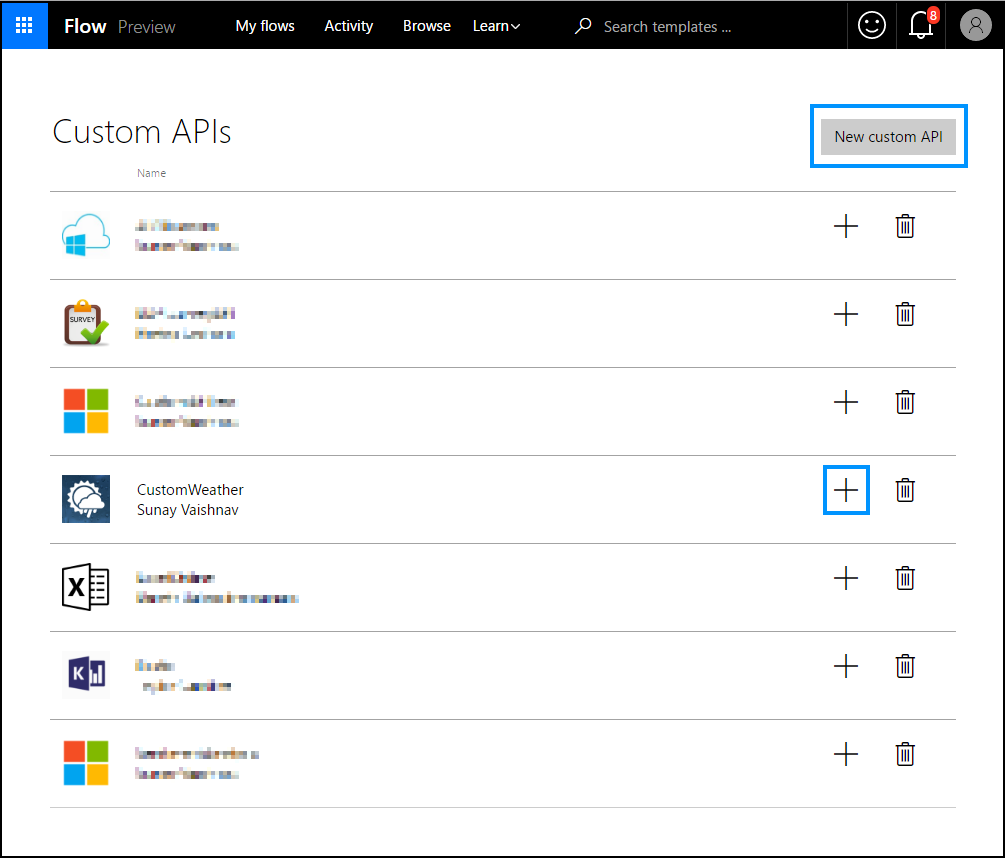
Once you have downloaded and saved your swagger, proceed to upload it to Flow. You can access the custom API create UI from the accounts menu. Click “New custom API” and fill in the necessary details. Upload the Swagger API definition along with an icon to identify the API.
Once you have successfully created the custom API, create a connection for it by clicking on the “+” button.
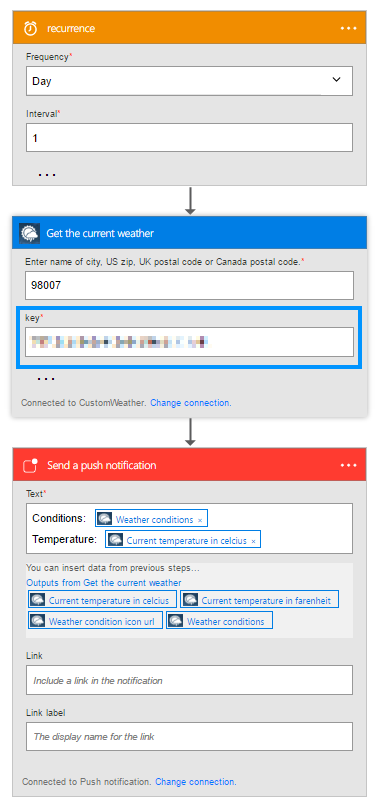
You can then setup a flow as shown to send yourself weather updates as push notifications. Be sure to paste in the API key that you acquired in the first place from apixu.
Let us know how you are using Flow in the comments section below. Follow us on Twitter to keep up with our latest updates and to learn more about how you use Flow to work smarter.

  • Power Pages
    Two coworkers working in cubicle looking at computer monitor
    1 min read

    Modern List in Power Pages is now generally available

    Today, we’re announcing the general availability of Modern List in Power Pages, a refreshed data presentation experience that helps makers showcase Dataverse data with modern Fluent UI components, seamless infinite scrolling, inline filtering, shimmer loading, flexible low-code customization and custom JavaScript support.
  • Power Apps
    Power Platform Feature Update (hero image)
    20 min read

    What’s new in Power Platform: September 2026 feature update

    Power Platform Build hands-on Power Platform and AI expertise with Power Series Developed by the Power CAT team, Power Series is now available with 20 hands-on labs that help customers, partners, and field teams build practical Power Platform and AI skills at their own pace.