What if your AI agents truly understood your business—your data, your workflows, your goals—and IT could still govern them at scale?
That’s the promise of Adaptive Intelligence, and it’s now within reach. In our recent Ignite session, Jason Huang and I walked through exactly how to build enterprise-grade agents that don’t just automate—they think, adapt, and elevate work. See this in action:
Why Adaptive Intelligence Matters
Security and governance are table stakes. The real question is: are your agents smart enough to be useful?
The real differentiator is intelligence. Agents that understand your business. That remember how you work. That act proactively, not reactively.
That’s Adaptive Intelligence. And it’s built on two foundations:
- Work IQ + Dataverse: Work IQ is the intelligence layer that gives agents context, memory, and inference. Dataverse extends Work IQ with trusted business data: giving agents the ability to reason over your structured enterprise data while staying inside governed boundaries. Together, they transform Dataverse from a system of record into an intelligent system of action.
- Agent 365: the control plane that makes agents enterprise-ready by default. It handles registry, access control, visualization, interoperability, and security—so IT doesn’t lose control as agents scale.
When Work IQ, Dataverse, and Agent 365 come together, agents don’t just automate. They think. They adapt. They elevate work.
How We Built It
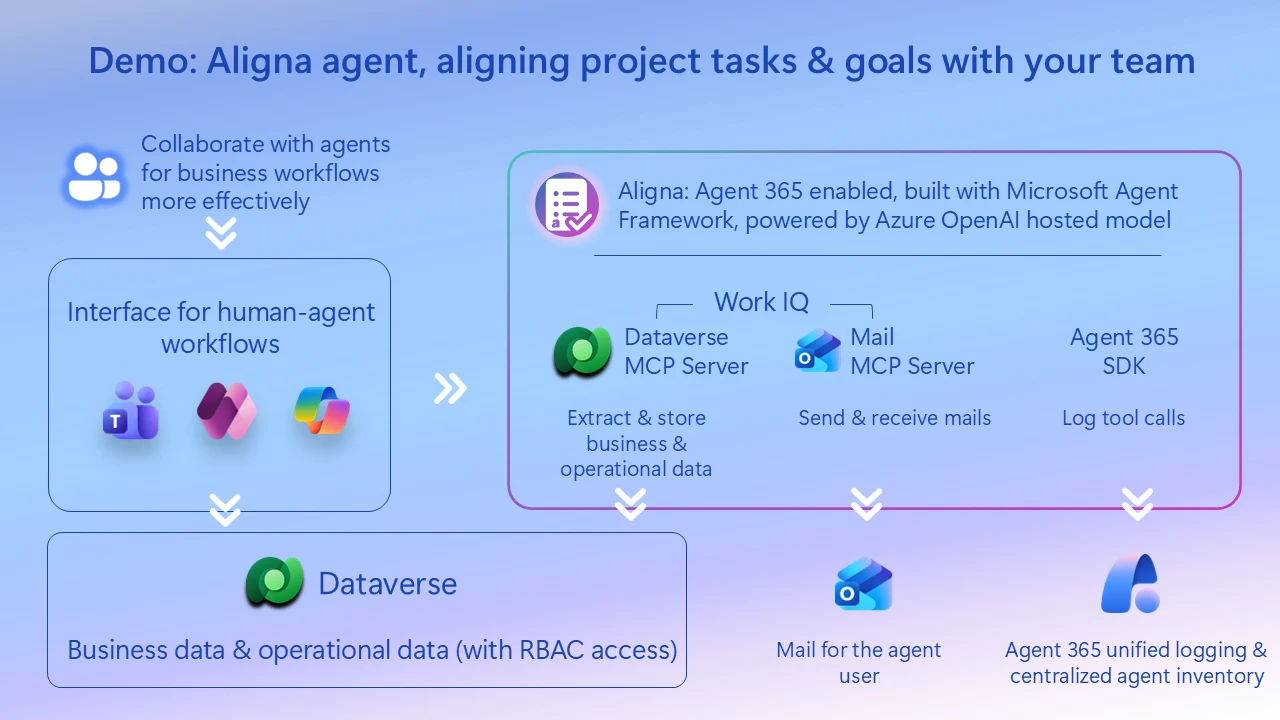
The agent in our demo, Aligna, is an AI teammate for a fictitious construction company (Zava Construction). In the demo, a site coordinator chats with Aligna in Teams: “@Aligna, I’m at the Adatum site, log this plumbing issue, inform the client…” — and Aligna handles the rest.
Here’s how each component powers that workflow:
Step 1: Microsoft Agent Framework
Aligna is built on the Microsoft Agent Framework—it’s what enables the agent to receive the Teams prompt, decide which tools to call, and orchestrate the entire workflow. When the user describes the plumbing issue, the Agent Framework routes the request to the right tools (Dataverse MCP for logging, Mail MCP for communication) and manages the execution flow.
Step 2: Dataverse MCP
When the user says “log this plumbing issue,” Aligna uses Dataverse MCP (now in GA) to create the issue record directly in Dataverse—no forms, no app-switching. All business data (clients, contacts, projects, vendors) lives in Dataverse, and MCP provides the standardized interface for Aligna to read and write that data through natural language.
Step 3: Mail MCP Server
When the user says “inform the client,” Aligna uses the Mail MCP Server to draft and send the email—all within the same conversational flow. The client gets notified about the issue without the user ever leaving Teams.
Step 4: Agent 365 SDK
Every action Aligna takes—logging the issue, sending the email—is recorded via the Agent 365 SDK for compliance and audit. IT gets full observability into what the agent did, when, and why—without requiring extra instrumentation from developers.
Step 5: Dataverse SDK for Python
For developers building agents like Aligna, the Dataverse SDK for Python (in Public Preview) provides direct programmatic access to Dataverse—ideal for custom data operations, schema setup, batch processing, or integrating with Python-based ML pipelines. Also leveraged: Azure OpenAI for model inference
Turn Your Business Data into Agent Intelligence
The tools are here. The documentation is live. Now it’s your turn.
Start building agents that truly understand your business:
- Connect to your data — Use Dataverse MCP to give your agents instant access to business data. It’s GA and ready for production.
- Write in your language — Python developer? The Dataverse SDK for Python lets you prototype in minutes. .NET team? The Agent Framework has you covered.
- Make it enterprise-ready — Register with Agent 365 and your agent inherits identity, governance, and observability from day one.
Your competitors aren’t waiting. The agents your organization needs—agents that think, adapt, and elevate work—you can build them now.
Read More
Related Documentation:
- Dataverse MCP: Connect to Dataverse with MCP
- Dataverse SDK for Python: SDK Overview
- Agent 365 Overview: Agent 365 Documentation
- Agent 365 SDK: Agent 365 SDK Overview
- Microsoft Agent Framework: Agent Framework Documentation
- Mail MCP Server: Mail MCP Server Reference
Related Ignite & Blog Resources: