Agents help deliver intelligent, conversational experiences for your site users directly within your websites. With the latest enhancements to agent integration in Power Pages, you now have more flexibility to configure authentication, manage access, and validate agent experiences more easily.
These updates simplify how agents built with Microsoft Copilot Studio integrate with Power Pages, making it easier to bring existing agents to your site while maintaining the access controls and authentication models your organization already uses.
Support for all authentication types available in Copilot Studio
Agents hosted in Power Pages now support all authentication types available in Microsoft Copilot Studio. This allows organizations to configure agent authentication in a way that aligns best with their existing identity and security requirements.
For example, agents can now use Microsoft Entra ID authentication, enabling organizations to securely connect agent conversations with authenticated users.
By supporting the full range of authentication options, Power Pages makes it easier to build secure, identity-aware agent experiences for both internal and external users.
Test agents directly from Copilot Studio
Agents integrated within Power Pages sites can now be tested directly from within Microsoft Copilot Studio.
This enhancement allows makers to validate agent conversations and authentication flows much more efficiently during development without needing to repeatedly switch between tools.
Bring your own Copilot Studio agent and control visibility with web roles
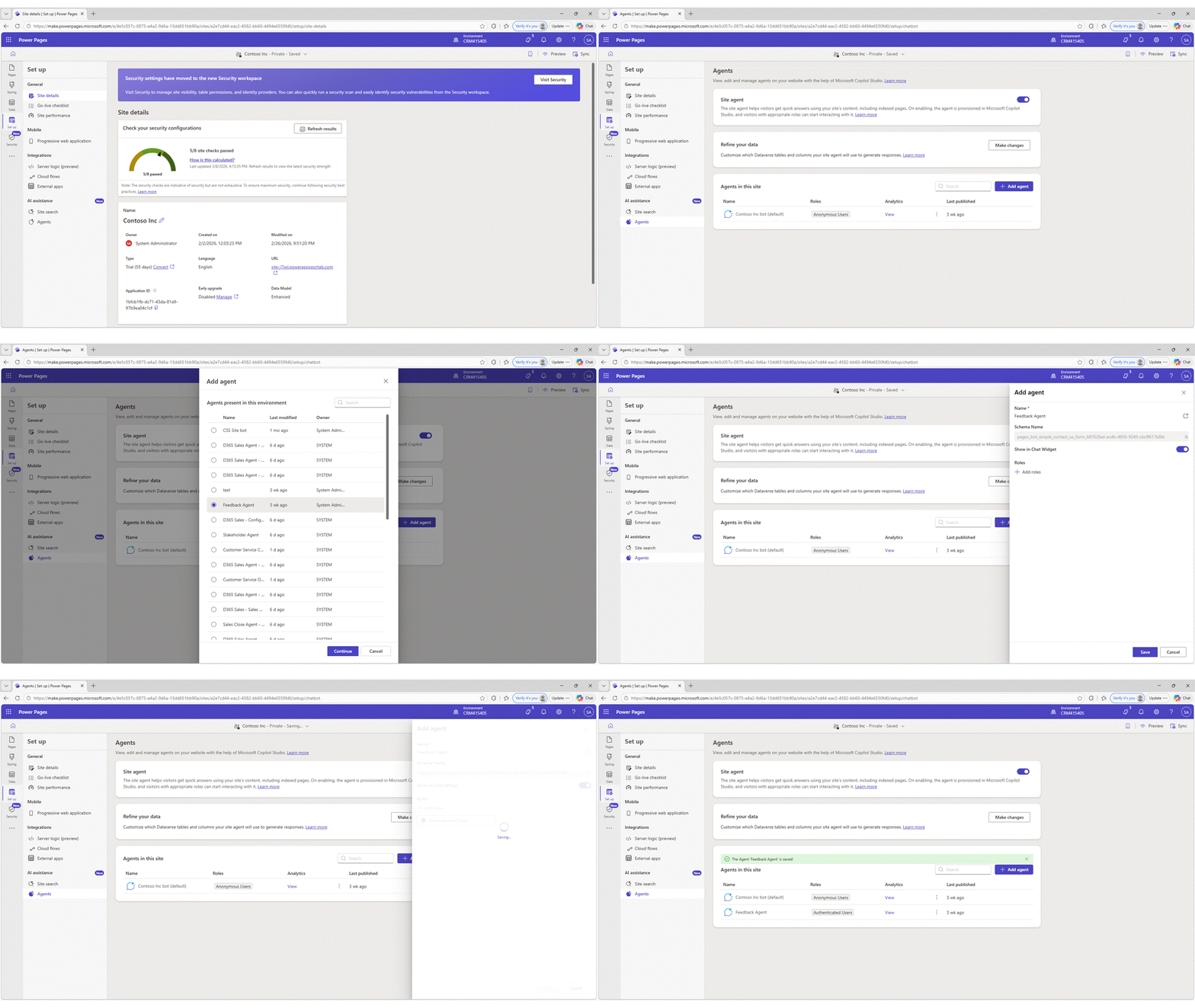
Power Pages now makes it easier to embed existing agents created in Microsoft Copilot Studio in your site.
You can add a custom agent to a Power Pages site and control which users can access the agent using Power Pages web roles. This enables you to manage agent availability in the same way they control access to other site content.
With web role-based visibility, you can ensure that the right users interact with the corresponding agents, whether the experience is intended for anonymous visitors, authenticated users, or specific user groups.
Learn more
To learn how to configure and enable agents in Power Pages, see the following documentation:
- Configure user authentication for agents
- Configure Microsoft Entra ID authentication for agents
- Enable agents in Power Pages
These enhancements continue to expand how agents can be integrated into Power Pages, helping makers build more secure and flexible conversational experiences for their sites.
We are looking forward to your feedback
Your feedback is crucial in shaping the future of this feature. We want to hear from you!