Summary Welcome to the Power Platform monthly feature update! We will use this blog to share news in Power Platform from the last month, so you can find a a summary of product, community, and learning updates from Power Platform in one easy place. Now, let’s dive into what’s new in Power Platform:
Get started with the latest updates today!
Jump into Power Apps, Power Automate, and Power Pages to try the latest updates, you can use an existing environment or get started for free using the Developer plan.
Apps, agents and Copilot
Public preview: M365 Copilot chat in model-driven apps
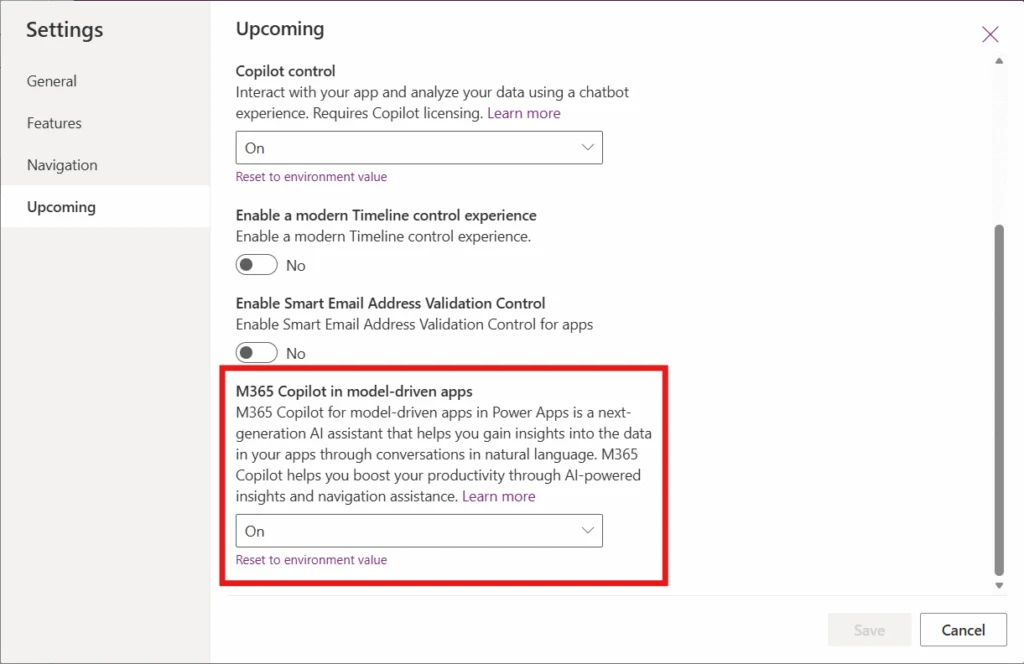
Copilot chat is now available directly inside apps built with Power Apps, bringing the intelligence of Microsoft 365 Copilot into the flow of business processes.
This unified experience—currently limited to model-driven apps—lets users ask questions, reason over in‑app data, and connect insights from documents, communications, and collaboration—without leaving the application they’re working in. By embedding Copilot chat into low‑code apps, organizations can keep users in context and in flow, reducing app switching while accelerating decision‑making. Teams can also leverage powerful first‑party agents like Researcher and Analyst, as well as custom Copilot Studio agents, to analyze data, generate insights, and take informed action directly within their apps.
To manage Microsoft 365 Copilot chat for model-driven apps, start by learning how to manage Microsoft 365 Copilot chat. Power Platform administrators can set up and configure the Microsoft 365 Copilot chat feature for users in their environment and makers can then enable or disable Microsoft 365 Copilot chat for a specific model-driven app.
Public preview: Power Apps MCP and enhanced agent feed
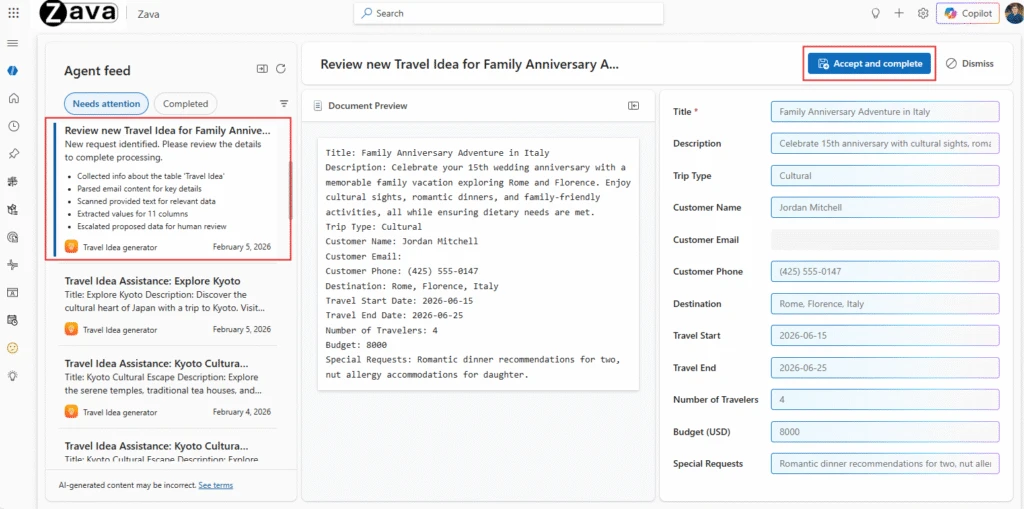
We’re bringing Power Apps Model Context Protocol (MCP) Server and an enhanced agent feed into public preview. This is a step to enable better human-agent collaboration directly inside business applications with built‑in human supervision.
Power Apps MCP brings agentic features from apps to agents as tools – starting with data entry. Agents will be able to parse the unstructured data into forms that users use in apps and create records directly, as well as flag them for human review or action.
The enhanced agent feed provides a shared workspace for humans to oversee the agent activity—makers can provide granular visibility into agent actions for their users, use side‑by‑side comparison views for approvals, and direct navigation to in‑app records.
Building modern apps
Public preview: a new modern Card control
This new modern Card control helps makers build clean, responsive, and consistent UI layouts in canvas apps.
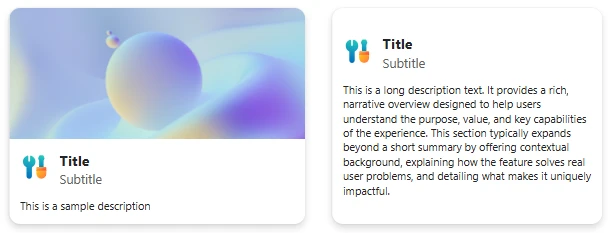
The modern Card control allows makers to present structured information—such as summaries, previews, and tiles—using a single layout‑aware control instead of composing multiple classic controls. Cards automatically adapt to vertical or horizontal layouts and align with Fluent UI design principles, improving visual consistency across apps.
By reducing layout complexity and improving responsiveness out of the box, the Card control enables faster UI composition while supporting accessibility and scalability across screen sizes.
Generally available: theme copy‑paste
With theme copy-paste it is it easy to reuse visual styles across canvas apps without manual reconfiguration.
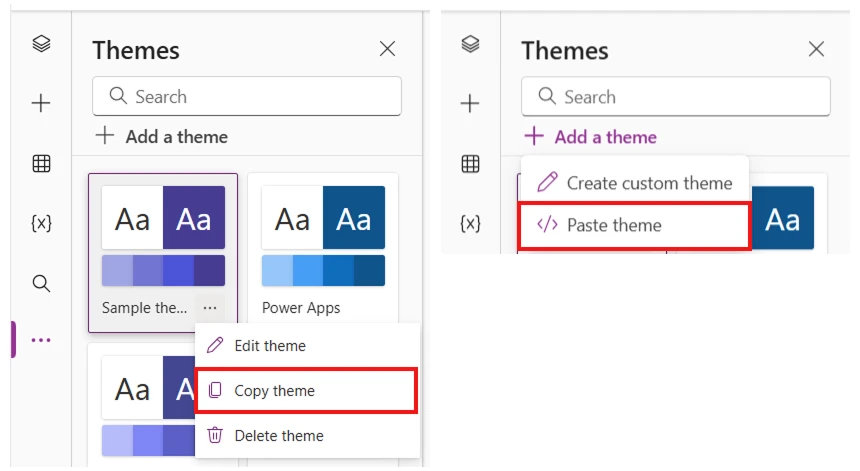
Theme copy‑paste allows makers to copy and reuse a Canvas app’s theme—including colors, typography, and styling tokens—across other apps. These themes are copied as YAML which can also be edited manually by makers as text. This reduces repetitive setup and helps ensure consistent branding and visual identity across an app portfolio.
By simplifying theme reuse, this update accelerates new app creation and supports design governance at scale, especially for teams managing multiple canvas apps across environments.
Generally available: confirm() function in canvas apps as a fluent dialog
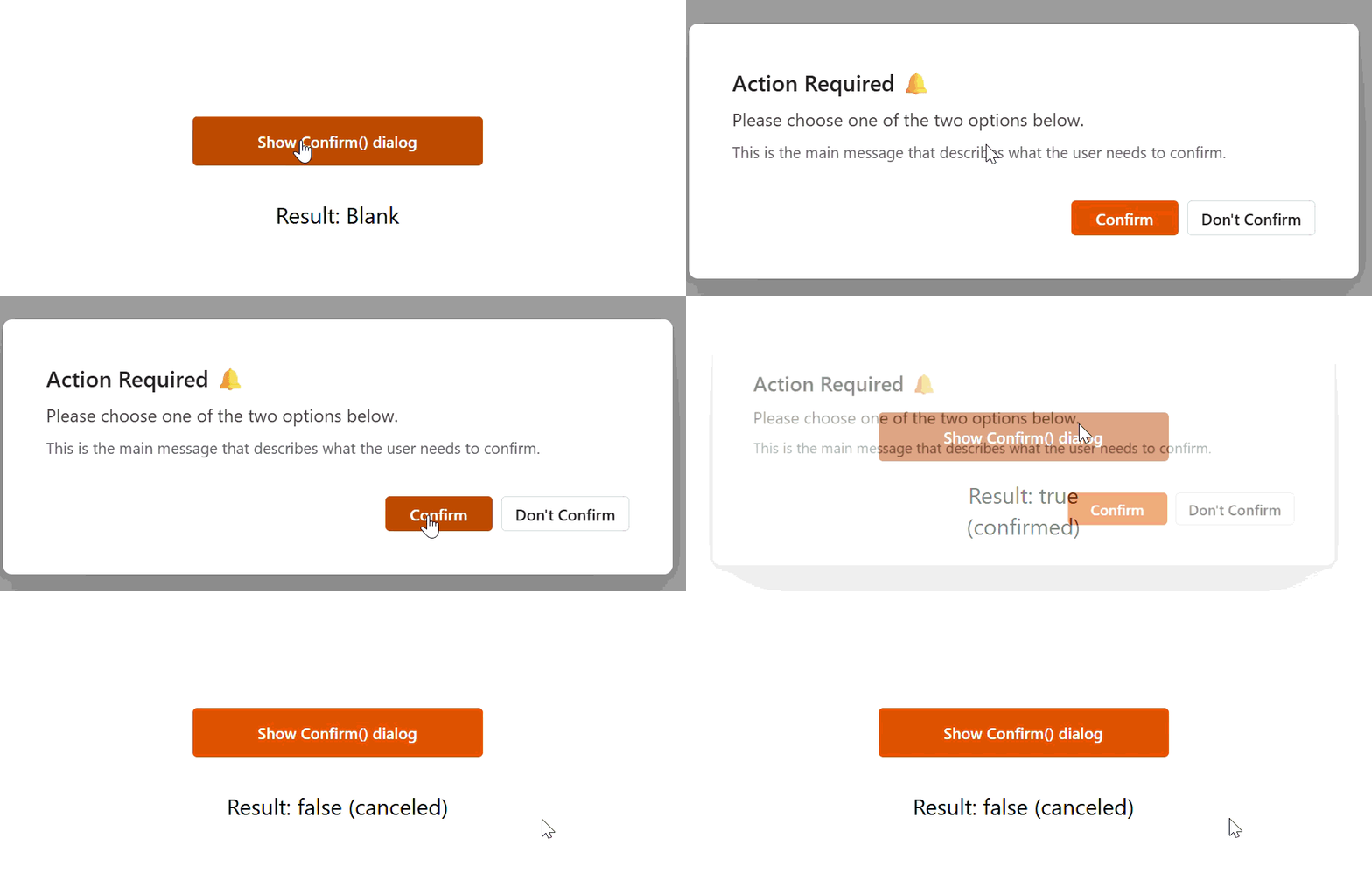
The Confirm function displays a modal confirmation dialog over the current canvas screen, prompting the user to explicitly confirm or cancel before continuing. In canvas apps, there’s also a dismissal path (for example, clicking outside the dialog) that is treated as no action and returns blank.
The canvas experience is designed to align with Fluent dialog behavior and to respect the current app theme. You need to have modern controls turned on to get fluent dialog, else you will get a browser native dialog.
Managed platform
Public preview: move canvas apps and custom SharePoint forms out of the default environment
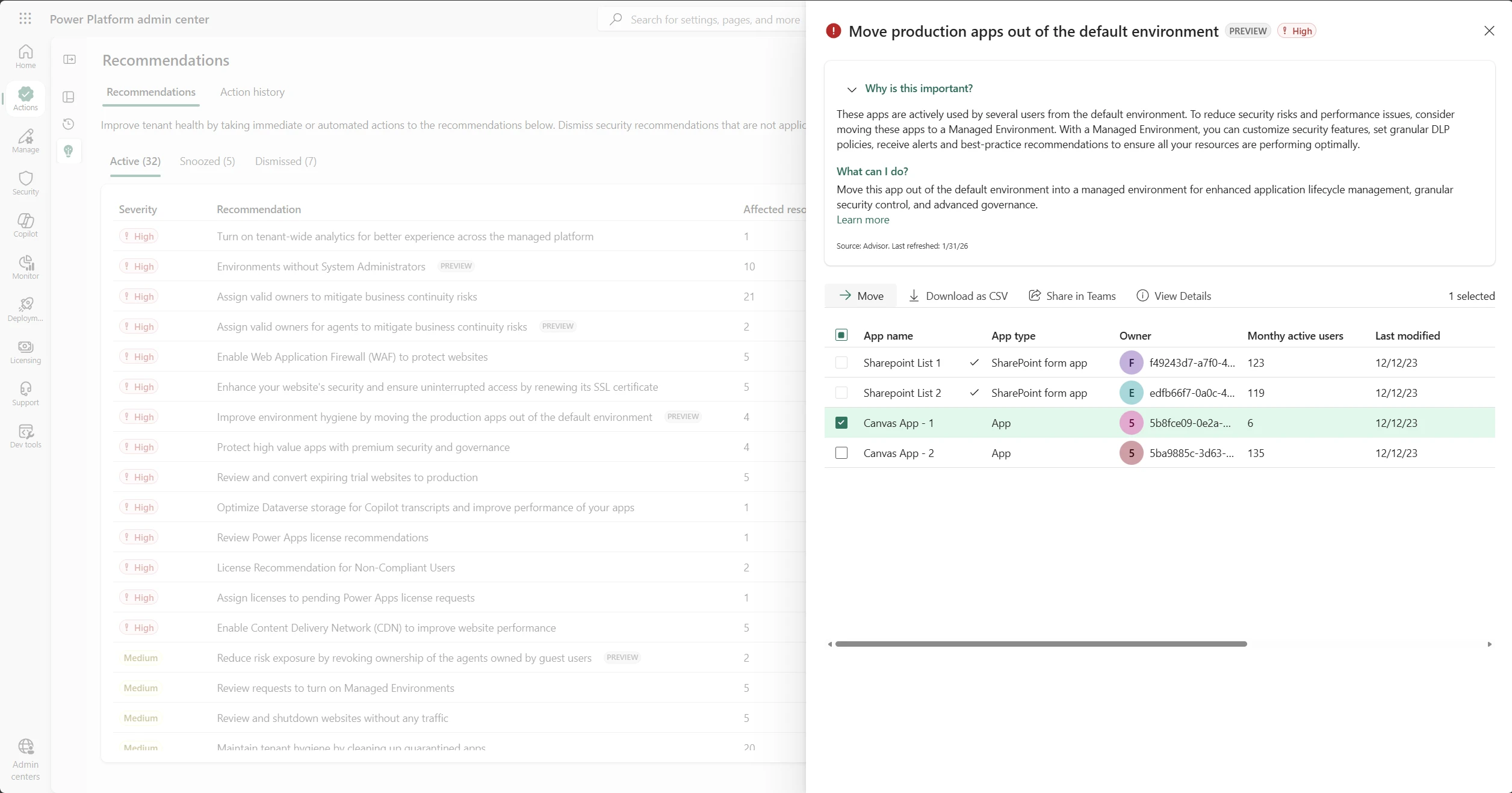
The default environment in Power Platform often becomes a shared space where makers build and test applications, leading to potential challenges with governance and organization. As resources accumulate in this environment without structured oversight, administrators may face difficulties managing security policies, tracking ownership, and maintaining compliance across their tenant.
We introduced a recommendation in Power Platform advisor, as a preview, that enables administrators to migrate certain canvas apps and custom SharePoint forms from the default environment to designated managed environments. The migration can be done manually from the Recommendations page under the Actions menu in the Power Platform admin center or automated using the Power Platform for Admin v2 Connector. When moving apps, administrators can choose to keep the original resource as is or restrict access to it by quarantining, or deleting it entirely.
This helps Power Platform administrators in implementing effective governance and DLP controls and establish clearer boundaries for app development.
Generally available: host and run code apps in Power Apps
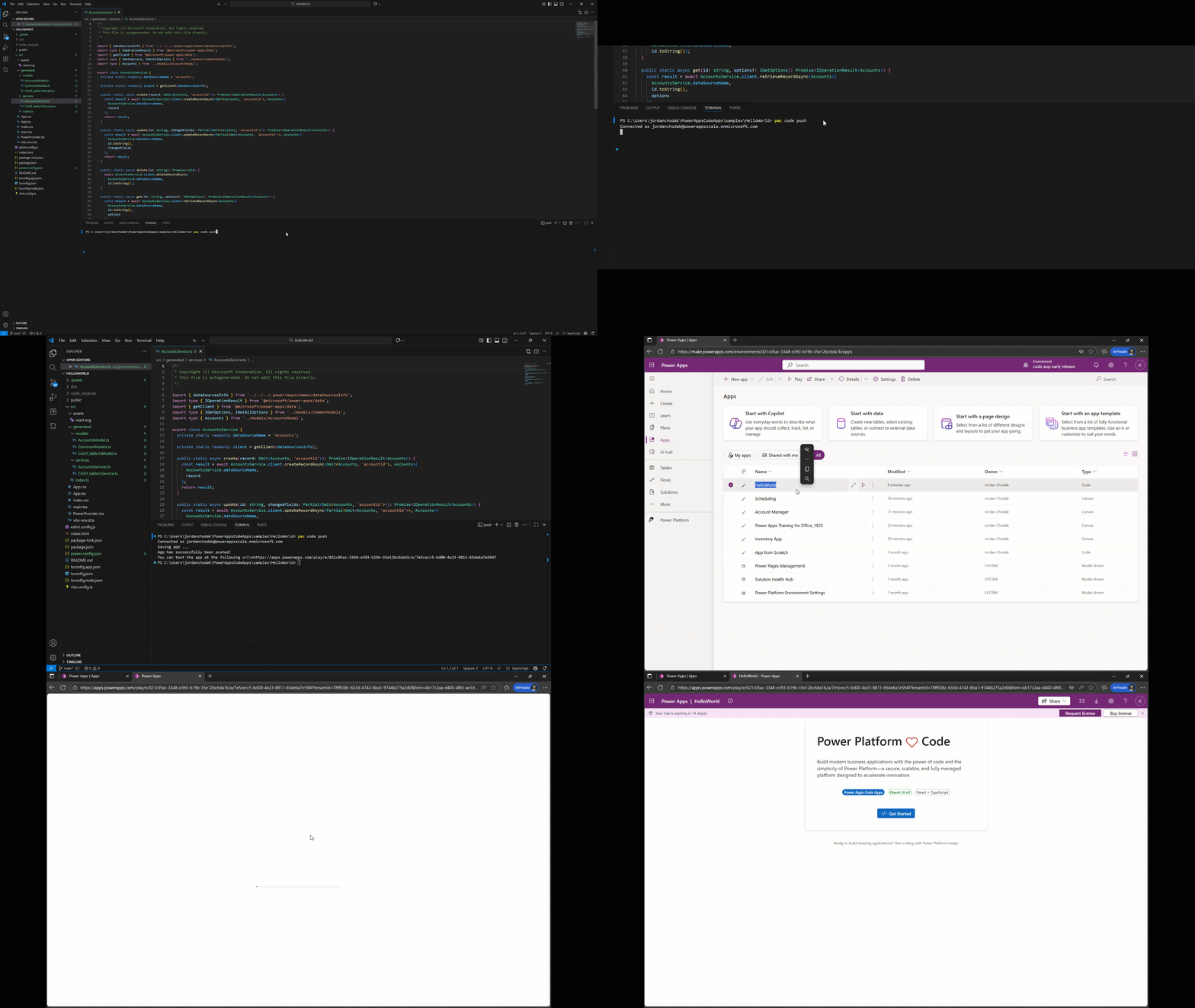
We’re excited to announce that code apps in Power Apps are now generally available, empowering developers and IT alike at a moment when organizations are building more custom applications than ever. With the rise of AI‑accelerated and code‑generation‑assisted development, teams can build high‑quality web apps faster than before while IT faces mounting expectations around governance, security, and operational oversight. Code apps bridge that gap by giving developers full code‑first flexibility and giving IT the enterprise‑grade guardrails needed to manage a growing app landscape
Power Apps code apps bring the full strength of Power Platform to web developers. Build with popular frameworks (React, Vue, and others) in any code-first IDE, and deploy to Power Apps. Every code app automatically becomes a governed Power Platform asset, giving IT visibility and control without creating friction for developers.
Learning updates
Training paths and labs
Updated training
- Create and customize sites with Power Pages design studio – Training
- Explore Power Pages design studio data and security features – Training
- Explore Power Pages templates – Training
Power Apps maker
New
Updated
- Create or edit model-driven app web resources to extend an app
- Generate a page using natural language
- Overview of pipelines in Power Platform
- Admin deployment page
- Use table segmentation in solutions
- Add Microsoft 365 Copilot chat for app user in model-driven apps
- Overview of the new Power Apps vibe experience
- Create apps, data, and plans together using Power Apps vibe
- Card modern control in Power Apps
- Keyboard shortcuts for canvas apps
- Sign in to Power Apps
Power Platform administration
New
Updated
- Virtual Network support overview
- Set up virtual network support for Power Platform
- Automatic deletion of Power Platform environments
- Microsoft 365 environment for recurring Copilot prompts
- Preview and experimental AI models
- Export data to Application Insights
- General availability deployment
- PowerShell support for Power Apps and Power Automate
- Environment routing
- Manage Copilot Studio credits and capacity
- Buy Power Automate licenses
- Restore deleted Microsoft Dataverse table records (preview)
- Dataverse capacity-based storage details
- Configure Dataverse search for your environment
- Track, manage, and scale Copilot adoption in the Power Platform
- Content security policy
- Continuous access evaluation (preview)
- Power Platform inventory
- Finance and operations storage capacity
- Permissions and roles for SharePoint document management tasks
- Allow external language models for generative responses
- View and manage on-premises data gateways
- System Settings Service tab
- Administrator analytics and reports for Microsoft Power Apps
- Microsoft Power Platform admin documentation
- Power Platform inventory API
- Discover what drives engagement in the Power Platform by using the Usage page
- Configure email resolution with the DoNotResolve flag
- Licensing and AI Builder credits
- Licensing and Copilot Credits
- End of AI Builder credits
- Workflows agent privacy and data subject request (DSR) FAQ
Power Platform developer
New
- Web API Query Data Sample (PowerShell)
- Web API Conditional Operations Sample (PowerShell)
- Web API Functions and Actions Sample (PowerShell)
- dataApi reference for generative pages
- RetrieveTimeZone sample (C#)
Updated
- Power Apps code apps overview (preview)
- How to: Connect your code app to data (preview)
- How to: Connect your code app to Dataverse (preview)
- navigateTo (Client API reference) in model-driven apps
- How to: Configure Content Security Policy (preview)
- Generate a page using natural language with model-driven apps in Power Apps
- Microsoft Power Platform CLI auth command group
- Dataverse SDK API Reference
- Microsoft Power Platform API reference
Power Apps user and mobile
Updated
- How mobile offline works in Power Apps
- Use Microsoft 365 Copilot chat in model-driven apps (preview)
- Optimize the offline profile
- Set up mobile offline for canvas apps
- FAQ for Dataverse search
- What is Dataverse search?
- Visualize data in a view with Copilot (preview)
- Customize and build your mobile app using the wrap wizard
- Prevent canvas app restarts in the Power Apps mobile app
- Check user access to a row
- Use Copilot’s form fill assistance feature in model-driven apps
- Use Copilot chat in model-driven apps
- Modern, refreshed look for model-driven apps
- Supervise agents in model-driven apps with agent feed
Power Pages
New
Updated
- Create an event registration page
- How to interact with Dataverse tables using server logic
- Power Pages server logic overview (preview)
- Advanced Settings (preview)
- Create and deploy a single-page application in Power Pages
- Set page permissions
- Security agent (preview)
- Add Copilot summarization to case page (Preview)
- Configure Omnichannel with Power Pages site agent
- Edit code with Visual Studio Code for the Web (preview)
- Use the Visual Studio Code extension
- FAQ for site search with generative AI
- Set up Microsoft Entra External ID with Power Pages