United States   Change   |   All Microsoft Sites

Microsoft System Center Data Protection Manager

Overview

Database administrators, e-mail managers, and other IT implementers and developers are looking for a better way to protect and recover data from key business applications like SQL Server, Microsoft Exchange, Windows SharePoint Services or file shares on Windows Server 2003 and Windows Server 2008. Microsoft has heard from our customers and partners and delivered a complete solution with System Center Data Protection Manager (DPM) 2007.

TechNet Video From Tech-Ed 2008 US: Technical Introduction to DPM 2007

This is the first of three sessions covering System Center Data Protection Manager 2007. In this session, we provide an overview of DPM 2007, including demonstrations of primary workload protection—Microsoft SQL Server, Microsoft Exchange, Office SharePoint Server, and Microsoft Virtual Server—using both near continuous protection to disk and long term archival to tape. Specifically, we will spend most of the time in demonstration:

  • Installing the DPM Server

  • Configuring the DPM Server disk and tape

  • Deploying DPM agents from the administration console

  • Setting up Data Protection

  • Recovering Data

System Center Data Protection Manager (DPM) 2007

Data Protection Manager 2007 is a member of the Microsoft System Center family of management products, which are designed to help IT Professionals manage their Windows Server infrastructure. DPM 2007 sets a new standard for Windows backup and recovery—delivering continuous data protection for Microsoft application and file servers to a seamlessly integrated secondary disk and tape solution on the DPM server. DPM enables rapid and reliable recovery through advanced technology for enterprises of all sizes.


Microsoft designed DPM 2007 to provide the best backup and most reliable restore for Windows Server applications.

Focused on the primary Microsoft server workloads, DPM 2007 was specifically built to protect and recover SQL Server, Microsoft Exchange Server, SharePoint Portal Server, Microsoft Virtual Server, as well as Windows file services. In addition, DPM 2007 blends the best aspects of continuous data protection (CDP) with traditional tape backup.

System Center Disaster Recovery and Multi-Tiered Data Protection

This 17-minute streaming video provides an overview of DPM 2007 in disaster recovery configurations; step-by-step setup of the DPM server at the disaster recovery location; and how multi-tiered data protection meets branch office protection goals.

Protection and Recovery for Microsoft Applications

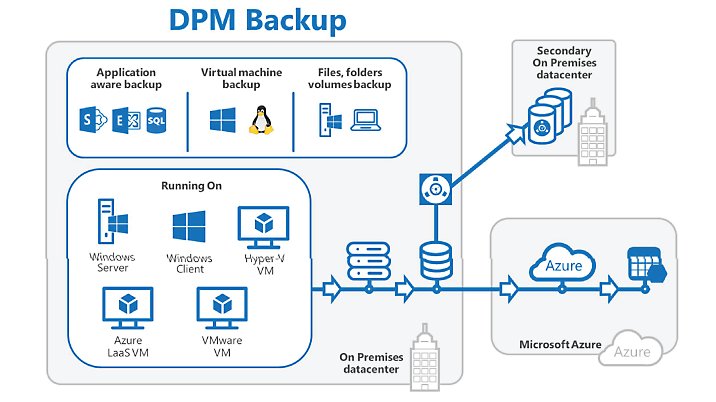
DPM 2007 continuously protects the core Microsoft server workloads to a DPM server or appliance, which then provides disk-based recovery and tape-based, long-term archival storage for a complete data protection and recovery solution.

Data Protection Manager 2007 in an IT environment

Setting a New Standard for Data Protection in Windows Environments

  • Continuous Data Protection for Windows Application and File Servers DPM protects core Windows Server workloads by continuously capturing data changes with application-aware byte-level agents, providing an easy-to-manage and robust disk/tape back-end platform, and one-click lossless application recovery.

  • Rapid and Reliable Recovery DPM enables IT administrators and end-users to easily recover data in minutes from easily accessible disk instead of locating and restoring from less-reliable tapes.

  • Advanced Technology for Enterprises of All Sizes DPM brings together the best aspects of CDP real-time protection with traditional tape backup/restore to provide a comprehensive disk-to-disk-to-tape data recovery solution. Combined with Microsoft Windows Server technology, DPM 2007 provides a technically advanced and comprehensive data protection solution for the most demanding Windows environments—from the SMB to the Enterprise.

Maximizing Protection of Microsoft Workloads with Microsoft Backup and Recovery

DPM 2007 is designed for the application stakeholder, a SQL or Exchange Administrator, or an IT generalist, and uses wizards and workflows to help ensure that you can protect your data—without requiring an advanced degree, training, or certification in storage and backup technologies.

DPM 2007 presents the data to be protected in the same context as users access it. This empowers SQL Server administrators to select databases or Exchange managers to choose Storage Groups. SharePoint farms, Virtual Server guest machines, and Windows Server file shares are all selectable—with DPM then determining the files and components to protect.

Easy-to-use wizards help you protect data.

Meeting Microsoft Customer Needs

Common customer questions about their existing backup:

“Who can help me restore?”
During a crisis, as part of the data recovery, many customers are frustrated when bringing in multiple support organizations to help restore their data. The third-party backup vendor may say that the data restored successfully. But Microsoft Product Support Services may say that the data appears un-mountable. And the systems integrator, the database administrator, or the lone IT professional can be stuck in the middle. Having a Microsoft backup product protecting a Microsoft SQL Server, Exchange Server, or SharePoint platform means that customers don’t have to worry about misunderstandings between vendors when restoring their data.

“My backup product does some things well, but protecting my advanced Exchange configuration isn’t one of them.”
Because third-party backup products try to back up a wide variety of applications, it is very difficult to protect every application well, particularly with flexible applications like mirrored SQL Server 2005 databases or a CCR/LCR cluster under Exchange Server 2007. Microsoft is dedicated to making sure that our backup solution is one of the very best for protecting our application workloads. Microsoft protects our own Enterprise SQL and Exchange servers with DPM, beginning early in the beta process. This helps ensure that no DPM build will go to a customer that Microsoft IT hasn’t signed off as tested in our own demanding production environment.

Take a look at how DPM 2007 can protect your Windows Server infrastructure

Microsoft is committed to listening to our customers and partners—to help shape the products and services that we offer. While most customers currently have some form of tape backup technology, there are many who are discontent with the current offerings, either looking for better support of key business applications like Microsoft Exchange Server 2007 or SQL Server 2008, or looking for better than nightly protection to a medium other than tape. Microsoft Data Protection Manager 2007 addresses those needs.

If you depend on Microsoft server-based platforms, including SQL Server, Microsoft Exchange, or SharePoint Services to manage and deliver information within your company, take a look at how DPM 2007 can help you protect your business-critical data.