Introduction
In my previous post I explained how to configure and process an advance shipping notice that was received from a vendor, or what I call the “inbound ASN”.
But what about notifying our customers whenever we ship something to them? We’d like to send them a shipping notice in advance as well. Well, this functionality has been present in AX for a while now, and can still be used today.
But in this post I would like to describe how to configure and process an outbound ASN using the new Warehouse management solution data model and processes.
Configuring the ASN service
The ASN, as I mentioned before, is a standard service based on the AIF framework, so before we walk through the configuration of the data, we need to ensure that the AIF framework and the corresponding service is up and running.
The service that provides the outbound ASN capabilities is the same as for inbound and is called WHSShipmentASNService. The service operation that is used for generating the ASN is called WHSShipmentASNService.read.
Here is how the outbound port should look after configuring the service operations.

XML schema
With documents being sent in the outbound direction it is important to control the information that is exposed in the document (for example, to avoid showing some of the internal identifiers like RecIds, InventDimIds, etc.), so let’s go ahead and customize the document through the Data policies button, enabling only some of the fields available through the service. Here’s how I’ve set mine up:
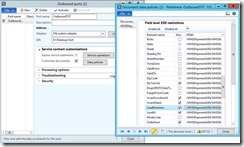
OK, now we are ready to activate the outbound port and move on to walking through the flow of sending an ASN in Dynamics AX.
Sending an ASN for a selected load
Configuring the customer
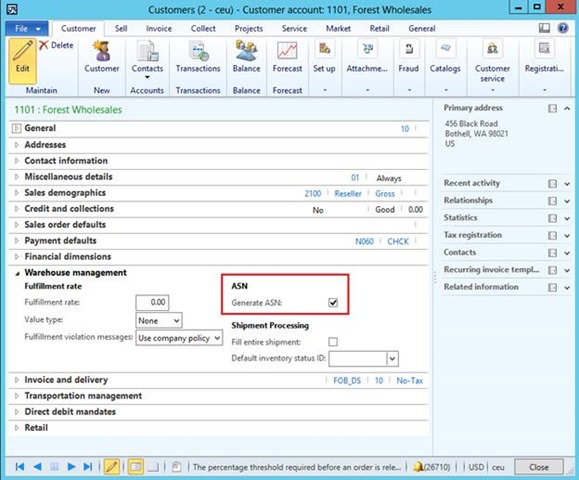
In order to be able to send an advance shipping note to a customer, we need to enable this on the customer, under the Warehouse management fast tab. This way you can clearly distinguish which customers need to receive an ASN when the shipment is being sent. Especially useful if you ship large loads which contain multiple shipments for multiple customers.
Creating and processing the outbound load
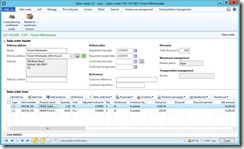
Let us create a new sales order for the above customer, and add a few sales lines for WHS-enabled items to it. Ensure the lines are physically reserved, and then release the order to warehouse.
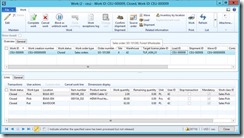
Execute the created work, so the items end up in the Final Shipping location. I am not going to walk through that part, as it has nothing to do with the ASN. Here’s how the work looks for the sales order in my example:
Now that the goods are picked and loaded onto the truck, we need to confirm the outbound shipment, print the packing slip and send the driver on his way. After that we will be able to send the advance shipping note to let the customer know the truckload is on its way. These steps can be done from a number of forms in Dynamics AX, and in this post I am just going to do it from the Load details.
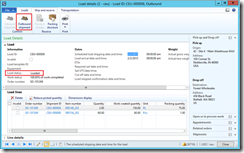
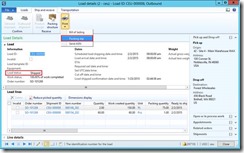
OK, now that the packing slip is printed, we are able to send the ASN.
Note
The Send ASN button gets enabled earlier, before we have printed the packing slip. However, clicking it will not actually do anything. You need to print the packing slip first.
Note
If the selected load is part of Transportation management system route, all loads on that route will need to be in the Shipped state with packing slips printed, same as for the load above, before the ASN can be sent.
You can send the advance shipping note for more than one load at the same time, by multi-selecting the loads in the Load planning workbench or the All Loads list page / details page. Same goes for shipments if that is where you are sending the ASN from.
Each shipment that is part of the load will have an individual ASN document, assuming that it is enabled for the corresponding customer, as described above.
There is no infolog message shown to the user to confirm that the ASN has been created successfully, but you can tell whether that happen if you look at the AIF document queue.
It is currently not possible to send the ASN a second time.
Processing the outbound AIF queue
Like with other AIF services, you would typically have a batch job that picks up all new outgoing documents and sends them. For the sake of simplicity, I will use the following method, which is part of the AIF configuration tool I mentioned above:
1publicstaticvoid processOutboundDocuments() 2{ 3new
AifOutboundProcessingService().run(); 4new AifGatewaySendService().run(); 5}
Result
Here is how the ASN document looks for my example. You can download the file here.
1
2 3
4 5 6 7{AE2B908D-68BB-4D59-99CF-FCDC879242A9}
8 9http://tempuri.org/WHSShipmentASNService/read 10 11
12 13 14 15
16 17
18 19
20 211101
22 23456 Black Road, Bothell, WA 98021, USA
24 25Forest Wholesales
26 27FOB_DS
28 2942
30 314
32 33Outbound
34 35CEU-000008 36 37SO-101269
38 39CEU-000008 40 41
42 43TLP_ASN_01 44 45
46 47000148_202
48 49150.00 50 51ea
52 53 54 5542
56 574 58 59Available
60 61TLP_ASN_01
62 63BAYDOOR
64 65 66 67
68 69 70 71000154_202
72 7360.00 74 75Pcs
76 77 78 7942
80 814 82 83Available
84 85TLP_ASN_01
86 87BAYDOOR
88 89 90 91 92 93
94 95 96 97Bothell
98 99USA 100101
WA 102103456 Black Road 10410598021 106107
108109 11011
112113 114115
116117 118119
Technical details
Class WHSShipConfirm contains the majority of the business logic around sending the ASN, with sendASNAllLoads() being the main entry method for the procedure.
Method generateASN() takes care of creating the packing structure corresponding to the shipment. It loops through all the relevant work orders, creating a UOMStructure record for each new target license plate (which corresponds to the different pallets that are part of the shipment). It will then for each load line loop through the corresponding inventory transactions (With StatusIssue == Deducted) and create the ASNItem records for each of the load lines items, taking into consideration the inventory dimensions of each line. This happens in method createASNItems().
Once the data structure is populated for the shipment, the document is generated and processed in the method sendElectronically().
Note
It will never create a nested structure where multiple cases are put on the pallet; it will always be the individual items directly on the pallet.
Conclusion
As you can see, the current capabilities are rather limited, but it is a good start, and this functionality will hopefully be further extended in future versions of Dynamics AX to include things like:
- Multi-level package structure
- Closer integration with the container structure generated through manual packing and automatic containerization processes