We got a couple of issues when on the purchase requisition workflow how the [Purchase Requisition Lines.Category] is evaluated in workflow conditional statements. While we expect to see it like that:
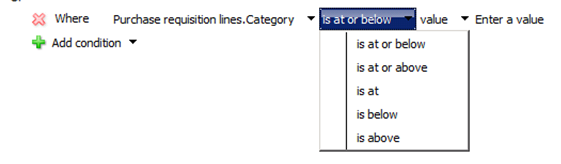
And when you clicked on Enter a value you were able to drill back and select a record from the hierarchy.
While it is shown like:
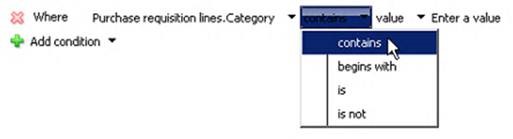
The issue is connected to DEL_ProductCategoryId field which also has label category and it is not connected to Category hierarchy
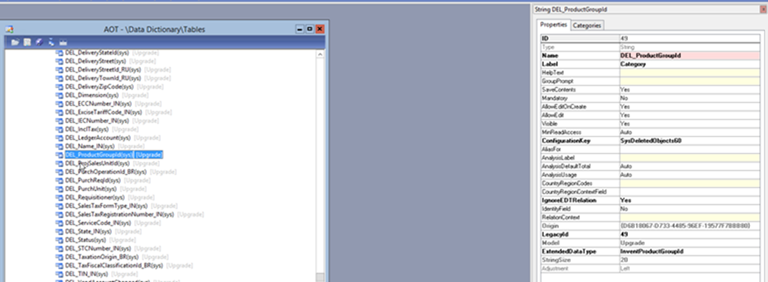
This is due to Foundation Upgrade model installed on the environment. This model is installed when we upgrade between versions: 6.0 to 6.1 or between AX4 to 6
After we are done with data upgrade we can delete this model.
If you installed also CU10 you will also need to delete the model Update for Foundation Upgrade
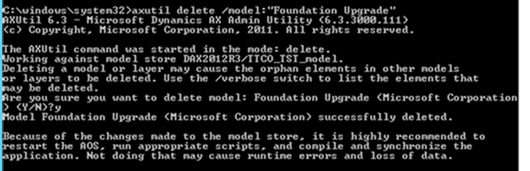
For more details please see video: https://channel9.msdn.com/Blogs/mfp/Microsoft-Dynamics-AX-2012-Uninstalling-the-Upgrade-model
After removing Foundation Upgrade model and Update for Foundation Upgrade you can select correct condition for Category field
![Avatar of Czesława Langowska Vliegen [MSFT]](https://secure.gravatar.com/avatar/7933315d96be0b8de9c21764d3853a3da614f642723b461e62e61a4e0d4307df?s=212&d=mm&r=g)