Imagine being able to ask your CRM system a question like, “Which opportunities are likely to close this week?” or “Who has met with Ernie Kerrigan at Contoso recently?” and getting an instant, accurate answer without writing a single query or navigating through multiple Views in Dynamics 365.
Whether you’re using Copilot in Dynamics 365 Sales, Power Apps customized through Microsoft Copilot Studio or Microsoft 365 Copilot for Sales, under the hood, these experiences leverage one common engine: AI-powered Dataverse (DV) Search, which seamlessly connects business users to the underlying database schema, translating intent into action without requiring technical expertise. Thousands of enterprise customers already rely on this capability to power their business workflows.
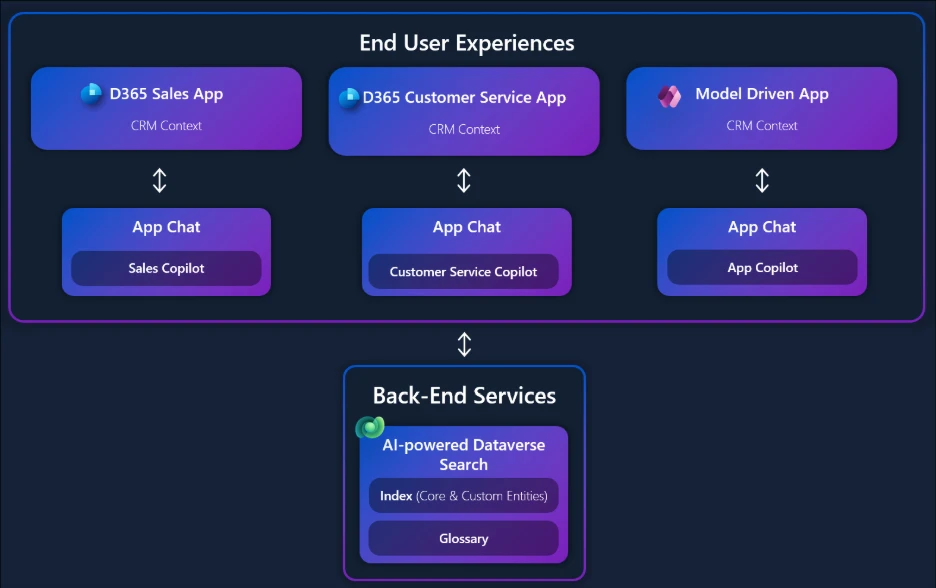
Figure 1: How AI-powered Dataverse Search Connects Copilot Experiences Across Dynamics 365
We’ve reimagined the technology behind Dataverse Search from the ground up. Leveraging recent breakthroughs in agentic AI, the new system delivers answers that are more relevant, contextual, and accurate to your specific business data. Think of it as an intelligent assistant that not only understands your question but figures out the best way to answer it using an adaptive reasoning process.
In this blog, we’ll explore why this agentic approach was necessary, how it works under the hood, and how it scales to enterprise needs supporting complex schemas, massive datasets, and domain specific terminologies while adhering to Microsoft Responsible AI principles. In particular, the agentic approach is model-agnostic, and while different models or fine-tuned models can influence the quality of results, the choice of model is orthogonal to the architecture. For this post, our emphasis remains on the agentic loop and its role in delivering dynamic, context-aware answers. Further, we will demonstrate our success via evaluation results and show you ways to customize it for your business.
Queries to Conversations: Unlocking Your Live Business Data
Every organization’s Dynamics 365 environment is unique, and most customers customize it extensively. Over time, these customizations lead to complex schemas, ambiguous relationships, and massive datasets spanning millions of records and terabytes of data. Our original Dataverse Search system was pioneering, but it relied on a fixed-plan natural language to SQL pipeline. A user’s question was converted to SQL through sequential stages: parsing, schema mapping, data linking, and SQL generation. This design was prone to cascading failure in a sequential pipeline. Each stage operated in isolation without shared context, so a single error could invalidate the entire query. Every question followed the same fixed flow, even when certain steps were unnecessary. This resulted in brittle behavior and suboptimal answers for complex or ambiguous queries that spanned multiple tables.
We recognized the need for a more adaptable, resilient approach to tackle the complexities of enterprise data. This upgrade shifts DV Search beyond simple Search into intelligent, interactive conversations with your business data. For you, this translates into immediate, actionable value by providing:
- Real-Time, Actionable Answers: Ask, “Which of my open opportunities in New York are scheduled to close this month?” and get an instant answer from the live Dataverse data. This isn’t a report from last night’s data refresh; it’s the current state of your business.
- Democratized Data Access: A service manager can ask, “Show me active, high-priority cases that haven’t been updated in 3 days” without needing to understand the underlying table structure of incidents and case/activities.
- Deeper Contextual Conversations: The agent supports multi-turn conversations. After asking about opportunities in New York, you can follow up with, “Of those, which ones are for our ‘Pro’ license?” The agent remembers the context, providing a progressively refined answer.
Under the Hood: Agentic Architecture
To overcome some of the limitations of the earlier system and to meet the complex customer scenarios, the new DV Search architecture introduces an Agentic Orchestrator powered by GPT4.1. It transforms query handling from a static pipeline into a dynamic reasoning loop: plan → execute → refine. Instead of blindly converting text to SQL, the orchestrator treats each question as a goal, intelligently deciding the best steps to reach it.
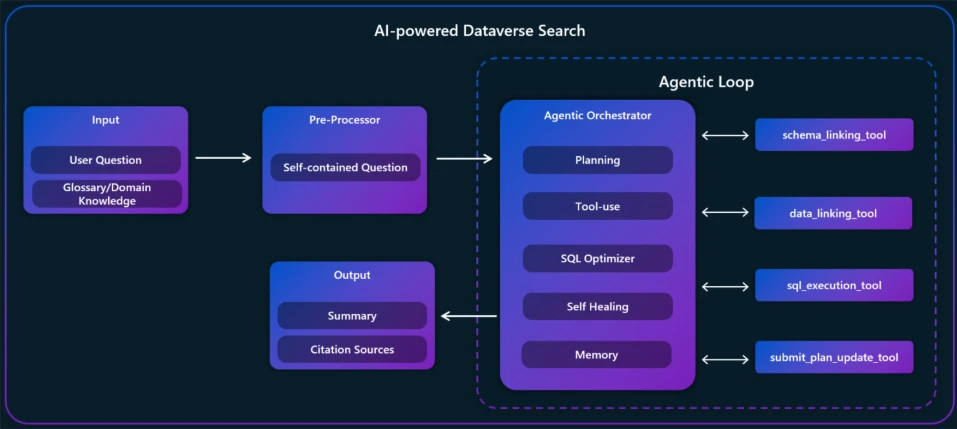
Figure 2: Agentic Architecture for AI-powered Dataverse Search
Context Awareness and Conversations: When a user submits a new or follow-up question, a dedicated preprocessing component reviews prior conversation history and rewrites the query as a single, self-contained question, enabling coherent multi-turn conversations. For example, if you ask, “Show my top opportunities in Q4” and then follow up with “How about in Europe only?”. the component understands the second question is a refinement of the first rather than starting from scratch or losing track of prior context. This conversational capability makes interactions feel natural and efficient. The refined question is then enriched with the business’s domain knowledge (glossary) to fully reflect the user’s intent within the specific business context.
Dynamic Planning and Execution: When the self-contained question comes in, the orchestrator doesn’t simply translate it into SQL. Instead, it breaks the query into logical steps and decides which tools to use and in what order, while also utilizing the domain knowledge encapsulated with the supplied glossaries. These tools include:
- schema_linking_tool: Schema lookup for understanding tables and relationships
- data_linking_tool: Semantic Search for finding relevant data values and resolving data ambiguities
- sql_execution_tool: SQL execution tool for retrieving results
- submit_plan_update_tool: Captures both the original plan and any course corrections made during execution
The orchestrator adapts on the fly if the first attempt fails or returns incomplete results. It analyzes the issue, revises the plan, and retries. This self-correcting loop is a major improvement over older systems that suffered from cascading failures.
Handling Relational Complexity: One of the most powerful aspects of this approach is its ability to handle relational complexity. Operational business application schemas often require multi-hop joins across multiple tables, including custom entities. The orchestrator understands these relationships and can navigate them intelligently, ensuring accurate joins and filters even in highly customized environments. For example, if a question involves linking Accounts to Opportunities and then to a custom Product table, the agent plans the steps and executes them seamlessly.
Personalization and Learning: Personalization further enhances the experience. Over time, the system learns from usage patterns within your organization. If you frequently work with the Accounts table or use certain custom fields, the agent prioritizes those interpretations in future queries. This learning is based on interaction signals, not external data, and is carefully scoped to respect privacy and organizational boundaries. The result is a system that becomes more aligned with your business logic the more you use it.
Real-World Example
Imagine you run Fourth Coffee Machines, a business selling premium espresso and grinder units to commercial and residential customers. It’s managed through a Power App built on Dataverse. A seller begins with a simple keyword search in top-bar search in Power Apps for “Fourth Coffee” to confirm the account record. Thanks to fuzzy matching and relevance re-ranking, even typos like forth coffee or 4thcoffee surface the right entity instantly.
From there, the seller asks Copilot: “Show me my open opportunity at risk with Fourth Coffee.” The agent rewrites the query, scopes it to the current user, interprets at risk as a cold rating, and joins Account → Opportunity. It executes SQL, returns the results, and summarizes them with citations—no manual filtering, no report building.
Finally, the seller pivots to a KPI question: “What is the HRR for Coffee Grinder 02?” Here, the agent consults the business glossary, which defines HRR as Happy Response Rate (positive sentiment ÷ total reviews in the Product Review table). It computes the metric, explains the formula, and cites the source records. The user now understands exactly how the number was derived.
Under the hood, this seamless experience is powered by an Agentic Orchestrator that plans, executes, and refines dynamically. It chooses the right tools, adapts when errors occur, and injects domain knowledge from glossaries. By combining dynamic planning, iterative refinement, relational understanding, and personalization, it represents a significant leap forward from static query pipelines. It’s not just about generating SQL it’s about orchestrating an intelligent, context-aware process that feels conversational and delivers real business value.
Evaluation Results
To measure how well our agentic system performs in practical enterprise scenarios, we evaluated it against curated datasets of user prompts each representing or assisting with a real job to be done. These prompts reflect the everyday questions and tasks that drive productivity for CRM users— from quick record lookups and aggregation analytics using keyword search or simple filters and joins, to complex multi-join queries requiring domain expertise. By categorizing prompts into levels of complexity, we ensure the evaluations capture the full spectrum of enterprise challenges.
For each complexity level, we report two practical metrics: Relaxed Execution Accuracy (EX Accuracy) and P80 Latency. Relaxed Execution Accuracy measures how often the generated SQL returns the same rows as the reference SQL when both are executed on the same data—extra columns in the predicted query are allowed, but extra or missing rows are not; order is ignored unless ORDER BY is specified. P80 Latency is the 80th percentile end to end response time, from request receipt through retrieval, model inference, and verification to the final SQL result. Together, these metrics give a transparent, action-oriented view of correctness and responsiveness as task complexity increases. It highlights where the Agentic framework delivers reliable, efficient answers that empowers users to get more done with natural language.
| Complexity Level | Description | Prompt Distribution (%) | EX Accuracy (Relaxed)† | P80 Latency (s) |
| Level 1 | Keyword Search | 21% | 96.2% | 7.7s |
| Level 2 | NL Queries involving retrievals with filters and joins | 28% | 96.4% | 7.5s |
| Level 3 | NL Queries requiring understanding of Domain knowledge, Customizations | 51% | 81.2% | 10.6s |
† Metrics averaged over multiple runs
In practice, higher accuracy often comes at the cost of increased latency. Conversely, pushing for low latency can reduce end to end quality. This Agentic system is designed to navigate that tradeoff, delivering strong accuracy while keeping latency within practical bounds. This achieves a practical balance for production use.
Tuning for Your Business: Glossaries and Enriched Schema
No AI system knows your business out-of-the-box. We’ve added tuning mechanisms that let makers refine how the Q&A agent understands your data:
- Glossaries: You can define a glossary to teach the agent your company’s unique vocabulary and acronyms. For example, if “QoQ” is common slang on your team for “quarter-over-quarter” or “CTX” refers to a particular set of products, you can add those to the glossary. The next time someone asks “What’s the QoQ growth for CTX?”, the agent will know exactly what that means. This helps align the AI with the lingo of your organization so it interprets queries the same way a knowledgeable employee would.
- Schema Descriptions: Dataverse allows adding custom descriptions to tables and columns. By populating these descriptions with meaningful info, you give the agent extra context. For instance, two fields might both be called “Status” – one on a custom entity and one on a standard entity. If you add descriptions like “(Order Status – custom)” vs “(System Status code)”, the agent can use that to pick the right field during SQL generation. Essentially, you’re able to clarify the semantics of your data model for the AI.
Using the inherent metadata in Dataverse (like relationships and display names) plus these maker-driven additions, the agentic system can be tailored to use the correct terms and relationships in your domain, boosting accuracy even further. And because you control these glossaries and descriptions, you can continuously refine the AI’s understanding as your business evolves.
Conclusion
By reinventing Dataverse Search with an agentic architecture, we’ve moved from a rigid query engine to an adaptive, intelligent assistant for your business. The system understands nuance, handles ambiguity through reasoning, and even lets you inject your domain knowledge. Early adopters are seeing more questions answered correctly and faster than before, turning previously buried data into actionable insights. One leading global financial services company saw an Execution Accuracy surge from 22% to 97% on their marquee set of scenarios. This marks a significant step toward making enterprise data truly conversational. It empowers everyone from business users to power makers to tap into complex data and get the answers they need instantly and accurately, simply by asking.