
Every seller knows how much time gets lost between selling moments. Information arrives in many forms—emails, screenshots, documents, handwritten notes—and turning that into structured CRM data often means manual copying, rework, or skipped fields altogether. At the same time, answering everyday questions like “Which leads should I follow up on?” or “How is my pipeline shaping up right now?” can require complex filters, multiple views, or exporting data just to get a clear answer.
Dynamics 365 Sales is evolving to address these challenges with agentic assistance. Instead of sellers adapting to rigid forms, grids, and filters, agentic AI in Dynamics 365 Sales now adapts to how sellers naturally work—by understanding unstructured inputs, interpreting intent, and assisting directly at the point of action. Two purpose-built agents bring this to life:
- A Data Entry Agent that uses LLMs to understand pasted content and uploaded files, extract relevant details, and quickly populate CRM forms for faster lead and contact creation.
- A Data Exploration Agent helps sellers quickly understand trends across opportunities, leads, or accounts by turning natural language questions into filtered views and visual insights.
Together, these agents reduce two of the biggest productivity drains in sales—manual data entry and cumbersome data exploration—so sellers can spend less time managing CRM and more time engaging customers.
Let’s look at how these experiences use agentic AI in Dynamics 365 in real sales scenarios:
Capture sales data faster with the Data Entry Agent
Accurate customer data is critical, but sellers encounter information in many forms—emails, websites, documents, and business cards. The Data Entry Agent uses large language models to understand unstructured text and files, infer intent, and map extracted details to the right CRM fields, without requiring sellers to manually interpret or retype information.
Capture Lead and Contact details instantly with Smart Paste
When a seller receives an inbound email from a prospect, creating a lead often means manually copying names, email addresses, phone numbers, and company details into CRM. For example, a prospect may write:
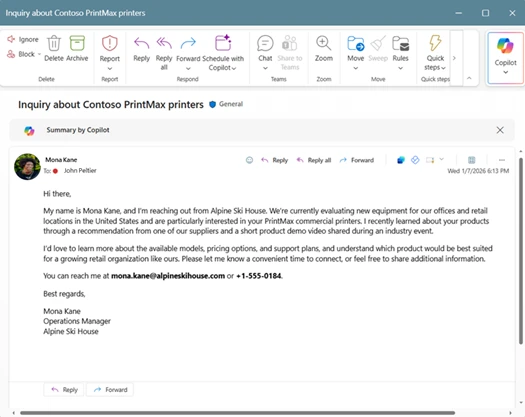
You want to respond quickly, but first you need to log the lead.
With Smart Paste (Preview), sellers can copy the email content, navigate to the lead or contact form. The system analyzes the copied text, extracts key details such as name, company, email, and phone number, and suggests values inline for the relevant fields. Each suggestion includes inline citation from the email, so sellers can clearly see the source of the information.
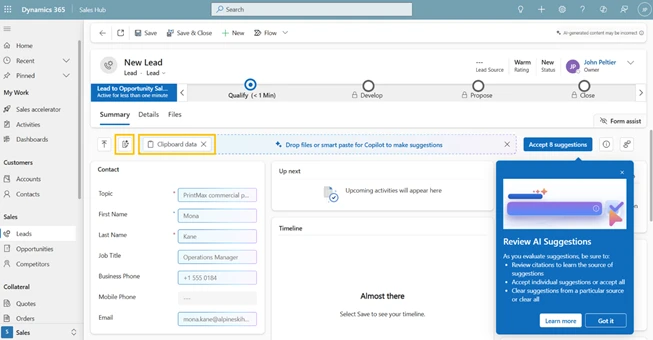
Sellers can review AI-generated field suggestions, view citations, accept what looks right, and save—enabling faster lead capture with greater confidence in data accuracy.
Similarly, a seller may be reviewing a prospect’s website or LinkedIn profile in separate tabs. Instead of manually re-entering details later, they can copy text from the company’s About Us page or the prospect’s LinkedIn profile and paste it directly into a CRM form. The agent analyzes the content and suggests values such as industry, company name, location, and job title, allowing the seller to review and apply the information immediately while the context is still fresh.
Convert Physical Documents into CRM Records with Files (Preview)
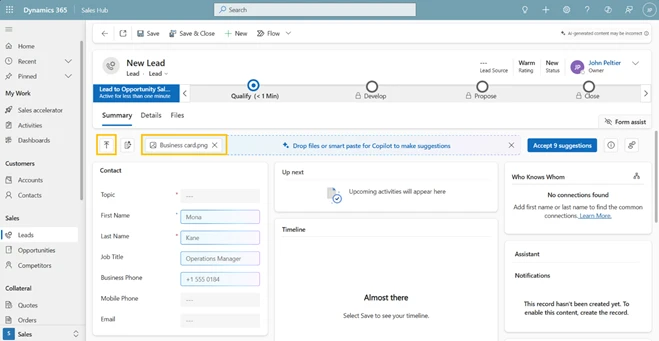
After trade shows, conferences, or in-person meetings, sellers often return with a stack of business cards or documents from dozens of conversations. Manually transcribing this information delays follow-up and increases the chance of errors.
With Files (Preview), sellers can upload images of business cards or documents such as .txt, .docx, .csv, .pdf, .png, .jpg, .jpeg, or .bmp, directly into the form. The system analyses the uploaded files and suggests values for relevant fields, including names, titles, company details, email addresses, and phone numbers. Sellers simply review and confirm the suggestions, turning what once took hours into minutes.
This enables faster post-event follow-up and more complete lead and contact records.
Find and understand sales data faster with the Data Exploration agent
Finding the right records and understanding trends is essential for sellers, but navigating views and filters can be time-consuming. Powered by natural language understanding, the Data Exploration Agent (Preview) translates seller questions into structured filters, allowing users to interact with CRM data using plain language instead of complex query logic, making it easier to plan, prioritize, and understand pipeline health directly within their views.
Find the right records faster using Natural Language in Views
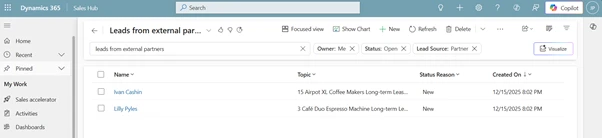
Filtering records in CRM can be time-consuming, especially when multiple criteria are involved. Imagine planning your day and opening My Open Leads to focus on recent campaign responses. Instead of building complex filters, you simply type: “Leads from the Summer Campaign created last month.”
Or, when preparing for a forecast call, you search: “Opportunities from Technology accounts closing next quarter.”
The system interprets the request and automatically applies the appropriate filters to the view. Sellers can review and modify the filters if needed, giving them both speed and control. This simplifies daily planning, follow-ups, and pipeline reviews.
Visualize data in Views to spot trends quickly
Understanding trends often requires more than scanning rows of data, but building dashboards or exporting reports isn’t practical for day-to-day sales work. With Visualize (Preview), sellers can turn the filtered data they’re already viewing into interactive charts with a single click—directly within the view and without breaking their flow.
Because the visualization is generated from the current view and visible columns, it automatically reflects the exact filters, segments, and scope the seller is working with. Sellers can hover to see detailed values, drill into specific segments, and switch chart types on the fly as new questions come up. This makes it easy to answer questions like “Where are most of my open opportunities concentrated?”, “Which lead sources are driving volume right now?”, or “How is my pipeline distributed across stages?”
Visualize is designed for quick, in-the-moment understanding, not deep reporting. It complements Power BI by giving sellers immediate visual insight at the point of work—without creating reports, navigating dashboards, or leaving CRM—so they can recognize patterns and act faster while staying in flow.
Enable these agentic capabilities in Power Platform Admin Center
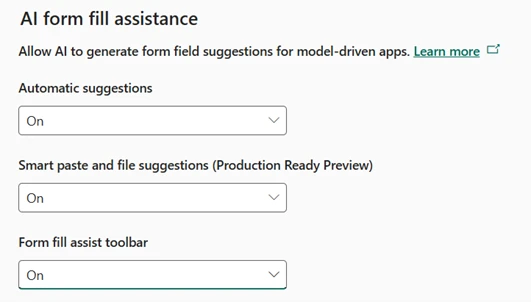
- To enable Data Entry agent capabilities, go to Power Platform Admin Center → Settings → Product → Features.
Under AI form fill assistance, turn On- Automatic suggestions
- Smart paste and file suggestions and
- Form fill assist toolbar. Changes apply to model-driven apps once saved.
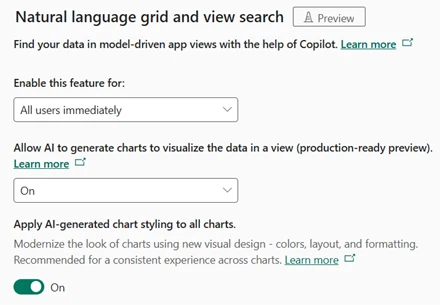
- To enable Data Exploration agent capabilities, go to Power Platform Admin Center → Settings → Product → Features.
Under Natural language grid and view search, set Enable this feature for to All users immediately
- Turn On Allow AI to generate chartsto visualize the data in a view and enable AI-generated chart styling for a consistent visual experience.
Focus More on Selling, Less on Administration
With agentic AI in Dynamics 365 Sales, the platform evolves from a system of record into a system that understands, assists, and adapts—helping sellers spend more time selling and less time managing CRM.