I recently had a customer that wanted to run the Email Router as a user other than the System Administrator, offhand this seemed like an easy task. The customer setup a new “Service User” and created a special “Service Role” that only had access to email related privileges. Here is what the Implementation Guide says:
“If you did not specify an incoming e-mail server during Microsoft Dynamics CRM Server Setup, you must manually add the service account running the E-mail Router service to the PrivUserGroup security group. The PrivUserGroup is created during Microsoft Dynamics CRM Server Setup. For steps on how to add members to this group, see the “Troubleshooting” section later in this section.”
The trick was that they did not want to add this user to the PrivUserGroup, but instead wanted to have this user be relatively low privilege. Unfortunately, this was not straightforward so I had to do some digging. First thing I did was to enable CRM tracing to work through all the failed “Privilege Checks”, adding the needed privilege to the service role on after another. Unfortunately, after we added all the privileges we ended up with this error:
MessageProcessor fail to process message 'GetDecryptionKey' for 'email'.

[2009-06-04 00:33:21.0] Process: w3wp |Organization:6f10d233-a921-4185-a303-7ae7d2fcffbc |Thread:    9 |Category: Platform.Sdk |User: 25d8907f-f84a-de11-80a2-00110aa06f20 |Level: Error | CompositeSoapExtensionExceptionHandler.Handle

CrmSoapExtension detected CrmException:

System.Web.Services.Protocols.SoapException: Server was unable to process request. ---> System.Reflection.TargetInvocationException: Exception has been thrown by the target of an invocation. ---> Microsoft.Crm.CrmException: Access is denied.

at Microsoft.Crm.ObjectModel.EmailService.GetDecryptionKey(ExecutionContext context)
This obviously required a little more digging. That digging determined that CRM actually requires this user to have System Administrator role. We granted the user this role and all was well. But why was this required and is there anything we can learn from this? The answer is “of course”, so read on. J
The System Administrator role in Microsoft Dynamics CRM is “special”, which is to be expected as it is basically the root security role that is granted to the setup user and users that have total access to things within the system. Grant a user this role, make them a Deployment Administrator, and give them the corresponding required AD permissions and the user has total control over the CRM system. But for today, I want to focus on the System Administrator Role and provide a bit of details behind it, some obvious and some not so obvious.
First, what is the System Administrator role? Well obviously it is the role with the name System Administrator, but let’s be more specific. If you create a new role via the Role Editor and grant it all privileges and call it “System Administrator” it will just be a role with a lot of privileges, but it won’t be the System Administrator role. Here is why. To CRM, the System Administrator Role is any role whose Role Template ID is that of the known System Administrator Role Template. The GUID (627090FF-40A3-4053-8790-584EDC5BE201) of this template is well known and the template is created when you install CRM.
Now let’s take a look at the difference between the privileges of the role you created with “everything”. We will use the following query:
— Set these to the two roles you are trying to compare
— This script is provided “AS IS” with no warranties, and confers no rights
DECLARE @SystemAdminRoleId uniqueidentifier

DECLARE @EverythingAdminRoleId uniqueidentifier

SET @SystemAdminRoleId = '66b89fc2-64b2-dc11-b25e-0003ffb8057d'

SET @EverythingAdminRoleId = '7057625a-4f6a-de11-bfd3-0003ff6e9d4e'

SELECT pb.privilegeid, pb.name FROM

       RolePrivileges rp JOIN PrivilegeBase pb ON rp.privilegeId = pb.privilegeid

       WHERE RoleId = @SystemAdminRoleId

       AND rp.PrivilegeId NOT IN (SELECT privilegeid FROM RolePrivileges WHERE Roleid = @EverythingAdminRoleId)

       ORDER BY [name]
Here is a list of privileges that are missing from the “everything” role:
| Privilege ID | Privilege Name |
| 25523F7C-7B1D-4844-8D2D-50767D6FAA94 | prvAppendAsyncOperation |
| 78969DB5-5F70-4782-8299-F9258E4449C8 | prvAppendAttributeMap |
| 26B5FDB2-1C17-478B-B448-EB66AFA82AD0 | prvAppendBusinessTask |
| CF716BA0-04E5-4438-AE87-0B8729CC5219 | prvAppendBusinessUnit |
| 7D827946-147E-4292-A385-CCB34DC96525 | prvAppendQueue |
| 84B19140-92BB-4341-BED1-2AC5E0B1DD38 | prvAppendToAttributeMap |
| FCD88D2B-7C3F-4FDA-8CF7-AD9AD27A4A32 | prvAppendToBusinessTask |
| 2055B892-9068-4B43-854E-814671E53E8C | prvAppendToEntityMap |
| E7753B34-17F3-400E-8396-88E24B8DC519 | prvAppendToOrganization |
| 28C3A786-82A5-4FF6-8D54-4876DB4BA2F8 | prvAssignManager |
| B75A726F-E7AA-44AE-9282-F8776D913BBB | prvBulkDelete |
| B22E57F2-9D2E-4FAB-9667-F351133AB035 | prvCreateApplicationFile |
| EBA97FF0-C3E4-47E2-A064-84ACD680092F | prvCreateAsyncOperation |
| EE9C4874-14A6-4F47-B72D-F6AACC65C554 | prvCreateAttributeMap |
| AC1C8A42-C63B-4908-9988-F3CEB23CC50F | prvCreateBusinessTask |
| 30713160-C5ED-43C2-9B66-5923CD7236B1 | prvCreateCustomization |
| 03FA6BCF-30F3-4C07-88C3-5B02E5713701 | prvCreateEntityMap |
| 9E931DB8-975F-4DBD-BEFD-9244895D49B8 | prvCreateOrganization |
| 01750F14-3320-49CC-A7D1-52502CDCD16D | prvCreateOrgEmailTemplates |
| C81A03BB-4BFC-45A6-9184-E899CE26811A | prvCreatePluginAssembly |
| 592CB518-880D-492F-BD3C-3558413B8CED | prvCreatePluginType |
| 303DEF1C-947C-4AF3-A63B-406A7ABC72DE | prvCreateSdkMessage |
| 998329E9-5CE5-4538-99B1-983191899A8B | prvCreateSdkMessageProcessingStep |
| 65171D1B-1581-4FBB-96A3-95D14B5723CB | prvCreateSdkMessageProcessingStepImage |
| 1BD35330-06E3-4495-8C8D-BAABF5F0208A | prvCreateSdkMessageProcessingStepSecureConfig |
| 9BAEF8E0-76F8-42AA-8D48-DA0582A0D7E7 | prvCreateWebWizard |
| FC0435ED-332A-459C-B1DD-4D037A560E94 | prvCreateWizardAccessPrivilege |
| DC2393EA-4536-4DA0-8BD3-A02DF9CDB3E6 | prvCreateWizardPage |
| 60540CB9-61E0-49F4-BEDA-65E65F26CC3C | prvDebug |
| 2CB0B47F-0BC8-44B6-9D62-838B31CA44B8 | prvDeleteApplicationFile |
| D0F7B7C2-8891-400D-B6EC-848603001D0C | prvDeleteAttributeMap |
| B43C0E6E-0CF2-4D2F-BDEB-0E3FCB663690 | prvDeleteBusinessTask |
| 648BE51F-6EB2-4660-A564-A5FB555406A0 | prvDeleteBusinessUnit |
| 10B166F6-2F94-42DE-8049-1462D23A0E62 | prvDeleteCustomization |
| 24B20DD9-F2D7-4ECF-865D-F4CBF82C1A92 | prvDeleteEntityMap |
| 9A48030C-0AA6-434E-8DE5-C8EAB10D7E8A | prvDeleteOrganization |
| 3FA24EFF-E413-4224-8CF2-BD29193F8ADF | prvDeletePluginAssembly |
| 5E1C5422-9A12-4D3E-9960-51A812A005E2 | prvDeletePluginType |
| 8F9B0745-2842-45B6-A306-EAB47F138C7A | prvDeleteSdkMessage |
| 25CA2AFD-E85D-4A14-BB81-C368CD59BF5B | prvDeleteSdkMessageProcessingStep |
| 5EBF516C-E769-47DF-AD46-458B4B23603F | prvDeleteSdkMessageProcessingStepImage |
| E63E21E5-C2AF-4807-B5CA-78F257FC007F | prvDeleteSdkMessageProcessingStepSecureConfig |
| A3AC3B6F-6D09-4230-9221-C8B9AB0ABF06 | prvDeleteTeam |
| 820A33EB-A459-4B55-BA3E-4EC3F5B691BE | prvDeleteUser |
| EEBF0DDC-D4F3-4F22-A19A-A158868D3FA6 | prvDeleteWebWizard |
| 17A5FE9C-5981-48FB-81DB-F896BF113D15 | prvDeleteWizardAccessPrivilege |
| 828BD698-5B7D-47E4-A53D-5551CE989A7A | prvDeleteWizardPage |
| D48CF22F-F8C2-4E16-89EB-49F8281DE4EA | prvOverrideCreatedOnCreatedBy |
| 5A9F6284-E81F-4294-9C63-D68052189B87 | prvPublishDuplicateRule |
| AC3CC10E-F735-4F34-95E4-097EC2AB478B | prvPublishOrgMailMergeTemplate |
| 7497D08B-CB4C-49AE-A1F0-47F21CACA6B8 | prvPublishOrgReport |
| 6C835796-0A87-4790-A6BA-E72651427EC1 | prvPublishRSReport |
| E499D375-C305-4A8B-8C5B-4539AC212F77 | prvReadBusinessTask |
| A629BCA1-FEFB-4B4C-A4E2-3401EFF833D4 | prvReadSdkMessageProcessingStepSecureConfig |
| E6672D30-ED9E-4A1D-847D-7B1D05CD12E2 | prvReparentTeam |
| B367742D-E25D-4223-8691-E055BCBE3D98 | prvShareAsyncOperation |
| B3A3672D-2B04-4D65-87D9-217EC86BC1D0 | prvWriteApplicationFile |
| F96E1B75-8A54-4EAC-823B-AE6F1CA465EF | prvWriteAttributeMap |
| 40066203-C76A-4A58-9A89-F9D7B0D1E08D | prvWriteBusinessTask |
| F435A3D6-E4A2-4212-81D4-919DF326C95E | prvWriteEntityMap |
| 37009C66-2E53-49F0-B857-62252EAA6412 | prvWritePluginAssembly |
| C70843E8-D617-4873-9D05-8A8D4A68EE58 | prvWritePluginType |
| 6EBC7C4C-FDE7-424C-842E-11651498A9B3 | prvWriteSdkMessage |
| 072AEE35-581D-4488-85B1-AF09926FDA70 | prvWriteSdkMessageProcessingStep |
| 11954A66-B7AD-4DD9-B845-225D1B4C9FFE | prvWriteSdkMessageProcessingStepImage |
| 51AA61B6-C2F7-4BD7-BE1E-5EA0F3AF463F | prvWriteSdkMessageProcessingStepSecureConfig |
| AFA371AC-1D2C-4B43-8026-A2055683E2D0 | prvWriteWebWizard |
| 32CAC4BD-93BA-4DB0-B3D8-7B2A96ADFF52 | prvWriteWizardAccessPrivilege |
| 4E016DC5-719E-4F11-ABAA-3A131A3B18A2 | prvWriteWizardPage |
As you can see, there are 69 missing privileges from your “everything” role.
Why is there a difference? Well, this is because the CRM Role Editor UI does not allow you to set every privilege.
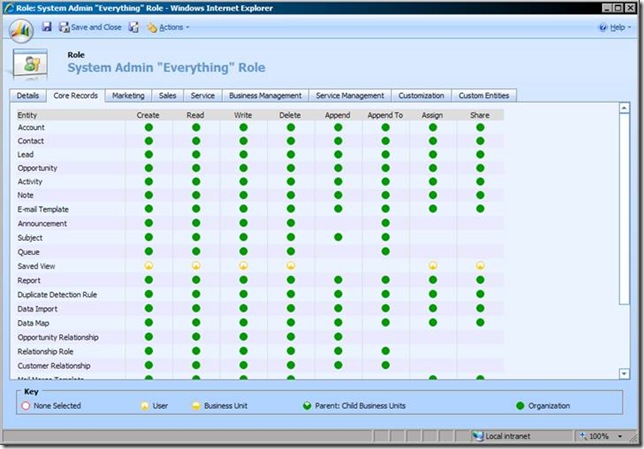
To get around this you should use the “Copy Role” feature to make an exact copy of the role.
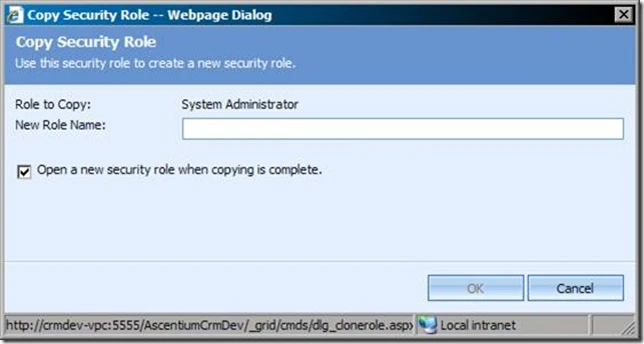
So what if you manually (via the platform) add all the missing privileges to your role? Unfortunately for some scenarios, this still isn’t good enough. In CRM, there are some very specialized messages like GetDecryptionKey that actually have a check to see if the user has the System Administrator role:
if (service.IsSystemAdministratorRole(guid, context))
{
     flag = true;
     break;
}
Here is a breakdown of what worked and what did not:
| Test | Result |
| Add ascentiumtest\routerService to PrivUserGroup | PASS |
| Remove ascentiumtest\routerService from PrivUserGroup | FAIL |
| Add CRM role of “System Administrator” to ascentiumtest\routerService | PASS |
| Remove “System Administrator” Role and add “Copy of System Administrator” Role to ascentiumtest\routerService | FAIL |
| Add ascentiumtest\routerService back to PrivUserGroup with “Copy of System Administrator Role” | PASS |
This message is used by the Email Router Service and as such, the account that the email router is running as must have the System Administrator role. Unfortunately, there is no supported way around this, as even making a “copy” of the System Administrator role via the UI does not yield the desired results as the Template ID of the copied role is NULL. You also can’t set the Role Template ID in a supported manner either as this attribute is marked as not valid for CREATE or UPDATE. The only other operation I could find that appears to require the System Administrator role is registering your CRM installation.