
A deep dive into MUTZ
Understanding MapUrlToZone(MUTZ): A critical security component in Windows
At DEF CON 33, we shared our research into MapUrlToZone, a critical Windows security component that determines whether a given path is local, on the intranet, or on the broader Internet. This classification drives several security decisions across Windows, for example, preventing a CreateFile call on an Internet path to avoid leaking NTLM credentials. As part of our investigation, Microsoft security researchers uncovered nearly a dozen important CVEs related to bypassing MapUrlToZone, all of which were addressed in early 2025. In this blog, we outline our research process and key findings to shed light on how these vulnerabilities were discovered and mitigated.
This blog post will explore
- What MapUrlToZone is
- Why MapUrlToZone is critical in several scenarios and why attackers are interested
- Our analysis of the current state of MapUrlToZone
- Our findings: MapUrlToZone bypasses (11)
- Why some cases are difficult to fix
- Investigations into some fixes
Throughout this document, you will see MapUrlToZone lovingly referred to as “MUTZ”.
What is MUTZ?
MapUrlToZone is a UserMode API split between urlmon.dll and iertutil.dll whose function is quite simple: Take a path from the caller and determine which zone the path belongs to. There are several zones, but the ones that matter for our purposes are:
| Zone | Description |
|---|---|
URLZONE_LOCAL_MACHINE |
MUTZ believes the path exists locally on the machine
|
URLZONE_INTRANET |
MUTZ thinks the path exists in the INTRANET zone - typically on the same network as the machine
|
URLZONE_INTERNET |
An untrusted path that MUTZ believes exists somewhere on the Internet
|
URLZONE_INVALID |
MUTZ isn’t sure where this path is
|
Even if you’ve never called MUTZ before, these zones may ring a bell. That’s most likely because MapUrlToZone is what Internet Explorer used to determine where a path lived. You may be familiar with this window, where you can change specific settings for each individual zone. Later, when your browser visits a new location, MUTZ will check which zone that path maps to, and apply your chosen settings accordingly.
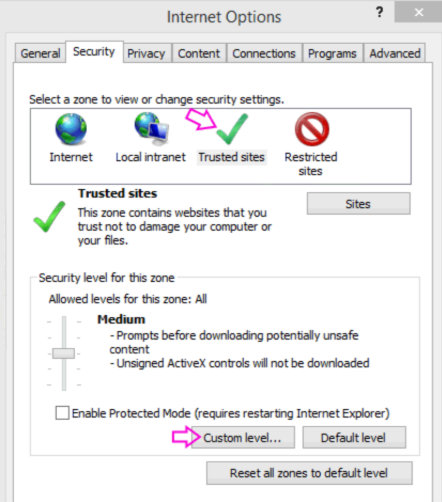
Over time, different components in Windows began adopting MUTZ to help make security decisions without compromising usability. Even if you no longer use Internet Explorer directly, you’re likely still interacting with MUTZ as the binaries (such as iertutil.dll and urlmon.dll) still ship with Windows. Some components that use MUTZ include:
- Clicking on a link in Outlook
- Opening a file in Microsoft Office
- Applying Mark of the Web to external files
- Opening
.lnkand.urlfiles in the Windows Shell - Chromium based browsers to determine whether a download is trusted
If MUTZ returns URLZONE_LOCAL_MACHINE or URLZONE_INTRANET for a path that actually points to an Internet resource, it can lead to security issues when components rely on that classification to make decisions. This misclassification has potential implications for remote code execution (RCE) as users may not be properly prompted before accessing the resource. It also affects sandboxing, since MUTZ helps determine whether a path belongs to a sandboxed process. Therefore, attackers will often look for paths that fool MUTZ into thinking that the path is more trusted than it should be.
Prior research
Before our research, roughly ten MUTZ bypasses had been submitted to MSRC. In 2023, Akamai researcher Ben Barnea released several blogs, focusing on the new call to MUTZ (From One Vulnerability to Another: Outlook Patch Analysis Reveals Important Flaw in Windows API | Akamai, Mute the Sound: Chaining Vulnerabilities to Achieve RCE on Outlook: Pt 1 | Akamai, and Mute the Sound: Chaining Vulnerabilities to Achieve RCE on Outlook: Pt 2 | Akamai) which detailed three unique MUTZ bypasses:
- CVE-2023-29324:
\\.\UNC\\Akamai.com\test.wav- MUTZ returnsURLZONE_LOCAL_MACHINEdue to the second backslash before the domain - CVE-2023-35384:
\\./UNC/C://../Akamai.com/file.wav- MUTZ returnsURLZONE_LOCAL_MACHINEdue to improper canonicalization - CVE-2024-20652:
\\;LanmanRedirector\akamai.com\..\test- MUTZ returnsURLZONE_INTRANETdue to improper canonicalization after a redirector
These issues were all fixed in 2023, and Ben’s work was a major source of inspiration for our own research, as it showed interesting behavior in how paths were canonicalized. We built much of our analysis on top of Ben’s canonicalization findings.
Methodology
There are a few main rules to keep in mind when trying to identify issues with MUTZ:
- Input constraints: The input must be a single path, realistically, less than
MAX_PATH - Crash behavior: If MUTZ crashes, this is an interesting finding. Even a null pointer dereference could be interesting as there are services an attacker could DoS
- Zone classification: Focus on paths that return
URLZONE_LOCAL_MACHINEorURLZONE_INTRANET, with a preference for the former - Remote path triggers: There must be some mechanism that makes the path a remote path - typically either by a CreateFile call or through an HTTP GET request
This behavior presents an interesting attack surface for fuzzing. We attempted to stand up a fuzzer targeting both memory safety and logic issues. Our logic fuzzer yielded slow results due to the need for network access to validate remote paths, while our memory safety fuzzer did not yield any findings. Follow up research to improve a MUTZ fuzzer is recommended.
As a result, the majority of our testing was done through manual source code review and testing. Our approach was informed by recent MSRC cases and fixes, as well as the public documentation on previous research into MUTZ.
Findings
The full list of findings can be found in the table below. This section will dive into how our approach revealed these cases and the technical details behind them.
| Case | Path | MUTZ decision |
|---|---|---|
| CVE-2025-21219 |
knownfolder:{D20BEEC4-5CA8-4905-AE3B-BF251EA09B53}\\\172.24.62.162\share\file
|
Local
|
| CVE-2025-21189 |
shell:NetworkPlacesFolder\\\172.24.62.162\share\file
|
Local
|
| CVE-2025-21332 |
\\.\C:\\?\..\..\UNC\172.24.62.162\share\newico.ico
|
Local
|
| CVE-2025-21328 |
\\f343::1b4e:1ab6:1339:a344%000000012\share\file
|
Intranet
|
| CVE-2025-21328 |
\\f343::1b4e:1ab6:1339:a344%000000000000000000012\share\file
|
Intranet
|
| CVE-2025-21329 |
http://00000000000000000000000000000017700000001:8000/file
|
Intranet
|
| CVE-2025-21247 |
\\.\UNC\C:1234:1234::1324\share\file
|
Local
|
| CVE-2025-21268 |
\\0xac1d26a@080\webdav\file
|
Intranet
|
| CVE-2025-21269 |
\\;LanmanRedirector\\172.29.38.158\share\file
|
Local
|
| CVE-2025-21322 |
\\;lanmanredirector\\localhost\..\172.25.62.6\share\file
|
Local
|
| CVE-2025-21322 |
\\;lanmanredirector\;a\localhost\\..\172.25.62.6\share\file
|
Intranet
|
Our dive into MUTZ was at first driven by our desire to answer the questions around how attackers could choose their path prefix. This raised the question: what other path prefixes could an attacker choose? How would these affect the results in MUTZ?
Path Prefixes
After trying a number of different path prefixes, two stood out because they forced MUTZ to always return URLZONE_LOCAL_MACHINE: shell: and knownfolder:. This is evident in _MapComponentsToZone, which is a main component of MUTZ. This function could end early if the scheme is opaque (which basically just checks if the path prefix is file: or not):
else if (IsOpaqueScheme(pzc->nScheme)) // The scheme is opaque since the path prefix is shell: or knownfolder:
{
    if (!(dwFlags & MUTZ_IGNORE_ZONE_MAPPINGS) && S_OK == CheckSiteAndDomainMappings(pzc, pdwZone))
        goto done;

    if (S_OK == CheckMKURL(pzc, pdwZone, pzc->pszProtocol))
        goto done;
}
Since we end this function early, we end up not having a zone yet, and calling CheckProtocolDefaults:
if (*pdwZone == URLZONE_INVALID)
{
    // Check for protocol defaults.
    if (S_OK == CheckProtocolDefaults(pzc->pszProtocol, pdwZone))
    {
        //*pdwZone is set
    }
}
CheckProtocolDefaults is a simple function: it checks the registry if there are any default zone mappings for the file prefix. These defaults are stored in HKCU\SOFTWARE\Microsoft\Windows\CurrentVersion\Internet Settings\Zones, and the defaults are as follows:
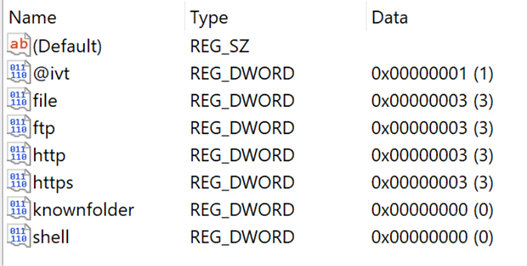

Both knownfolder: and shell: will always return URLZONE_LOCAL_MACHINE, regardless of what the path was.
Therefore, all an attacker needs to do is find a path that starts with either knownfolder: or shell: to bypass MapUrlToZone in scenarios where a prefixed path is accepted. However, it wasn’t immediately obvious how to craft such a path. Both prefixes are typically used to describe local folders on the system, rather than a network location. For example, one could choose FOLDERID_AccountPictures to specify the %APPDATA%\Microsoft\Windows\AccountPictures path. Please note that all the folder IDs are specified here: KNOWNFOLDERID (Knownfolders.h) - Win32 apps | Microsoft Learn. One particular folder stood out: My Network Places. Initially, we could not find a path that we could directly use with one of the prefixes we needed.
Concurrently, we happened to come across an article about a separate malware campaign: The Malware That Must Not Be Named: Suspected Espionage Campaign Delivers “Voldemort” | Proofpoint US. Although the issue described in the article differs from our research focus, one particular line stood out and prompted further investigation.


Here we see something interesting: the malware authors chose to use the Network Places folder and used three backwards slashes after the GUID to specify the remote address. Building on this technique, we found that combining the triple backwards slash trick with the shell: or knownfolder: prefixes bypass MUTZ for each.
MUTZ Bypass #1: CVE-2025-21219
knownfolder:{D20BEEC4-5CA8-4905-AE3B-BF251EA09B53}\\\172.24.62.162\share\file
Components:
knownfolder:- path prefix, which bypasses MUTZ as all knownfolder paths returnURLZONE_LOCAL_MACHINE{D20BEEC4-5CA8-4905-AE3B-BF251EA09B53}- GUID to specify My Network Places\\\- triple slash trick, which will be accepted to specify a remote path172.24.62.162\share\file- The remote host and share
MUTZ Bypass #2: CVE-2025-21189
shell:NetworkPlacesFolder\\\172.24.62.162\share\file
Components:
shell:- path prefix, which bypasses MUTZ as all shellpaths returnURLZONE_LOCAL_MACHINENetworkPlacesFolder- folder ID to specify My Network Places\\\- triple slash trick, which will be accepted to specify a remote path172.24.62.162\share\file- The remote host and share
As these two file prefixes are the only two prefixes that do have defaults of URLZONE_LOCAL_MACHINE, we can be reasonably confident these are the only vulnerabilities of this type. Although @ivt also has an interesting default value, we could not find any paths that successfully leverage this path prefix.
With a basic understanding of MUTZ and a few bypasses identified, we wanted to dig deeper into the internals of MUTZ and find more issues with how MUTZ classified paths. Over the following month, we discovered nine more issues, which we’ve classified into three major buckets:
- Hostname misclassification issues
- Canonicalization issues
- Miscellaneous.
Hostname misclassification
As we did a code review, one piece of code in particular jumped out to us, where ParseHostType attempts to find out if a given hostname is an IPv6 address, IPv4 address, or DNS address. This code is as follows:
else if (IsIPv6Unterminated(pwzHost, cchHost))
{
    result = Uri_HOST_IPV6;
}
else if (IsIPv4Unterminated(pwzHost, cchHost))
{
    result = Uri_HOST_IPV4;
}
else if (IsDNS(pwzHost, cchHost))
{
    result = Uri_HOST_DNS;
}
else
{
    result = Uri_HOST_UNKNOWN;
}
Here, we try to determine if an IP address is IPv6 or IPv4, and if not, we attempt to determine if the address is a DNS address. If it is none of these, MUTZ falls back to calling the hostname Uri_HOST_UNKNOWN, which would, under normal circumstances, cause MUTZ to return an error. However, we noticed something interesting in the IsDNS function:
BOOL
inline IsDNS(
    __in_ecount(cchHost) PCWCHAR /*pwzHost*/,
    __in                 DWORD   cchHost)
{
    return TRUE;
}
IsDNS always returns true, for any path. This means that if ParseHostType doesn’t think that a hostname is IPv4 or IPv6, it will always default to Uri_HOST_DNS. This is important, because in general, if a hostname of type Uri_HOST_DNS does not have a ‘.’ character, it is nearly always treated as URLZONE_INTRANET, as it looks like an Intranet address.
Therefore, to bypass MUTZ, an attacker has to find a hostname that:
- Is treated as either IPv6 or IPv4 by CreateFile or some other parser
- Is not correctly treated as IPv6 or IPv4 by
IsIPv4orIsIPv6 - Has no ‘.’ characters
This puts MUTZ in a difficult situation: it must precisely mimic the behavior of the APIs opening the file exactly or be vulnerable to bypasses. This is complicated by the fact that ParseHostType does not know what type of file it has, meaning that CreateFile, HTTP, or some other function could be used by the caller to open the file. Through our investigation, we identified four paths that demonstrate this mismatch and fit this pattern.
MUTZ bypasses with too long IPv6 interface: CVE-2025-21328
We first looked into ways to use an IPv6 address that MUTZ did not understand because these addresses should not have any ‘.’ characters in them. This led to two similar paths to bypass MUTZ. For both cases, we realized that CreateFile would accept an IPv6 scope identifier of any length. However, if we make the IPv6 scope identifier long enough, it can cause certain parts of IsIPv6 to fail, causing a MUTZ bypass. The first path is as follows:
\\f343::1b4e:1ab6:1339:a344%000000012\share\file
Components
\\f343::1b4e:1ab6:1339:a344- IP address of remote share%000000012- the long IPv6 scope identifier\share\file- share name and file name
The important part here is the long IPv6 scope identifier. MUTZ first percent encodes the string, turning the identifier into %25000000012. IsIPv6 then tries to use RtlIPv6StringToAddressEx to convert the full hostname into an address structure. However, since the interface ID is now too long, this function fails, causing IsIPv6 to return false, as seen in the following:
BOOL IsIPv6(
    __in_ecount(cchHost + 1) PCWSTR pwzHost,
    __in                     DWORD  cchHost)
{
    BOOL fIsIPv6 = FALSE;

    if (cchHost < INET6_ADDRSTRLEN)
    {
        SOCKADDR_IN6 sockAddr;
        ZeroMemory(&sockAddr, sizeof(sockAddr));
        sockAddr.sin6_family = AF_INET6;

        // RtlIpv6StringToAddressExW fails with a too-long interface ID
        fIsIPv6 = NT_SUCCESS(RtlIpv6StringToAddressExW(pwzHost, &sockAddr.sin6_addr, &sockAddr.sin6_scope_id, &sockAddr.sin6_port));
    }

    return fIsIPv6;
}
Ultimately, this leads to MUTZ misclassifying this path and thinking that f343::1b4e:1ab6:1339:a344%000000012 is a hostname, not an IP address. As a result, a DNS lookup is performed on this address, and since it does not appear to be part of an Internet domain (since there are no ‘.’ characters), MUTZ classifies this as a URLZONE_INTRANET address.
The second path is very similar but fails out of IsIPv6 in a slightly different way. Rather than reaching RtlIPv6StringToAddressEx, we supply a very long IPv6 scope identifier. This makes the IP address longer than the maximum that MUTZ will accept, and as a result, the IPv6 determination fails.
\\f343::1b4e:1ab6:1339:a344%000000000000000000012\share\file
Components
\\f343::1b4e:1ab6:1339:a344- IP address of remote share%000000000000000000012- a very long IPv6 scope identifier\share\file- share name and file name
As a caveat, these do require the attacker to know a valid scope identifier, but there are ways of inferring what the victim might use.
Paths that cause IsIPv4 to fail: CVE-2025-21329 and CVE-2025-21268
After looking into ways to force IsIPv6 to fail, we also wanted to find paths that could force IsIPv4 to fail. After much digging, we identified one HTTP path and one file path that causes this function to fail. The first case, CVE-2025-21329, is similar to the paths that caused IsIPv6 to fail. In this instance, we used the alternate octal encoding to specify an IP address, such as 017700000001 for 127.0.0.1. However, by preceding the IP address with a large number of 0s, we can force IsIPv4 to fail because the underlying calls it makes do not support such a long path. This gives a path like the following:
http://00000000000000000000000000000017700000001:8000/file
Components
http://- specifies the http prefix00000000000000000000000000000017700000001- a very long IP address that corresponds to127.0.0.1, but forces certain functions inIsIPv4to fail:8000/- the port to connect tofile- the filename
The octal encoding is necessary as this allows the attacker to prepend the IP address with 0s, while still not using any ‘.’ characters in the path so the resulting DNS lookup will not appear to be in the larger Internet domain.
Similarly, we found an issue with octal encoding in how ports are handled in CVE-2025-21268. Here we found that webdav will accept ports with 0s prepended to the port. However, the functions that MUTZ calls think that the prepended 0 corresponds to the user trying to use octal encoding for the port. Since these functions fail, IsIPv4 fails, causing a separate bypass:
\\0xac1d26a@080\webdav\file
Components
\\0xac1d26a- the IP address, in hexadecimal notation@080- the @ character tells webdav to expect a port. Webdav removes the initial 0 in the port, but MUTZ thinks that the port is octal-encoded. Since 8 is larger than the largest possible octal value, this function fails, causingIsIPv4to fail.\webdav\file- the folder and file
In the following code that parses a port number, we can see the port number is treated as octal if the port starts with a 0:
if (*Terminator == _T(':')) {
    TCHAR Ch;
    USHORT Base;
    BOOLEAN ExpectPort = TRUE;
    Terminator++;
    TempPort = 0;
    Base = 10;
    if (*Terminator == _T('0')) { // looks for the preceding 0
        Base = 8; // sets the base to 8 (octal)
        Terminator++;
        if ((*Terminator == _T('x')) || (*Terminator == _T('X'))) {
            Base = 16;
            Terminator++;
        }
    }
    if ((Ch = *Terminator) != 0) {
        ExpectPort = FALSE;
    }
    while ((Ch = *Terminator++) != 0) {
        if (ISDIGIT(Ch) && (USHORT)(Ch - _T('0')) < Base) { // The digit is larger than the base, and fails out
            //
            // Check the possibility for overflow
            //
            if (((ULONG)TempPort * Base + Ch - _T('0')) > 0xFFFF) {
                return STATUS_INVALID_PARAMETER;
            }
            TempPort = (TempPort * Base) + (Ch - _T('0'));
Since the port number is treated as octal, yet 8 is not an octal character, this function fails, causing IsIPv4 to fail. As a result, this is treated as an Intranet path.
Canonicalization
Canonicalization issues occur when a path is incorrectly normalized by MUTZ. In some cases, these are caused by a large difference in how paths are parsed; in other cases, these are caused by extremely subtle differences in how MUTZ and NTDLL parse paths.
Most of our research focused on identifying file paths, rather than HTTP or HTTPS paths. This is due to the fact that file paths are very powerful, since they can be used to open a file (and bypass certain security controls) or to leak NTLM hashes.
MUTZ bypass with ? separator: CVE-2025-21332
The first interesting behavior we noticed came when we tried to use the ? character in a path. When using this character, we noticed that the remainder of the path seemed to be ignored by MUTZ. Therefore, we could use the ? character and just needed to find a way to convince CreateFile to ignore the ? character. To do this, we chose to use path traversal characters (..\) to force CreateFile to go up a directory after the ?. As a result, the ? will be ignored, but MUTZ will never see the path traversal characters because it stops parsing the path after the ?. The full path is:
\\.\C:\?\..\..\UNC\172.24.62.162\share\newico.ico
Components:
\\.\- needed to get to the Win32 device namespace. If we use a different path, such as one starting with\\orC:\, we would be locked into that specific namespace and be unable to change it.C:\- specifies the C: drive, which MUTZ will treat as local?- the question mark character, which tells MUTZ that a query is coming, and to not consider anything beyond this character as part of the path. As a result, MUTZ thinks the path is\\.\C:\?, which appears to be a local path under the C: drive\..\..\- path traversal characters, which forces CreateFile to ignore the?UNC\172.24.62.162\- The UNC name and IP address, which specifies the share locationshare\newico.ico- The share and filename
NTDLL resolves this to \\172.24.62.162\share\newico.ico because it does canonicalization before trying to parse the file path. Therefore, it doesn’t even see the ? character, and removes the C:\?\ because of the ..\..\ immediately following.
However, MapUrlToZone resolves this file a little differently. File paths are parsed in iertutil!FileCrack, which calls FetchFileQueryFragment. This function attempts to find if a path contains the ? character, and assumes that everything after the ? is a query:
static HRESULT
FetchFileQueryFragment(
    __inout_ecount(cchUri) PWSTR         pwzUri,
    __in                   DWORD         cchUri,
    __inout                UriComponents *pComponents)
{
    DWORD error = ERROR_SUCCESS;

    // At this point pwzUri and cchUri includes path and beyond.
    BOOL  fFoundQuery      = FALSE;
    BOOL  fFoundFragment   = FALSE;
    DWORD dwQueryLength    = 0;
    DWORD dwFragmentLength = 0;

    INET_ASSERT(pwzUri);
    INET_ASSERT(pComponents);

    if (!pwzUri || !pComponents)
    {
        return E_INVALIDARG;
    }

    for (DWORD dwIdx = 0; !fFoundFragment && dwIdx < cchUri; ++dwIdx)
    {
        switch (pwzUri[dwIdx])
        {
        case QUERY: // Look for question mark character in path
            if (!fFoundQuery && !fFoundFragment)
            {
                dwQueryLength = cchUri - dwIdx; // if a question mark exists, then the actual path is everything leading up to the question mark
                fFoundQuery = TRUE;

                pComponents->pwzQuery = pwzUri + dwIdx;  // OUT param includes '?'
            }
            break;

        // ...

        default:
            break;
        }
    }

    if (fFoundQuery)
    {
        pComponents->cchQuery = dwQueryLength;
    }

    return error;
}
After looking into this case, we continued to try to find other characters that would cause MUTZ to act strangely, but nothing showed up. However, after looking into previous cases, we noticed that there were some interesting cases that started with \\;LanmanRedirector. This is a network redirector (What is a Network Redirector - Windows drivers | Microsoft Learn) that allows for an attacker to specify a remote path. Since there is no ‘.’ character in the redirector name, if the redirector is incorrectly treated as the hostname, MUTZ would think the path is an Intranet path.
The following cases represent the previous research in MUTZ using a redirector:
| Case Number | Path | Fix |
|---|---|---|
| CVE-2019-0761 |
\\;LanmanRedirector\server\share\path
|
Solely check for
\\;
|
| CVE-2019-1220 |
\\;LanmanRedirector\;xxxx\server\share\path
|
Check for
\\;LanmanRedirector\;chained-redirector
|
| CVE-2024-20652 |
\\;LanmanRedirector\akamai.com\..\test
|
Correctly canonicalize the path after the redirector and by not saving the DNS name
|
After the first case, research in this area got increasingly complex, either by chaining redirectors together or by exploiting the canonicalization behavior with a redirector. Redirectors represent a very interesting attack surface because they have slightly different canonicalization behaviors from the normal UNC syntax. After digging into this, we identified four more bypasses of MUTZ using canonicalization issues and a redirector.
MUTZ bypass with double slash after \\;LanmanRedirector: CVE-2025-21269
The first thing we tried to do was add additional slashes in the path. This quickly led us to CVE-2025-21269, where we added an extra slash after the redirector. In previous fixes to address redirectors, the changes only looked for a single slash after the redirector, meaning that MUTZ was not finding the correct DNS name and returning URLZONE_LOCAL_MACHINE as a result. The full path is as follows:
\\;LanmanRedirector\\172.29.38.158\share\file
Components
\\;LanmanRedirector- the redirector\\- this double slash confuses MUTZ and forces it to get the wrong value for the hostname172.29.38.158\share\file- the IP, share, and filename
This is very similar to CVE-2024-20652, but is different in that it has two slashes after the LanmanRedirector and before the IP address. This causes the parsing of the redirector to fail, as it expects there to only be one slash after the redirector. Interestingly, CreateFile will take any number of slashes after the redirector:
C:\Users\Administrator\Desktop>type "\\;LanmanRedirector\\\\\\\\\\\\\\\\\\\\\\172.29.38.158\share\file"
file contents
The fix for CVE-2024-20652 explains the difference. A comment from the fix goes in depth:
// Remove redirector to identify the host correctly. Redirectors start with L';' and end with L'\\'
Notably, this comment only takes into account a single slash at the end of the redirector. The following code in CrackUrlFile attempts to check for the redirector:
if (pwzRedirectorEndPos != NULL)
{
    pwzRedirectorEndPos++; // moving ahead of slash/ whack, this moves past only one slash.
    LPWSTR pwzMoveEnd = pwzMoveTemp + cchMoveTemp;
    wmemmove(pwzRedirectorStartPos, pwzRedirectorEndPos, pwzMoveEnd - pwzRedirectorEndPos + 1);
    cchMoveTemp = (ARRAYSIZE(pwzDBLSLASH) - 1) + (DWORD)(pwzMoveEnd - pwzRedirectorEndPos);
    *lpdwPathLength = *lpdwPathLength - (DWORD)(pwzRedirectorEndPos - pwzRedirectorStartPos);
}
This essentially chops off everything before the second slash after the redirector, since MUTZ is trying to look for the redirector and remove it. The working string that is later parsed for hostname becomes this:
wchar_t * pwzMoveTemp = 0x1ecf0fa0 L"\\\172.29.38.158\share\file"
This should contain just a normal path after two slashes. However, you may notice that an extra backslash is added after the first two backslashes. We then chop off the first two slashes to determine the hostname for classification:
// Skip the double slashes
*lpszHost = pwzMoveTemp + (ARRAYSIZE(pwzDBLSLASH) - 1);
*lpdwHostLength = cchMoveTemp - (ARRAYSIZE(pwzDBLSLASH) - 1);
So the hostname string at this point is:
\172.29.38.158\share\file
CrackUrlFile then it tries to determine host length by searching for the first \ in the hostname string. However, since the hostname now starts with a slash, the first slash is the start of the hostname string and thus the hostname parsing fails below.
// Determine host length.
LPWSTR pwzEndWhackPosition = FindCharacterInStringN(*lpszHost, WHACK, *lpdwHostLength);
LPWSTR pwzEndSlashPosition = FindCharacterInStringN(*lpszHost, SLASH, *lpdwHostLength);
LPWSTR pwzEndPosition = pwzEndSlashPosition == NULL ? pwzEndWhackPosition
    : (pwzEndWhackPosition == NULL ? pwzEndSlashPosition : __min(pwzEndWhackPosition, pwzEndSlashPosition));

if (pwzEndPosition != NULL)
    *lpdwHostLength = (DWORD)(pwzEndPosition - *lpszHost); // this becomes 0
else
    *lpdwHostLength = *lpdwPathLength - (DWORD)(*lpszHost - *lpszPath);
Everything else is skipped in CrackUrlFile and it ends up confused during the return. As a result, an invalid path is used for the hostname, and it sets the drive type to FIXED_DRIVE. As a result, MapComponentsToZone will return URLZONE_LOCAL_MACHINE:
else if (pzc->fDrive)
{
    switch (pzc->dwDriveType)
    {
    case DRIVE_UNKNOWN:
    case DRIVE_NO_ROOT_DIR:
        //  just fall back to default behavior...
        break;
    case DRIVE_REMOTE:
        // Removed the Assert that used to be here.
        // We can come here in case a drive-letter is mapped to a remote share for which WNetGetConnectionW fails (feature behind a regkey as of Sept 07)
        // This happens in case of subst shares
        *pdwZone = URLZONE_INTRANET;
        break;

    default:
        *pdwZone = URLZONE_LOCAL_MACHINE; // URLZONE_LOCAL_MACHINE is returned here since it thinks it is a fixed drive
        break;
    }
    goto done;
}
Incorrect canonicalization after double slash leading to MUTZ bypass: CVE-2025-21322
After reporting CVE-2025-21269, we knew that adding support for multiple slashes after the redirector could also open up additional attack surface. After engineering worked on a fix, we were able to perform additional testing using multiple slashes after the redirector, and found the following path:
\\;Lanmanredirector\\localhost\..\172.25.62.6\share\file
Components
\\;LanmanRedirector- the redirector\\- this double slash no longer confuses MUTZ with the change from CVE-2025-21269localhost\- MUTZ would treat this asURLZONE_LOCAL_MACHINE..\- path traversal characters to remove the localhost name172.25.62.6\share\file- remote IP, share, and filename
In this case, MUTZ would canonicalize this path down to \\localhost\172.25.62.6\share\file due to the fix from CVE-2024-20652, which suggested that path traversals should not affect the hostname. If there was only one slash after the redirector, this behavior would be correct. However, CreateFile will not collapse the path if there are two slashes after the redirector, and instead only treats this path as remote.


As seen above, CreateFile will resolve the path with two slashes after the redirector, but does not with only one slash, instead canonicalizing down to \\localhost\172.18.71.17\share\asdf. This highlights a huge inconsistency in how CreateFile treats paths: CreateFile may have different canonicalization behaviors depending on how many slashes are in the path.
MUTZ must be aware of these differences or will be vulnerable to bypasses.
In this case, Ntdll will call GetFullPathName, which attempts to canonicalize the path. Interestingly, it appears that there is an order of operations to how paths are canonicalized:
- Attempt to determine the hostname
- Collapse
..\\characters - Collapse multiple
\\or/characters - Attempt to determine the hostname if the first hostname classification failed
Due to the precedence, in the first case, GetFullPathName will assume localhost is the hostname. However, since the extra slash exists in the second example, GetFullPathName does not assign localhost as the hostname: instead, it canonicalizes the path first, then attempts to find the hostname. As a result of the canonicalization, the hostname becomes the remote IP address. However, MUTZ is not aware of these differences, and instead always follows the same order of operations to attempt to find the hostname after any number of slashes, leading to a bypass.
MUTZ bypass due to chained redirectors and double slash after hostname: CVE-2025-21322
In a similar vein, we kept digging into canonicalization issues after a redirector and noticed some interesting behavior after a chained redirector. For our purposes, a chained redirector is a second redirector in the path and can be just about any characters the attacker chooses. We noticed in these cases that canonicalization rules are different after the hostname is given, which opens potential for MUTZ bypasses. This gave us the following path:
\\;lanmanredirector\;a\localhost\\..\172.25.62.6\share\file
Components
\\;LanmanRedirector\- the redirector;a\- this second redirector changes how canonicalization takes placelocalhost- MUTZ will treat this asURLZONE_INTRANET(some oddness in how MUTZ handles the second redirector forces this to beURLZONE_INTRANET, notURLZONE_LOCAL_MACHINE)\\- MUTZ incorrectly handles the double slash here and does not collapse this path down..\- path traversal characters to remove localhost172.25.62.6\share\file- remote IP, share, and filename
In this case, MUTZ does not correctly canonicalize the path, and treats it as URLZONE_INTRANET. However, CreateFile will open a remote path. There are a few tricks that make this interesting, starting with the different rules in ntdll for canonicalization after a redirector in a path:
- If the path is a single redirector followed by a hostname, path traversal characters (
..\\) cannot be used to remove the hostname from the path. - If the path is multiple redirectors followed by a hostname, path traversal characters CAN be used to remove the hostname from the path.
As a result, the above path would become:
\\172.25.62.6\share\file
In general, MUTZ is able to handle the discrepancy. However, if there are two slashes after the hostname, then MUTZ does not correctly determine that the hostname, and instead assumes that the hostname remains the same, even after the path traversal characters. It then will do a lookup for the hostname, which doesn’t have any ‘.’ characters, meaning it looks like an Intranet path.
Interestingly, this logic occurs after check for localhost. localhost is not correctly checked if there are redirectors in the path. This is actually a hindrance to attackers, as \\;lanmanredirector\;a\localhost\\..\172.25.62.6\share\file would surprisingly return URLZONE_INTRANET, not URLZONE_LOCAL_MACHINE. Furthermore, no canonicalization occurs on this path until it’s too late to do so - canonicalization only correctly happens if the path begins with \\.\.
These cases highlight that canonicalization is not always as simple as it seems and that the rules for canonicalization may not be immediately obvious. MUTZ’s approach of trying to copy the logic in CreateFile without calling the same APIs as CreateFile poses an essentially impossible challenge.
Miscellaneous
Throughout our testing, we also identified one additional vulnerability in MUTZ that didn’t fit into our primary categories.
MUTZ bypass with C: in first part of IP address: CVE-2025-21247
This vulnerability came during research we were doing into MUTZ. While reading Ben Barnea’s previous research, we noticed an interesting idea they had:

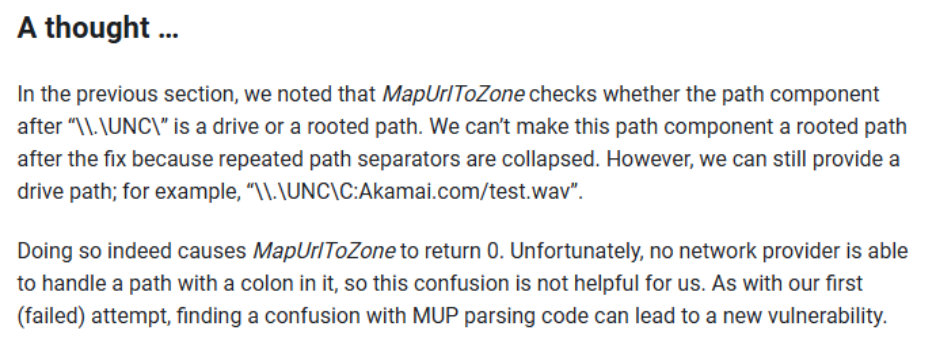
This external researcher realized that a domain name starting with C: could be used to bypass MUTZ. However, they could not identify a way to bypass MUTZ using this method, because they found that no network provider could handle the path starting with C:. Importantly, this misses one point: what comes after UNC does not have to be a domain name, but could instead be an IP address. Since IPv6 uses colons to separate parts of the IP address, an attacker could allocate themselves an IPv6 address starting with C: and bypass MUTZ:
\\.\UNC\C:1234::1324\share\file
Components
\\.\UNC\- start of the path to get to the UNC providerC:1234::1234- IPv6 address that begins withC:, making MUTZ think this refers to the local drive\share\file- the share name and file name
Fixes
Early canonicalization of paths
Several of the bypasses we identified stemmed from canonicalization issues where a path is not correctly collapsed in the way CreateFile collapses paths. This is in part due to the fact that MUTZ uses a different canonicalization API than CreateFile. CreateFile uses GetFullPathNameW, which does not follow the same rules that PathCchCanonicalizeW does. This mismatch has led to several MUTZ bypasses.
This overall mismatch is not a new finding. In these cases, incorrect canonicalization causes MUTZ to resolve a different hostname than CreateFile, resulting in incorrect zone classification. To address these issues, we initially implemented targeted fixes. However, this does not address the overall trend, which is why canonicalization issues had remained prevalent. Therefore, to holistically address these issues, rather than point fixing them, we released a fix in early 2025 that canonicalizes the path as early as possible in the MUTZ call.
Conclusion
MUTZ is a security-critical component that is now being used in ways beyond its original design. As a result, it has faced several security-related issues, including full bypasses where attackers can trick MUTZ into returning the incorrect zone for a file path. Since many locations now rely on MUTZ to make security decisions, these callers would be vulnerable to making incorrect security decisions for their users.
Given the prior research in this component and the growing number of callers, we set out to understand its behavior more deeply, identify issues, and propose solutions to strengthen MUTZ against future bypasses.
Acknowledgements
Thanks to everyone who contributed to this work: Ben Faull, Ben Lichtman, Eric Lawrence, Rajiv Chikine, Srirama Mogali, Uma Kadam, Ben Barnea, and Jonathan Amparo.
George Hughey
Rohit Mothe
MSRC Vulnerabilities & Mitigations