We are excited to announce that Power Apps application runtime users can now use Copilot to quickly filter, sort, and search the items in canvas app galleries with SharePoint. Copilot uses your natural language to generate a query to the database that scopes the current view of records in a gallery so you can quickly find the records you need. This feature is available only for Power Apps canvas web apps and only at runtime for all applications that have been republished after version 7.4 which is expected to be available starting on July 29. It will be fully rolled out to all regions several weeks later. This premium feature is on by default and authors may disable if required.
Using Copilot with filter
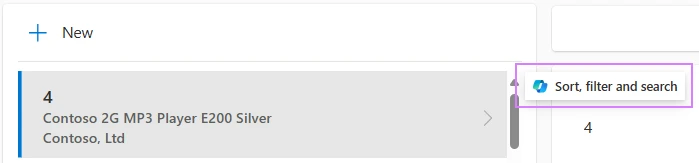
Open a running app that uses a gallery against SharePoint. If you have a premium license, then you will see an adorner on your gallery.
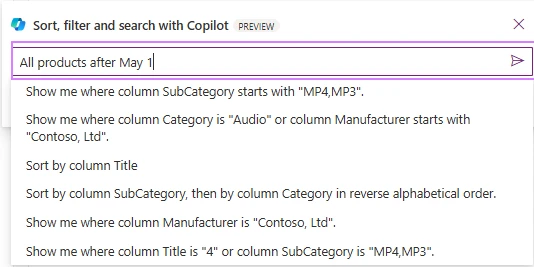
Copilot supports three kinds of queries – filter, sort, and search. While you can type any query you might like, it suggests possible questions based on your data in your app at the time.
Copilot then scopes the records to satisfy the query. It displays a “Filtered” badge in the upper right corner of the gallery. The exact query that was executed is displayed as a tag. And you can continue to refine your query with additional details by adding more query commands.
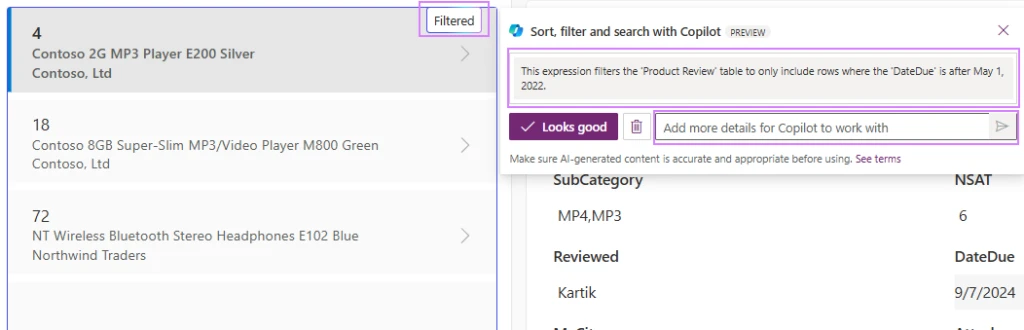
Filter, sort, and search galleries with Copilot to filter provides five key benefits:
- Copilot makes end users more productive and saves time. If an author has not built in search and sort capabilities, Copilot enables this scenario and makes them more productive. End users save time with the ability to directly express their query in natural language.
- Copilot saves author’s development time. Authors save time developing apps because they don’t need to develop all the UI controls necessary for the app. Instead, they can rely on Copilot for this functionality.
- Copilot enables queries over the full query result – not just what you can see in the gallery. Users can filter, sort, and search on fields even if the application doesn’t provide UI controls for these tasks. For example, you can search for records even if the application doesn’t have a search bar.
- Copilot is query safe. It only generates queries that can be run on the server. Authors don’t need to worry about whether or not their queries can be delegated.
- Copilot keeps private data private. It only works with the data that is normally returned to the application. It doesn’t access fields that aren’t returned to the app in a gallery/grid or form.
Getting started
Choose a build after 7.4 (expected on 7/29) and make sure you’ve also re-published your app on 7.4 or later. Then access your app while it is running. (Copilot with filter only appears at runtime, it does not appear inside of studio.) Select an item in the gallery to start using Copilot with filter.
See the documentation for this feature for more details. https://learn.microsoft.com/en-us/power-apps/user/smartgrid