Skip to main content Build an agentic enterprise Get Started Guided Tours Security & Governance Dataverse Connectors Power BI Desktop Pro Premium Embedded Report Server Power Apps Power Automate Power Pages Copilot Studio Pricing Resources by Product Power Platform Learn Power Platform Blog Documentation Power Platform Topics Contact us Start free
1 min read

Announcing Delay, Command-Line Arguments, and Copy-Paste Features for UI Flows


We are excited to announce the availability of Delay, Command-line argument, and Copy-paste features in Power Automate UI flows. These features empower our customers to have more options in building UI flows and more control over UI flow executions.

Delay

The Delay action can be added as an explicit action anywhere in UI flow. The wait time’ formatting is straightforward: enter the duration count and pick the unit of time. For example, ‘2’ and ‘Seconds’ would configure this action to wait two seconds. Read the full documentation.
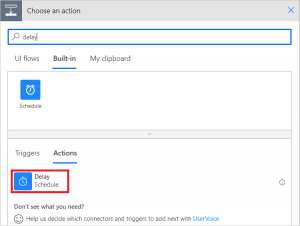
Selecting the Delay action in UI flows
Finding the Delay action in UI flows

Command-line arguments

The Command-line argument feature is available in the launch action’s advanced options. Use this feature to configure how the application launches. Read the full documentation.
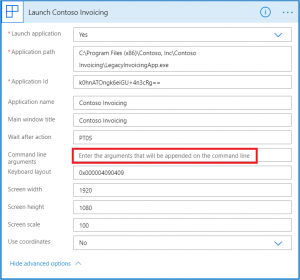
Configuring command line argument in UI flows
Finding command line argument in UI flows

Copy and paste

The copy and paste feature is available in the . . . menu and My clipboard. You can copy any action or scope and then add it from My clipboard. This feature supports copying and adding actions within the same scope. You cannot paste actions into other scopes or UI flows. Read the full documentation.
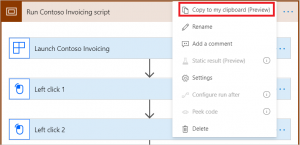
Copy an action in UI flows from the ... menu
Copying an action in UI flows


  • Power Pages
    Two coworkers working in cubicle looking at computer monitor
    1 min read

    Modern List in Power Pages is now generally available

    Today, we’re announcing the general availability of Modern List in Power Pages, a refreshed data presentation experience that helps makers showcase Dataverse data with modern Fluent UI components, seamless infinite scrolling, inline filtering, shimmer loading, flexible low-code customization and custom JavaScript support.
  • Power Apps
    Power Platform Feature Update (hero image)
    20 min read

    What’s new in Power Platform: September 2026 feature update

    Power Platform Build hands-on Power Platform and AI expertise with Power Series Developed by the Power CAT team, Power Series is now available with 20 hands-on labs that help customers, partners, and field teams build practical Power Platform and AI skills at their own pace.