For founders and builders, the pace of innovation is both a blessing and a curse. Every week brings new APIs, smarter AI models, and fresh opportunities—but also the constant threat of breakage. One day your product works perfectly; the next, a third-party service updates its API and your code grinds to a halt. The scramble to patch, rewrite, and reintegrate is a familiar pain for anyone building in the modern startup ecosystem.
But what if there was a way to future-proof your stack? What if your AI could automatically adapt to new APIs, workflows, and data sources—without you having to rewrite a single line of code? That’s the promise of Model Context Protocol (MCP).
What is MCP?
MCP is an open standard designed to revolutionize how AI agents interact with external tools, APIs, and data. Think of MCP as the “USB-C of AI integrations,” a universal connector that lets your AI agents communicate with any service, adapt to changes, and orchestrate complex workflows—all with minimal developer intervention. Unlike traditional APIs, which require constant maintenance and updates, MCP empowers AI to understand context, follow structured prompts, and respond intelligently to evolving environments.
Why does it matter to startups?
To a startup founder, agility is everything. MCP offers a way to build smarter, more resilient products that scale effortlessly as your business grows. By offloading routine integration and orchestration tasks to AI agents guided by MCP, your team can focus on what matters most: innovation, customer experience, and rapid iteration. With major platforms like Microsoft Azure already embracing MCP, the ecosystem is primed for founders who want to stay ahead of the curve and avoid the costly pitfalls of brittle integrations.
You know this pain all too well
Everything is running smoothly—until your code suddenly breaks because a third-party API suddenly updated from v1.2 to v1.2.1.
Now, picture a world where your AI automatically adapts to new APIs—no extra code, no frantic patches, no firefighting. That’s exactly what MCP delivers. It’s a shift that can transform how you build with AI—faster, smoother, and future-proof.

API vs. MCP
An API is a contract between pieces of software—it defines how one system can “talk” to another using predefined calls (like requests for data or actions). The catch? Every version change or logic update can break integrations and force developers to update code.
Whereas MCP is an open protocol that sits on top of APIs, standardizing how AI agents powered by large language models (LLMs) connect to external tools, APIs, and data sources. It doesn’t just connect AI to tools—it also provides context through resources, predefined prompts, and notifications.
As a result, AI can adapt to new or changing APIs without requiring developers to rewrite code.
In simple terms
- API = the “language” developers must learn and maintain
- MCP = the “smart translator” that helps AI understand and adapt automatically
For startups, this means faster development, less maintenance debt, and the ability to scale across multiple AI platforms without being locked into proprietary solutions.
MCP is more than just tools

Most conversations about MCP focus on its powerful Tools feature—the ability to let an LLM directly call APIs. But MCP is far more ambitious. It introduces three additional pillars that make it much more than an API bridge:
1. Resources
MCP lets an AI agent request and access resources such as files, logs, or even browser outputs.
For example, imagine an MCP server that exposes browser logs. The LLM can write code for the browser, ask the MCP server to run it, and then analyze the logs in real time. If the logs show an error, the AI can automatically fix the code before a developer even reviews it.
2. Notifications
Instead of polling, MCP supports real-time updates. For instance, if new content is added to a log, the MCP client immediately receives a notification. The LLM can then analyze the new log entry on the spot for adaptive, continuous workflows.
3. Prompts
MCP allows developers to provide predefined prompts and instructions for the AI to follow. This is especially powerful for multi-step workflows where order matters.
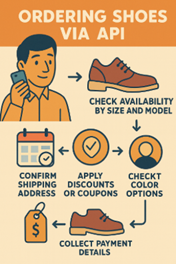
Take the example of ordering shoes using API:
- Check availability by size and model
- Select color options
- Confirm shipping address
- Apply discounts or coupons
- Calculate final price
- Collect payment details
A traditional API requires developers to hard-code this entire sequence. But with MCP, you can embed prompts that teach the LLM the correct process flow. The AI agent follows the structured steps automatically, without needing to know the API in advance.
For instance, if a customer says “Order me a pair of running shoes, size 42,” but skips the shipping address, a normal API would throw a 400 error.
With MCP, the server can return a human-readable instruction instead: “Please ask the customer for the delivery address.” Then, this “LLM-native” design makes integrations smoother, more resilient, and more user-friendly.
Why MCP matters for startups
- Agility without rewrites: No more frantic updates every time an API version changes. Your AI adapts on the fly.
- Stronger developer experience: Offload routine orchestration to AI agents guided by MCP, letting your team focus on innovation.
- Scalable integrations: As your stack grows, MCP ensures your AI agents can talk to any service in a standardized way.
Microsoft and Azure are already in
Microsoft has embedded MCP across its ecosystem:
- Azure MCP Server (Preview)–Natural-language access to Azure services such as Cosmos DB, Storage, Monitor, and more.
- Azure AI Foundry Agent Service–Adds MCP support with enterprise-grade security and integration into Azure AI Foundry.
- Azure AI Foundry and MCP–Expanding MCP integration to cover models, knowledge sources, and evaluation.
- Copilot Studio–Extend Copilot with MCP resources, tools, and prompts, fully synced in real time.
- Dataverse–Streamlines data integration and management across MCP architectures, driving agility and innovation.
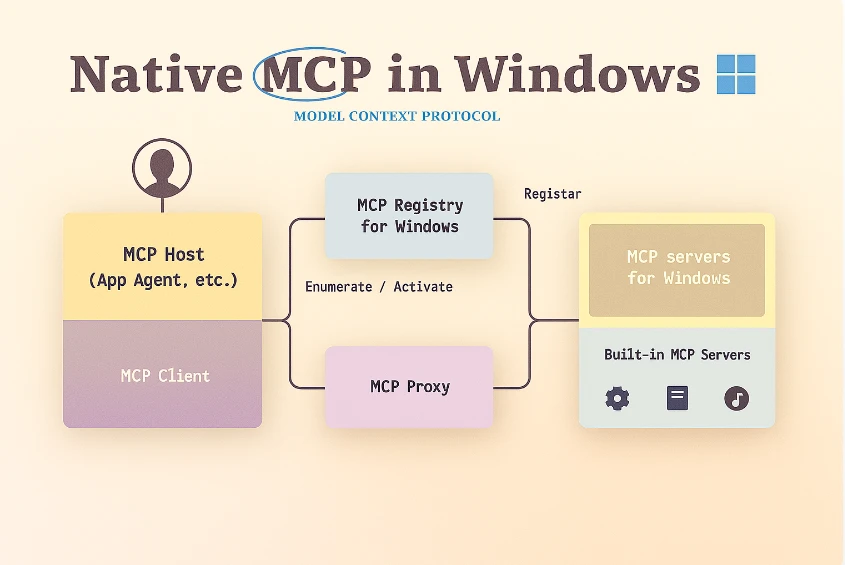
- Windows AI Foundry–Introduces native MCP support in Windows 11, using an MCP registry to securely expose features like file system and WSL to AI agents.
- Learn MCP Server–A free, public MCP server providing AI agents with access to Microsoft technical documentation.
For startups building with Azure, MCP means faster prototypes, smarter agents, and future-proof integrations.
How to scale your team: The Learn MCP Server in action
The Learn MCP Server is one of the most practical ways startups can experiment with MCP today. It instantly gives AI agents access to the extensive library of tutorials, documentation, and training content of Microsoft Learn.
Examples of impact on development:
- Accelerate onboarding–New engineers can simply ask, “How do I set up Azure Key Vault?” and receive authoritative step-by-step instructions.
- Surface secure configuration patterns–For example, best practices for setting up Azure Functions securely.
- Prevent common missteps–Such as catching Bicep syntax issues before deployment.
- Offer context-aware optimizations–For example, improving performance in Entity Framework queries.
For startups, this translates into faster onboarding, reduced advisory overhead, higher code quality, and more time to focus on innovation.
Drawbacks and challenges
MCP is powerful, but not without issues:
- Security–Risks include prompt injection, token theft, and misuse of rogue tools. Care is needed when using 3rd-party MCP servers.
- Maturity and scale–Still new: Error handling is inconsistent, context can bloat, and the stateful design makes scaling harder.
- Ecosystem–Adoption is early, documentation is thin, and the protocol is evolving fast; future changes may break current setups.
Mitigations: Run MCP servers in sandboxes or locally, use audit tools like MCPSafetyScanner, and rely on Microsoft’s guardrails (registry control, user prompts, and strict guidelines).
Final thoughts
For startups, MCP represents more than a protocol—it’s a paradigm shift. Instead of coding around APIs, you let AI agents orchestrate, adapt, and act across your stack. Microsoft’s adoption of MCP within Windows and Azure means startups can confidently build on a future-proof ecosystem.
The next wave of startup innovation will come not just from using AI models, but from giving them the right protocols to act in the real world. MCP is that protocol.
Microsoft learning resources for MCP
Microsoft provides a wide range of official learning resources around MCP:
- Microsoft Learn MCP Server – A free, public MCP server for AI agents to access Microsoft technical documentation.
- Get Started Tutorial – How to integrate MCP into VS Code with GitHub Copilot Agent Mode.
- .NET AI and MCP – Documentation for .NET developers on using MCP with SDKs, Copilot Studio, and Semantic Kernel.
- GitHub – mcp-for-beginners – An open-source repo with MCP basics in C#, Java, JavaScript, Python, and more.