
Using this guide
Copilot Credits power AI experiences across the Microsoft ecosystem. This guidance provides an overview of how Copilot Credits are consumed and managed. It outlines where credits are required, how usage is measured, and key considerations that help organizations plan and govern AI workloads effectively.
For help determining the right technology solution for any given organization, including the license requirements for a specific product or scenario, consult with your Microsoft account team or a Microsoft Certified Partner.
All pricing is in USD and subject to change.
Additional Information
This guide does not supersede or replace any of the Microsoft Product Terms legal documentation covering use rights. Microsoft reserves the right to review or update this document at any time without notice.
Copilot Credits
Overview
As AI workloads become more advanced, particularly with multi-step, agent-driven scenarios, the amount of work required to complete a task can vary significantly. This variability is best served by a usage-based model that aligns cost to the work performed, complementing subscription-based services with flexible consumption. Copilot Credits serve as the common currency in this usage based model, powering AI capabilities across Microsoft offerings. These capabilities span Microsoft Copilot experiences such as Copilot Cowork, agents and apps built with Microsoft Copilot Studio, AI-powered capabilities in Dynamics 365 and Power Platform, and Work IQ APIs for agent and AI solutions.
The number of Copilot Credits consumed for each response, action, or operation depends on the complexity of the task performed. Copilot Credits are pooled at the tenant level. An organization’s total cost is based on the sum of Copilot Credits consumed across all supported experiences. This shared model enables organizations to centrally manage consumption and allocate usage across scenarios. Copilot Credits are offered through the Microsoft Copilot Studio pay-as-you-go meter and the Copilot Credit Pre-Purchase Plan.
Copilot Credit Purchase Options
There are two options for purchasing Copilot Credits: 1) Pay-as-you-go and 2) Pre-Purchase Plan (P3)
1. Microsoft Copilot Studio Pay-As-You-Go Copilot Credit
The Microsoft Copilot Studio pay-as-you-go Copilot Credit meter enables organizations to post-pay based on the actual number of Copilot Credits consumed by agents in a billing month. No up-front commitment is required, allowing organizations to scale usage and ensure business continuity for critical business processes with flexibility, scalability, seasonality, and no interruptions due to overages.
-
Pricing: $0.01/Copilot Credit
-
Meter Definition: The Microsoft Copilot Studio pay-as-you-go Copilot Credit meter counts the total number of Copilot Credits consumed by agents. This usage is billed in arrears at the end of the billing month..
Microsoft Copilot Studio Pay-As-You-Go Copilot Credit Offer Summary
| SKU Description | Microsoft Copilot Studio Pay-As-You-Go Copilot Credit |
|---|---|
| Billing Configuration | Manage spend policy and billing plan (Learn more about billing) |
| Meter name | Microsoft Copilot Studio – Pay As You Go Copilot Credit |
The Microsoft Copilot Studio pay-as-you-go Copilot Credit meter can be provisioned in the Power Platform admin center.
2. Copilot Credit Pre-Purchase Plan (P3)
Copilot Credit P3 is a one-year pay-upfront purchase option for Copilot Credits. Customers purchase a pool of Copilot Credits, which are automatically deduct the Copilot Credit P3 balance. If usage exceeds the available number of credits, customers can purchase additional Copilot Credits or be billed on a pay-as-you-go basis. Unused credits expire at the end of the annual term.
Copilot Credit Pre-Purchase Plan (P3) Pricing Tiers
| Tier | Copilot Credits | Discount |
|---|---|---|
| 1 | 300,000 | 5% |
| 2 | 1,500,000 | 6% |
| 3 | 3,000,000 | 7% |
| 4 | 15,000,000 | 8% |
| 5 | 30,000,000 | 10% |
| 6 | 75,000,000 | 12% |
| 7 | 150,000,000 | 14% |
| 8 | 225,000,000 | 17% |
| 9 | 300,000,000 | 20% |
Copilot Credit Pre-Purchase Plan Offer Summary
| SKU Description | Microsoft Copilot Studio |
|---|---|
| Billing Configuration | Manage billing configuration and billing plans (Learn more about billing) |
| SKU name | Copilot Credit Pre-Purchase Plan (P3) |
The Copilot Credit Pre-Purchase (P3) can be provisioned in the Azure admin portal.
Both the Microsoft Copilot Studio pay-as-you-go and the Pre-Purchase Plan (P3) purchasing constructs will decrement the Microsoft Azure Consumption Commitment (MACC).
Please refer to the Microsoft Copilot Studio licensing guidance for more information on other purchasing constructs (e.g., Microsoft Agent Pre-Purchase Plan (P3), Microsoft Copilot Studio License (Copilot Credit Pack).
Managing usage and spend
Copilot Credit usage is centrally managed through the Microsoft 365 admin center (MAC), giving administrators the capabilities to govern AI consumption across workloads, services, and agents. Administrators can monitor spend and usage, configure spend policies, define usage thresholds, and manage Copilot Credits allocation across the organization. MAC provides the FinOps controls to help organizations scale AI adoption while maintaining visibility into consumption and cost management. To learn more, refer to the Understand Usage-based Billing and Cost Management for Copilot Credits article on Microsoft Learn.
Microsoft provides Copilot Credit estimators to help organizations model potential consumption and spending. Select the estimator that supports the workload or agent type being evaluated.
| Estimator | Use for |
|---|---|
| Copilot Credit Estimator | Copilot Cowork and GitHub Copilot harness in Microsoft Copilot Studio |
| Copilot Credit Estimator for Agents | Copilot Studio agents, Dynamics 365 agents, Microsoft 365 agents, and other supported agent experiences |
These estimators provide informational estimates and do not guarantee final costs. Additional workloads may be added as estimator support expands.
Usage Based Billing Across Workloads
The sections below detail usage-based billing through Copilot Credits across Copilot Cowork, Work IQ APIs, Microsoft Copilot Studio, and Business Applications.
Copilot Cowork
Copilot Cowork is an agentic system that plans, executes, and delivers real work. Describe the outcome you want, and Cowork does the work, building apps (Microsoft Frontier Program), sending emails, scheduling meetings, creating documents, posting in Teams, and managing files, while you stay in control. Grounded in Work IQ and operating within Microsoft 365's security and governance boundaries, Cowork runs multi-step work autonomously at enterprise scale. Learn more about Copilot Cowork.
How Copilot Cowork uses Copilot Credits
Users rely on Cowork for complex, multi-step work across apps that runs autonomously. Credit usage scales with task complexity, driven by intermittent steps and capabilities involved.
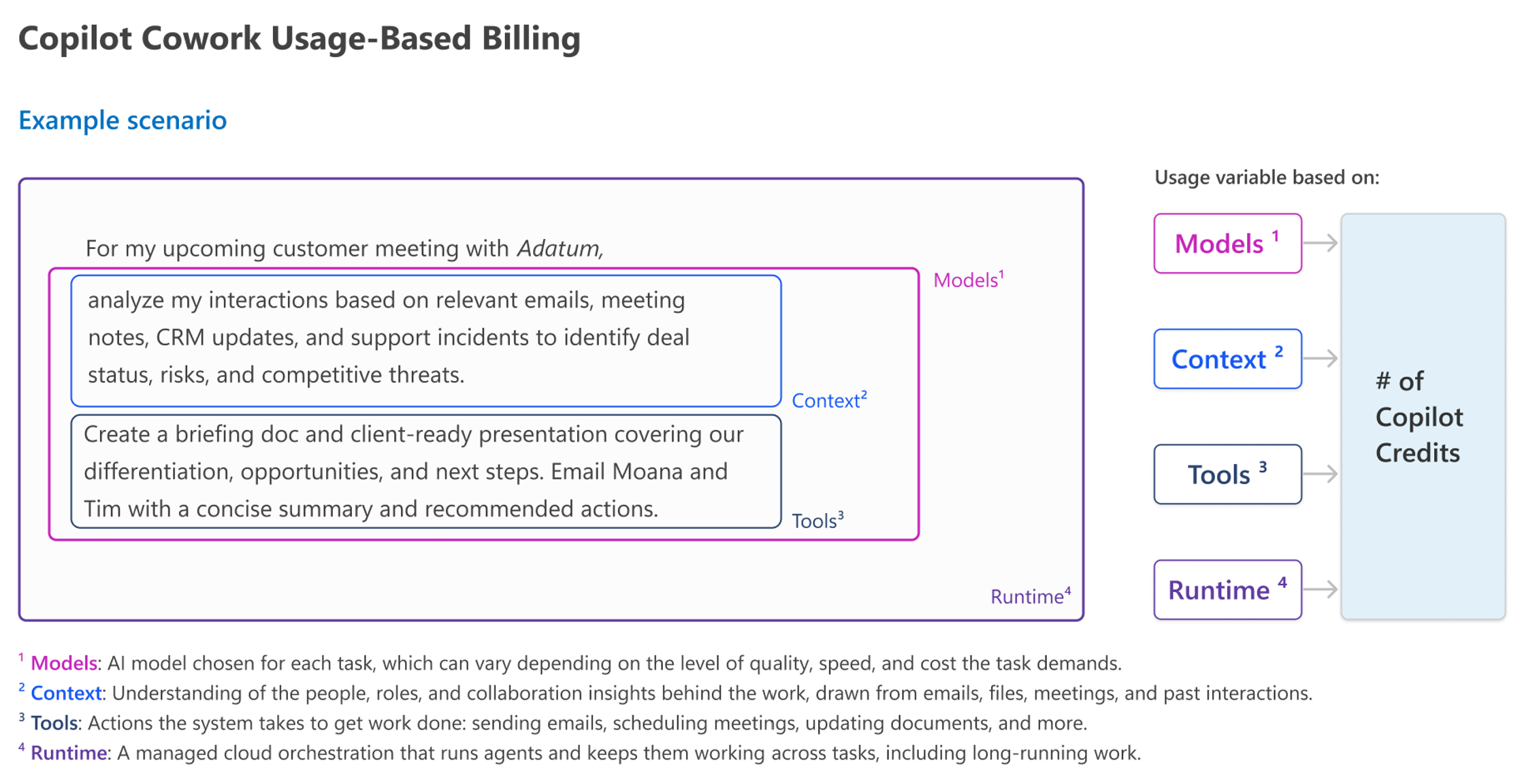
Copilot Credit usage for a given task varies based on the mix of four cost buckets:
-
Models — AI models chosen for each task, which can vary depending on the level of quality, speed, and cost that the task demands.
-
Runtime — A managed cloud orchestration that runs agents and keeps them working across tasks, including long-running work.
-
Context —Understanding of the people, roles, and collaboration patterns behind the work, drawn from emails, files, meetings, and past interactions.
-
Tools —Actions the system takes to get work done including sending emails, scheduling meetings, updating documents, and more.
Here is an illustrative view of how Cowork uses Copilot Credits:
Managing Copilot Cowork usage and spend
To help organizations translate this model into practical planning, the simplest way to estimate Cowork usage is by first sizing the number of users, then modeling usage intensity across light, medium, and heavy profiles, and finally applying estimated pricing per prompt. This approach provides a way to forecast usage based on expected behavior.
Estimating Copilot Credits for Cowork:
- Determine number of Cowork users (grouped by persona)
- Estimate number of prompts per persona (across light, medium, and heavy prompts)
- Apply an average price per prompt (across light, medium, and heavy prompts) Result: Estimated monthly Copilot Credit spend for Cowork.
Result: Estimated monthly Copilot Credit spend for Cowork
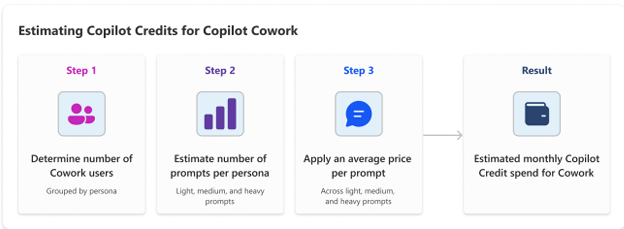
Organizations can use this same methodology to build their own estimates, adjusting user counts, intensity assumptions, and cost inputs to reflect their environment, using this simple, transparent model.
Copilot Cowork tasks and task types
Copilot Credit consumption varies based on the type and complexity of the task being performed. This section provides estimated consumption for representative task types.
These figures are rough planning estimates. Actual pricing will vary based on workflows and usage patterns.
Copilot Cowork prerequisites
Copilot Cowork prerequisites:
• Microsoft Copilot USL
• Cowork enabled in the Microsoft Copilot environment
• Copilot Credits usage-based billing enabled
• Anthropic enabled in the tenant
For more information about Cowork see the Get started with Copilot Cowork learn page article.
Work IQ APIs
Work IQ is a workplace intelligence layer that enables agents and applications to access and reason over organizational data, context and tools. It continually builds a semantic understanding across Microsoft 365 and external systems with built-in permission-aware governance.
Microsoft Work IQ APIs enable developers to build agentic and AI-powered applications that securely reason over Microsoft 365 data. Work IQ APIs are available through A2A, MCXP and REST protocols and support permission-aware access to organization data and actions. are the access mechanisms that expire the Work IQ intelligence layer to developers allowing apps and agents to reason over Microsoft 365 data while preserving permissions, compliance and governance controls.
Work IQ is a workplace intelligence layer that delivers semantic understanding of everything happening across your business. Built on four core components: chat, context, tools, and workspaces, it continuously transforms signals from Microsoft 365 and business systems into agent-ready intelligence for grounding, reasoning, and permission awareness. The result is a platform, built for agentic intelligence, speed, and efficiency at enterprise scale enabling higher utilization, with security and governance by design now accessible via APIs. By shifting more AI processing into the Work IQ runtime, tokens needed for context retrieval and tool use are reduced by up to 80%, thereby reducing Copilot Credit consumption in agentic solutions.
Apps in Copilot Cowork (Microsoft Frontier Program)
a. Build apps
With Cowork, users can leverage a secure, governed way to build apps using natural language. Users describe the app they want to create, and Cowork generates the data schema and user interface required for the app. Apps built in Copilot Cowork are billed through Copilot Credits usage-based billing. Copilot Credit consumption varies based on the large language model (LLM) used, the complexity of the app, and the amount of generation and iteration involved during creation.
b. Host, run and manage apps
Apps built in Cowork are deployed to the Copilot Managed Runtime Host. The Copilot Managed Runtime Host uses Microsoft Entra authentication and provides the infrastructure required to deploy, run, monitor and manage apps while applying enterprise governance, security and administrative controls. Hosting, runtime and management of apps deployed to the host are billed through Copilot Credits usage-based billing. Copilot Credit consumption varies based on the volume and complexity of the tasks processed by the app. Running apps in the Copilot Managed Runtime Host by default follows Copilot Credits usage-based billing. For users with Power Apps Premium USLs, running apps in the Copilot Managed Runtime Host is included, subject to existing Power Apps Premium request limits. Runtime usage exceeding request limits is billed through Copilot Credits usage-based billing. Usage of AI-powered runtime, such as agents and Work IQ APIs, is not included in these request limits and consumes Copilot Credits. Refer to the Requests limits and allocations and the Microsoft Copilot Studio Licensing Guide for additional information.
| Light | Medium | Heavy |
|---|---|---|
|
Build an app 1 / Prompt Example: "Build a workshop hub where attendees can view the schedule, session materials, labs, and submit feedback. Add an admin page to manage sessions." Est. Copilot credits: 250 - 450 |
Build an app 1 / Prompt Example: "Create a high-touch donor task manager that shows who is arriving today, why each donor needs attention, and let center manafers complete and track follow-up tasks" Est. Copilot credits: 400 - 750 |
Build an app 1 / Prompt Example: "Build a supplier compliance audit workspace. Let quality managers upload certificates, pull audit findings from Dataverse and contracts from SharePoint, and trigger an agent that scores suppliers against our risk rubric. Add a status board with retries, a reviewer page to approve or reject, an exceptions page for failures, and export approved results to Azure Blob Storage." Est. Copilot credits: 700 - 1350 + |
|
Host, run, and manage an app 2 Small personal or team apps by a handful of people for simple tasks like forms, with light connector use. Est. Copilot credits: 10 - 50 / app / month |
Host, run, and manage an app 2 Departmental apps with multiple connectors and moderate daily usage across a department. Est. Copilot credits: 300 - 500 / app / month |
Host, run, and manage an app 2 Enterprise or business-unit-wide apps with many users and heavy middle-tier and connector traffic. Est. Copilot credits: 3000 - 5000 / app / month |
1. Actual credit usage for building an app varies based on the LLM model used, complexity of the app, and the amount of generation and iteration involved during authoring.
2. Actual credit usage for hosting, running, and managing an app varies based on the volume and complexity of the tasks processed by the app.
These figures are rough planning estimates.
Learn more about buliding apps in Build apps with the App Skill learn page article.
How Work IQ API uses Copilot Credits
Usage is billed in two parts: a variable charge for query-style consumption (grounding, retrieval, and reasoning) and a static component for actions and tools.
| Query Type | Scope | Copilot Credits Consumption |
|---|---|---|
| Work IQ Chat or Context API | Variable | Query-style consumption — grounding, retrieval, and reasoning. Driven by models, runtime, context, and tools. |
| Work IQ Tools API | Static | 0.1 Copilot Credit per API call for actions and tools. |
Work IQ API Experiences
Given cost scales with usage and intensity, pricing is easiest to reason through representative scenarios. The ranges below are illustrative and will vary with the complexity of the query:
| Scenario | Work IQ API examples |
|---|---|
| Light | “Identify tasks or action items assigned to me from my manager and compile them into a checklist.” |
| Medium | “Review the latest customer interview emails to identify top themes and roadmap impact and recommend three prioritized product actions with alignment, tradeoffs, and objections.” |
| Heavy | “You are a business partner and PR-sensitive editor. Your job is to produce Level 1 and Level 2 summaries from our most recent roadmap executive review and use the latest meetings, documents, and what’s top of mind for our CMO.” |
Managing Work IQ API usage and spend
Work IQ APIs can be invoked in agents and AI solutions on behalf of any Microsoft 365 user. These agents can be built on a variety of agent building platforms such as Microsoft Copilot Studio, Azure Foundry etc. Use of Work IQ APIs in these agents and AI solution scenarios is billed using Copilot Credits. Work IQ APIs are not included as entitlements in the Microsoft Copilot license.
Microsoft Copilot is natively built on Work IQ and does not need to leverage Work IQ APIs. There are no incremental charges for Work IQ accessed in Microsoft Copilot experiences such as chats, AI experiences in apps such as Word, Excel, PowerPoint, or agents natively included in Microsoft Copilot such as Researcher, Facilitator and Analyst. The usage charges described above only apply to access to Work IQ using the Work IQ APIs.
Note: There are no changes to the licensing for older APIs such as Retrieval API and Chat API. Users licensed with Microsoft Copilot were not charged for use of these APIs. This licensing model will continue for now.
Work IQ API Prerequisites
- Enable your tenant for Work IQ
- Copilot Credits usage-based billing enabled
For more information about Work IQ APIs, see Work IQ API Overview page.
Microsoft Copilot Studio
Microsoft Copilot Studio is a comprehensive conversational AI platform that empowers users to create, customize and deploy agents using natural language or a graphical interface. With Copilot Studio, users can easily design, test and publish agents tailored to specific needs for internal or external scenarios across industries, departments, or roles. For licensing details, see the Microsoft Copilot Studio Licensing Guide.
Copilot Studio authoring experience and runtime usage of agents and workflows
Building agents and workflows with the GitHub Copilot harness consumes Copilot Credits during LLM-power creation experiences, including natural language authoring, evaluation, and preview. Manual, non-LLM configuration does not require Copilot Credits.
How Copilot Studio uses Copilot Credits
Copilot Studio harnesses
Agents, workflows and agent flows built in Copilot Studio use a harness. A harness is the software scaffolding that enables an agent to plan, reason, maintain context, and interact with tools, systems, or other agents to complete tasks. Harnesses can be optimized for different results, depending on the desired outcome. In certain scenarios, the selected harness can also affect how Copilot Credits are consumed during creation and runtime execution.
Copilot Studio supports three harnesses, each designed for different building scenarios.
| Harness | Description |
|---|---|
| GitHub Copilot Harness | Agents and workflows: Build agents that automate end-to-end business processes. |
| Standard Harness | Agents and agent flows: Build rule-based conversational agents with predefined topics and flows. |
| Copilot Chat Harness | Agents: Customize agents that extend Microsoft Copilot with your organization's knowledge. |
GitHub Copilot Harness

These figures are rough planning estimates. Actual pricing will vary based on workflows and usage patterns.
For Copilot Studio licensing details when using the GitHub Copilot harness, please see the Microsoft Copilot Studio Licensing Guide.
GitHub Copilot harness runtime
Agents and workflows built with the GitHub Copilot harness can perform complex, multi-step tasks autonomously. Copilot Credit consumption increases with the complexity of the work being performed.
Runtime costs are driven by four factors:
- Models - AI models chosen for each task, which can vary depending on the level of quality, speed, and cost that the task demands.
- Runtime - A managed cloud orchestration that runs agents and keeps them working across tasks, including long-running work.
- Context - Understanding of the people, roles, and collaboration patterns behind the work, drawn from emails, files, meetings, and past interactions.
- Tools - Actions the system takes to get work done including sending emails, scheduling meetings, updating documents, and more.
Because usage depends on these factors, the most effective way to estimate cost is through representative scenarios. The examples below are illustrative and actual credit consumption will vary based on task complexity.
GitHub Copilot harness runtime scenarios

These figures are rough planning estimates. Actual pricing will vary based on workflows and usage patterns.
Standard and Copilot Chat harnesses
Runtime execution in Microsoft channels for agents and agent flows built using the Standard harness and agents built using the Copilot Chat harness are included with the Microsoft Copilot USL (fair usage limits apply). Otherwise, Copilot Credits are required.
Apps in Microsoft Copilot Studio (Paid Public Preview)
a. Build apps
Makers can build apps in Copilot Studio and publish them into the Copilot Managed Runtime Host. Apps built in Copilot Studio are billed through Copilot Credits usage-based billing. Copilot Credit consumption varies based on the large language model (LLM) used, the complexity of the app, and the amount of generation and iteration involved during authoring.
b. Host, run and manage apps
Apps built in Copilot Studio are deployed to the Copilot Managed Runtime Host. The Copilot Managed Runtime Host uses Microsoft Entra authentication and provides the infrastructure required to deploy, run, monitor and manage apps while applying enterprise governance, security and administrative controls. Hosting, runtime and management of apps deployed to the host are billed through Copilot Credits usage-based billing. Copilot Credit consumption varies based on the volume and complexity of the tasks processed by the app.
Running apps in the Copilot Managed Runtime Host by default follows Copilot Credits usage-based billing. For users with Power Apps Premium USLs, running apps in the Copilot Managed Runtime Host is included, subject to existing Power Apps Premium request limits.
Runtime usage exceeding request limits is billed through Copilot Credits usage-based billing. Usage of AI-powered runtime, such as agents and Work IQ APIs, is not included in these request limits and consumes Copilot Credits. Refer to the Requests limits and allocations and the Microsoft Copilot Studio Licensing Guide for additional information.
| Light | Medium | Heavy |
|---|---|---|
|
Build an app 1 / Prompt Example: "Build a workshop hub where attendees can view the schedule, session materials, labs, and submit feedback. Add an admin page to manage sessions." Est. Copilot credits: 250 - 450 |
Build an app 1 / Prompt Example: "Create a high-touch donor task manager that shows who is arriving today, why each donor needs attention, and let center manafers complete and track follow-up tasks" Est. Copilot credits: 400 - 750 |
Build an app 1 / Prompt Example: "Build a supplier compliance audit workspace. Let quality managers upload certificates, pull audit findings from Dataverse and contracts from SharePoint, and trigger an agent that scores suppliers against our risk rubric. Add a status board with retries, a reviewer page to approve or reject, an exceptions page for failures, and export approved results to Azure Blob Storage." Est. Copilot credits: 700 - 1350 + |
|
Host, run, and manage an app 2 Small personal or team apps by a handful of people for simple tasks like forms, with light connector use. Est. Copilot credits: 10 - 50 / app / month |
Host, run, and manage an app 2 Departmental apps with multiple connectors and moderate daily usage across a department. Est. Copilot credits: 300 - 500 / app / month |
Host, run, and manage an app 2 Enterprise or business-unit-wide apps with many users and heavy middle-tier and connector traffic. Est. Copilot credits: 3000 - 5000 / app / month |
1. Actual credit usage for building an app varies based on the LLM model used, complexity of the app, and the amount of generation and iteration involved during authoring.
2. Actual credit usage for hosting, running, and managing an app varies based on the volume and complexity of the tasks processed by the app.
These figures are rough planning estimates.
Managing Copilot Studio usage and spend
Organizations can estimate Copilot Studio consumption by evaluating the types of agents, apps and workflows they plan to deploy, the expected number of users, anticipated traffic levels and features used within each solution. Copilot Credit consumption varies based on design, orchestration, knowledge sources, tools, workflows and user interaction patterns. Forecasting expected usage helps organizations plan budgets, and align spend with anticipated outcomes.
Estimating Copilot Credits for GitHub Copilot harness
- dentify the agents, apps and workflows expected to be deployed.
- Estimate user volume and interaction frequency.
- Evaluate solution complexity, including orchestration, knowledge sources, actions, workflows, and AI tools.
4. Use the Microsoft Copilot Credit Estimator and to model potential Copilot Credit consumption and spending based on traffic, orchestration, knowledge, and tool usage. (This estimator provides a monthly Copilot credit informational estimate for a single agent and makes no guarantees of final costs.)
Copilot Studio prerequisites
- Access to Microsoft Copilot Studio (Turn on the new experience toggle on the home page to see the App Preview tile).
- Copilot Credits usage-based billing enabled
Microsoft Copilot Managed Runtime (Paid Public Preview)
Copilot Managed Runtime enables organizations to deploy, host, run, and manage apps in a Microsoft-managed environment with enterprise governance, security, monitoring, and administrative controls. Apps can be built in Copilot Cowork, Microsoft Copilot Studio, or third party development tools and deployed to the Copilot Managed Runtime Host. Hosting, runtime, and management consume Copilot Credits.
Apps Built in Copilot Cowork
Apps built in Cowork are deployed to the Copilot Managed Runtime Host. See Apps in Copilot Cowork for licensing, scenarios, and estimated costs.
Apps Built in Microsoft Copilot Studio
Apps built in Copilot Studio are deployed to the Copilot Managed Runtime Host. See Apps in Microsoft Copilot Studio for licensing, scenarios, and estimated costs.
Apps Built with Third-Party Development Tools
Host, run and manage apps
Apps built using third-party development tools can be deployed to the Copilot Managed Runtime Host through the Copilot Managed Runtime SDK. Hosting, runtime and management of apps deployed to the host are billed through Copilot Credits usage-based billing. Copilot Credit consumption varies based on the volume and complexity of the tasks processed by the app.
Running apps in the Copilot Managed Runtime Host by default follows Copilot Credits usage-based billing. For users with Power Apps Premium USLs, running apps in the Copilot Managed Runtime Host is included, subject to existing Power Apps Premium request limits. Runtime usage exceeding request limits is billed through Copilot Credits usage-based billing. Usage of AI-powered runtime, such as agents and Work IQ APIs, is not included in these request limits and consumes Copilot Credits. Refer to the Requests limits and allocations and the Microsoft Copilot Studio Licensing Guide for additional information.
| Light | Medium | Heavy |
|---|---|---|
|
Host, run, and manage an app 1 Small personal or team apps by a handful of people for simple tasks like forms, with light connector use. Est. Copilot credits: 10 - 50 / app / month |
Host, run, and manage an app 1 Departmental apps with multiple connectors and moderate daily usage across a department. Est. Copilot credits: 300 - 500 / app / month |
Host, run, and manage an app 1 Enterprise or business-unit-wide apps with many users and heavy middle-tier and connector traffic. Est. Copilot credits: 3000 - 5000 / app / month |
1. Actual credit usage for hosting, running, and managing an app varies based on the volume and complexity of the tasks processed by the app.
Business Applications
Across Business Applications, Copilot Credits power AI and agentic capabilities in Dynamics 365 and the Power Platform, with credit consumption varying based on the capabilities already included in each license.
Dynamics 365 Agents
Copilot Credits are consumed in both prebuilt and custom Dynamics 365 agents. These credits pool at the tenant level, so they should be allocated to environments to manage usage across workloads. For pricing and licensing details, see the Dynamics 365 licensing guidance.
Power Apps Premium
Copilot Managed Runtime Access to Copilot Managed Runtime is included with Power Apps Premium User Subscription Licenses (USLs), subject to existing Power Apps Premium request limits. Runtime usage exceeding these request limits is billed through Copilot Credit usage-based billing. Hosting and management in the Copilot Managed Runtime Host and AI-powered runtime, such as agents and Work IQ APIs, consume Copilot Credits. Refer to Request Limits and Allocations and the Microsoft Copilot Studio Licensing Guide for details.
AI in apps with Microsoft Copilot For Power Platform workloads, Power Apps and Power Automate, Copilot Credits apply only when AI or agentic functionality is invoked, such as:
- Interacting with Copilot Studio agents embedded in apps or workflows.
- Using AI tools, prompts, or generative AI capabilities (summarization, data exploration, or document processing).
- Running AI Tools or Copilot-assisted features when usage exceeds included entitlements or is backed by Copilot Credits.
For pricing and licensing details, see the Power Platform Licensing Guide.
AI in apps with Microsoft Copilot
For Power Platform workloads, Power Apps and Power Automate, Copilot Credits apply only when AI or agentic functionality is invoked, such as: • Interacting with Copilot Studio agents embedded in apps or workflows. • Using AI tools, prompts, or generative AI capabilities (summarization, data exploration, or document processing). • Running AI Tools or Copilot-assisted features when usage exceeds included entitlements or is backed by Copilot Credits.
For pricing and licensing details, see the Power Platform Licensing Guide.
Our commitment to the Microsoft Copilot subscription license
The Microsoft Copilot subscription continues to provide a comprehensive, enterprise-ready experience designed to support everyday productivity and broad organizational adoption. The per-user subscription currently includes capabilities such as:
- Copilot Chat in Microsoft 365, the primary interface to ask, create, analyze and complete tasks through natural language.
- Copilot experiences across Microsoft 365 applications including Word, Excel, PowerPoint, OneNote, Outlook, and Teams.
- Microsoft built agents and experiences such as Researcher, Analyst, and Facilitator.
- Work IQ grounding across emails, calendar, files, people, and organizational context.
- Access to multiple models that power Copilot experiences, applied to match each task.
Microsoft remains committed to continued innovation across the Microsoft Copilot experience, with ongoing investments in the per user offering.
How to buy Copilot Credits
Microsoft provides multiple purchasing channels for Copilot Credits to accommodate different business requirements. Customers can engage a Microsoft partner for end-to-end solutions or work with Microsoft Sales for pricing guidance.
-
Microsoft Partners
Customers can purchase Copilot Credits from Partners via the Microsoft Cloud Solution Provider (CSP) program in which partners manage provisioning, billing, and provide direct support to customers to manage the full lifecycle of Microsoft cloud services. Connect with a partner. -
Microsoft Sales Online
For customers who want to learn more about Copilot Credits, explore use cases or receive pricing guidance, Microsoft Sales Online can provide direct assistance. Contact Microsoft Sales Online. -
Microsoft Online
Customers can purchase Copilot Credits directly through Microsoft Online by selecting from the following licensing options. Learn more about how to buy from Microsoft.
Appendix A: Offers Available in the Microsoft Frontier and Paid Public Preview programs
The Microsoft Frontier Program
Frontier gives organizations early access to emerging Microsoft 365 capabilities before general availability (GA). Learn more about the Microsoft Frontier Program.
Microsoft Paid Public Preview Program
Paid Public Preview allows eligible customers to evaluate, and use select pre-release Microsoft features and services before General Availability (GA). Offers in Paid Public Preview are subject to the terms applicable to Previews as detailed in the relevant sections of the Microsoft Product Terms, the Supplemental Terms of Use for Microsoft Power Platform and Dynamics 365 Preview for Online Services, and the Microsoft Products and Services Data Protection Addendum.
