
The following is a quick example that may help if you need to add an Exchange Rate to an existing Currency Pair in Microsoft Dynamics AX 2012 R3 using the AIF LedgerExchangeRateService service. I ran into a couple snags along the way and finally was able to insert data correctly in AX using the below. When you create the AIF Inbound Port for this service, I recommend to enable logging under the Troubleshooting section in case you need to review the XML that is created.
C# Console Application Example
The goal in the support case was to add an Exchange Rate to at an already existing Currency Pair (EUR to USD) pair.
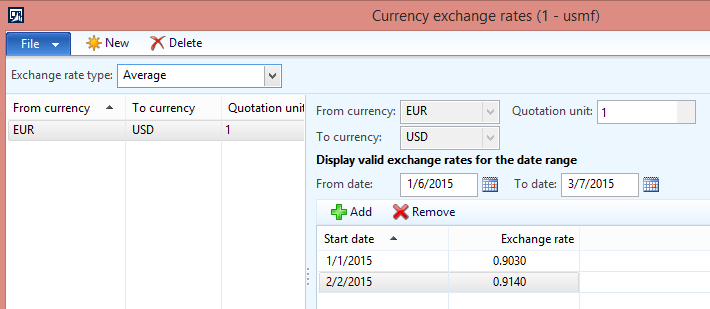
The code below adds a new Exchange Rate to this existing Currency Pair.
using System;
using System.Collections.Generic;
using System.Linq;
using System.Text;
using System.Threading.Tasks;

using UpdateExchangeRateTester.ERService;

namespace UpdateExchangeRateTester
{
    class Program
    {
        static void Main(string[] args)
        {
            ExchangeRateServiceClient proxy = new ExchangeRateServiceClient();

            CallContext cc = new CallContext();
            cc.Company = "USMF";

            // Call Read First per http://community.dynamics.com/ax/f/33/t/75714.aspx
            //Criteria will be the From and To for the CurrencyPair (EUR to USD)
            QueryCriteria qc = new QueryCriteria();
            qc.CriteriaElement = new CriteriaElement[2];
            qc.CriteriaElement[0] = new CriteriaElement();
            qc.CriteriaElement[0].FieldName = "FromCurrencyCode";
            qc.CriteriaElement[0].DataSourceName = "CurrencyPair";
            qc.CriteriaElement[0].Value1 = "EUR";
            qc.CriteriaElement[1] = new CriteriaElement();
            qc.CriteriaElement[1].FieldName = "ToCurrencyCode";
            qc.CriteriaElement[1].DataSourceName = "CurrencyPair";
            qc.CriteriaElement[1].Value1 = "USD";
            EntityKey[] keylist = proxy.findKeys(cc, qc);
            AxdLedgerExchangeRate axdExchangeRate = proxy.read(cc, keylist);

            foreach (AxdEntity_CurrencyPair currencyPair in axdExchangeRate.CurrencyPair)
            {
                currencyPair.action = AxdEnum_AxdEntityAction.update;
                currencyPair.actionSpecified = true;
                currencyPair.RateType = null; // do not send in a CurrencyPair RateType on updates

                //create new exchange rate
                AxdEntity_ExchangeRate newExchangeRate = new AxdEntity_ExchangeRate();
                newExchangeRate.ExchangeRate = 95.60M; //AX value is .95600
                newExchangeRate.ExchangeRateSpecified = true;
                newExchangeRate.ValidFrom = new DateTime(2015, 2, 5);
                newExchangeRate.ValidFromSpecified = true;
                newExchangeRate.action = AxdEnum_AxdEntityAction.create;
                newExchangeRate.actionSpecified = true;

                currencyPair.ExchangeRate = new AxdEntity_ExchangeRate[1] { newExchangeRate };
            }

            try
            {
                proxy.update(cc, keylist, axdExchangeRate);
                Console.WriteLine("Update Call Complete");
            }
            catch (Exception e)
            {
                Console.WriteLine(e.Message);
                Console.WriteLine("The AxdLedgerExchangeRate was not updated.");
            }
            Console.ReadLine();
        }
    }
}
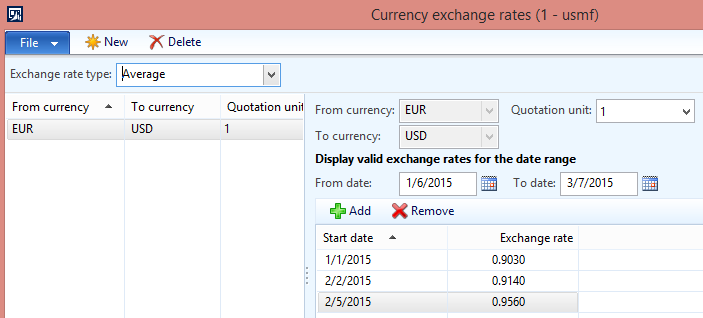
A couple items I had to do was set the RateType to null on the AxdEntity_CurrencyPair object otherwise I was receiving an AIF Exception on RateType. I also did not send the existing Exchange Rate data in the AxdEntity_ExchangeRate[] collection.I just created a new AxdEntity_ExchangeRate with the action property set to create. The final result looks like what I wanted to achieve with a new Exchange Rate added with correct dates:
XML Example
This is the XML document that AIF processes from the C# Console Application. You can use this as a starting point if you need to know what the XML schema should look like if you need to create XML for a File Adapter Inbound port.
          RecId
          22565423204


    Original
    USMF
    2015-02-05T00:00:00Z

    AsOf


      <_DocumentHash>911f6653fc2da5d3ce42d69fb95f7269
      22565423204
      1
      EUR
      USD
      Average
      One

        95.60
        2015-02-05


