A new way to bring service workflows, insights, and actions directly into Copilot
Microsoft 365 Copilot is becoming the primary interface for how people get work done. As more teams rely on Microsoft 365 Copilot to retrieve information, reason over data, and take action, the need for domain‑specific intelligence, especially for customer service, has never been greater.
On March 9th, we announced the frontier transformation, where we introduced a new type of business application integrated with Microsoft 365 Copilot. Today, we’re excited to introduce Service Agent in Microsoft 365 Copilot: a purpose‑built agent that brings customer service context, insights, and actions directly into the Copilot experience employees already use every day.
Service Agent enables service teams to move faster, stay focused, and resolve issues with greater confidence, without switching tools or losing context.
What is Service Agent?
Service Agent is a declarative agent that runs inside Microsoft 365 Copilot, designed specifically for customer service scenarios.
It combines:
- The reach and familiarity of Microsoft 365 Copilot
- The depth of Dynamics 365 Customer Service data
- The power of agents that can reason, retrieve, and take action
With Service Agent, service professionals can interact with cases, knowledge, and service workflows using natural language—grounded in both Microsoft 365 and Dynamics 365 Customer Service system data—right from Copilot.
Why this matters for IT and service leaders
For years, service professionals have had to juggle multiple tools: CRM systems, knowledge bases, emails, internal chats, and reports, often switching context.
Service Agent changes that model by making Copilot the primary system of engagement for service work.
This approach delivers three key benefits:
1. One Copilot experience, across all applications including within Dynamics 365 Customer Service
Service Agent brings service workflows into the same Copilot surface used for everyday productivity, reducing friction, training overhead, and context switching.
2. Faster resolution through richer context
By grounding Copilot in both Microsoft 365 data (Outlook, Teams, SharePoint) and Dynamics 365 service data (such as cases, emails, knowledge, customer history), service professionals can build case understanding in seconds—not minutes.
3. Action, not just answers
Service Agent doesn’t stop at reading and synthesizing data. It can help service professionals prioritize cases, update records, draft responses to customers, and trigger workflows—all through natural language.
What Service Agent can do in Public Preview
In its initial release, Service Agent enables scenarios such as:
- Case understanding and summarization
Quickly generate rich summaries of customer cases, including context from prior interactions and related knowledge. - Case prioritization and workload awareness
Ask Copilot what needs attention now, based on customer signals and service data. - Service knowledge retrieval
Get relevant answers grounded in Dataverse and SharePoint knowledge, directly within Copilot. - Make data updates and initiate workflows
Make updates to service records, add case notes and initiate workflows such as child case creation without leaving Copilot. - Cross‑app continuity, shared history, shared memory
Move seamlessly between applications such as Teams, Outlook, and Dynamics 365 Customer Service while maintaining shared memory and chat history.
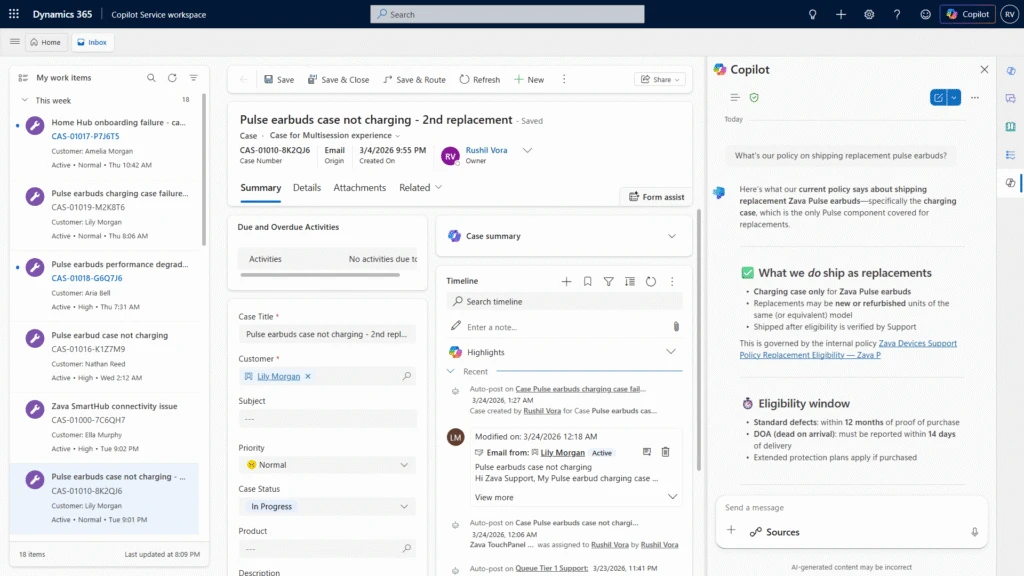
Figure 1: Getting answers from Dataverse and SharePoint in Copilot Service Workspace
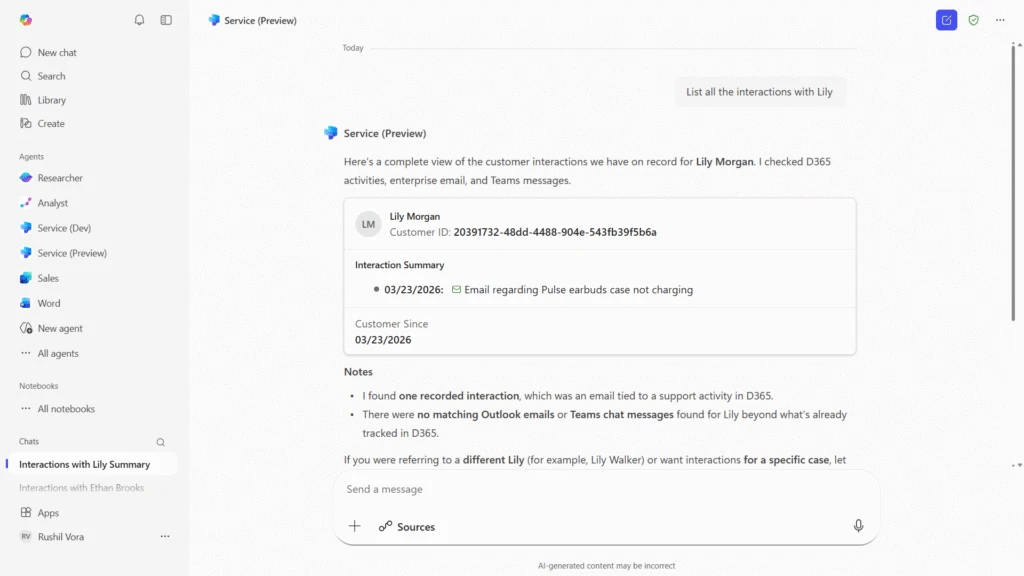
Figure 2: Customer interactions summaries across Dataverse, Teams and Outlook in Microsoft 365 Copilot app
Built for enterprise requirements
Service Agent is designed with enterprise IT needs in mind:
- Grounded in Microsoft 365 Copilot with enterprise‑grade security and compliance
- Aligned with existing Dynamics 365 Customer Service investments
- Extensible, Service Agent will extend to supporting additional skills, apps, and workflows over time
- Admin‑friendly, building on familiar Copilot and Dynamics management models
Service Agent acts as an intelligent layer on top of existing service systems, bringing the right information and actions to users, when and where they need them across the application ecosystem.
Getting started
Service Agent is now available in public preview, with several ongoing enhancements planned as we expand capabilities, performance, and extensibility.
To learn more:
- Turn on Service Agent using the public preview documentation
- Add the Microsoft 365 Copilot to Dynamics 365 Customer Service using the documentation
- Follow updates on Microsoft Learn and the ITPro Blog
- Engage with your Microsoft account team for preview guidance
Looking ahead
Service Agent is a significant step toward a future where Copilot is the primary way people engage with business systems—not just to ask questions, but to get work done.
We’re excited to partner with customers and IT leaders as we continue to evolve Service Agent and bring more service capabilities into Microsoft 365 Copilot.
Stay tuned for more.