Do you have a requirement to backup or restore your bots across environments? Do you need to create a copy of your production bot environment before updating it? Do you want to recover bots from a deleted environment?
Today, we are happy to announce that Power Virtual Agents now supports many environment lifecycle operations like backup, restore, delete, recover, copy, and reset.
An environment is a space to store, manage, and share your organization’s business data, bots, apps, and flows. It also serves as a container to separate bots that might have different roles, security requirements, or target audiences. How you choose to use environments depends on your organization and the bot you are trying to build. For example:
- You can choose only to build your bots in a single environment.
- You might create separate environments that group the test and production versions of your bots.
- You might create separate environments that correspond to specific teams or departments in your company, each containing the relevant bots for each audience.
- You might also create separate environments for different global branches of your company.
Backup and restore bot environment
1. Go to the Microsoft Power Platform admin center (https://aka.ms/ppac) and sign in with your administrator credentials.
2. Select the Environments on the left nav panel and then select the bot’s environment you want to backup.
3. Select Backups dropdown and select Create.

4. To restore a bot environment, select Backups dropdown and then Restore or manage.
5. Select the environment you want to restore from the list of backups and choose Restore.
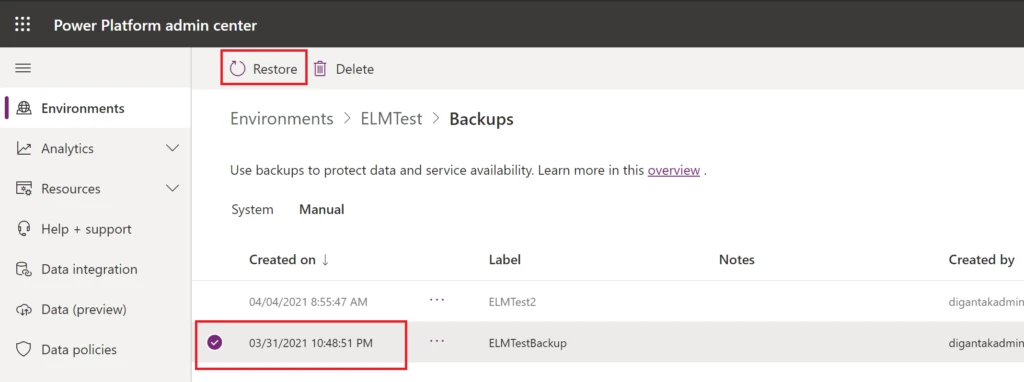
You can find documentation of the remaining supported environment operations here.
We would love to hear about your experience with this feature! Please visit our community forum at https://aka.ms/PowerVirtualAgentsForum and share your feedback.
If you have any idea requests, please submit them at https://aka.ms/PowerVirtualAgentsIdeas.
Thanks!