AX 2009
To be able to arrange different intercompany orders for getting one delivery note or invoice, you have to use Automatic summary settings in the following way:
1. Click Area Page node: Accounts payable -> Setup -> Parameters.
2. Switch to the Summary update tab on the Accounts payable parameters form. Set as “Automatic summary” the field Default values for summary updates.

3. Click the Summary update parameters button. Ensure you have set up fields for packing slip and invoice.
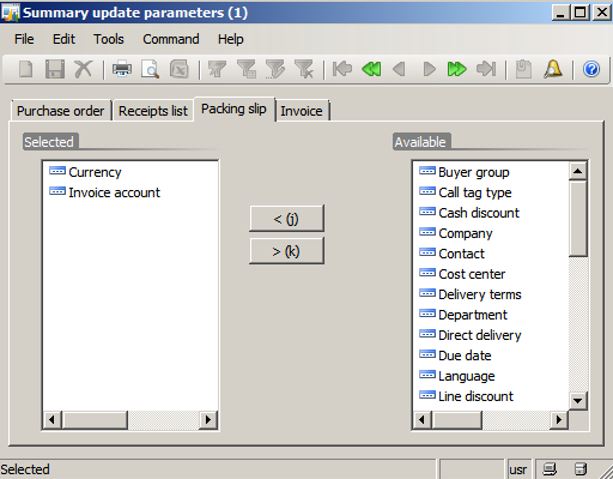
4. Do the same for Accounts receivable parameters in the other company (which sells).
5. Click Area Page node: Accounts payable -> Vendor Details. Select the intercompany vendor.
6. Click the Setup -> Summary update menu button. Active Automatic summary for packing slip and invoice.
7. Do the same for the intercompany Customer in the other company (which sells).
8. Click Area Page node: Accounts payable -> Purchase Order Details.
9. Click the Posting -> Packing slip menu button. Ensure in tab Other you have “Automatic summary” in the field Summary update for. (The same if you’re invoicing.)
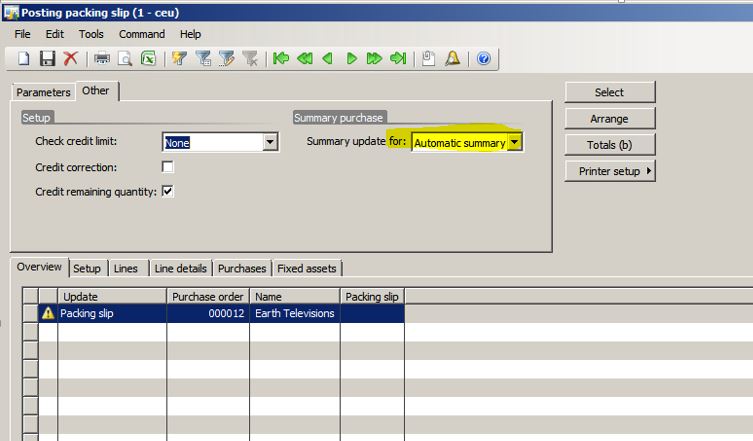
10. Do the same in the company that sells if you want to arrange sales orders.
Hope it’s helpful.
Kind regards
Marialecia Guada
Dynamics AX SCM Technical Lead