As organizations face an evolving threat landscape, strengthening Windows authentication is more critical than ever. The deprecation of RC4 (Rivest Cipher 4) encryption in Kerberos is a shift toward modern, resilient security standards. RC4, once a staple for compatibility, is susceptible to attacks like Kerberoasting that can be used to steal credentials and compromise networks. It is crucial to discontinue using RC4.
By mid-2026, we will be updating the domain controller default assumed supported encryption types. The assumed supported encryption types is applied to service accounts that do not have an explicit configuration defined. Secure Windows authentication does not require RC4; AES-SHA1 can be used across all supported Windows versions since it was introduced in Windows Server 2008. If existing RC4 use is not addressed before the default change is applied, authentication relying on the legacy algorithm will no longer function. This blog post helps IT professionals transitioning to AES-SHA1 encryption by offering steps to detect and address remaining RC4 usage.
For additional details on our Windows Update rollout strategy, check out this page on how to manage Kerberos KDC usage of RC4.
Detect RC4 usage with new tools
Aside from the Windows Update rollout of changes to domain controller default assumed supported encryption types, RC4 should be completely disabled in domain environments to maximize security. Legacy applications or interoperability with non-Windows devices may still necessitate the use of RC4, and such dependencies will need to be identified and addressed.
To support the identification of RC4 usage, we have enhanced existing information within the Security Event Log and developed new PowerShell auditing scripts. These enhancements are available in Windows Server versions 2019, 2022, and 2025.
New fields within existing Kerberos Events
The Security Event Log on Key Distribution Centers (KDC) logs when a client requests a ticket during authentication and when they request access to a specific service within the domain:
- 4768: A Kerberos authentication ticket (TGT) was requested
- 4769: A Kerberos service ticket was requested
New fields have been added to these events to capture all of the encryption algorithms supported by an account and to log the specific algorithm that was used during a ticket request. Using this information, you can now better identify:
- Authentication client devices that only support RC4
- Authentication target devices that only support RC4
- Accounts that don’t have AES-SHA1 keys provisioned, specifically for AES128-CTS-HMAC-SHA1-96 (AES128-SHA96) and AES256-CTS-HMAC-SHA1-96 (AES256-SHA96)
The first important, new field is called msds-SupportedEncryptionTypes. This field specifies the encryption algorithms that an account supports and is provided for both the client machine and the target service in a request. By default, this field should include both AES-SHA1 and RC4. If it does not include AES-SHA1, that indicates an account that we would expect to use RC4, which would need to be remediated.
The next new field, Available Keys, provides information on the encryption keys that have been created for an account in Active Directory. For most accounts in Windows, this should include RC4 and AES-SHA1 already. If this field contains RC4 but not AES-SHA1, it indicates an account that is not ready to use AES-SHA1 and that would need to be addressed.
The last important new field is the Session Encryption Type. This field contains the encryption algorithm that was used for a specific Kerberos request. Most events will indicate AES-SHA1 was used because that is the default behavior for Windows devices and accounts today. Filtering this event for RC4 will help identify potential problematic accounts and configurations.
New PowerShell scripts
Instead of manually reviewing the Security Event log on your domain controllers to find problematic RC4 usage via events 4768 and 4769, let’s introduce two new PowerShell scripts that are available to you on the Microsoft Kerberos-Crypto GitHub repository.
List-AccountKeys.ps1
Use this PowerShell script to query the Security Event Log for the new Available Keys field. The script enumerates the keys that are available for the accounts it finds from the event logs, as well as the following information:
- The time at which an event happened
- The account name
- The account type
- The account keys
PS C:tools> .List-AccountKeys.ps1
Time Name Type Keys
—- —- —- —-
1/21/2025 2:00:10 PM LD1$ Machine {RC4, AES128-SHA96, AES256-SHA96, AES128-SHA256…}
1/21/2025 2:00:10 PM AdminUser User {RC4, AES128-SHA96, AES256-SHA96, AES128-SHA256…}
1/21/2025 6:50:34 PM LD1$ Machine {RC4, AES128-SHA96, AES256-SHA96, AES128-SHA256…}
1/21/2025 6:50:34 PM AdminUser User {RC4, AES128-SHA96, AES256-SHA96, AES128-SHA256…}
1/21/2025 6:50:34 PM LD1$ Machine {RC4, AES128-SHA96, AES256-SHA96, AES128-SHA256…}
In this case, the results show that there are AES128-SHA96 and AES256-SHA96 keys available for the accounts found in the logs, meaning these accounts will continue to work if RC4 is disabled.
Get-KerbEncryptionUsage.ps1
Use this PowerShell script to query the same events to see which encryption types Kerberos used within your environment. In this example, the requests used AES256-SHA96, which is a part of AES-SHA1.
PS C:tools> .Get-KerbEncryptionUsage.ps1
Time : 1/21/2025 2:00:10 PM
Requestor : ::1
Source : AdminUser@CONTOSO.COM
Target : LD1$
Type : TGS
Ticket : AES256-SHA96
SessionKey : AES256-SHA96
Time : 1/21/2025 2:00:10 PM
Requestor : 192.168.1.1
Source : AdminUser
Target : krbtgt
Type : AS
Ticket : AES256-SHA96
SessionKey : AES256-SHA96
With this script, you can try out additional filtering options on specific encryption algorithms. For example, use the RC4 filter to specifically find requests that used RC4:
PS C:tools> .Get-KerbEncryptionUsage.ps1 -Encryption RC4
You can also use security information and event management (SIEM) solutions, like Microsoft Sentinel, or built-in Windows event forwarding as described in So, you think you’re ready for enforcing AES for Kerberos? to query these logs.
Recommendations on RC4 usage scenarios
You’ve used the scripts and identified RC4 usage. Now what should you do?
Here are some common scenarios and recommended solutions. For deeper dives, see our official Detect and remediate RC4 usage in Kerberos documentation.
A user account only has RC4 keys
You used the List-AccountKeys.ps1 script and have identified a user or machine account that only has RC4 in the list of keys. To prepare this account to use AES-SHA1 instead of RC4, reset the account password. Resetting the password will automatically create AES128-SHA96 and AES256-SHA96 keys in Active Directory for the account.
A user account doesn’t show support for AES-SHA1
You queried the Security log and found an account where the msds-SupportedEncryptionTypes field does not include the AES-SHA1 encryption types. There are multiple reasons why this may be the case and the most common scenarios are outlined below:
Scenario 1: The source or target account for a request might not have AES128-SHA96 and AES256-SHA96 correctly configured in its supported encryption types. If this is the case, here’s how you can view the policy:
- You can use Active Directory Users and Computers (ADUC) with Advanced Features enabled (under View > Advanced features). Review the msDS-SupportedEncryptionTypes attribute for an account to confirm the configuration. Find the account of interest in ADUC and right-click the account name. Select Properties and, in the newly opened window, select the Attribute Editor tab. In the list of attributes, find msDS-SupportedEncryption to confirm the configuration of the account. If needed, configure the account to include AES128-SHA96 and AES256-SHA96 using Group Policy.

- You can also use PowerShell. Use the following Get-ADObject command. Note: The output for mdds-SupportedEncryptionTypes will be in decimal format.
PS C:> Get-ADObject -Filter “Name -eq ‘LM1’ -and (ObjectClass -eq ‘Computer’ -or ObjectClass -eq ‘User’)” -Properties “msds-SupportedEncryptionTypes”
DistinguishedName : CN=LM1,CN=Computers,DC=contoso,DC=com
msds-SupportedEncryptionTypes : 28
Name : LM1
ObjectClass : computer
ObjectGUID : 3a4c6bc4-1a44-4f1f-b74a-02ec4a931947
To interpret the values and to determine the best configuration for your environment, check out Active Directory Hardening Series – Part 4 – Enforcing AES for Kerberos and Decrypting the Selection of Supported Kerberos Encryption Types.
After setting the right combination for your environment, restart the device, and it will update its msds-SupportedEncryptionTypes attributes in the active directory database.
Scenario 2: The source or the target machine might not have the msds-SupportedEncryptionTypes defined in AD and is falling back to the default supported encryption types.
You’ll need to have a more holistic understanding of your environment. Do you know what happens to devices that don’t have a value defined for msds-SupportedEncryptionTypes or the value is set to 0? Normally, these devices will automatically receive the value of DefaultDomainSupportEncTypes. Depending on your individual risk tolerance, consider using one of the following methods to address this scenario:
- Define the specific msds-SupportedEncryptionTypes value in the account properties to ensure it isn’t falling back to the DefaultDomainSupportedEncTypes.
- Set the DefaultDomainSupportedEncTypes to include AES128-SHA1 and AES256-SHA1. Note: This will change the behavior of all accounts that don’t have a value for msds-SupportedEncryptionTypes.
The device doesn’t support AES128-SHA96 or AES256-SHA96
The last version of Windows devices that did not support AES128-SHA96 and AES256-SHA96 was Windows Server 2003. We strongly recommend that you migrate to a supported version of Windows as soon as possible.
If you have a third-party device that does not support AES128-SHA1 and AES256-SHA1, we want to hear from you! Please reach out to stillneedrc4@microsoft.com telling us:
- What is this device?
- How does it fit into your workflow?
- What is your timeline for upgrading this device?
Using WAC for configuring allowed encryption types
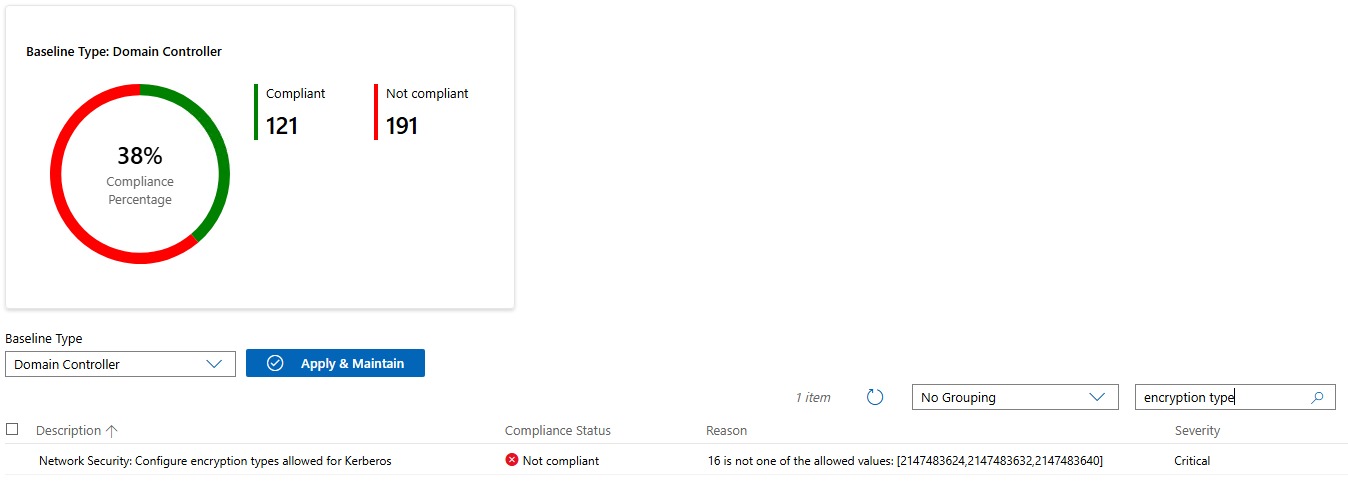
Microsoft provides a security baseline for Windows Server 2025 to set and audit recommended security configurations. This baseline includes disabling RC4 as an allowed encryption type for Kerberos. You can apply security baselines or view compliance using PowerShell or using the Windows Admin Center.
In Windows Admin Center, you can access the security baseline compliance report by connecting to the server you’ve configured using OSConfig by selecting the Security Baseline tab of the Security blade. In the Security Baselines tab, you can filter for the policy “Network Security: Configure encryption types allowed for Kerberos” to see your current compliance state for allowed encryption types. The compliant values for this policy in the baseline that do not allow RC4 are:
- 2147483624: AES128-SHA96 + Future Encryption types
- 2147483632: AES256-SHA96 + Future Encryption types
- 2147483640: AES128-SHA96 + AES256-SHA96 + Future Encryption
This is an example of the audit report indicating a device with a compliant setting:

This is an example of audit showing devices configured with a setting that is different from the previous compliant values:
Using stronger ciphers
In the current security landscape, RC4 isn’t required to ensure secure Windows authentication. You can use stronger ciphers, like AES-SHA1, for authentication among all supported versions of Windows. We hope that these detection and mitigation tools help you and your organization in your hardening efforts. Please check out official Detect and remediate RC4 usage in Kerberos documentation for more details and scenarios.