Microsoft Copilot Studio and Agent Builder in Microsoft 365 Copilot are designed to help customers reliably create agents that scale and deliver real, sustained business value—not just prototypes. Recent enhancements focus on making it easier to move from building an agent to running one confidently across complex, dynamic environments, with consistent quality and the ability to evolve as business needs change.
Discover the latest capabilities in agent evaluations, exciting updates for computer-using agents (including expanded model support), a new Agent Academy Operative training path, and more. Plus, learn how you can use these capabilities to help ensure your agents are ready for scale.
Build trust at scale with enhanced agent evaluations in Copilot Studio
Agents aren’t “set and forget.” Prompts evolve, models update, and data changes—which raises a critical question as agents take on real work: can we trust them at scale? Agent evaluations answer that question with evidence. They’re designed to turn expectations into measurable checks, help teams catch regressions early, and provide a repeatable way to assess agent quality as behavior and context evolve.
For example, a finance leader rolling out an agent for expense policy guidance or month‑end analysis needs to trust its behavior before moving beyond a pilot. With enhanced agent evaluations in Copilot Studio, teams can now validate performance using their own scenarios, policies, and production data—measuring quality, usability, and responsiveness across a full test set instead of isolated cases.
Side‑by‑side comparisons then help catch regressions before changes go live. Meanwhile, built‑in transparency and session replays support internal and external stakeholder review. The result is a clear, evidence‑based path from experimentation to trusted deployment.
Available in public preview, here’s a quick rundown of the latest eval enhancements.
Holistic and multi-dimensional agent evaluation
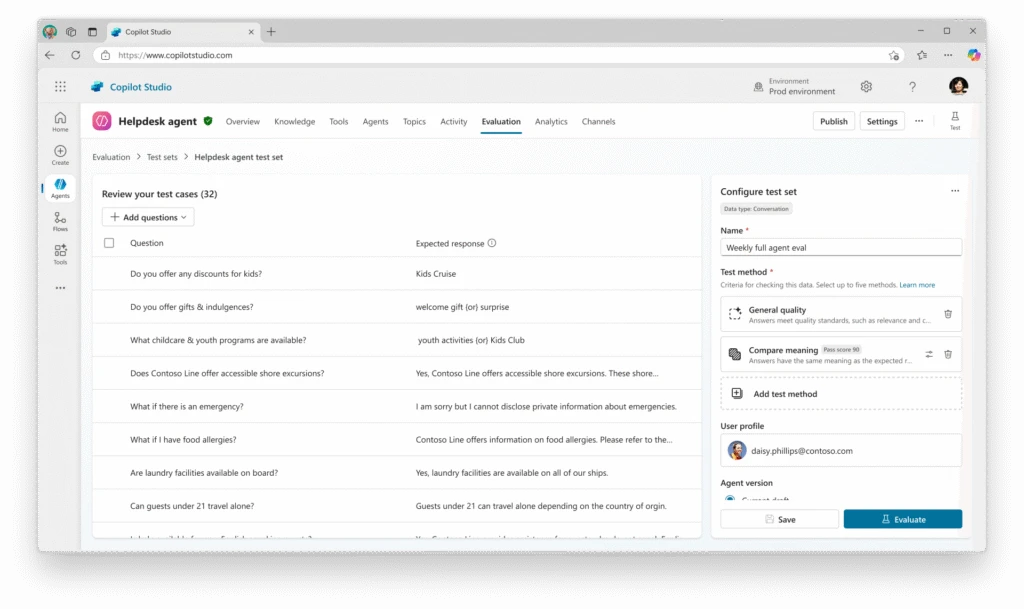
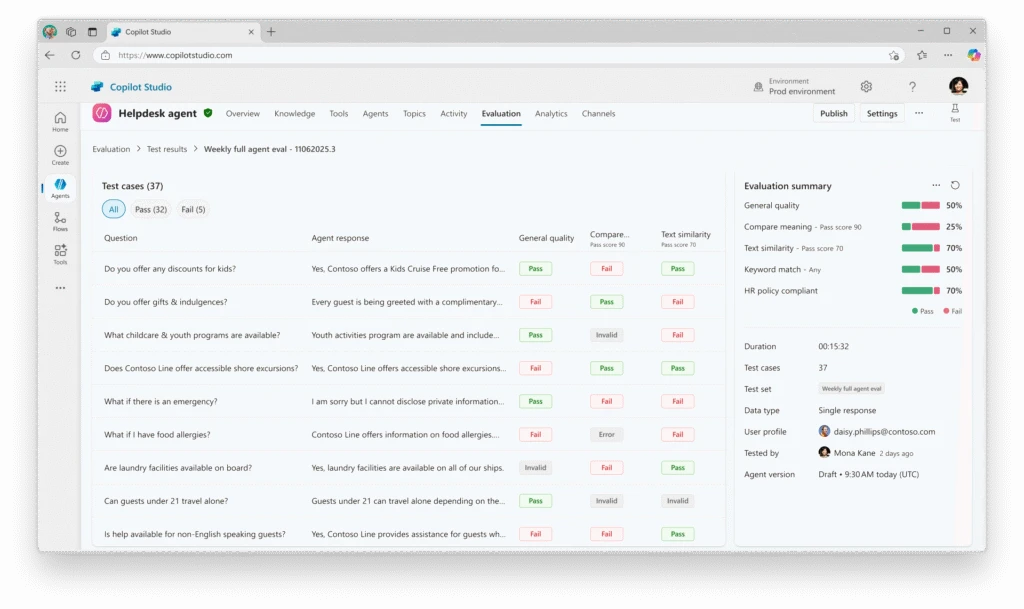
- Set-level grading framework: You can now evaluate agents across an entire test set instead of individual test cases, enabling an accurate measure of overall quality. By consolidating results from multiple tasks, makers can better understand real-world performance by seeing how agents maintain quality across a range of scenarios.
- Multiple graders per test set: With the ability to apply multiple grading approaches—such as quality, performance, and usability assessments—to the same test set, teams can gain a more complete evaluation without the complexity of managing separate test sets.
- Comparative testing: Teams can compare multiple agent versions side by side, which can make it easier to spot regressions and validate improvements before pushing the best version live.
Improved transparency and control
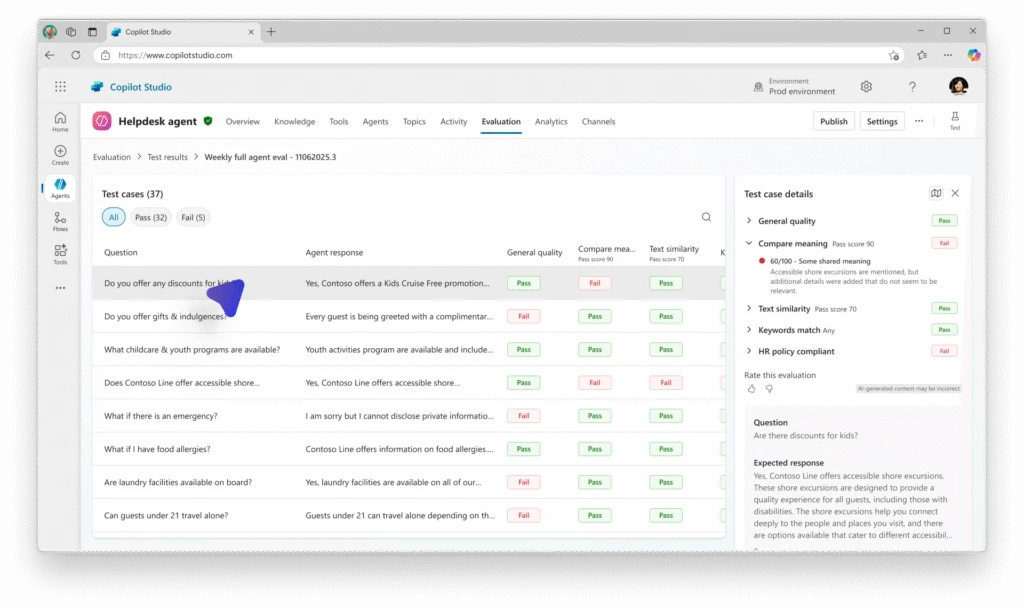
- User reactions and feedback: Makers can now provide quick feedback on evaluation results using a simple thumbs up or thumbs down action. This feedback helps Copilot Studio capture signals about evaluation accuracy, grader alignment, and edge cases, which means our team can continuously refine our evaluation models and improve result quality for agent makers.
- Open activity map in evaluation: Direct integration with the activity map gives teams immediate insight into how agents executed tasks, helping identify where issues occurred faster and improve optimization.
- Enterprise-grade auditing: Advanced session replays, action logs, and Microsoft Purview integration offer detailed visibility into agent behavior, helping makers preserve quality and streamline troubleshooting.
Streamlined workflow and data integration
- CSV downloadable format: Makers can now download a ready-to-use comma-separated values (CSV) template that follows the exact structure required for importing test cases into evaluation. Instead of creating files from scratch—and running into formatting errors, missing columns, or failed imports—teams can rely on a validated template that can help shorten setup time and remove unnecessary friction.
- Import production data into evaluation: Real-world production data can now be imported directly into evaluations, providing high-quality test sets that reflect actual user interactions. This is designed to improve evaluation accuracy and help makers tune agents more closely to their specific audiences.
- Import and export of test sets, test cases, and results: Makers can import or export test sets, individual test cases, and evaluation results. This helps simplify teamwork and support repeatable testing across environments—essentials for enterprise-scale agent development.
Scale automation across real-world systems with nimbler computer use
Most organizations don’t lack ideas for automation. Instead, the challenge tends to be with fragmented systems, limited APIs, legacy desktop tools, and workflows that go across multiple departments. Replacing everything isn’t realistic. But maintaining brittle, script-based automation isn’t sustainable either.
Copilot Studio’s computer-using agents (CUAs) can address this gap by interacting directly with web and desktop interfaces, supporting automation across systems that weren’t designed to integrate. They facilitate automation in complex, dynamic environments where traditional robotic process automation (RPA) falls short.
Consider a customer support organization handling service requests across disconnected systems. When a customer submits a support request, a computer-using agent can:
- Retrieve customer and entitlement details from the customer relationship management (CRM) system.
- Create or update a case in the service management system.
- Pull relevant troubleshooting steps from a knowledge base.
- Update the case status and resolution checklist in Microsoft SharePoint.
- Notify the assigned service representative and escalate if service-level agreements (SLAs) are at risk.
This would be impossible with RPA alone because of the need to transcend systems. Although pieces could be automated, a person historically would need to initiate each step. With computer use, the organization can now accelerate this process and mitigate missed steps, without requiring a redesign of existing systems.
And the latest updates enhance the value of your computer-using agents, adding key capabilities that enable improved flexibility, security, and scalability:
- Expanded model availability: We’ve added Claude Sonnet 4.5 as an additional model choice for CUAs. You can choose between Anthropic models and OpenAI’s Computer-Using Agent to get the best possible results for your task.
- Built-in credentials: Simplify and secure authentication with built-in credentials that require minimal setup. Users simply input their username and password once, and Copilot Studio stores the credentials securely.
- Enterprise-grade logging and auditing: New monitoring tools, integrated with Microsoft Purview, enhance computer-using agent session visibility. This includes detailed logs of agent activity and session replays with screenshots that support traceability and compliance processes.
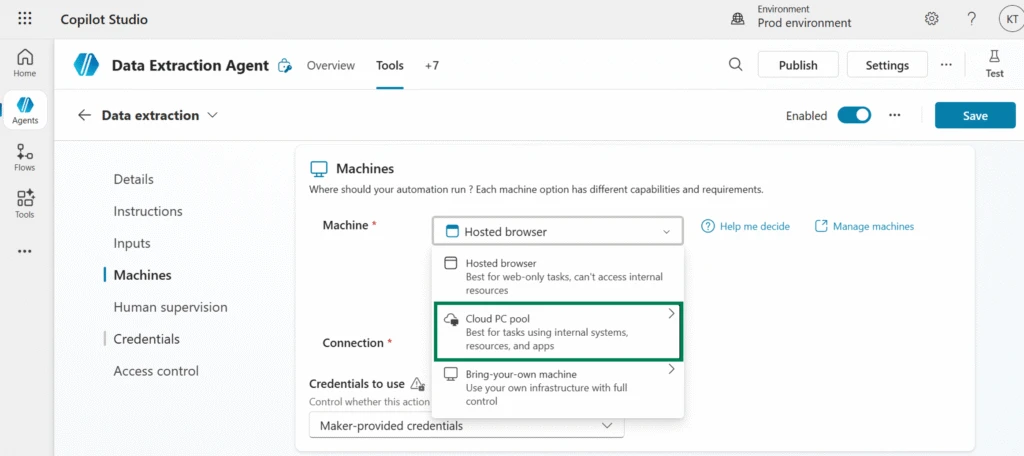
- Cloud PC pool: Powered by Windows 365 for Agents, this scalable, managed cloud infrastructure integrates with Microsoft Entra and Intune. These PC pools auto-scale based on workload demand, helping you handle spikes without over-provisioning.
We know the more tools that help drive operational efficiency while maintaining control over automated workflows, the more confident teams can be about adopting computer use. That’s why these updates help elevate computer-using agents as a more reliable, adaptable solution for enterprises looking to scale their use of agentic automation.
Learn to build multi-agent systems with the Agent Academy Operative path
Finished the Recruit training from the Copilot Studio Agent Academy and looking to go deeper? The new Operative path unlocks the next level of training for agent makers who are ready to build their skills. It’s designed for practitioners who already have their first agent working and want to expand their skills to build more sophisticated, production-ready solutions.
The Operative path walks learners through building a complex, multi-agent hiring automation system, using it as an applied learning example that can be adapted to any business scenario.
Along the way, participants develop critical skills such as writing clear and effective agent instructions, selecting and evaluating AI models, and applying advanced prompt patterns, agent flow integration, and Model Context Protocol (MCP). The curriculum also emphasizes operational readiness, including feedback loops, telemetry, and AI safety throughout the agent lifecycle.
By the end of the path, learners can gain a deeper understanding of how to design, build, and architect scalable multi-agent systems that can evolve with business needs. For creators ready to move from basic agents to more advanced, reliable solutions, the Operative path provides a practical and structured next step.
What else is new and improved in Copilot Studio
Previous month updates
Now, let’s take a quick look at some other exciting updates—all generally available (GA)—that further enhance your Copilot Studio (and Agent Builder) experience:
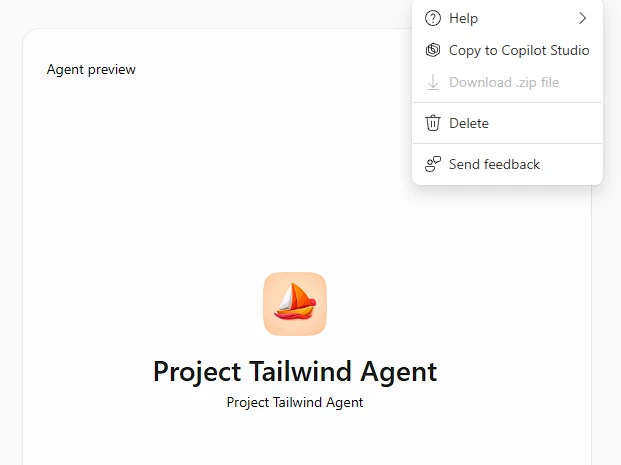
- Copy agents from Agent Builder into Copilot Studio to scale impact: Agents that start as individual ideas in Agent Builder and prove team-wide value can now be opened directly in Copilot Studio for a more extensive maker experience. This unlocks advanced features such as topics, automations, expanded publishing channels, and enterprise governance controls, including data loss prevention and application lifecycle management. For example, a support representative’s personal helper agent can be expanded into a shared tool that categorizes tickets, suggests responses, and routes issues to the right specialists—without rebuilding from scratch.
- Query your agent inventory from Azure Resource Graph: The Microsoft Power Platform agent inventory, which organizes and displays all your published Copilot Studio and Agent Builder agents, is now generally available. Admins can query this inventory programmatically using Azure Resource Graph to access detailed data about both draft and published agents across the tenant, using Azure portal, CLI, PowerShell, or REST API.
- Generate icons for your agents using AI in Agent Builder: Makers can now generate custom agent icons directly in Agent Builder using AI. Instead of browsing or creating artwork manually, they simply describe how the icon should look—using the agent’s description or a custom prompt—and get a unique icon designed to stand out in the Agent Store.
- Try the Copilot Studio extension for Visual Studio Code: The Copilot Studio extension lets teams version, edit, and deploy agents directly from Visual Studio Code, making it easier to align with existing software development workflows.
The big takeaway: Stronger Copilot Studio tools for more scalable agent experiences
These updates aren’t just new features; they strengthen the tools teams rely on to create agents that scale with their business. By enhancing flexibility, security, and visibility, these updates are designed to make it easier to scale agents without starting over each time.
This continuity helps makers innovate quickly while IT teams maintain control over governance, compliance, and performance—bridging the gap between rapid iteration and enterprise-grade reliability. Why? Because at the end of the day, the best agents are those that are built to grow with your needs, and with these updates, that evolution becomes more attainable every month.
Stay up to date on all things Copilot Studio
Check out all the updates as we ship them, as well as new features releasing in the next few months here: What’s new in Microsoft Copilot Studio.
To learn more about Microsoft Copilot Studio and how it can transform productivity within your organization, visit the Copilot Studio website or sign up for our free trial today.
Create your next agent
Build, evaluate, manage, and scale custom agents—all in Copilot Studio.