
Last year, we launched the public preview of export and import chatbots using solutions, used by most Power Virtual Agents customers today. With this feature, customers can easily manage their Power Virtual Agents chatbot’s lifecycle to address change control, governance, data residency, and latency requirements by exporting and importing bots across environments. In addition, we also enabled Microsoft Teams users to export and import chatbots in Dataverse for Teams.
Today, we are excited to announce the general availability of Power Virtual Agents export and import chatbots using solutions.
Besides many bug fixes and backend improvements, we augmented this feature with the following:
- New bot’s components (topics, flows, etc.) are auto-added to the bot’s current solution. Previously, customers needed to add new components manually using the “Add required components” feature, which caused import failures if they forgot that manual step.
- Skills environment variables are auto-added when a chatbot is added to a solution.
- Show the bot’s current solution name under the bot picker panel for easy access to solutions and troubleshooting. This is only available on the web app and doesn’t show the Default Solution name.
See current solution name under bot picker

You can continue going to the Power Virtual Agents web app settings page to open Power Apps solution explorer to export and import bots using the solution, like at the public preview.

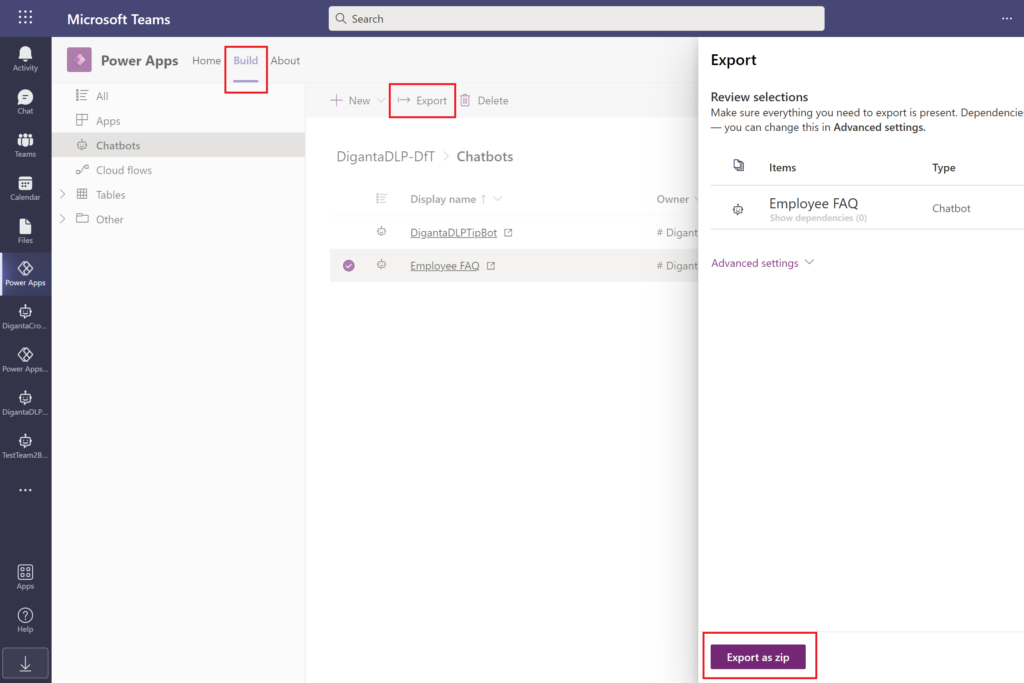
Furthermore, you can use the Power Apps personal app in Teams, select the Build tab of the team where you want to export and import your chatbots. More information: Install the Power Apps personal app in Microsoft Teams.
Export chatbot using Power Apps personal app in Teams
To learn how to use export and import bots using solutions, see documentation here.
We’d love to hear about your experience with this feature! Please visit our community forum at https://aka.ms/PowerVirtualAgentsForum and share your feedback.
If you have any idea requests, please submit them at https://aka.ms/PowerVirtualAgentsIdeas.
Happy bot building!