Microsoft Copilot Studio helps organizations move beyond isolated AI experiences and build connected systems of agents that can scale, adapt, and deliver real business value. Recent enhancements focus on making it easier for agents to work together across tools and data sources, while giving makers more control over how those agents behave in production.
What you’ll see this month: New generally available capabilities for multi-agent coordination across Microsoft Fabric, the Microsoft 365 Agents SDK, and open Agent-to-Agent (A2A) protocols—all of which help agents collaborate across your ecosystem and perform more valuable work. Plus, you’ll find updates to prompt authoring, model choice, and governance controls that can help make it faster to build and refine high-quality agent experiences with confidence.
Agents that work together across your entire ecosystem
The challenge in scaling AI inside an organization isn’t creating a useful agent. It’s about getting many agents—across teams and tools—to work together in a way that’s reliable and repeatable.
In many organizations, data teams might build one kind of agent, app teams another, and productivity teams yet another. Each agent can be valuable on its own, but once a workflow needs knowledge from one system, reasoning from another, and action in a third—teams often run into brittle handoffs and custom integration work. This slows agent adoption and makes it harder to move from promising pilots to real business impact.
This month, Copilot Studio takes a meaningful step forward: several multi-agent capabilities are rolling out to general availability over the next few weeks, giving your teams new ways to connect and orchestrate agents across your ecosystem. These updates include Microsoft Fabric integration, Microsoft 365 Agents SDK orchestration, and Agent-to-Agent (A2A) communication—all designed to help your agents operate together as a coordinated system rather than in isolated silos.
Multi-agent support for Microsoft Fabric
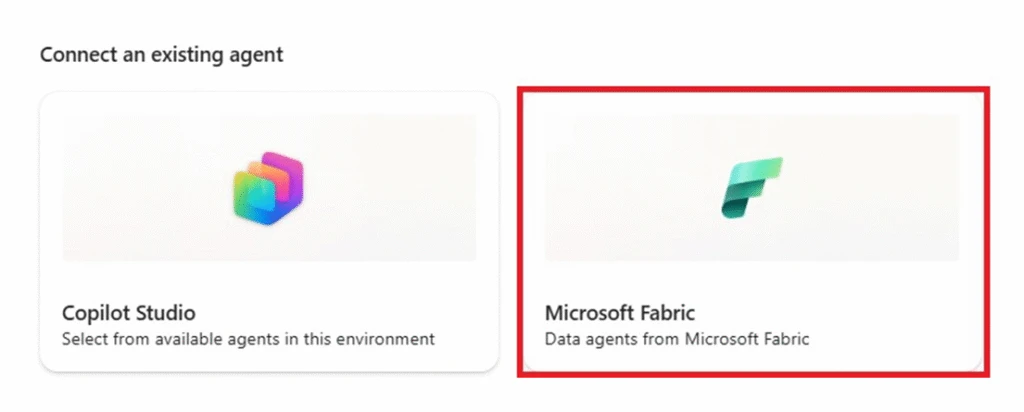
With multi-agent support, your Copilot Studio agents can work with Fabric agents to reason over enterprise data and analytics at scale. That means you can connect business-facing agent experiences more directly to the data estate they already rely on, without treating every data-intensive scenario like a one-off engineering project. Instead of working with limited or disconnected data, these agents will be able to operate with full business context—helping make their outputs more accurate, relevant, and actionable.
Multi-agent support for the Microsoft 365 Agents SDK
Using the Microsoft 365 Agents SDK, teams can now orchestrate Copilot Studio agents alongside agents built for Microsoft 365 experiences. Instead of recreating the same logic across multiple agents (think retrieving data, applying business rules, or completing common tasks), you’ll be able to reuse and combine existing capabilities. This makes it easier to compose cross-app workflows from what’s already been built, reducing duplication and keeping experiences more efficient and consistent.
Agent-to-Agent (A2A) support
With A2A support, Copilot Studio agents can directly communicate with and delegate work to other agents—first-party, second-party, or third-party—using an open protocol that allows universal access. This matters because the future of enterprise AI will not belong to a single stack. Organizations need to build agents on platforms that can participate in a broader ecosystem, not just operate within one product boundary. Copilot Studio A2A provides that interoperability and power.
The impact of multi-agent systems
We’ve already seen the power of this approach with the Ask Microsoft web agent, one of our early “customer zero” implementations. As site traffic and knowledge sources grew, the single-agent architecture began to strain, creating slower response times. Using Copilot Studio, the team upgraded the agent to a modern architecture with generative orchestration and multi-agent coordination.
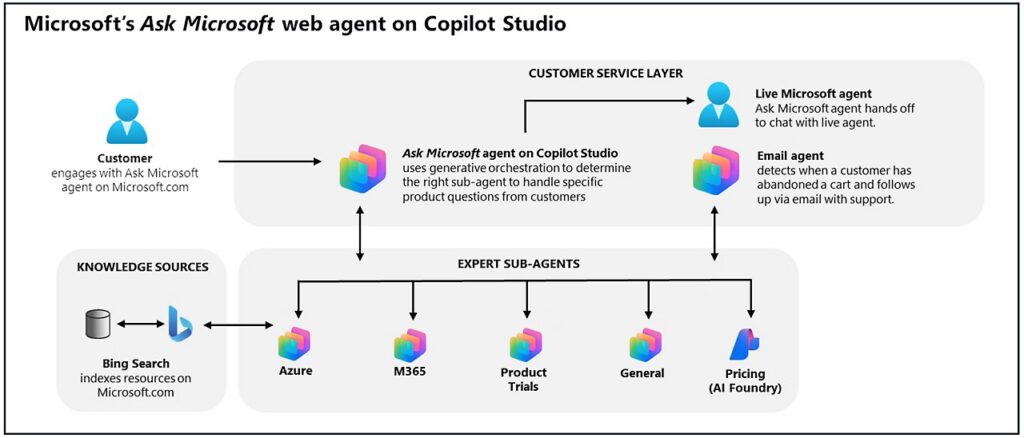
Now, multiple sub-agents handle different parts of the site—Microsoft Azure, Microsoft 365, pricing, trials, and more—while the main agent orchestrates them to provide fast, coherent, multi-turn responses. This setup allows Ask Microsoft to answer complex questions involving multiple products or services, and to tailor responses based on where the customer is on the site.
Building a more advanced assistant with Copilot Studio has meaningfully raised the bar for our customer experience and enabled us to scale faster across products to deliver real business impact
– Alyse Muttera, Director of eCommerce Programs at Microsoft
To show how this approach works in other organizations, consider a common scenario at a bank. The loan department has one agent handling mortgage applications, while the banking department runs a separate agent for account inquiries. A customer, however, expects a single seamless experience.
Multi-agent orchestration lets each specialized agent manage its area of expertise while coordinating responses behind the scenes. For instance, if a customer asks about a mortgage payment and their account balance in the same interaction, the system delivers a cohesive, context-aware answer that combines insights from both agents—no juggling multiple interfaces required.
When specialized agents work together behind the scenes, customers can get a unified experience and employees can get time back.
That’s exactly the kind of impact Coca‑Cola Beverages Africa is realizing today by using Copilot Studio agents and Microsoft Dynamics 365 to autonomously run planning cycles and automate workflows end to end, saving planners 1 to 1.5 hours every day.
These features will be fully available to all eligible customers as of April 2026. Three capabilities, one outcome: agents that can operate more like a system and less like a collection of disconnected point solutions.
Build prompts faster while maintaining control
As agent experiences grow more sophisticated, the quality of the prompt an agent maker uses matters more. A great prompt yields more powerful results from agents than a good prompt, and fine-tuning prompts is key to unlocking them.
But in practice, prompt iteration has historically felt disjointed and slow. Makers previously balanced their flow of work with jumping into a separate editor, making a small change, testing it, and then repeating the process again. That friction can add up quickly, especially when teams are tuning prompts for specialized business scenarios.
The new immersive Prompt Builder, now generally available, helps reduce that friction by bringing prompt editing directly into each agent’s Tools tab. You can update instructions, switch models, add inputs or knowledge, and test changes—all in one place. Instead of breaking context every time you want to refine an agent’s behavior, you can iterate while staying grounded in the agent you’re building.
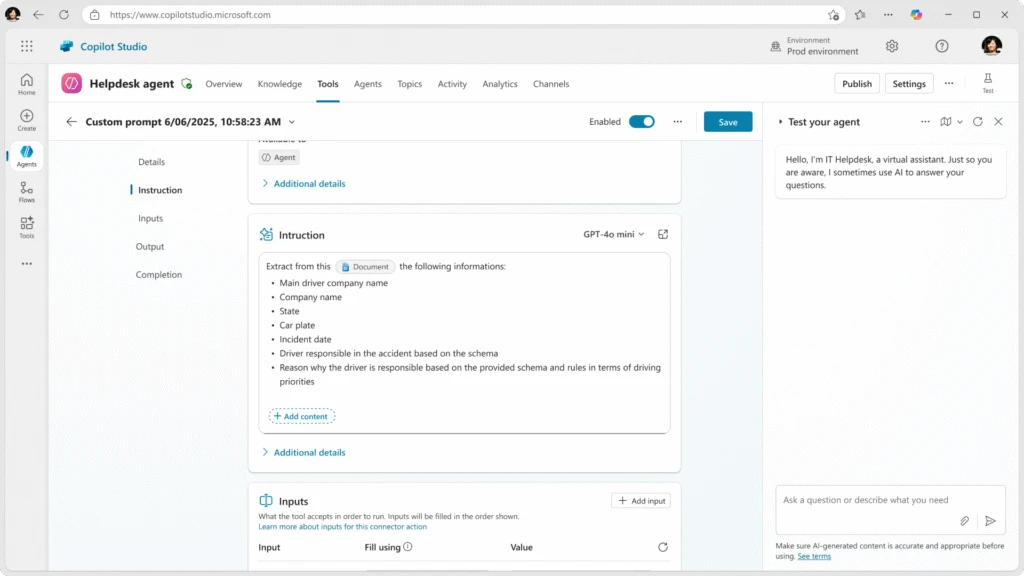
This matters most in real-world scenarios where prompt behavior is tied to domain knowledge and policy nuance. For example, a team building an agent to support clinical documentation might need to refine instructions, swap in a better knowledge source, and test outputs against terminology that is common in healthcare but more likely to trigger default safeguards. Doing that from one workspace can make iteration faster and help lower the effort required to get a production-ready result.
More options for prompts: Content moderation and model choice
Speaking of triggering default safeguards, Copilot Studio has also added content moderation settings for prompts, now generally available in supported regions. This gives makers more control over harmful content sensitivity on managed models, including turning down that sensitivity to help unblock legitimate scenarios in industries like healthcare, insurance, and law enforcement, where default settings may be overly restrictive for the content being processed.
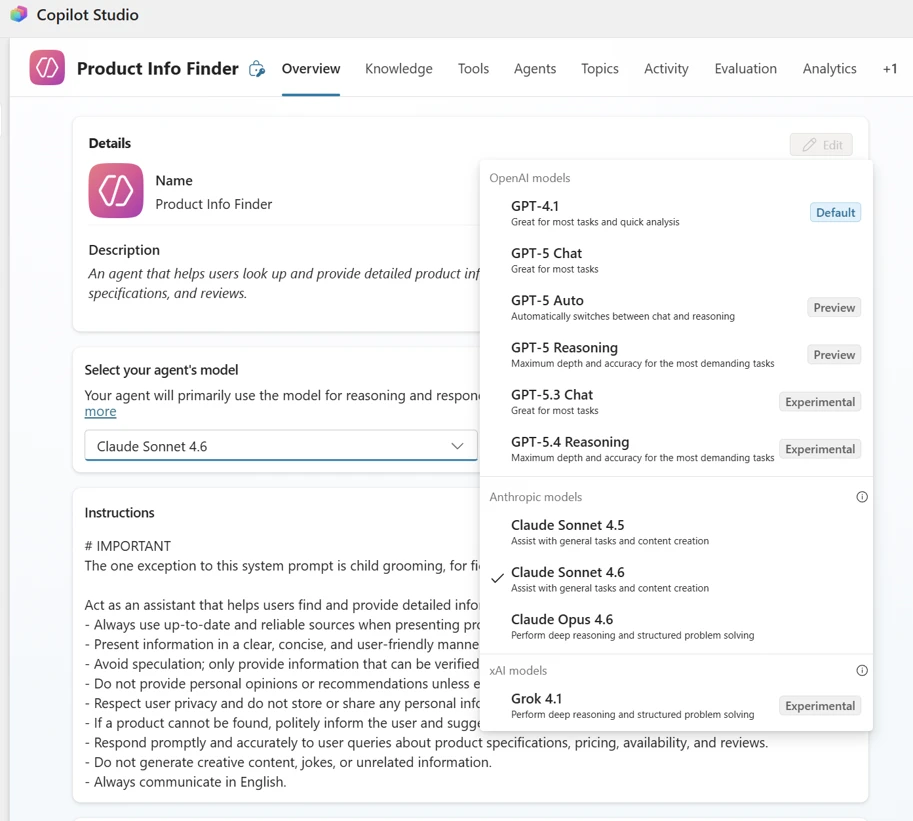
For even more control over prompts, the Prompt Tool now supports Anthropic Claude Opus 4.6 and Claude Sonnet 4.5 in paid experimental preview in the United States. That gives makers more choice in matching the right model to the right prompt, rather than forcing every scenario into the same tradeoff profile. This feature is great for teams that want more flexibility in how they balance performance, reasoning depth, and cost.
All together, these improvements help teams move faster on prompt iteration while maintaining the control and flexibility required in production scenarios.
What else is new and improved in Copilot Studio
We have also recently released several additional updates across automation, meetings, retrieval quality, and model support.
- ServiceNow and Azure DevOps connector quality improvements are now generally available. These help agents better understand operational questions, retrieve the right ticket or work item data, and return more complete, actionable answers automatically.
- Evaluation automation APIs are now generally available through Microsoft Power Platform APIs and connectors. These APIs help make it easier to run evaluations programmatically and integrate quality checks into continuous integration and continuous delivery (CI/CD) workflows.
- Agents for Microsoft Teams meetings can now access real-time meeting transcripts and group chat. This supports scenarios like answering questions during the meeting, surfacing relevant information, or helping track decisions and follow-ups as they happen.
- Model context protocol (MCP) apps and Apps SDK support have expanded how agents connect to your external work apps, helping to make it easier to integrate business systems and enable agents to take action across your broader ecosystem—not just respond with information.
- Additional model support, including Grok 4.1 Fast, GPT-5.3 Thinking, and GPT-5.4 Instant in paid experimental preview, gives makers more options as they tune experiences for speed, cost, and capability.
Overall, these updates reflect a continuing broader shift in Copilot Studio: moving from building individual AI experiences to building connected, governed systems that can fit more naturally into how work already happens. As you scale up your organization’s use of multi-agent ecosystems, these will help your teams reach further across channels and knowledge sources to more accurately fulfill your business needs.
Stay up to date on all things Copilot Studio
More is coming in April 2026 across voice channels, workflows, and the building experience. Check out all the updates as we ship them, as well as new features releasing in the next few months here: What’s new in Microsoft Copilot Studio.
To learn more about Microsoft Copilot Studio and how it can transform productivity within your organization, visit the Copilot Studio website or sign up for our free trial today.