As organizations move from early AI experiments to deploying agents at scale, they often ask: How do we architect agents responsibly, integrate them into existing systems, and run them reliably at scale?
To help teams like yours answer these complex questions faster and move with confidence, we’ve launched the new agent architecture guidance hub and a refreshed Microsoft Copilot Studio guidance hub. These on-demand resources offer end‑to‑end documentation across the agent lifecycle—from design and planning through operations, governance, and advanced architectural patterns.
Built on established practices from Microsoft engineering teams and real‑world deployments, these hubs give architects, developers, and IT a shared blueprint to work from. And they were designed to help your team make smarter architectural decisions, accelerate delivery with practical how‑to guidance, and scale safely with trusted governance, security, and responsible AI practices.
Whether you’re building your first agent or scaling across your enterprise, these hubs can help you start—and stay—on the right path.
Now, let’s explore what each hub offers and how to put them to work for your organization.
Meet the new agent architecture guidance hub
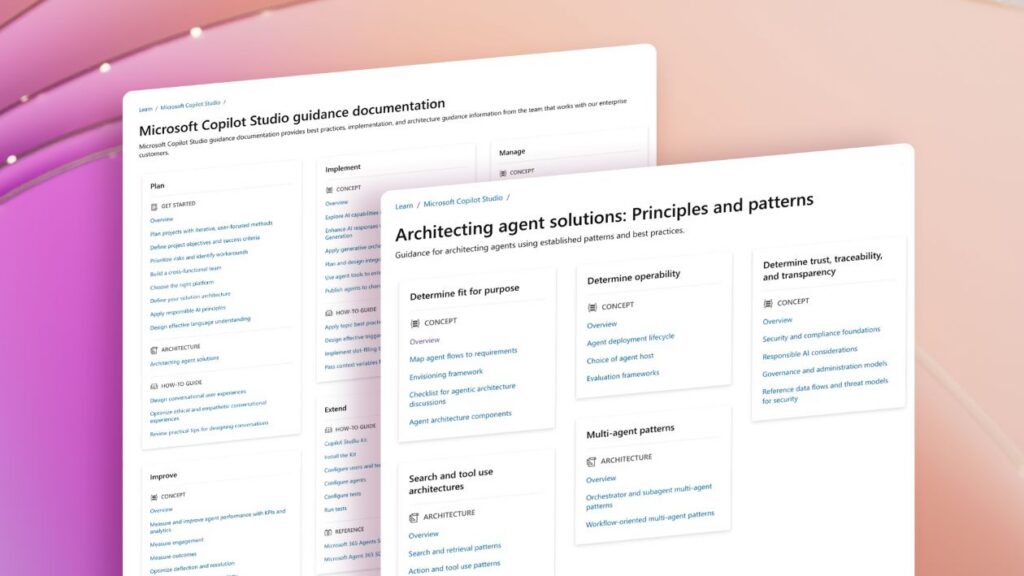
The new agent architecture guidance hub is a technology‑agnostic playbook for designing secure, reliable, and accountable agents. Unlike the Copilot Studio guidance hub and Azure Well‑Architected guidance, this hub focuses on the principles and patterns required to build scalable agent systems—regardless of platform, tools, or runtime.
Grounded in the same practices Microsoft 365‑grade agents use, this hub distills lessons from real‑world deployments into a single source of truth. It provides clear answers to foundational architecture questions, such as how your agents should be structured, how they should run, and how they should be governed at scale.
Use the agent architecture guidance hub to:
- Identify fit for purpose by mapping your scenario to the right agent flows, components, and reference architectures.
- Design for operability by building reliability in from the start, using deployment lifecycle and evaluation guidance.
- Establish trust, traceability, and transparency through responsible AI practices, governance, auditability, and security practices.
- Optimize search and tool‑use patterns by adopting retrieval, grounding, and tool‑execution approaches used in Microsoft 365 Copilot.
Discover the redesigned Copilot Studio guidance hub
The reimagined Copilot Studio guidance hub is your end‑to‑end playbook for designing, building, and operating agents in Copilot Studio. Unlike architecture‑level resources, such as the agent architecture guidance, this hub focuses on hands‑on implementation—so makers, developers, and IT admins know exactly how to execute their work inside the product.
The newly reorganized and expanded hub now mirrors the full lifecycle of an agent. It’s built around five practical stages—Plan, Implement, Manage, Improve, and Extend—so your team can quickly find the right guidance at the right moment, whether you’re starting fresh or scaling an existing deployment:
- Stage 1: Plan. Align on business goals, define success measures, apply responsible AI considerations, and design effective language understanding before building anything. This helps to ensure every agent starts with a clear purpose, measurable outcomes, and a responsible foundation.
- Stage 2: Implement. Focus on the design and build work inside Copilot Studio. Learn generative orchestration patterns, build topics effectively, integrate systems and APIs, and publish agents with confidence using patterns established to work in production.
- Stage 3: Manage. Operate agents with governance, ALM, capacity planning, project security, testing guidance, and compliance best practices. This stage helps teams define the guardrails and decisions needed to maintain trust, reliability, and control over time.
- Stage 4: Improve. Center continuous optimization around analytics, KPIs, and conversation insights to drive measurable improvements in accuracy, containment, deflection, and user satisfaction—turning real usage data into targeted enhancements.
- Stage 5: Extend. Go beyond out‑of‑the‑box capabilities with hands‑on extension guidance. Use the Copilot Studio Kit and work with the Microsoft 365 Agents SDK to add custom logic, actions, and richer workflows tailored to your organization’s unique scenarios.
Together, these stages make this hub a practical, step-by‑step playbook for building agents in Copilot Studio that are useful, safe, and maintainable from day one—and that can scale as your needs grow.
Build agents with confidence

Successful agents require more than a powerful platform—you also need clearer choices, practical guardrails, and a way to spend less time reinventing the wheel. The new agent architecture guidance hub and Copilot Studio guidance hub (together with our other resources like the Copilot Studio adoption site and Copilot Studio community forum) make it easier to go from early experiments to confident, repeatable delivery.
Use the agent architecture guidance hub to clarify what to build and why. Then, turn to the Copilot Studio guidance hub when you’re ready to design, build, and operate those agents more effectively in Copilot Studio.
Whether you’re experimenting with your first agent or managing a collection of agents in Microsoft Copilot Studio, put these resources to work to make your next build easier, safer, and faster.