Skip to main content Microsoft Intelligent Data Platform Azure Arc Azure databases Power BI SQL Server 2025 SQL Server BI SQL Server 2022 SQL Server 2019 SQL Server 2017 SQL Server 2016 SQL Server 2005 - 2014 Downloads Community SQL End of Support Data Security - SQL Server Encryption SQL Server blog SQL Server and Azure SQL workshops Browse Microsoft Solutions Hub SQL Server Tech Community Azure Databases Tech Community Azure Synapse Analytics Tech Community Developer Find a partner Become a partner Partner resources Try SQL Server 2025 Microsoft Security Azure Dynamics 365 Microsoft 365 Microsoft Teams Windows 365 Microsoft AI Azure Space Mixed reality Microsoft HoloLens Microsoft Viva Quantum computing Sustainability Education Automotive Financial services Government Healthcare Manufacturing Retail Find a partner Become a partner Partner Network Microsoft Marketplace Software companies Blog Microsoft Advertising Developer Center Documentation Events Licensing Microsoft Learn Microsoft Research View Sitemap
·
1 min read

SQL Automated Backup and Patching Support in Existing SQL Server Virtual Machines

In January, we released the SQL Automated Backup and SQL Automated Patching services for SQL Server Virtual Machines in Azure. These services automate the processes of backing up and patching your SQL Server VMs. In that release, you were able to configure these services in the Azure Preview Portal when provisioning a new SQL Server 2014 Enterprise or Standard VM. You could also configure these services in an existing Virtual Machine via PowerShell commandlets.

We have now expanded the experience so you can configure these services in an existing SQL Server VM in the Azure Preview Portal. Whether you have already enabled these services or not inside your Virtual Machine, you can go to that VM in the Azure Preview Portal and either update your configuration or create a new configuration for each service. You will find both services under the Configuration label, shown in Figure 1 below.
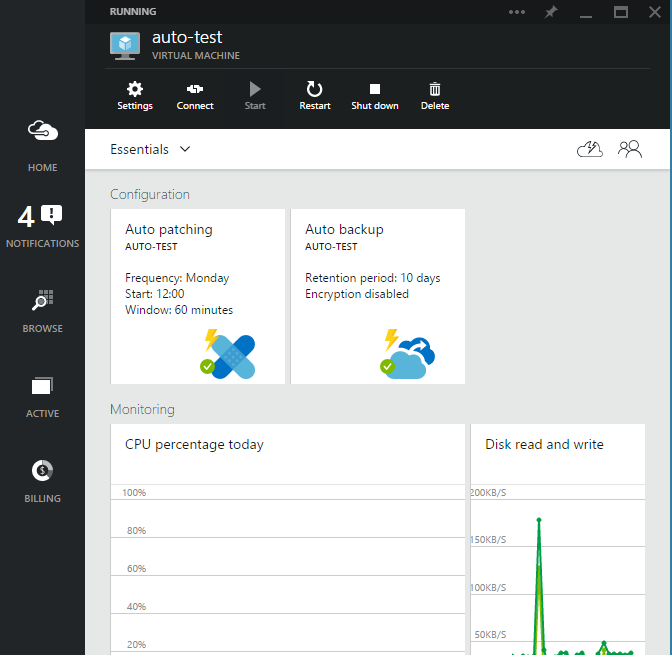
Figure 1. Configuration label has both services

Try these services out in the Azure Portal, and check out the documentation for further details.
English (United States)
Your Privacy Choices Opt-Out Icon Your Privacy Choices
Consumer Health Privacy Sitemap Contact Microsoft Privacy Manage cookies Terms of use Trademarks Safety & eco Recycling About our ads