
March 25, 2026
Share this page


How large-screen tablets make everyday tasks easier
Everyday tasks now demand more from our devices. A single day can mean juggling video meetings, shared documents, handwritten notes, research tabs, and creative tools all at once. When screen space is limited, constant switching slows everything down.
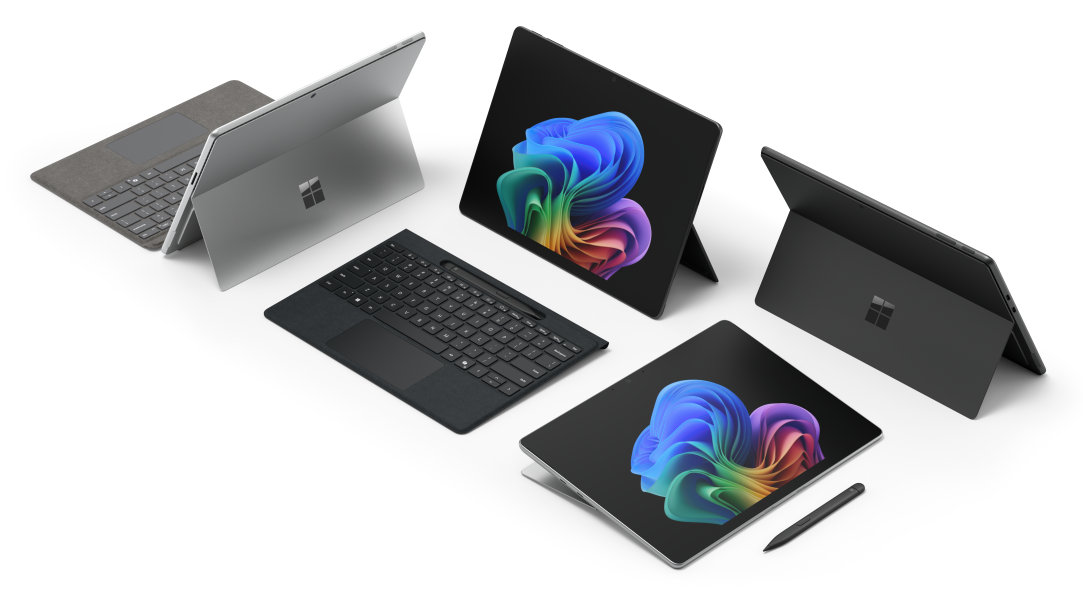
A large‑screen tablet, typically around 12 inches or larger, gives you room to work more naturally, with space for multitasking, reading, and focus. And when that larger display is built into a flexible 2‑in‑1 like Surface Pro, screen size becomes more than a feature—it becomes a real productivity advantage.
The core benefits of large-screen tablets for productivity
A tablet’s size influences how you work, create, and connect every day:
- Portability: A 12-inch tablet is lighter, more compact, and easier to carry—all day, anywhere. Surface Pro, 12‑inch is ideal for students, travelers, and mobile content creators.
- Productivity: A 13-inch large tablet gives you more screen real estate for multitasking, editing, and navigating complex workflows. Surface Pro, 13‑inch is great for professionals, creatives, and power users.
- 2‑in‑1 versatility: With touch, voice, Surface Slim Pen2 (with its generative AI technology), and attachable keyboards, Surface Pro, 12-inch and Surface Pro, 13-inch switch seamlessly between tablet creativity and full laptop productivity.
A larger display directly improves how you handle everyday tasks:
- Easier multitasking: Large-screen tablets make split‑screen work practical. You can review documents while joining a video call, compare files side by side, or drag content between apps without losing context.
- Improved readability: With more screen real estate, documents, spreadsheets, and textbooks are easier to read and navigate. Less zooming means less friction during longer work or study sessions.
- Better focus: Large-screen tablets reduce interruptions. Seeing more at once helps minimize context switching and keeps attention on the task at hand.
- More natural creativity: Writing, drawing, and editing feel more precise on a larger canvas—especially when using pen and touch input designed for creative work.
Large-screen tablets for multitasking
With more screen space to work with, a large-screen tablet makes a clear difference across common daily tasks.
- Work & productivity: Email, documents, presentations, and video meetings are easier to manage on a tablet for multitasking. You can stay in a meeting while editing files or reviewing notes, all on one screen.
- School & learning: Students and educators can take notes, read digital textbooks, and research simultaneously. Split‑screen layouts support lectures, studying, and collaboration without needing multiple devices.
- Personal organization: Calendars, budgeting tools, and planning apps are easier to manage when you can see more information at once, making it simpler to stay organized.
- Creativity & entertainment: From sketching and photo editing to streaming content, a larger display creates a more immersive experience while remaining portable.
How Surface Pro unlocks the full potential of a large-screen tablet
Surface Pro shows how a large-screen tablet can support work, learning, and creativity in one device. With tablet‑to‑laptop flexibility and attachable keyboards, Surface Pro shifts easily between tablet use and full laptop productivity—so you can write, present, sketch, or type depending on what you need to do.
Support for touch and pen input makes note‑taking and creative work feel natural, while attachable keyboards allow Surface Pro to be used for typing and focus.
When deciding between Surface Pro, 12‑inch and Surface Pro, 13‑inch, it comes down to how you balance mobility and workspace. Both deliver the intelligence of AI, long battery life,1 the security of Windows 11, and the performance of Qualcomm Snapdragon® X Elite and Plus processors. The larger display gives you more screen real estate for multitasking, reading, and editing content.
Tablet vs. laptop vs. phone: Why a large-screen tablet hits the sweet spot
A large-screen tablet fills the gap between devices:
- More portable and flexible than a laptop
- More capable and spacious than a phone
- One device for productivity, creativity, and downtime
This balance is why many users see a large-screen tablet—especially Surface Pro—as the best tablet for work and school.
Who benefits most from a large-screen tablet?
Because screen space and flexibility affect how people work differently, a large-screen tablet tends to benefit certain users more than others, for example:
- Hybrid workers moving between home, office, and travel
- Students balancing notes, research, and assignments
- Creators who want pen‑enabled flexibility without compromise
- Everyday users ready to replace multiple devices with one
The best tablet for work and school
A large-screen tablet gives you the space to work, learn, and create more comfortably. With Surface, the choice is yours. Choose Surface Pro, 12‑inch if portability, lighter weight, and budget are top priorities—ideal for students, travelers, and mobile creators. Choose Surface Pro, 13‑inch if you need more screen space, higher performance configuration options, and advanced connectivity—ideal for professionals, students, and creatives. Find your Surface Pro today.
Frequently asked questions
-
A large screen tablet typically has a display around 12 inches or larger, offering enough space for multitasking, reading, and productivity tasks.
-
Yes. Large‑screen tablets for productivity make it easier to manage documents, meetings, and multiple apps at once—especially in 2‑in‑1 designs like Surface Pro.
-
For many users, it can. Surface Pro, for example, combines a large-screen tablet experience with the flexibility to switch into full laptop productivity when you need it.
-
A larger display helps students take notes, research, and read simultaneously, making learning more efficient.
- [1] Battery life varies significantly based on usage, network and feature configuration, signal strength, settings and other factors. See Surface Battery Performance for details.
- [2] Sold separately.
Mentioned in this article

Compare Surface Copilot+ PCs
You may also like

The differences between Surface Laptop and Surface Pro from Microsoft

Why a Microsoft Surface is the best Windows device experience
