 Discover Windows
Discover Windows
Discover Windows
May 20, 2026
Share this page


Gaming on Windows 11 PCs lets you choose how you play. You can download the latest blockbuster titles, stream a game right away without waiting for an install, or jump between platforms and devices. You get the games you want, at the graphics setting you want, and with the peripherals you want.
From XBOX Game Pass and XBOX Cloud Gaming2 to the Microsoft Store on Windows and the XBOX Store on the XBOX PC app to popular third-party platforms like Steam, Epic Games Store, and GOG, Windows connects you to the largest catalog of PC games available. Whether you’re gaming on a high-performance desktop, a laptop on the go, or even a gaming handheld, Windows 11 supports the XBOX PC app so it’s easier to discover, access, and enjoy your next favorite game.
Play games your way with XBOX Game Pass
XBOX Game Pass3 gives players access to hundreds of games. Explore a wide range of games across genres—from major new releases to indie favorites—all in one place.
For players focused exclusively on PC gaming, PC Game Pass offers access to hundreds of PC titles, including new games on day one1. For those who want both downloadable games and cloud gaming access across devices, XBOX Game Pass Ultimate expands your options even further.
Game Pass Ultimate, Premium, and Essential let you play across PC, console, and supported devices with cloud gaming. This flexibility makes it easier to try something new, revisit old favorites, or jump into the latest releases.
Download or stream: choose how you play
One of the biggest advantages of gaming on Windows with XBOX is flexibility. You can choose whether to download and install games directly to your PC or stream them right away with XBOX Cloud Gaming.
Streaming games with XBOX Cloud Gaming offers a different kind of convenience. You can start playing without waiting for a full install, which is especially helpful if you have limited storage space or want to try a game quickly before committing more time to it.
Both options work within the broader XBOX ecosystem, so you can choose the experience that fits your setup and your schedule.
What’s included with Game Pass
Game Pass includes a library of hundreds of games and more.
Game Pass Ultimate and PC Game Pass subscribers get access to hundreds of games, including new games on day one1, helping players jump into major releases as soon as they arrive. Subscribers also get access to EA Play, adding even more popular titles to your library.
Additional benefits include in-game benefits for select free-to-play titles, and rewards for playing and shopping with XBOX. For players who like discovering new games while still building a long-term collection, these extras help extend the value beyond the subscription itself.
If your main goal is simply having access to a strong downloadable PC library, PC Game Pass offers a streamlined option.
The XBOX PC app: your gaming hub on Windows
The XBOX PC app helps bring your gaming experience together in one place.
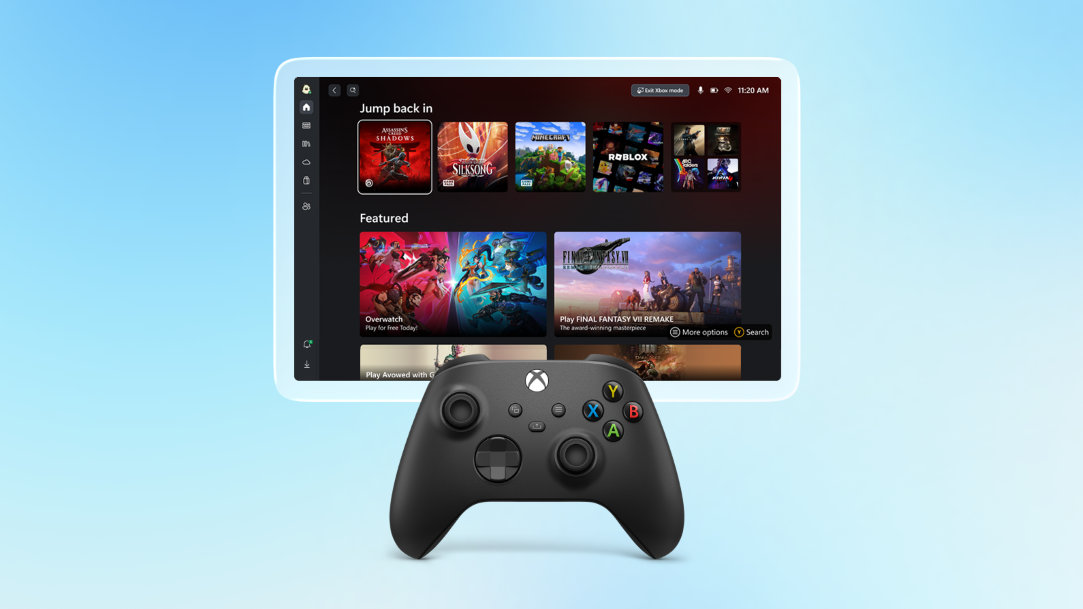
The XBOX PC app is pre-installed on most Windows 11 devices, making it easy to discover, install, launch, and manage your games. It connects your Game Pass library, your XBOX friends, achievements, and profile—and even games downloaded from other popular PC storefronts.
Getting started is simple:
The app also helps you stay connected with friends through XBOX Social, making it easier to see who’s online, chat across platforms, and continue your gaming experience across devices.
Play with third-party gaming platforms
With Windows gaming you can also access major third-party platforms like Steam, Epic Games Store, and GOG, giving you even more freedom to build your game library the way you want.
Whether you’re chasing seasonal sales, revisiting older classics, or buying directly from your preferred platform, Windows supports the broader PC gaming ecosystem.
This flexibility is one of the biggest reasons so many players choose Windows for gaming—it puts more choice in your hands.
Windows 11 is built for gaming
Windows devices can handle a wide range of games right away, and some PCs give you the option to upgrade over time.
Windows 11 also supports a wide range of gaming accessories, so you can play the way that feels best for you. That includes traditional keyboard-and-mouse setups, Bluetooth controllers like the XBOX Wireless Controller, and other supported peripherals from your favorite brands.
Whether you’re gaming casually or building a full setup over time, Windows gives you room to grow.
Find your next game on Windows
Windows gives players access to a massive game library, flexible ways to play, and powerful tools built for modern gaming.
Whether you prefer downloading games for peak performance, streaming instantly through the cloud, or managing everything through the XBOX PC app, Windows 11 helps make gaming simpler and more connected.
From XBOX Game Pass to third-party platforms and built-in Windows gaming features, your next game is always within reach.
Open the XBOX PC app, explore Game Pass, and find your next favorite game on Windows.