
Microsoft Teams for Small Business
Connect with prospects and customers – and move business forward.

Collaboration software built for small business
Chat, meet, and securely share files with your team and customers.

Meet from anywhere
Start meetings with anyone and boost engagement with virtual backgrounds, recordings, transcriptions, and AI-powered recaps.

Chat with anyone
Get work done with people inside and outside your company. Send messages, react with emojis, create teams, and coordinate events—all from one app.

Get things done in one place
Collaborate on documents in real time and reduce context switching by working in Microsoft 365 apps right from Teams.

Stay secure and productive
Proactively reduce risk while helping employees stay in the flow of work. Have peace of mind knowing sensitive information is encrypted in all chats, calls, meetings, and files.
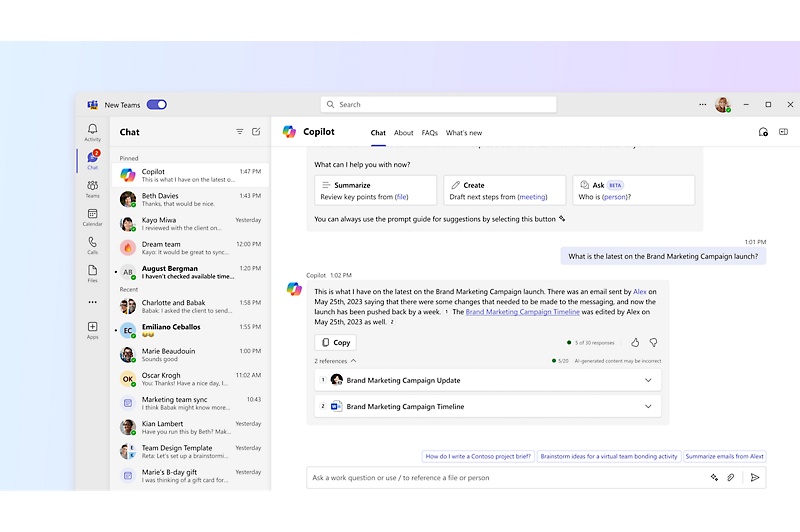
Streamline communication with Copilot in Teams
Track discussions in real time and summarize conversations.
Solutions
Simple, smart, secure
-
Communicate effortlessly in your flow of work and enable connectivity with external phone numbers and calling plans.6
Improve customer experiences with collaborative call handling and reporting in Queues app.7
Use Copilot and agents to bring AI to every call, boosting productivity, saving time, and improving interactions.
Back to tabsStreamline call management and enjoy peace of mind with a reliable and secure cloud-based calling solution.


-
Engage website visitors in real time through live chat in Microsoft Teams to shorten response time and improve customer experience.
Bring conversations, shared content, Microsoft Loop and OneNote pages, and third‑party apps together in one place.
Find, organize, and stay on top of chats and channels with personalized views that surface what matters most.
Protect chats and channels with access controls and information protection to help keep messages, files, and shared information secure.
Back to tabsUse AI‑powered workflows, Microsoft 365 Copilot and third‑party agents to turn conversations into valuable, shared context and action.


-
Run more effective meetings with AI‑driven insights, notes, and actions from Facilitator in Teams.8
Enable real‑time translation and interpretation so participants can engage in the language of their choice.8
Safeguard every Teams meeting with built‑in security controls and encryption to protect confidential content and conversations.
Back to tabsHost and manage professional, branded Teams events at scale.9


-
Use Places finder to book desks and rooms.
Support in-room and remote participants with inclusive, engaging meeting experiences in Teams.
Use collaborative AI like Facilitator to prepare, participate, and follow up on meetings automatically.
Back to tabsDeploy, secure, and manage your environment and use insights to plan effectively.


Find the right Teams plan for your small business
There are several ways to get Teams for your small business. Compare plans and pricing to find the small business software solution that works best for you.
Microsoft Teams Essentials
Originally starting from $4.00 now starting from $4.00
$4.00 $4.00
user/month, paid yearly
(Annual subscription—auto renews)2
-
Unlimited group meetings for up to 30 hours and 300 participants
-
10 GB of cloud storage per user
-
Real-time collaboration with file sharing, tasks, and polling
-
Team meeting recordings with transcripts and live captions (English)4
-
Standard security with data encryption for meetings, chats, calls, and files
-
Microsoft 365 Copilot, available as an add-on.5
Microsoft 365 Business Basic
Originally starting from $7.00 now starting from $7.00
$7.00 $7.00
user/month, paid yearly
(Annual subscription—auto renews)2
Everything offered in Teams Essentials, plus:
-
Identity and access management for up to 300 users
-
Web and mobile versions of Word, Excel, PowerPoint, Outlook, and other apps
-
Custom business email
-
Chat, call, meet, host events
-
1 TB of cloud storage per user
-
10+ additional apps (including Microsoft Bookings, Planner, and Forms)
Microsoft 365 Business Standard
Originally starting from $14.00 now starting from $14.00
$14.00 $14.00
user/month, paid yearly
(Annual subscription—auto renews)2
Everything offered in Business Basic, plus:
-
Identity and access management for up to 300 users
-
Desktop, web, and mobile versions of Word, Excel, PowerPoint, Outlook, and other apps
-
Custom business email
-
Chat, call, meet, host events
-
1 TB of cloud storage per user
-
10+ additional apps (including Microsoft Loop, Clipchamp, Bookings, Planner, and Forms)
Microsoft 365 Business Basic (no Teams)
Originally starting from $5.40 now starting from $5.40
$5.40 $5.40
user/month, paid yearly
(Annual subscription—auto renews)2
-
Identity and access management for up to 300 users
-
Web and mobile versions of Word, Excel, PowerPoint, Outlook, and other apps
-
Custom business email
-
Microsoft 365 E5 (no Teams)
1 TB of cloud storage per user
-
.
10+ additional apps (including Microsoft Bookings, Planner, and Forms)
Microsoft 365 Business Standard (no Teams)
Originally starting from $10.79 now starting from $10.79
$10.79 $10.79
user/month, paid yearly
(Annual subscription—auto renews)2
-
Everything offered in Business Basic, plus:
-
Identity and access management for up to 300 users
-
Desktop, web, and mobile versions of Word, Excel, PowerPoint, Outlook, and other apps
-
Custom business email
-
1 TB of cloud storage per user
-
10+ additional apps (including Microsoft Loop, Clipchamp, Bookings, Planner, and Forms)
Stay in the flow of work with Microsoft 365
Learn how Microsoft 365 and Teams work seamlessly with collaborative apps to help small businesses stay connected, protected, and productive.

Expand your reach with Teams Essentials
Learn how Go Narrative used Teams to re-create the magic of in-person workshops virtually, using features such as breakout rooms, whiteboarding, and transcription.
Add to Teams
Teams Phone
Get the virtual calling features you need to stay productive, manage calls, and connect reliably.
Microsoft Places
Modernize the office with a connected platform that optimizes physical spaces for hybrid work.
Microsoft Viva
Support an inclusive work culture with spaces for conversations, company news, and shared interests.
Microsoft Designer
Create professional visuals and graphics in a flash with the help of AI.
Need help?

Teams support
Find how-to articles, tutorials, FAQs, and instructional content to help you get started.

Documentation
Explore guidance and learning resources to help your small business get the most out of Teams.

Video trainings and tips
Subscribe to the Teams YouTube channel to learn more about the latest features.

Quick start tutorial
Get up and running in Teams with the basic info you need to be productive right away.
Add Copilot to your Microsoft plan.5
Sign in to add Copilot to your existing Microsoft 365 business plan.
If you’re not an existing customer, buy a Microsoft 365 plan to get started.
Frequently asked questions
-
No, a free version of Teams is only available for home and personal use.
For business use, paid Teams options are available—either as a standalone offering or as part of Microsoft 365. Teams for business use includes a wider range of features, like expanded storage and increased security, which make it ideal for small, medium, or enterprise businesses.
Explore plans and pricing to compare options, or get started with a free 30-day trial of Microsoft 365 Business Basic or Microsoft 365 Business Standard.
-
Yes, Teams Essentials is a standalone offering designed with small businesses in mind. Explore plans and pricing to find out what’s included in Teams Essentials.
- [1] Only available in select offerings.
- [2] Once your paid subscription begins, cancellation policies vary based on your status as a new customer, product, and domain selections on Microsoft. Learn more. Cancel your Microsoft 365 subscription any time by going to the Microsoft 365 admin center. When a subscription is canceled, all associated data will be deleted. Learn more about data retention, deletion, and destruction in Microsoft 365.
- [3] After your one-month free trial, you will be charged the applicable subscription fee. Credit card required. Cancel any time to stop future charges.
- [4] Live captions are available in the English language with Microsoft account identities and over 30 additional languages with Microsoft Entra ID (formerly Azure Active Directory) identities. For more information, see the Live Captions support article.
- [5] Microsoft 365 Copilot may not be available for all markets and languages. To purchase, customers must have a qualifying plan for enterprise or business.
- [6] Teams Phone enables advanced call handling and connectivity with a Public Switched Telephone Network (PSTN) solution. A PSTN solution is separate from a Teams Phone license. A PSTN solution provides a customer’s tenant with phone numbers and PSTN access to domestic, international, and emergency calling.
- [7] A Teams Premium license add-on to Teams Phone is required to access the Queues app.
- [8] AI-powered meeting features are available with Microsoft 365 Personal, Family, Premium, and Teams Premium subscriptions. Feature availability may vary by plan.
- [9] Available as an add‑on license, Attendee Capacity Packs extend Teams events to support up to 100,000 attendees.
Follow Microsoft Teams