Multi-device Conversation (Preview)
Multi-device Conversation (Preview) is the first step towards a personal universal translator and Translator’s overall goal of breaking the language barrier. It’s a multi-device, multi-language, in person translation feature available in the Microsoft Translator apps (Android, iOS, and Amazon Fire) and from the browser at http://translate.it.
What are the live feature’s typical use cases?
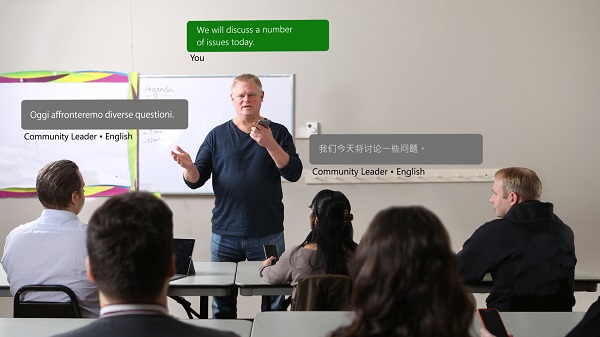
There are many uses for the live feature, and here are just some of the situations:
Be part of the conversation
Join a conversation regardless of your language. Chat. Share experiences. Make a connection.
Present to a wider audience
Break the language barrier and make your message heard by everyone in the room.
Immerse as you travel
Interact with ease when traveling internationally. Meet locals. Make new friends.
Make everyone feel welcome
Greet anyone regardless of the language they speak. Provide people with needed information.
How does the multi-device conversation feature work?
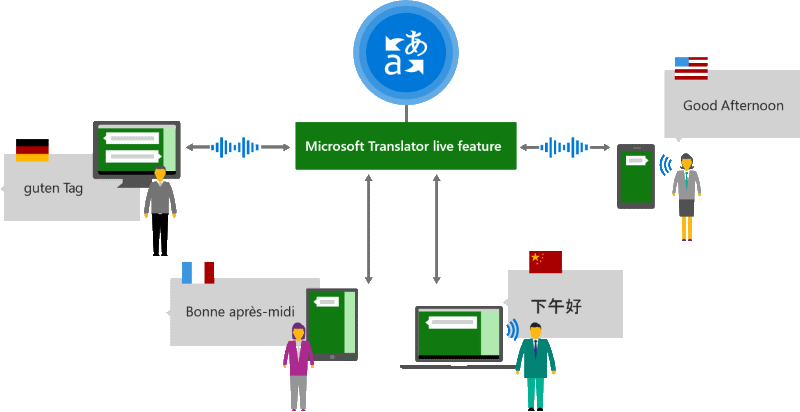
The multi-device conversation feature is built with the Microsoft Azure Cognitive Services Speech SDK and Translator’s core text translation services. It manages all the different elements necessary to enable these multi-person, multi-device scenarios:
- Creates and manages private conversation sessions, including the attendees list
- Manages audio and text flow from and to the speaker(s) and the translation APIs
- Use of neural machine translation for all supported languages
Learn more about the multi-device conversation feature in Microsoft Azure Cognitive Services Speech documentation.
How do I get started?
To get started, download the Microsoft Translator app or start a translated conversation from your browser at http://translate.it