
AI is moving fast at Microsoft. Every month, we’re discovering new ways that our employees are using Microsoft 365 Copilot and rapidly emerging agentic tools to work smarter, automate routine tasks, and unlock new patterns of productivity.
As our ecosystem of AI tools expands, so does our responsibility and opportunity. We have to guide the process with the right structure, clarity, and confidence.

“With Agent 365, IT leaders can confidently embrace this innovation through a unified control plane that provides the capabilities that enterprises need to ensure agents are governed, observable, and secure—regardless of which tools, frameworks, or models were used to create them.”
Brian Fielder, vice president, Microsoft Digital
We approach the governance of AI as a task we’re shaping in real time while observing the different ways our people are using AI in their daily work.
That’s the advantage of being Customer Zero here in Microsoft Digital, the company’s IT organization. We’re living this transformation across Microsoft 365 every day, evolving our governance model alongside the evolution of AI and agents.
“With Agent 365, IT leaders can confidently embrace this innovation through a unified control plane that provides the capabilities that enterprises need to ensure agents are governed, observable, and secure—regardless of which tools, frameworks, or models were used to create them,” says Brian Fielder, vice president of Microsoft Digital.
Our governance approach is built around two complementary control planes: Microsoft Agent 365 for agents and Copilot controls for Microsoft 365 Copilot.

“We’ve seen the rapid pace of innovation firsthand. As Copilot evolves and agents expand, the control planes we use must evolve also. New AI and agent capabilities raise the bar for governance and management, so at Microsoft Digital, we’re working with our product teams to evolve the management to keep the company secure, informed, and ready for whatever comes next.”
David Johnson, principal architect, Microsoft Digital
These control planes are supported by the four fundamental concepts that we apply to every enterprise system we operate: security, governance, management, and observability.
“We’ve seen the rapid pace of innovation firsthand,” says David Johnson, principal architect in Microsoft Digital. “As Copilot evolves and agents expand, the control planes we use must evolve also. New AI and agent capabilities raise the bar for governance and management, so at Microsoft Digital, we’re working with our product teams to evolve the management to keep the company secure, informed, and ready for whatever comes next.”
This model gives us a consistent way to support new capabilities, encourage responsible experimentation, and help our employees adopt AI and agents with fewer hurdles.
Expanding our AI governance practices
As AI use evolves within our organization, we’re seeing clear patterns emerging. Copilot goes well beyond chat. It can execute tasks, create and modify content directly inside apps, connect systems, and coordinate multi‑step work through agents. The AI ecosystem is becoming more effective at boosting productivity with model choices, agent-to-agent orchestration, and agent mode within applications that leverage natural language to complete tasks.
These patterns are exciting, move fast, and expand how we think about governance.
The shift became clear as teams across Microsoft began experimenting with new AI capabilities in the last few years. Accelerating Copilot usage showed us how quickly people adopt tools to help them work better and faster. Rapid agent growth showed us how much value workers get when AI takes on more complex, multi‑step tasks. These expansions pushed us to evolve our security, governance, and management approaches alongside the technology.
That’s what led us to define two complementary control planes for Copilot and agents—not because one replaces the other, but because they serve complementary roles in the ecosystem. Copilot goes beyond chat, surfacing intelligence directly inside apps, workflows, and context to help people work smarter in the flow of their apps. Agents take on broader responsibilities across services, teams, and data boundaries.
By recognizing the different types of work that Copilot and agents do, we’re better equipped to manage and govern them. We can apply consistent principles, tailor the controls to each type of tool, and give employees a clearer understanding of how each AI capability behaves. It’s an approach that grows with technology, instead of forcing everything into a single frame.
Building governance on foundational pillars
As Copilot and agents expand across Microsoft 365 and the rest of our product offerings, we’ve anchored our approach on the fundamentals of security, governance, management, and observability. These principles have shaped our enterprise systems for years. What’s changing is how we apply them to a fast‑moving AI ecosystem.
Security and governance
Security and governance are the baseline for us at Microsoft. Every new capability—whether it’s Copilot helping you draft, find, or create content, or an agent running an automated workflow—must adhere to security and governance principles.

“The Microsoft 365 admin center is becoming the place where controls come together. Policies, observability, and configuration are in a single experience, so admins don’t have to hunt across multiple portals. That consolidation makes it easier for us to understand how AI is behaving in our tenant and what controls we have available to guide it.”
Mike Powers, senior systems engineer and AI admin, Microsoft Digital
Products like Microsoft Purview and Defender allow us to better understand what data our AI tools are accessing, for how long, and where additional guardrails might be needed as features and usage evolve.
Management
Management completes the foundation, and measurement is how we track our progress.
As AI tools take on more responsibility, we needed a unified way to manage access, lifecycle, and configuration. Agent 365 is evolving the Microsoft Admin Center to serve as a central focal point for agent management and observability. Agent 365 brings together agent information and controls that were previously scattered across different admin experiences and puts them in one coherent place.
“The Microsoft 365 admin center is becoming the place where controls come together,” says Mike Powers, a senior systems engineer and AI admin in Microsoft Digital. “Policies, observability, and configuration are in a single experience, so admins don’t have to hunt across multiple portals. That consolidation makes it easier for us to understand how AI is behaving in our tenant and what controls we have available to guide it.”
It’s how we track adoption, quality, and business value like time saved and reduction in operational costs. It’s how we identify what’s working, where to invest next, and how we can guide product teams with real‑world insights. We look carefully at active agents, usage patterns, assisted hours, sentiment, and the outcomes our people achieve with AI. Different audiences share the same goal: using telemetry to make AI better.
Together, these principles allow us to evolve our governance model without slowing innovation. They give us a steady foundation in a rapidly expanding environment—one where Copilot and agents will continue to grow, intersect, and unlock new ways of working.
Observability with Microsoft Agent 365
The widespread use of agents is an accelerating trend here at Microsoft. We use them to automate multi‑step tasks, build applications in plain language, connect systems, and streamline work that previously depended on manual coordination.
As the number of agents grows and becomes more autonomous, we need a management approach that matches their scale and autonomy. That’s what Microsoft Agent 365 gives us—a control plane designed for AI and agentic workloads that operate across platforms and traditional admin boundaries.
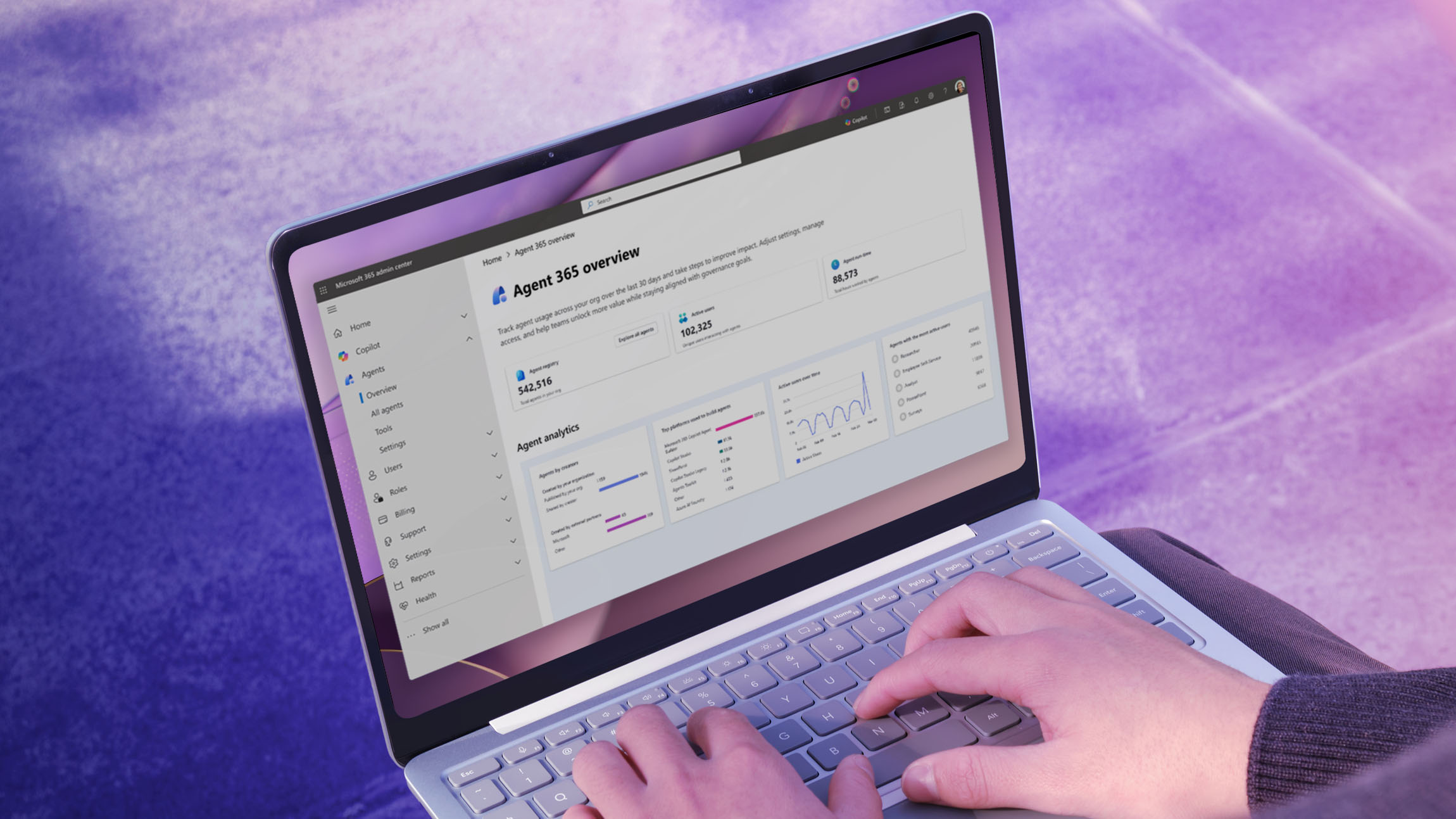
Agent 365 provides a registry for agents that lets us discover and understand how agents behave across Microsoft 365. It shows us who built them, who can use them, and what data they can access. From a single admin console, we can observe and manage agents created across different platforms. Day to day, Agent 365 gives AI admins agent observability we didn’t have before, and a way to connect insight to action.
“Agents represent a significant and growing workload that tenant administrators manage as part of day‑to‑day operations,” Powers says. “Agent 365 helps bring clarity to a diverse and rapidly scaling agent population by providing a centralized place to observe and manage how agents operate. This centralized approach is bringing together admin teams like never before so we can apply broad expertise to agent management.”
That clarity matters.
Agents behave differently than Copilot experiences. They can run continuously, trigger processes automatically, and touch systems across organizational boundaries. By treating them as advanced workloads, we can apply governance that supports experimentation without losing control over the ecosystem.
Agent 365 gives teams the confidence to build agents, knowing there’s a clear, consistent framework behind them. It helps ensure agents scale responsibly, are discoverable, and align to the enterprise patterns that keep Microsoft secure and productive.
Keeping track of Copilot controls
We rely on Copilot controls to give us a unified way to govern how different Copilot experiences show up for employees.
Copilot controls aren’t a single product. It’s a fabric of controls, insights, and guardrails that help us guide Copilot usage as it grows. It brings together settings, reports, and policies that once lived across separate admin surfaces and connects them into one coherent system.

“Copilot controls bring everything into one place, so admins don’t have to jump across different reports. It gives them a holistic view of Copilot health. That includes licenses, sentiment, usage, and recommendations. It’s everything they need to understand how Copilot is working in our tenant.”
Amy Ceurvorst, direct of business programs, Microsoft Digital
At its core, Copilot controls help us manage three things:
- Who has access
- How the experience is configured
- How we measure adoption and value
It’s how we track whether licenses are assigned as expected, whether teams are using Copilot regularly or occasionally, and where configuration gaps may exist. It also recommends changes that can make Copilot more effective and secure.
As Copilot evolves, our Copilot controls will evolve with it. New features, security patterns, and use cases all plug into the same foundation. That gives admins a rhythm they can rely on, even as the technology continues to move rapidly.
It also gives business leaders clearer visibility into how Microsoft 365 Copilot helps people work—how often it’s used, what tasks it supports, and where impact shows up.
“Copilot controls bring everything into one place, so admins don’t have to jump across different reports,” says Amy Ceurvorst, a director of business programs in Microsoft Digital. “It gives them a holistic view of Copilot health. That includes licenses, sentiment, usage, and recommendations. It’s everything they need to understand how Copilot is working in our tenant.”
That clarity is critical. It helps us guide Copilot responsibly without slowing its momentum. It gives our admins confidence in how the experience behaves. It gives our engineering teams the feedback they need to keep improving the platform. And it gives our employees a secure, well‑governed environment where they can adopt Copilot at their own pace.
Applying Agent 365 and Copilot controls as Customer Zero
We use Agent 365 and Copilot controls every day. They help us understand what AI is doing inside Microsoft, how these tools are evolving, and where we need to focus our efforts next.
These systems give us visibility we didn’t have a year ago, as well as a way to move faster without losing alignment across security, IT, and business teams.

“Measurement tells us what’s really happening. It shows us where people are finding value and where they need help. We can see the friction points, the successful patterns, and the opportunities that aren’t obvious from the surface. Having that level of insight lets us give the product team clear, actionable feedback.”
Tanya Roberts, senior business program manager, Microsoft Digital
Understanding how agents perform in the real world is essential. With Agent 365, we look at what’s being created, what’s actively being used, and which workflows people rely on most. We review how agents are scoped and published, and we check whether they’re operating as expected. These signals help us see emerging patterns—what’s gaining traction, what’s causing confusion, and where we need clearer controls.
The same applies to Copilot.
Copilot controls give us a consolidated view of how Copilot appears across the tenant—licenses, usage, sentiment, and recommended configuration changes. We use that data to advise product groups, flag issues early, and help business teams to adopt Copilot in ways that make sense for their work. Internally, these insights reduce friction. Externally, they help shape the product.
Cross‑team collaboration is essential. Security teams watch for data exposure risks. IT teams manage configuration and rollout. Business units surface scenarios they want to enable. We coordinate across all these groups so Copilot and agents can scale smoothly.
Measurement ties it all together.
“Measurement tells us what’s really happening,” says Tanya Roberts, a senior business program manager in Microsoft Digital. “It shows us where people are finding value and where they need help. We can see the friction points, the successful patterns, and the opportunities that aren’t obvious from the surface. Having that level of insight lets us give the product team clear, actionable feedback. We can connect the dots between what people are trying to do and what the technology needs to support next.”
This is how we make AI real and practical. We learn from what happens in production, evolve the controls, and feed those lessons back into the product. It’s an ongoing cycle that grows stronger as adoption increases.
Looking forward
The AI landscape isn’t slowing down. Copilot will keep getting smarter and more broadly used across other apps and services. Agents will take on more complex work. And the boundaries between them will continue to blur as new capabilities emerge across Microsoft 365. That’s why our governance model has to evolve alongside the technology.
We’re designing for a future where AI spans more systems, touches more data, and supports more business processes. That means deeper integration between Agent 365 and our Copilot controls; more connected signals across security, management, and measurement; and governance patterns that hold up no matter how AI capabilities shift.
We expect the control planes we use will continue expanding in ways that give admins even more clarity. We’re looking forward to seeing richer telemetry across Copilot and agents. We plan to develop simpler ways to scope, publish, and update AI workloads. And we anticipate more advanced governance features, which will help organizations understand not just what AI is doing, but why it’s doing it.
Our work with Microsoft product teams as Customer Zero will continue to shape this evolution. As part of this process, we can provide real‑world insights about how AI behaves at enterprise scale. That feedback is already influencing how controls show up in the Microsoft 365 admin center and how Agent 365 is expanding to support new workloads. These feedback loops will only get stronger over time.
We’re building our AI management approach into a living system that adapts to new capabilities, new risks, and new opportunities. A system that supports innovation instead of slowing it down. And one that keeps Microsoft—and our customers—confident as the AI stack keeps changing.

Key takeaways
If you’re establishing governance for Copilot and AI agents in your organization, consider these actions to drive responsible, scalable adoption:
- Start with governance fundamentals. Use security and governance, management, and observability as your pillars before layering in other tools or processes. Many of the same fundamentals that unblock Copilot provide the reason why a tenant can be comfortable with knowledge-only agents.
- Understand the unique and intersecting governance paths for Copilot and agents. Both have some of the same fundamentals but Copilot and agents have distinct AI controls, with different responsibilities, risks, and oversight needs.
- Use measurement to guide decisions. Track usage, value, sentiment, and friction to understand how AI is performing and where you need to refine the experience.
- Make governance a shared responsibility. Bring together security, IT, business leaders, and product teams to ensure clarity, alignment, and end‑to‑end control.
- Design governance that evolves. Adopt controls that can adapt as Copilot grows, agents mature, and new AI capabilities enter the stack.
- Prioritize clarity for builders and admins. Keep patterns simple, make guidance visible, and ensure that controls are easy to understand so your teams can adopt AI confidently.
- Invest in the AI admin role. Create space for a dedicated AI admin role and skill up AI Admins with deep, cross‑platform expertise, including SharePoint, Power Platform, Azure AI Foundry, Entra identity, and Exchange. Yes, agents will soon have their own mailboxes. In the evolving world of agents, effective administration depends on knowing how agent lifecycle is tied to the platforms where they are created and operate.


Related links
- Learn more about our Microsoft Agent 365 product launch.
- Check out our story announcing our internal rollout of Microsoft Agent 365 here at Microsoft.
- Find out more about how we’re tackling Copilot governance internally at Microsoft.
- Learn more Control controls security and governance.
- Find out how we’re riding the wave of agents washing over Microsoft with good governance.
- Use Agent 365 in the Microsoft 365 admin center.
- Manage Microsoft 365 Copilot scenarios in the Microsoft 365 admin center.
- Explore the tools, practices, and policies regarding Responsible AI at Microsoft.

We’d like to hear from you!


