As organizations accelerate their adoption of agents to automate tasks, boost productivity, and create better customer experiences, they often hit a critical challenge: How do you scale AI strategically while keeping costs predictable and maintaining good governance?
Microsoft Copilot for Microsoft 365 and Microsoft Copilot Studio give you powerful tools to build and distribute agents across your enterprise. But moving from pilot projects to full-scale deployments takes a thoughtful approach to cost management and rollout strategy.
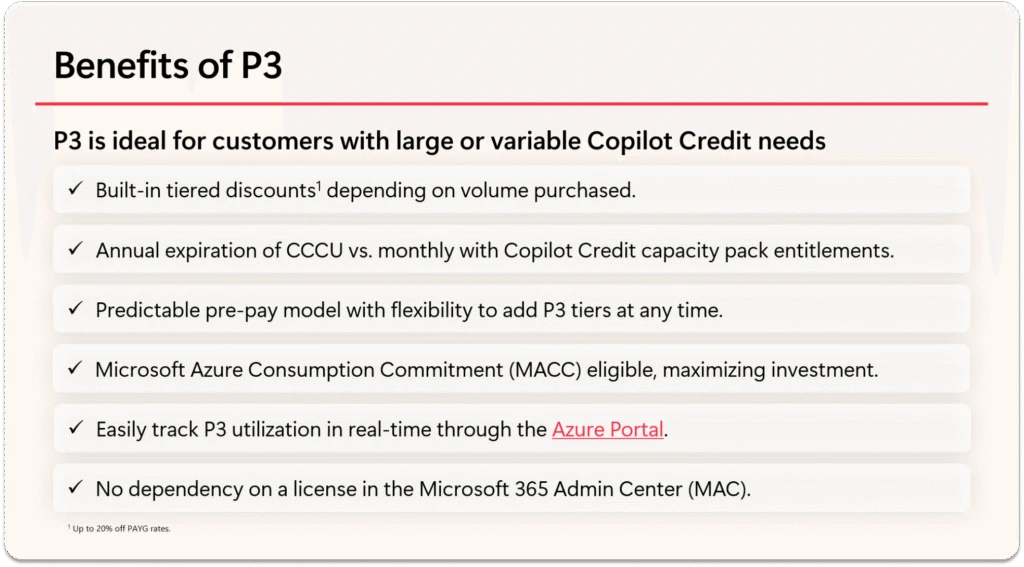
Today, we’re introducing the Copilot Credit Pre-Purchase Plan (P3), a new way to purchase Copilot Credits designed for organizations ready to scale their agent initiative with confidence, predictable costs, and streamlined management across multiple workloads.
What is the Pre-Purchase Plan (P3)?
The Pre-Purchase Plan (P3) is a one-year, pay-up-front purchase option for Copilot Credits at built-in tiered discounts. Customers purchase a pool of Copilot Credits Commit Units (CCCU) that can be used across Copilot Studio, Dynamics 365 first-party agents, and Copilot Chat. If usage exceeds the available amount of CCCU, customers can choose to pay for additional Copilot Credit usage by either purchasing another P3 plan or being billed on a pay-as-you-go (PayGo) basis.
The P3 plan auto-renews annually and counts toward the customer’s Microsoft Azure Consumption Commitment (MACC). P3 works great for organizations looking for cost savings and simplified governance across multiple workloads. Talk to your Microsoft account team to learn more about P3.
A smart approach to rolling out agents
We recommend starting with a phased rollout that helps you get started, prove value, and scale, all while keeping costs under control.
Phase 1: Build agent patterns and proof-of-concept agents
Start small and learn what works for your organization:
- Build agents on a small scale with both Microsoft 365 Copilot users and non-licensed users, letting departments and lines of business test agent capabilities in real-world scenarios.
- Use Pay-as-you-go (PayGo) to get started with zero upfront commitment at just $0.01 per message, billed through Azure.
- Connect PayGo to specific environments where you’re building agents and cross-charge usage to unlicensed users in Microsoft Admin Center (MAC). This helps you understand usage patterns and get clear visibility into costs across departments.
- Use agent sharing controls in MAC to share agents only with the people you want and start with individuals in specific departments. We recommend turning off organization-wide sharing to avoid oversharing during testing.
Phase 2: Scale up your agents with P3 Copilot Credits
Once you’ve proven value on a smaller scale, it’s time to expand:
- Roll out agents across larger parts of your organization: build cross-department agents and department-wide solutions grounded in your Microsoft 365 data.
- Manage your costs to turn your usage patterns into predictable, lower costs. Copilot credits P3 includes tiered discounts and a single pool of Copilot Credit Commit Units which make it perfect for organizations with growing, variable demand across Copilot Studio, Dynamics 365, and Microsoft 365 Copilot.
- Connect P3 to your departments in MAC and use them to track usage from unlicensed users. Map your cost centers to P3 based on what each team needs, and easily cross charge those agents’ users.
- Scale up agent sharing in MAC more broadly through departmental security groups, moving from individual sharing to wider distribution as your confidence and governance mature.
Phase 3: Go wall to wall with agents and Pre-Purchase Plans
Once you’ve landed departmental value, expand agents across your entire company:
- Roll out agents across your entire organization. Build companywide agents and intra-department solutions grounded in your Microsoft 365 data, and connect your valuable systems of record through Copilot Studio agents distributed in Microsoft 365 Copilot.
- Manage your costs in MAC to turn your usage patterns into predictable, lower costs. P3 Copilot credits help cost-optimize your variable agent demand.
- Consider moving heavy individual users to Microsoft 365 Copilot licenses ($30 per user/month) to save money or cap their costs.
- Expand agent sharing in MAC more broadly through functional or company-wide security groups, moving from departmental sharing to wider company distribution as you land a fully formed agent maturity model.
Understanding your purchase options
Microsoft offers flexible licensing to meet different organizational needs:
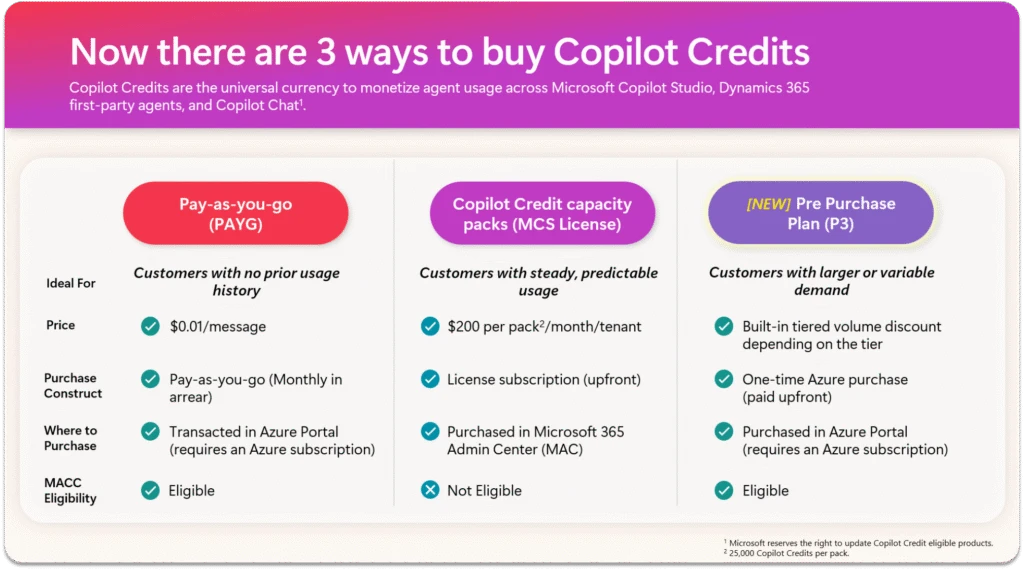
Pay-as-you-go (PayGo) – Perfect for unpredictable or low-volume usage and getting started. You pay $0.01 per message, billed through Azure with no upfront purchase. Learn more at Setting up pay-as-you-go.
Copilot Credit Capacity Packs – For more predictable Copilot Credit usage. Copilot Credit capacity packs are $200 per tenant per month for 25,000 Copilot Credit. Buy them directly in the Microsoft 365 admin center and grab multiple packs as needed. Learn more at Buy and manage prepaid capacity.
Pre-Purchase Plan (P3) – For larger or cross-workload needs with tiered discounts across Copilot Studio, Dynamics 365, and Microsoft 365 Copilot. It’s an annual commitment with pay-as-you-go overages, auto-renewal, and MACC decrements. Contact your Microsoft account team to learn more.
Microsoft 365 Copilot User License – The Copilot Studio lite experience is included in the Microsoft 365 Copilot license at $30 per user/month, giving each licensed user access to build internal agents. Agents built for Microsoft Teams, SharePoint, and Microsoft 365 Copilot are included at no extra charge.
Comprehensive cost management throughout your journey
Without good cost management, even the most promising AI initiatives can run into financial surprises and governance headaches. Microsoft’s agent cost management framework gives you an end-to-end approach:
Step 1: Estimation
Use the Copilot Studio Agent Consumption Estimator to forecast monthly message consumption and compare costs between billing models. You can also see what’s already covered under your existing licenses.
Step 2: Billing setup
Pick the licensing model that matches your usage patterns. This could be PayGo for exploration, Copilot Credit capacity packs for steady Copilot Studio usage, P3 for enterprise-scale cross-workload deployment, or user licenses for power users.
Step 3: Tracking and forecasting
Check out detailed reports in the Copilot Control System (CCS) and Power Platform Admin Center (PPAC). You’ll see message consumption breakdowns, real-time alerts, historical data, and Azure Cost Management integration. Learn more at Microsoft 365 reports in the admin center.
Step 4: Active management and controls
Admins can manage who creates and uses agents, set per-user and per-agent message limits, use departmental billing to allocate costs, and block or deactivate agents when needed. Learn how to Manage Copilot agents in the Microsoft 365 Admin Center.
Why this matters
Agents have huge potential to transform how your business operates, but that potential needs a solid foundation of financial governance and smart rollout planning. By taking a phased approach – starting with PayGo for exploration and moving to P3 as you scale – you can confidently accelerate your AI journey while:
- Keeping costs predictable through tiered discounts and consolidated metering
- Strengthening governance with detailed controls and visibility
- Maximizing ROI by matching licensing to how you actually use the platform
- Driving faster adoption by giving finance teams and executives confidence in your cost management
This proactive approach not only protects your budget but also builds trust with stakeholders, making it easier to expand AI-driven solutions across your entire organization.
Next Steps: Take control of your agent costs
Now’s the time to take charge of your AI journey and turn potential risks into real opportunities. Check out these resources to learn more about your options:
- Read the full Agent Cost Management eBook
- Try the Copilot Studio Agent Consumption Estimator
- Read about the Copilot Credit P3 best practices
- Watch the Agent Cost Controls webinar
- Listen to the Cost Controls podcast episode
- Explore cost management documentation
- Learn about Microsoft 365 Copilot Pay-As-You-Go
Start your agent journey with confidence, scale with predictability, and transform with control. Contact your Microsoft account team to discuss Pre-Purchase Plan Copilot Commit Units.