Have you ever struggled to find an important document or photo? Forgotten which app a colleague shared an important data point with you on? Browsed a website but forgot to bookmark it?
Recall on Copilot+ PCs can help. It uses whatever details you remember about the missing item to find it for you.
Our team in Microsoft Digital, the company’s IT organization, has deployed Recall, giving our employees access to its AI-powered memory in a secure and managed environment. Recall now integrates with Microsoft Purview, which layers enterprise-grade security and compliance controls on top of Recall’s local AI capabilities.
How Windows Recall works
Windows Recall is an AI-powered feature built directly into Copilot+ PCs with Windows 11. It’s designed to solve a problem every person knows too well: Finding something you’ve already seen.
Here are its core capabilities:
- Explore content with a visual timeline. Recall captures periodic screenshots of your active window and visualizes them in an explorable, chronological timeline. When you need to revisit something, you can scroll through your activity or jump straight to the moment you remember seeing it.
- Semantic AI-powered search. No need to recall exact filenames. Just describe what you remember—like “blue sustainability slide from last meeting”—and Recall uses on-device AI to surface images or text that match the description.
- Full user control and privacy. IT admins have a full set of controls to manage security and privacy when enabling the Recall feature for the enterprise. Once enabled by enterprise admins, you as the end user then have the choice to opt in to enable snapshots on your machines. Only your device stores them, and they’re encrypted locally via BitLocker or Device Encryption. Access requires Windows Hello biometrics (your face or fingerprint), which ensures only you can view them.
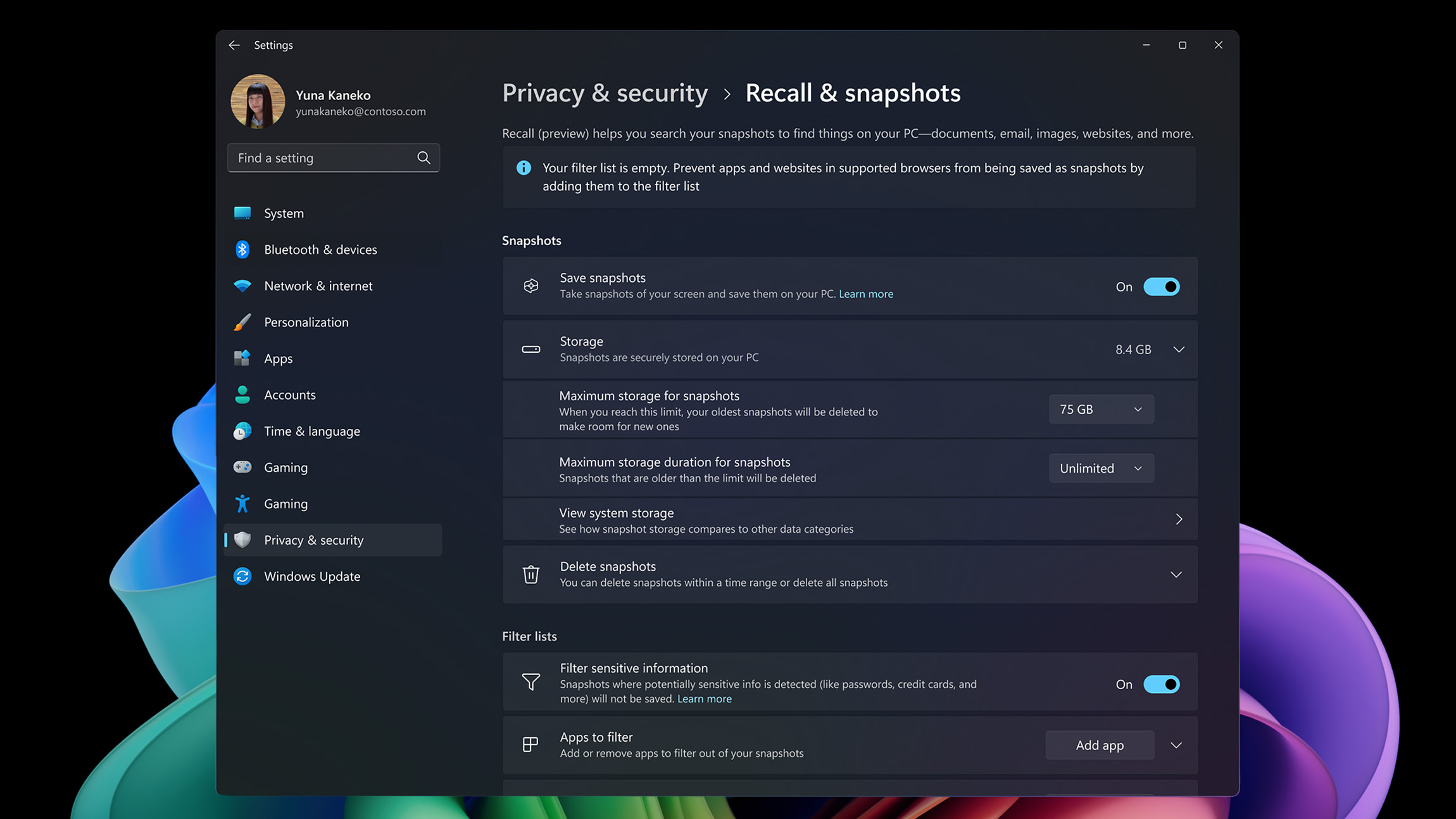
- Granular snapshot management. You choose which apps and websites to include or exclude. You can pause snapshot capture, delete past captures, and set retention limits (e.g., 30, 60, 90, or 180 days) to manage storage and privacy. And IT admins can control how these capabilities work for the entire organization.
- All snapshots, indexing, and AI processing occur on-device. Recall runs completely locally—no data leaves your PC.It never shares your data with Microsoft or third parties, nor across different user accounts on the same device.
- Jumping back in. Windows Recall doesn’t just help you find something you saw before, it helps you pick up where you left off, getting right back to the page, slide, or chat in Word, Excel, PowerPoint, and Teams, as well as in an app, document, or webpage.
It’s like having a photographic memory for your digital life. Recall is a productivity booster. But it’s also a security-first, enterprise-ready feature.

“We’ve been working for over a year with Microsoft Digital to understand how Windows Recall will function best in the enterprise environment. They helped us get it ready for our customers.”
Adam Wayment, principal product manager, Windows product team
To ensure security, privacy, and governance, the Windows product team turned to our team in Microsoft Digital, the company’s IT organization, to test Windows Recall. This happened after early users of the feature suggested that better controls needed to be put in place. Our team helped the product group design and deploy better enterprise controls.
This collaboration helped shape Recall into a feature that works for everyone—from individual users to global enterprises.
“We’ve been working for over a year with Microsoft Digital to understand how Windows Recall will function best in the enterprise environment,” says Adam Wayment, a principal program manager lead for Windows Recall. “They helped us get it ready for our customers.”
Establishing security and privacy for the enterprise
Recall doesn’t just remember what you’ve seen. It remembers what it should—and forgets what it shouldn’t.
That’s where enterprise-scale controls come in.
Comprehensive controls are at the center of deploying Recall to the enterprise.
Microsoft Digital partnered with the Purview and Intune product teams to help build a rich set of controls that give IT full visibility and governance over Recall’s data store. That includes sensitivity labels, data loss prevention (DLP) policies, and tenant trust reviews—all designed to keep enterprise data safe.
Purview and Intune provide the level of control that IT admins need to ensure that Recall respects the security and privacy concerns of the enterprise and the end user.

“We helped define these controls. We tested them to validate they worked as expected.”
John Philpott, principal product manager at Microsoft Digital
If a document is labeled “Highly Confidential,” Recall won’t index it. If a meeting is tagged “Recipients Only,” it won’t be captured. Purview admins can decide exactly which sensitivity levels are allowed in Recall and which are excluded.
That means no screenshots of HR portals. No copies of credentials. No risk of sensitive data lingering on a user’s device.
Recall’s content redaction feature automatically detects and removes highly confidential information from screen snapshots based on Purview sensitivity labels. Users can work with both sensitive and non-sensitive documents on the same screen without risk of accidental exposure. Only permitted content is captured during multitasking or collaborative activities. That Excel document with employee salary information? It never becomes part of the snapshot.
IT admins also have policy controls to manage access to Recall. They can set retention limits. They can restrict access by role, ensuring Recall is only available to the right people. And they can block specific apps and websites from being captured.
“We helped define these controls,” says John Philpott, a principal product manager within Microsoft Digital. “We tested them to validate they worked as expected.”
“Security is at the center—data is encrypted on the device. Recall uses the latest technology for security, from all the controls on the backend right up to user authentication, including Windows Hello with face or fingerprint recognition required to access the data.”
Adam Wayment, principal product manager, Windows product team
This wasn’t just about building features. It was about building trust.
We worked to identify the key scenarios and apps—including Word, Excel, PowerPoint, Outlook, Teams, and Edge—to prioritize what needed protection. We made sure Recall could handle the real-world complexity of enterprise data.
It was a massive undertaking, requiring collaboration between Microsoft Digital, the Recall product team, and the products teams from all the apps with which Recall interacts. It came down to creating useful functionality while protecting our data.
“Security is at the center—data is encrypted on the device,” Wayment says. “Recall uses the latest technology for security, from all the controls on the backend right up to user authentication, including Windows Hello with face or fingerprint recognition required to access the data.”
These controls were built in collaboration with the product team, with our Microsoft Digital team acting as Customer Zero. We helped define tenant trust requirements and test every scenario—credentials, certificates, internal portals, and more. And now Recall is stronger because of it.
Moving forward
Our team in Microsoft Digital learned a lot helping the Windows product team build and test Recall.
Some lessons were technical. Some were strategic. All of them made the product better.
One of the first challenges we tackled was credential protection. We wanted to make sure passwords, certificates, and other sensitive data wouldn’t be captured. The product team agreed, and we helped them build the exclusion logic that ensures Recall ignores credential-related content.
Another lesson came from deployment.
Recall is disabled by default in enterprise builds. That meant we had to work through IT policy hurdles to get it up and running. We hit race conditions. We found bugs. But we fixed them. And we made the deployment smoother for everyone.
We also learned the value of centering enterprise needs early in the deployment.
When Recall first launched, we focused on consumers. But customer feedback reinforced how powerful the tool could be for information workers in enterprises like ours. We built tenant trust requirements. We ran evaluations. We created a checklist of what needed to be done. And we did it.
That process changed the conversation, and we’re not done. We’re still listening, still improving, still building.

Key takeaways
Here are four actions you can take right away as you consider deploying Windows Recall in your organization:
- Test at scale. Roll out Windows Recall to a wide group to uncover complex issues—especially those that don’t show up in smaller test environments.
- Start with enterprise needs and roles. Engage enterprise stakeholders early review which roles should have access and shape feature requirements such as tenant trust and data-handling policies.
- Collaborate for improvement. Test controls early to ensure that they are configured to provide the level of security and privacy required by your organization.
- Build confidence for adoption. Use thorough evaluations and checklists to ensure readiness, leading to greater trust among users, partners, and teams.

Try it out

Related links
- Learn more about Windows Recall.
- ‘Click to Do’ in Recall: find out how to do more with what’s on your screen.
- Ensure privacy and control over your Windows Recall experience.
- Learn how the NPU is paving the way toward a more intelligent Windows.
- Learn how we’re supercharging our enterprise with Windows 11 and AI.
- Check our Microsoft Ignite Windows news announcements.
- Learn more about AI improvements to Windows that we’re announcing at Microsoft Ignite.
- Find out more about our Microsoft Purview-related news from Microsoft Ignite.

We’d like to hear from you!