
-

MapPoint Alternatives Using Bing Maps
If you are considering the Bing Maps Platform as an alternative to MapPoint, there are several options that you can explore within our developer platform.

Mapping Solutions
We have partnered with application developers who have full web-based mapping solutions available or can develop a custom application that implements Bing Maps features via the Bing Maps APIs.

SOLUTIONS
Routesavvy
Description
RouteSavvy is powerful, affordable, cloud-based route optimization software designed for small to mid-sized fleets up to 100 vehicles. Fleet managers & route planners can use RouteSavvy to input addresses for the day’s service calls, pick-ups, or deliveries; generate the most efficient route; and export that information to drivers with turn-by-turn navigation. Route optimization from RouteSavvy results in less miles driven, reduced fuel costs, reduced overtime labor costs, increased productivity, and savings that go straight to the bottom line. RouteSavvy is an ideal MapPoint alternative, with an interface so similar that MapPoint users will be up and running in a day.
Features
Key features include: handles 100s of stops; automatic geo-coding; multiple file import/export options; territory management; turn-by-turn GPS navigation; & more. RouteSavvy costs just $25/month for up to 3 users, with competitive volume pricing, too.

SOLUTIONS
EasyTerritory
Description
EasyTerritory is the leading map-based solution for territory management and geospatial business intelligence for Microsoft Dynamics 365 or SQL Server. Powered by Bing Maps for Enterprise, EasyTerritory allows users to geographically build and manage territories and get business-intel for leads, opportunities, contacts, accounts or any custom Dynamics 365 entity. EasyTerritory can optionally be deployed without Dynamics 365 using only SQL Server 2008, 2012, 2014, 2016 or SQL Azure.
Features
Features of EasyTerritory include, territory management, geospatial BI, including spatial data visualization, route planning and full legacy GIS integration. Out-of-the-box, this solution includes worldwide political boundary data as well as demographic for the US, Canada and parts of Europe. The EasyTerritory solution is available as an online service or can be deployed on-premises.

SOLUTIONS
BGI Analytics by Fichtner
Description
BGI Analytics by Fichtner is the next generation framework based on the award-winning solution BGI ThematicMapper, which combines business intelligence worldwide with precise location information. With its lean software architecture, BGI creates a quick and contemporary geovisualization of KPIs, regional sales, incidents, customer and sales areas. BGI can work as an integrated solution in your regular system – be it ERP, Business Cockpit, Global Market Portal, CRM, broker system and others.
Features
our data from Dynamics or SharePoint, for example, can be presented easily and in an appealing graphic design. Your key figures relating to geography – your addresses, post codes, Nielsen areas, or international regions can be quickly accessed and visualized for easy interpretation, either as symbols, pie charts or heat maps. Additionally, BGI enables immersive routing and stop optimization services for optimized wayfinding for your fleet, field workers and similar scenarios.

SOLUTIONS
Mapcite
Description
Mapcite’s platform enables users to dynamically visualize, analyze, filter, animate and consume data, combined with advanced functionality to easily create new and unique location specific data, generating new insight and perspectives on your business. The importance of real-time data from mobile and smart devices has increased massively and the Mapcite platform is perfectly placed to enable you to leverage the game changing opportunities this presents.
Features
Mapcite’s geofencing functionality ensures that our platform delivers true ‘Location Intelligence’ at the point of need. Mapcite’s simple to use Location Data Platform, empowers users to bring data to life, making it useful, productionizable and profitable. Mapcite online is free to access and use (for a limited amount of data). As you analyze increasing amounts of data, Mapcite has designed an extremely cost effective pricing model based around your needs.

SOLUTIONS
Maplytics™ by Inogic
Description
Maplytics™ the flagship product of Inogic, a 5 star rated preferred app on Microsoft AppSource is a comprehensive and powerful Geospatial and Analytical Mapping solution for Microsoft Dynamics 365 CRM / Dataverse (PowerApps) users. Maplytics is designed with Bing Maps to enable Microsoft Dynamics 365 users to leverage the power of location intelligence to plot, plan, analyze, and take action on their Microsoft Dynamics CRM data across devices. Maplytics enables users to visualize CRM data spatially thereby helping in quick analysis and tapping leads, gaining sales, marketing, customer services, and location-based business insights. Maplytics currently supports German, French, Spanish, Portuguese, Turkish, Hungarian, Dutch, Arabic, Polish, and Russian along with English as the default language.
Features
The noteworthy and popular features of Maplytics within Microsoft Dynamics 365 CRM include- Geographical Data Visualization for CRM records, Territory Management for assigning and managing Sales Territories, Radius Search, and Along The Route Search to plot within a predefined range or along the travel route for all standard and custom entities, Automated Appointment Planning, Truck Routing for a well-organized field schedule, Route Optimization to navigate with the shortest routes possible, Real-Time tracking to track field reps, live, POI Locations for relevant lead generation, Building Locational Marketing List for Targeted actions, Heat Map, Census Data & Analytical Dashboards for better visualizations.
SOLUTIONS
Maptitude
Description
Maptitude is the closest desktop replacement for MapPoint, Streets & Trips, and AutoRoute. Maptitude imports the Microsoft map file formats including PTM, EST, and AXE, saving you considerable time when migrating from MapPoint. Maptitude has enhanced versions of all the MapPoint features and gives you the tools, maps, and data you need to analyze and understand how geography affects your organization.
Features
Maptitude supports unlimited routing/directions, territory creation, address and post code matching/geocoding, ring and drive-time analysis, demographic exports, report creation, custom area manipulation, measurements and distances, and more. Maptitude is the easiest-to-use, most capable, and least expensive, full-featured mapping software available. For developers, Maptitude gives you all the programming tools that you need to add GIS functions, mapping, and geographic analysis capabilities to Windows desktop applications written in any .NET language or in Python.

SOLUTIONS
eSpatial
Description
A complete cloud-based replacement for MapPoint with free seven-day trial, live support from mapping experts, and more.
Features
eSpatial includes all the familiar MapPoint features, including data visualization, labeling, styling, route optimization, heat maps, territory management, radius/drive-time maps, and market analysis. Our mapping specialists provide full training and live in-app support, so it’s easy to hit the ground running. Since eSpatial is hosted in the cloud, you can securely access your maps from your computer, tablet or smartphone. This makes real-time map sharing and collaboration easy. Each account can be used by a single user or shared among hundreds, depending on your business needs. Automatic product, address and background map updates are also provided. In addition to MapPoint features, eSpatial has a comprehensive territory management tool that includes balancing, hierarchies, sharing, collaboration, approval, and rollout across your sales team.
Features
Compare all the features and capabilities of these MapPoint alternatives and choose the best solution for your needs.
| Find addresses/Geocoding | true | true | true | true | true | true | true | true |
|---|---|---|---|---|---|---|---|---|
| Save/share work with other users | true | true | true | true | true | true | true | true |
| Multiple file import/export | true | true | true | true | true | true | true | true |
| Create routes | true | true | true | true | true | true | true | true |
| Route optimization | true | true | true | true | true | true | true | true |
| Spatial queries | true | true | true | true | true | true | true | true |
| Create territories | true | true | true | On request | true | true | true | true |
| Offline/disconnected maps | true | true | On request | true | true | |||
| Fleet management | true | true | true | true | true | |||
| Data mapping (manipulation of pushpin colors, visibility, highlighting) | true | true | true | true | true | true | true | true |
| Business analysis | true | true | true | true | true | true | true | |
| GPS guidance (Turn by turn) | true | true | true | true | true | true | ||
| Points of interest | true | true | When used with Dynamics CRM customers can leverage POI data from providers | true | true | true | true | true |
| Modern technology/UI | true | true | true | true | true | true | true | |
| Automatic map data updates (map, geocoding, routing data) | true | true | true | true | true | true | ||
| Support for Mac and non-PC users | true | true | true | true | true | true | ||
| Mobile support | true | true | true | true | true | true | true | |
| Easy install | true | true | true | true | true | true | true | |
| Aerial imagery | true | true | true | true | true | true | true |
Custom app development
We partner with a number of application developers who can create a mapping solution tailored to your needs. The Bing Maps partners below all have expertise in the geospatial space and can provide custom app development. To see more Bing Maps partners, visit the Microsoft Pinpoint website.
Find a Partner
When contacting a partner, please provide a summary of the MapPoint features that you use and number of MapPoint users to help them scope your project.

PARTNERS
onTerra
OnTerra Systems is a USA-based software company offering a variety of web mapping services and products based on the Bing Maps platform. OnTerra Systems offers:
- RouteSavvy.com – route optimization for small to mid-sized fleets.
- RouteSavvy API – the RouteSavvy route optimization engine made available to software developers who want to quickly and easily incorporate route optimization into software solutions they are developing.
- Bing Maps Licensing – affordable access to Bing Maps licensing with a low starting price of just $500 per year. Visit OnTerraSystems.com for more information.
PARTNERS
EasyTerritory
EasyTerritory provides organizations with software and consulting services to help streamline territory management and route planning business processes. Our software is a turnkey product for customers needing territory management, route planning, mobile mapping, and geospatial business intelligence capabilities within Microsoft Dynamics 365 and SQL Server. EasyTerritory also provides utilities for easily converting your old MapPoint files.

PARTNERS
SpatialPoint
SpatialPoint focuses on extending the capabilities of Microsoft Bing Enterprise Maps, MapPoint 201x and SQL 201x technology platforms to help you solve problems where location is critical. For migrating MapPoint to other technologies, SpatialPoint brings capabilities that span years and many disciplines. For example, we have capabilities in simple mapping, site selection, demographic analysis, business intelligence, customer service, GPS, routing, logistics, spatial analysis, etc. We work with and develop desktop and web-based applications.
PARTNERS
Fichtner
Fichtner IT Consulting AG (FIT) is the competence center for IT expertise within the Fichtner Group. We design and implement information logistics for technical networks, assets and infrastructure. We combine industry-specific knowledge with process know-how and state-of-the-art technological expertise to deliver innovative and economic solutions for your success. We extract, structure, link, process and present your (geo-referenced) data to provide efficient and effective solutions.

PARTNERS
Inogic
Inogic, a Microsoft Gold ISV Partner with specialization in Microsoft Dynamics 365 CRM holds Maplytics™ as its flagship product, a 5 star rated preferred app on Microsoft AppSource. With Maplytics, Inogic aims at creating a leading solution for the Dynamics CRM market that provides a seamless add-on for geo-mapping, geo-analytics, and geo-data visualization on the integrated map. Inogic aims to meet the needs of small to large deployments with features that meet needs across user roles of Sales, Marketing, Field and Service Reps. Inogic has an experience of more than a decade in the geospatial and locational intelligence space. It has worked with data overlays on maps for better analytics and entertains customizations as an extension to the features supported by Maplytics to meet the exclusive needs of individual clients.
PARTNERS
Maptitude
Caliper Corporation: In addition to our commercial products such as Maptitude, Caliper can help you create custom mapping applications to meet your specific needs. Caliper provides comprehensive application development and GIS consulting services. We specialize in designing, implementing, and integrating mapping and geographic information system (GIS) applications and geospatial web services in areas including: territory management and site location modeling, fleet and vehicle routing logistics and optimization, demographics, and geocoding.
MapPoint FAQs
Have more questions about MapPoint? Check out our FAQ below.
MapPoint was first released in 1999. The product grew out of a 1988 blockbuster designed by four UK developers who bootstrapped it with other jobs. They released the beta to a few journalists in 1988 and it spread like wildfire. The consumer products were a hit for many years both in Europe and the U.S. and was discontinued December 31, 2014. Click here to read the full backstory.
MapPoint was discontinued December 31, 2014 and is no longer supported.
Other options
Data visualizations
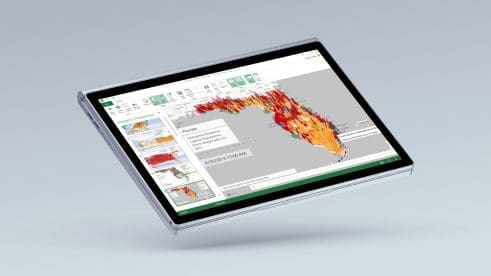
Power Map for Excel 2013 and 3D Maps for Excel 2016 allow you to quickly transform public or corporate data into dynamic and breathtaking 3D map visualizations and then easily share as cinematic tours that tell captivating narratives of your data. And you can do all of this within the familiar environment of Excel.

Microsoft 3D Maps
Microsoft 3D Maps for Excel is a three-dimensional (3D) data visualization tool that lets you look at information in new ways. 3D Maps lets you discover insights you might not see in traditional two-dimensional (2D) tables and charts.

Custom solutions
Need a custom solution? Contact a Bing Maps partner or search bing.com for a MapPoint partner.
Bing Maps for Enterprise
Get started building powerful location-based applications and experiences with Microsoft’s Bing Maps Platform. Start building for free with a Basic Key or contact our sales team.