The Project Portfolio Dashboard apps announced last fall are now available in the Apple and Office app stores! These apps come pre-configured with powerful dashboards allowing business leaders, portfolio managers and project managers to gain insights into areas such as resource utilization, project portfolio performance, costs, active risks/issues and key milestones.
Project Portfolio Dashboard web app
While the rich, out-of-box reports are designed to be immediately useful for many customers, the web app also allows customization of your portfolio dashboard to help meet specific organizational needs. Choose from a variety of project, task and resource-based reports, including issues/risks/deliverables reporting. Choose from several filtering options, including filtering by custom fields. Reports can be customized with just a few clicks without leaving the app. To learn more, read What can I do with a portfolio dashboard?
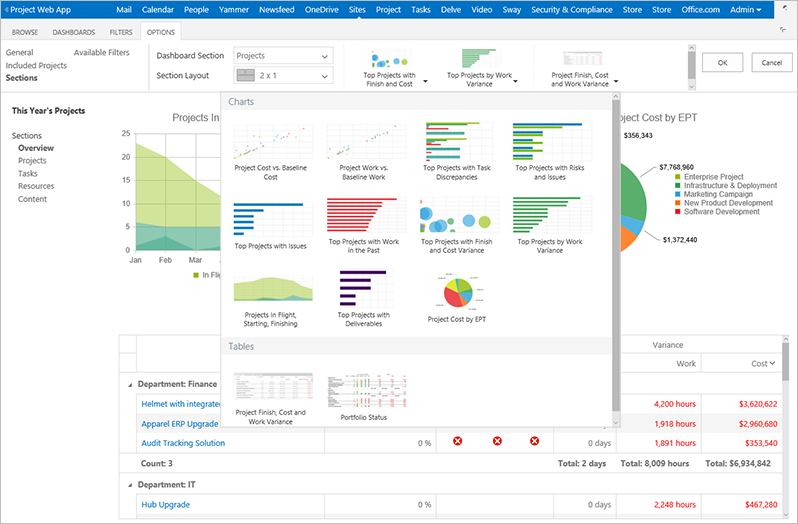
Ready to add Office 365 Project Portfolio Dashboard to your Project Online site? Get started by downloading the web app!
Project Portfolio Dashboard for the iPad
The iPad app provides access to powerful, professional-looking portfolio health reports on any iPad device anywhere, anytime. Connect the iPad app to Project Online to see the same out-of-box reports available in the web app. If you’ve added the web app to Project Online, you’ll also be able to see any customizations you’ve made, giving you a seamless reporting experience across both platforms. To learn more, read Office 365 Project Portfolio Dashboard for iPad.
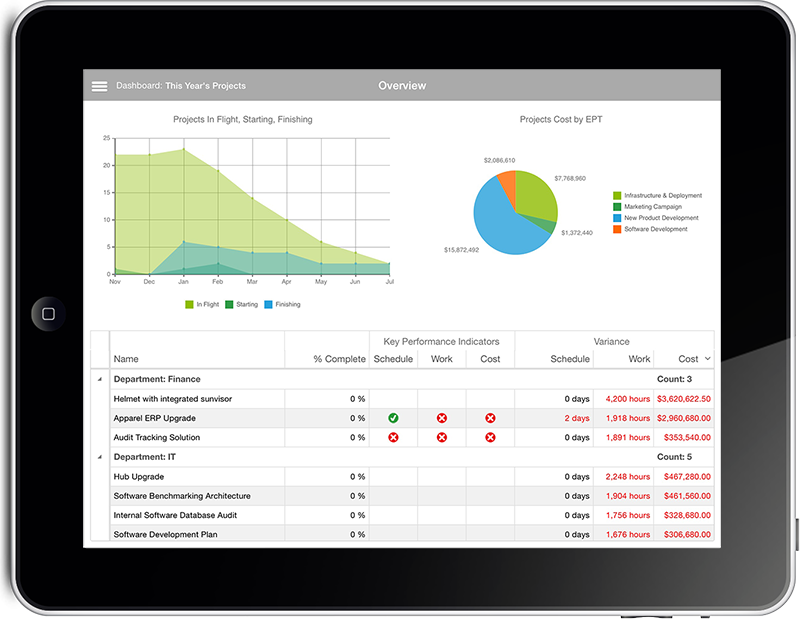
Ready to install Office 365 Project Portfolio Dashboard on your iPad? Download the iPad app to get started!