Microsoft Threat Intelligence identified a large-scale npm supply chain attack affecting more than 400 packages across multiple unrelated publishers, including packages associated with major enterprise software ecosystems such as keyv, flat-cache, cache-manager, and others. The malicious releases contain a Mini Shai-Hulud variant, a self-propagating credential-stealing worm delivered through a large, heavily obfuscated Bun-based JavaScript payload. The malware typically executes automatically through an npm preinstall lifecycle hook before package installation completes.
Once executed, the malware searches developer workstations and continuous integration and continuous delivery (CI/CD) environments for npm, GitHub, cloud, and infrastructure credentials. It uses recovered identities to authenticate to npm, GitHub, Amazon Web Services (AWS), Kubernetes, and HashiCorp Vault, enabling it to enumerate packages, repositories, workflow secrets, cloud parameters, and secret-store values. Collected data is encrypted and transmitted through an attacker-controlled HTTPS endpoint, with GitHub repositories serving as a fallback exfiltration channel.
The payload’s most significant capability is automated propagation. After obtaining an npm publishing token, it enumerates packages available to the compromised identity, downloads their latest tarballs, inserts the malware and setup loader, adds a preinstall hook, increments the patch version, and republishes the modified packages. The malware can also use stolen GitHub credentials to inject Claude and Visual Studio Code configuration files into repositories, establishing persistence and creating an additional developer-to-developer infection path.
In this blog, we’re sharing our analysis of this supply chain attack, along with protection, detection, amd hunting guidance. Organizations that installed an affected package with lifecycle scripts enabled should treat the associated developer workstation or build runner as potentially compromised. Investigations should prioritize credentials accessible to the affected identity, unauthorized npm releases, unexpected repository or workflow modifications, suspicious cloud and secret-store access, and artifacts produced by affected build systems. Organizations should revoke and rotate exposed credentials from a known-clean environment and rebuild affected systems and downstream artifacts from trusted sources.
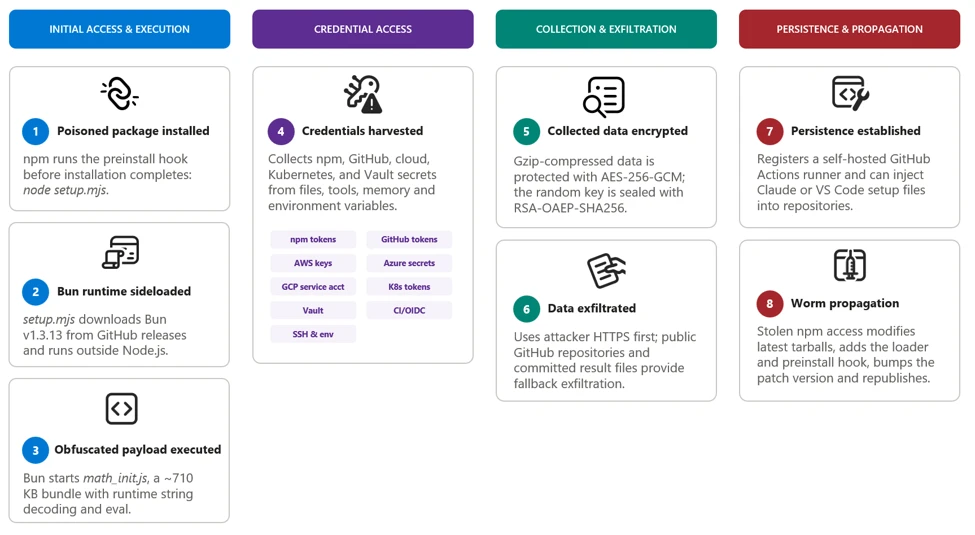
Attack chain overview
The campaign appeared as a rapid sequence of unauthorized patch releases across more than 400 npm packages maintained by otherwise unrelated publishers. Many malicious versions had no corresponding source-code commit, pull request, tag, or legitimate release, indicating that the attackers modified and published package tarballs directly rather than compromising each public source repository.
Affected releases typically added a preinstall lifecycle script that launched a malicious file, setup.mjs, contained within the package, which launched the large, obfuscated Bun JavaScript bundle included in the package. Because npm runs preinstall scripts before installation completes, the payload could execute on developer workstations and build runners before application tests or conventional security checks began.
After execution, the malware performs the following actions:
- Determines whether it is running on a developer workstation or in a CI/CD environment. On workstations, it detaches itself to continue after installation; on CI/CD systems, it remains in the active job to access workflow secrets, runner credentials, and OpenID Connect (OIDC) publishing permissions. Both paths could support further package or repository propagation when suitable credentials are found.
- Collects credentials from local files, environment variables, command-line tools, and GitHub Actions runner memory.
- Authenticates to npm, GitHub, AWS, Kubernetes, and HashiCorp Vault to enumerate additional accessible resources and secrets.
- Encrypts and exfiltrates collected data through an HTTPS channel, using GitHub repositories as a fallback.
- Uses recovered npm publishing access to modify and republish additional packages.
- Uses GitHub credentials to inject files into Claude and Visual Studio Code configurations across repository branches for persistence.
The payload’s package-propagation routine downloads each publisher’s latest release, inserts itself, increments the patch version, and publishes the resulting archive. This mechanism can rapidly transform one compromised npm identity into many malicious package releases.
0. Initial publisher access
Evidence points towards stolen maintainer credentials as the attack vector for initial compromise. Later propagation used stolen npm publishing tokens and, in targeted workflows, GitHub Actions OIDC publishing access.
1. Payload startup and background execution
The malicious npm package uses a lifecycle hook to launch its bundle.
During preflight, the payload checks the environment, exits on Russian-language systems, avoids duplicate instances, and starts a detached copy in the background on developer systems.
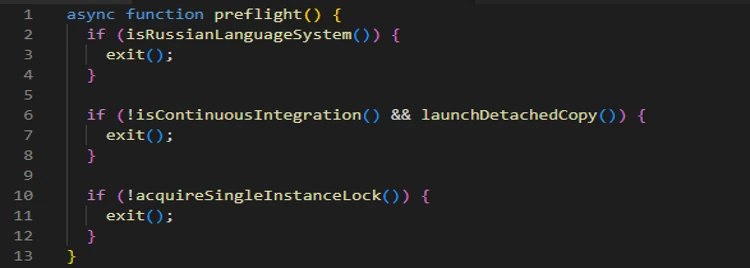
In CI environments, the payload remains attached so it can access credentials available to the active build job.
2. Initial credential discovery
The payload first collects information that is immediately available from the local system, shell, and GitHub Actions runner.
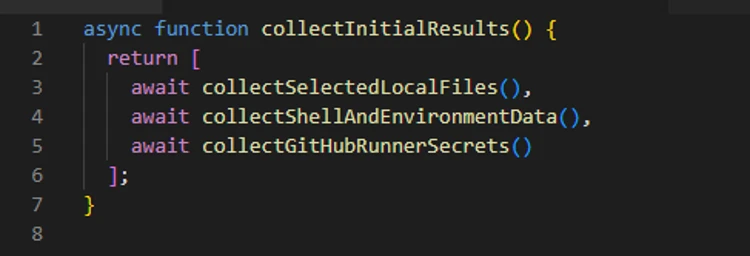
The shell collector attempts to obtain the GitHub CLI token and captures the values of all process environment variables. The filesystem collector searches credential files, shell histories, cloud configuration, Secure Shell (SSH) keys, and other sensitive locations.
3. Cloud and secret store enumeration
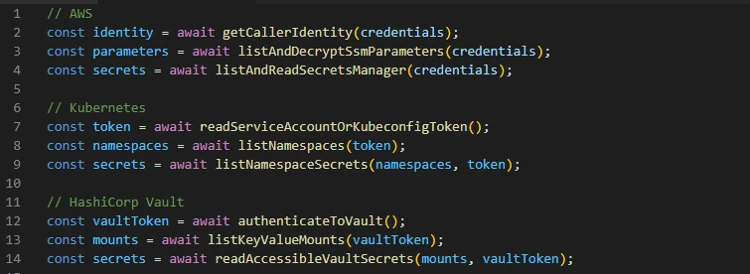
The recovered code then creates dedicated collectors for cloud and infrastructure services.
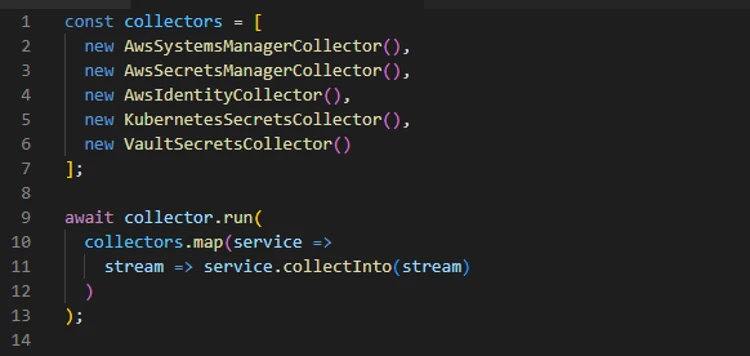
These modules do not merely scan files for token patterns; they use available credentials to call service APIs, verify access, and retrieve additional secrets permitted to those identities.
The following snippet shows the authentication attempt made using the found credentials:
4. GitHub credential theft and enumeration
Discovered GitHub tokens are validated before being used for additional collection or repository access.
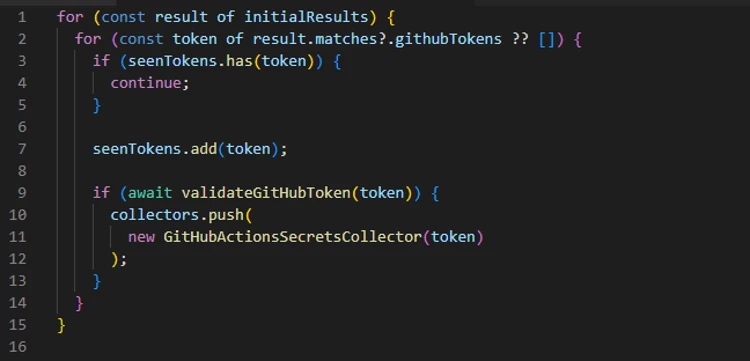
The payload checks token scopes, enumerates writable repositories, and identifies repositories where workflow execution could expose additional secrets.
6. GitHub Actions OIDC abuse
The payload also contains a targeted publishing path for GitHub Actions workflows configured as npm trusted publishers.
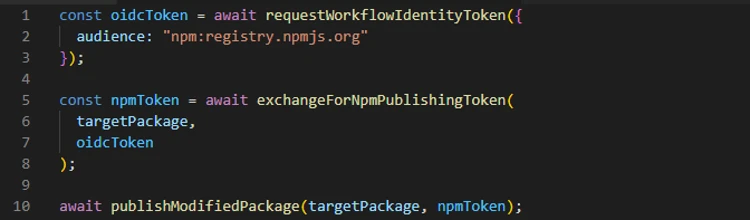
Packages published through this route can carry valid provenance because the publication originates from a legitimate workflow identity.
7. Exfiltration and fallback
Collected results are serialized as JSON, gzip-compressed, and encrypted with a randomly generated AES-256-GCM using a randomly generated 32-byte key and 12-byte initialization vector (IV). The AES key is then encrypted with the attacker’s RSA public key using RSA-OAEP-SHA256.
The payload first attempts delivery through an attacker-controlled dynamic HTTPS endpoint. The active domain can change through on-chain contract (0xE1f2395ee43e45A1556EC6438a88c31B83493103, selector 0x53ed5143) or, as a fallback, from a cryptographically verified signed GitHub commit (Signed fallback marker: thebeautifulmarchoftime). If that channel is unavailable, it creates a public GitHub repository with the description Shai-Hulud: Here We Go Again.
Encrypted results are committed as files such as: results-<timestamp>-<counter>.json.
At the time of analysis, the live contract returns npm-cache[.]com. Earlier candidates include pypi-get[.]com and js-mirror[.]com.
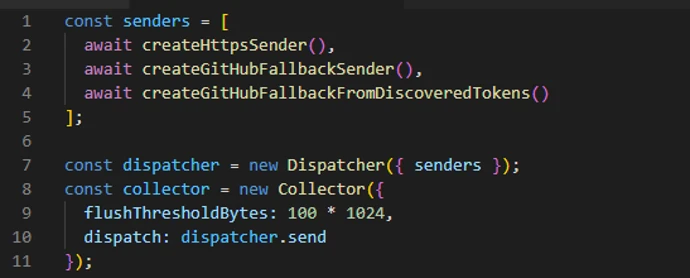
In one fallback path, a stolen GitHub token is added separately using double Base64 encoding. This token field is encoded, not encrypted.
8. Repository persistence and secondary spread
The payload can use stolen GitHub credentials to inject the malware and supporting setup files into eligible repository branches. The recovered code targets Claude and Visual Studio Code configuration paths, including .claude/settings.json, .claude/setup.mjs, .vscode/tasks.json, and .vscode/setup.mjs.
These changes create a secondary infection route: future Claude or Visual Studio Code activity can restart the payload even after the original npm installation has completed. In a conditional GitHub fallback path, the payload also attempts to install a token-monitor component that maintains credential access and contains a destructive handler if the monitored token is revoked.
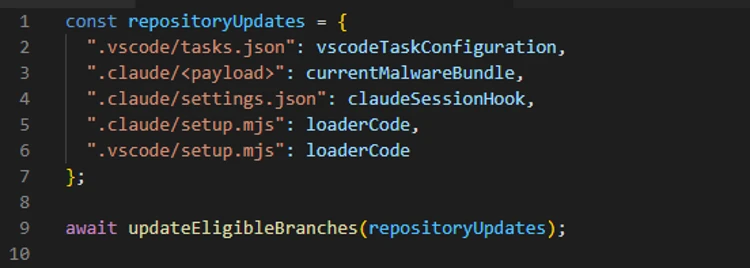
9. Worm behavior: Package modification and publication
The npm tokens found in collected data are checked for package-write permission and two-factor authentication (2FA)-bypass capability.
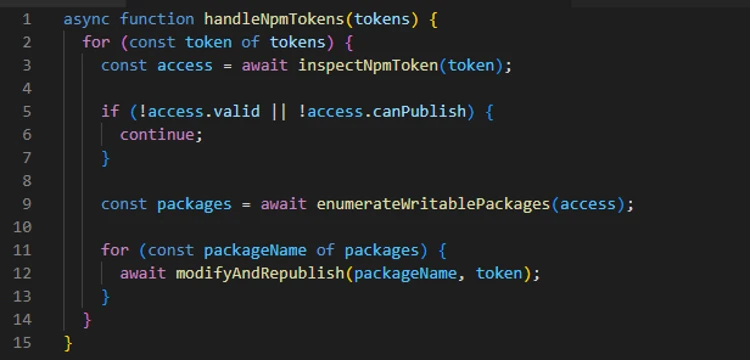
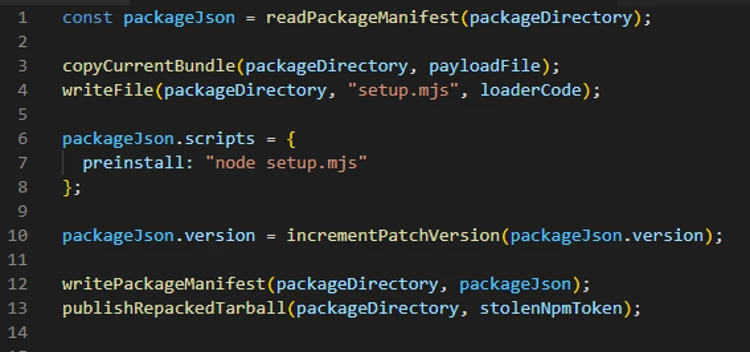
The propagation routine downloads a package’s latest tarball, copies the current malware bundle into it, adds a loader, and replaces its lifecycle scripts. This creates the worm-like propagation pattern: one stolen token can produce malicious patch releases across every package available to that publisher. This also explains why malicious releases frequently appeared as an otherwise ordinary patch-version increment without corresponding source commits or pull requests.
Mitigation and protection guidance
Microsoft recommends the following mitigations to reduce the impact of this threat.
- Update npm CLI to npm CLI v 12 and use the npm CLI min-release-age feature.
- Review dependency trees, lockfiles, artifact repositories, and CI caches for the five compromised versions, including transitive references.
- Pin known-good package versions.
- Purge npm and yarn caches on affected developer endpoints and build hosts, especially if the compromised tarballs were written into shared CI caches.
- Rotate credentials and secrets from a clean host if a build system or workstation imported a compromised version, because second-stage execution can expose tokens and compromise build integrity.
- Ensure that Microsoft Defender Antivirus cloud-delivered protection, Microsoft Defender for Endpoint telemetry, Microsoft Defender for Containers, and Microsoft Defender XDR investigation workflows are enabled across developer and CI assets.
- Organizations that produce software artifacts should also review their own release hardening because this incident appears consistent with CI/CD pipeline abuse through GitHub Actions OIDC publishing. Defenders should review token scopes, workflow approvals, protected environments, release provenance, and anomaly detection around automated package publication. Supply chain response cannot stop at host triage; it must also include verification that the release process itself has not been subverted.
- After remediation, validate recovery deliberately. Rebuild affected projects from a known-good dependency baseline, confirm that compromised hashes are absent from package caches and artifact stores, and review endpoint telemetry for any lingering NodeJS directory artifacts such as Math_Symbol.js, Math_init.js, or names similar to math_<guid>.js, or suspicious node child processes. For development organizations that share base images or golden build runners, rebuild those images as well so future jobs do not silently inherit poisoned caches or post-compromise persistence.
Indicators of compromise (IOC)
| Indicator | Description |
| 54dc7ea54a1317cca0e890a2770630cf7fa6c97813e0cb9d2caa93012b350668 | setup.mjs (npm tarball preinstall loader) |
| fd3ca4007b225fdf8de7af4345a19179d5efa8c4bb9205f88cda806e5684b1eb | setup.mjs (.claude and .vscode repository loader) |
| 9fc2570b7cef51c1b8df116d144d11ff4096357be7d2c4c6367cfc2509cf1bcc | Math_*.js |
| npm-cache[.]com | C2 domain |
| pypi-get[.]com | C2 domain |
| js-mirror[.]com | C2 domain |
| hxxps[:]//npm-cache[.]com:443/router | C2 URL |
Microsoft Defender XDR detections
Microsoft Defender XDR customers can refer to the list of applicable detections below. Microsoft Defender XDR coordinates detection, prevention, investigation, and response across endpoints, identities, email, and apps to provide integrated protection against attacks like the threat discussed in this blog.
| Tactic | Observed activity | Microsoft Defender coverage |
| Initial access / Execution | Malicious files embedded in compromised npm packages execute the embedded payload automatically through a malicious preinstall lifecycle hook. | Microsoft Defender Antivirus – Trojan:NPM/ShaiLoader.BY – Trojan:NPM/MalBun.A – Trojan:NPM/ShaiWorm.DAY!MTB Microsoft Defender for Endpoint – Suspicious Node.js process behavior – Suspicious Node.js script execution |
| Execution / Defense evasion | The preinstall loader launches a heavily obfuscated Bun-based JavaScript payload designed to hinder analysis and evade Node.js-focused monitoring. | Microsoft Defender Antivirus – Behavior:Linux/SuspBunActivity.A – Behavior:Win32/SuspBunActivity.A Microsoft Defender for Endpoint – Suspicious usage of Bun runtime – Suspicious installation of Bun runtime – Suspicious Node.js process behavior – Suspicious script execution via Bun – Suspicious Node.js script execution Microsoft Defender for Cloud – Suspicious npm supply-chain compromise activity detected |
| Credential access / Collection | The malware searches developer workstations and CI/CD environments for npm, GitHub, cloud, Kubernetes, and secrets. | Microsoft Defender for Endpoint – Credential access attempt – Suspicious cloud credential access – Enumeration of files with sensitive data – Suspicious access of sensitive files Microsoft Defender for Cloud – Sha1-Hulud Campaign Detected: Possible command injection to exfiltrate credentials |
Advanced hunting queries
Microsoft Defender XDR customers can run the following advanced hunting queries to find related activity in their networks:
Execution of the preinstall script
DeviceProcessEvents
    | where Timestamp > ago(3d)
    | where FileName in~ ("node", "node.exe")
    | where ProcessCommandLine in~ ("node setup.mjs", "node  setup.mjs")

CloudProcessEvents
    | where Timestamp > ago(3d)
    | where FileName in~ ("node", "node.exe")
    | where ProcessCommandLine in~ ("node setup.mjs", "node  setup.mjs")
Execution of second-stage JavaScript using Bun runtime
DeviceProcessEvents
    | where Timestamp > ago(3d)
    | where InitiatingProcessFileName in~ ("node", "node.exe")
    | where InitiatingProcessCommandLine in~ ("node setup.mjs", "node  setup.mjs")
    | where FileName in~ ("bun", "bun.exe")
    | where FolderPath contains "bun-dl-" or ProcessCommandLine has "node_modules"
Malicious JavaScript from malicious packages
DeviceFileEvents
| where Timestamp > ago(3d)
| where SHA256 in~ ("9fc2570b7cef51c1b8df116d144d11ff4096357be7d2c4c6367cfc2509cf1bcc", "fd3ca4007b225fdf8de7af4345a19179d5efa8c4bb9205f88cda806e5684b1eb", "54dc7ea54a1317cca0e890a2770630cf7fa6c97813e0cb9d2caa93012b350668")
Credential access by malicious JavaScript
DeviceProcessEvents
   | where Timestamp > ago(3d)
   | where ProcessCommandLine has_any ('gh auth token', 'gcloud config config-helper', 'az account get-access-token', "azd auth token")
   | where InitiatingProcessFileName in~ ("bun", "bun.exe")
   | where InitiatingProcessFolderPath contains "bun-dl-" or InitiatingProcessCommandLine has "node_modules"
Microsoft Security Copilot
Security Copilot customers can use the standalone experience to create their own prompts or run prebuilt promptbooks to automate investigation and response tasks related to this threat. Useful promptbooks for this activity include Incident investigation, Microsoft User analysis, Threat actor profile, Threat Intelligence 360 report based on MDTI intelligence, and Vulnerability impact assessment. Some promptbooks require access to Microsoft Defender XDR, Microsoft Sentinel, or related Microsoft security plugins.
For this campaign, Security Copilot can help analysts summarize affected devices, pivot from the package hashes to endpoint evidence, identify hosts that communicated with the IPFS path or C2 infrastructure, and build remediation actions such as cache purge, credential rotation, and containment sequencing for impacted developer systems and build runners.
Threat intelligence reports
Microsoft customers can use Microsoft Defender XDR Threat analytics and related Microsoft threat intelligence reporting to stay current on the malicious activity, indicators, detection coverage, and recommended response actions associated with this compromise. These reports provide investigation context, protection guidance, and updated intelligence that security teams can use to prevent, mitigate, or respond to related activity in customer environments.
As with other active supply-chain investigations, defenders should monitor for updated intelligence on package status, additional affected versions, infrastructure changes, and newly surfaced post-compromise tradecraft. Microsoft will continue to incorporate validated indicators and detections into Microsoft security products as the investigation evolves.
Learn more
For the latest security research from the Microsoft Threat Intelligence community, check out the Microsoft Threat Intelligence Blog.
To get notified about new publications and to join discussions on social media, follow us on LinkedIn, X (formerly Twitter), and Bluesky.
To hear stories and insights from the Microsoft Threat Intelligence community about the ever-evolving threat landscape, listen to the Microsoft Threat Intelligence podcast.
Review our documentation to learn more about our real-time protection capabilities and see how to enable them within your organization.
- Learn more about securing Copilot Studio agents with Microsoft Defender
- Evaluate your AI readiness with our latest Zero Trust for AI workshop.
- Microsoft 365 Copilot AI security documentation
- How Microsoft discovers and mitigates evolving attacks against AI guardrails