
Over the last several months, we’ve provided regular updates on the rapid progress we’re making with Microsoft Threat Protection, which enables your organization to:
- Protect your assets with identity-driven security and powerful conditional access policies which ensure your assets are secured from unauthorized users, devices, or apps.
- Connect the dots between disparate threat signals and develop threat incidents by grouping alerts from different parts of your environment, stitching together the elements of a threat.
- Empower your defenders, providing in-depth analysis to identify the full scope and impact of a threat.
We support these capabilities by offering you intelligent automation as well as human expertise to quickly resolve situations and keep your business running. I recently shared our vision of Microsoft Threat Protection with Jeremy Chapman in a Microsoft Mechanics video broadcast:
We strongly believe in our vision and are confident our customers will benefit from enhanced security with Microsoft Threat Protection as we continue adding capabilities with unstoppable momentum. Today, I want to spend time highlighting what Microsoft Threat Protection can already do for you. While we’re very excited about the vision and pushing towards releasing more features, it’s important to share the significant advantages which are already available with Microsoft Threat Protection today. I’m going to use a real example of a common, yet lethal, threat type to showcase how Microsoft Threat Protection already makes your organization more secure.
Executing on our vision
The more threats we see, the more we can stop. This virtual cycle means that each threat we see helps further enhance our machine learning models, which in turn improves our ability to stop subsequent threats. As we’ve shared in the past, the Microsoft Intelligent Security Graph (Figure 1) enables us to see billions of threats and assess 6.5 trillion signals daily. Importantly, we don’t only see a large quantity of threats, but we also see threats from a wide variety of sources. Through the Intelligent Security Graph, threat signals are seamlessly shared across all the services in Microsoft Threat Protection, providing comprehensive security across multiple attack vectors.
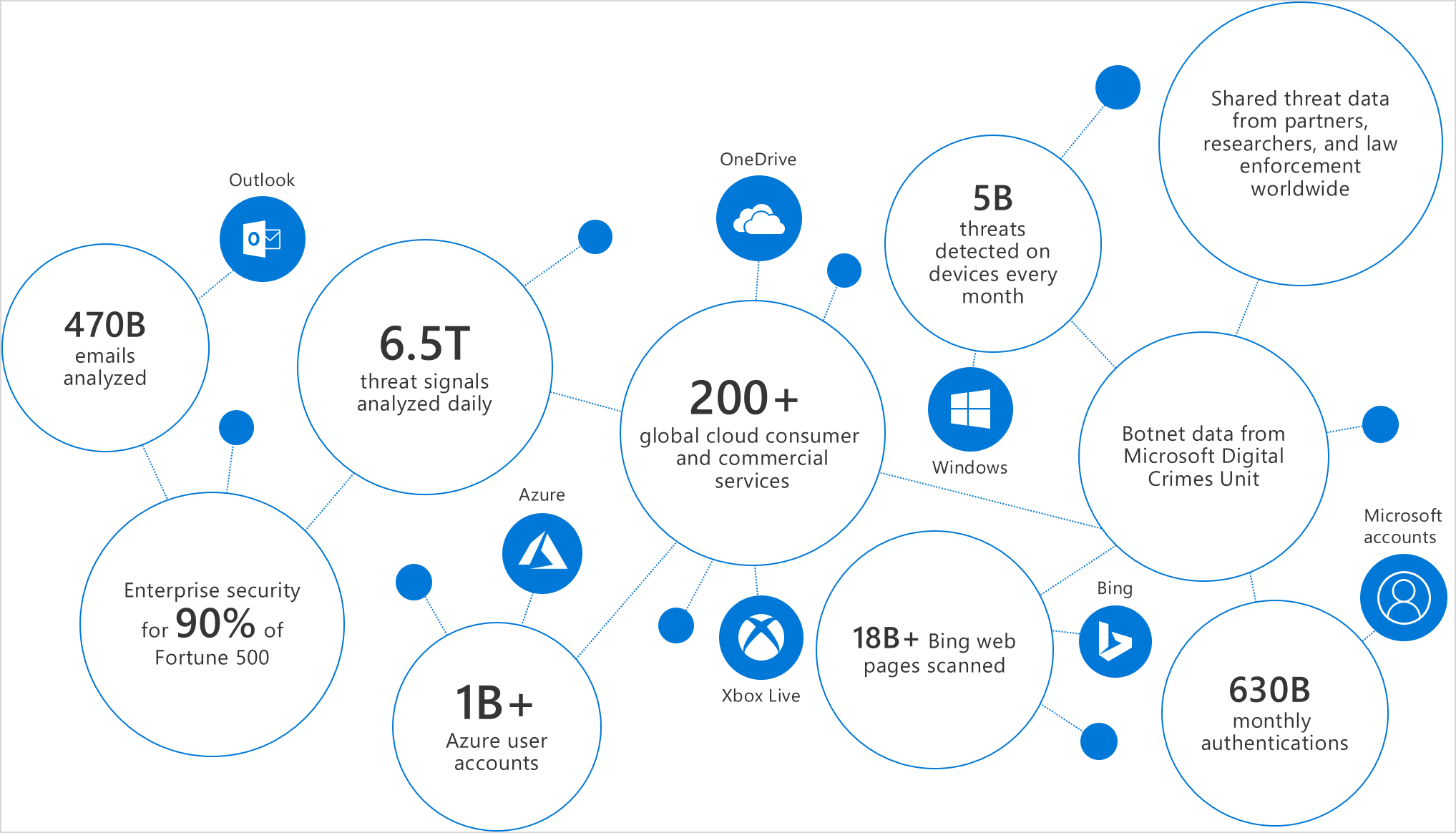
Figure 1. The strength of signal offered by the Microsoft Intelligent Security Graph.
A great example of how Microsoft Threat Protection is already executing on its promised vision is how we address phishing campaigns. Phishing has been on a steady rise over the last few years. As the provider of one of the largest email services on the planet, we expect to be a primary target for attacks. In 2018 alone, Microsoft’s analysts analyzed (Figure 2) over 300,000 phishing campaigns and 8 million business email compromise (BEC) attempts.
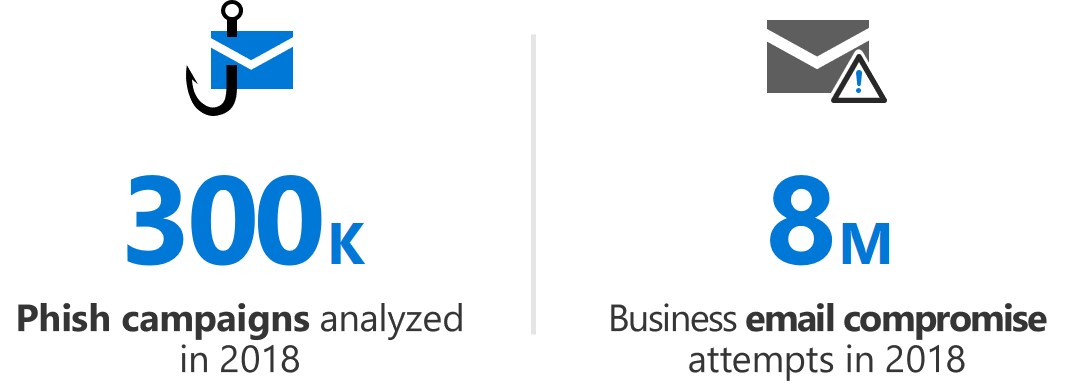
Figure 2. Data from Office 365 security analysts on the phishing campaigns and BEC attempts from 2018.
While these numbers can be worrisome, Microsoft Threat Protection is designed to secure your organization from phishing, whether the campaign attacks the endpoint, email, or through the web. In a recent campaign, anomaly detection algorithms in Microsoft Defender Advanced Threat Protection (ATP) next-generation protection pointed to multiple PDF files that Microsoft could detect. We were the only organization able to detect these phish PDFs because we leveraged the knowledge from multiple security services operating on various attack vectors. In this example, the malicious PDF files (Figure 3) were blocked by machine learning models, enhanced by assimilating signals from multiple services of Microsoft Threat Protection.
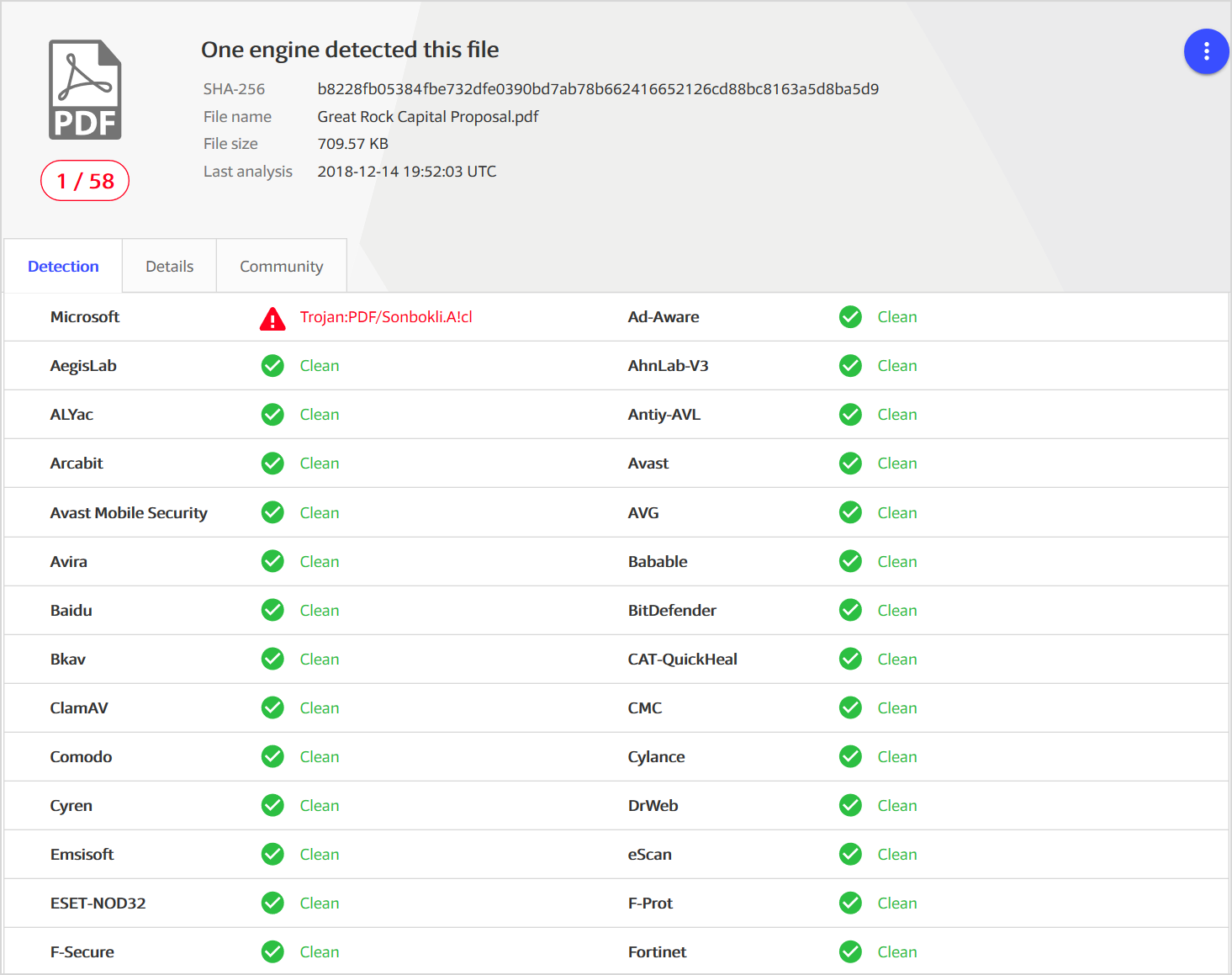
Figure 3. One of several PDF files that only Microsoft was detecting (as Trojan:PDF/Sonbokli.A!cl) at the time it was first observed (Source: VirusTotal).
Through the Microsoft Intelligent Security Graph, the detection algorithm was enriched with URL and domain reputation intelligence from Microsoft Defender SmartScreen, the service powering the anti-phishing technology in Microsoft Edge, as well as the network protection capability in Microsoft Defender ATP.
Additionally, Office 365 Advanced Threat Protection (ATP) provided rich optics from PDF phish files distributed via email. When Office 365 ATP detects a suspicious file or URL in emails, it can detonate the file and apply heuristics and sophisticated machine learning to determine a verdict. This verdict is shared with other services in Microsoft Threat Protection. In the case of these PDF files, all the services in Microsoft Threat Protection could immediately block the corrupted PDF files because the original signal from Office 365 ATP was shared with all the other services in Microsoft Threat Protection.
Microsoft Threat Protection also stops threats quickly because of its unique attributes. Every day, Microsoft sees millions of new attacks that run for just 60 minutes or less. This fast pace requires security to be automatic, in real-time, and accurate. The signal sharing and mitigation across Microsoft Threat Protection is robust and comprehensive. Below (Figure 4) is an actual timeline showing how the threat originally identified by SmartScreen provided signal to both Office ATP and Microsoft Defender ATP, which both blocked the threat.

Figure 4. Threat timeline of this campaign from the first identification with SmartScreen to mitigations by Office ATP/Exchange Online Protection (EOP) and Microsoft Defender ATP.
Great intelligence enables great security
Our unparalleled intelligence, seamless integration, and best-of-breed solutions for multiple attack vectors leads to the staggering numbers of threats we can detect and mitigate across multiple threat vectors. Below are statistics of the threats which Microsoft Threat Protection mitigated in 2018 (Figure 5). What’s important is not only the number of threats we’ve detected and blocked, but also the fact that we do so for threats across multiple, disparate attack vectors. This is the same strength of security you will benefit from when you implement Microsoft Threat Protection.
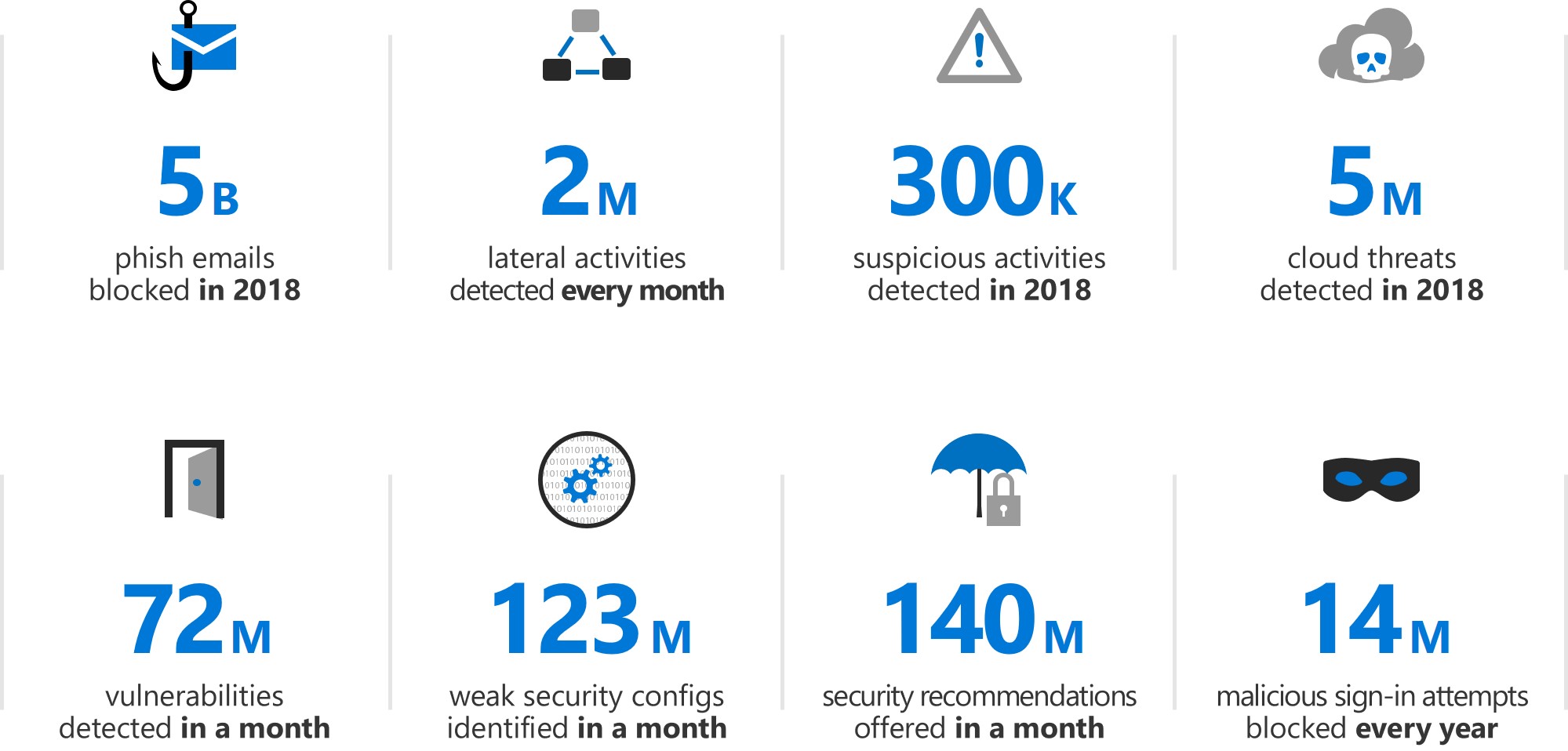
Figure 5. Microsoft Threat Protection in action. Some of the detections and mitigations already offered with the solution.
Revamped website to keep you up to date
Today, we’re excited to launch our new Microsoft Threat Protection website, where you’ll find great collateral summarizing the full scope of capabilities offered by Microsoft Threat Protection. On the site, you’ll find three new webcasts where our engineers offer details and examples of:
- Automated Incident Response—Unique SecOps capabilities only available with Microsoft.
- Azure Sentinel—Our newly launched SIEM-as-a-service.
- Microsoft Threat Experts and Threat and Vulnerability Management—For endpoints.
The new site also links to all the services which are part of Microsoft Threat Protection with great collateral offering details on how the individual services help secure specific attack vectors.
Experience the evolution of Microsoft Threat Protection
Hopefully, I gave you a glimpse of how Microsoft Threat Protection has already started executing on the vision of securing the modern organization. Take a moment to learn more about Microsoft Threat Protection, read our previous monthly updates, and visit our new website.
Organizations have already transitioned to Microsoft Threat Protection and partners are leveraging its powerful capabilities. Begin a trial of Microsoft Threat Protection services today to experience the benefits of the most comprehensive, integrated, and secure threat protection solution available to your organization.