Skip to main content Why Microsoft Security AI-powered cybersecurity Cloud security Data security & governance Identity & network access Privacy & risk management Security for AI Unified SecOps Zero Trust Microsoft Defender Microsoft Entra Microsoft Intune Microsoft Priva Microsoft Purview Microsoft Sentinel Microsoft Security Copilot Microsoft Entra ID (Azure Active Directory) Microsoft Entra Agent ID Microsoft Entra External ID Microsoft Entra ID Governance Microsoft Entra ID Protection Microsoft Entra Internet Access Microsoft Entra Private Access Microsoft Entra Permissions Management Microsoft Entra Verified ID Microsoft Entra Workload ID Microsoft Entra Domain Services Azure Key Vault Microsoft Sentinel Microsoft Defender for Cloud Microsoft Defender XDR Microsoft Defender for Endpoint Microsoft Defender for Office 365 Microsoft Defender for Identity Microsoft Defender for Cloud Apps Microsoft Security Exposure Management Microsoft Defender Vulnerability Management Microsoft Defender Threat Intelligence Microsoft Defender Suite for Business Premium Microsoft Defender for Cloud Microsoft Defender Cloud Security Posture Mgmt Microsoft Defender External Attack Surface Management Azure Firewall Azure Web App Firewall Azure DDoS Protection GitHub Advanced Security Microsoft Defender for Endpoint Microsoft Defender XDR Microsoft Defender for Business Microsoft Intune core capabilities Microsoft Defender for IoT Microsoft Defender Vulnerability Management Microsoft Intune Advanced Analytics Microsoft Intune Endpoint Privilege Management Microsoft Intune Enterprise Application Management Microsoft Intune Remote Help Microsoft Cloud PKI Microsoft Purview Communication Compliance Microsoft Purview Compliance Manager Microsoft Purview Data Lifecycle Management Microsoft Purview eDiscovery Microsoft Purview Audit Microsoft Priva Risk Management Microsoft Priva Subject Rights Requests Microsoft Purview Data Governance Microsoft Purview Suite for Business Premium Microsoft Purview data security capabilities Pricing Services Partners Cybersecurity awareness Customer stories Security 101 Product trials How we protect Microsoft Industry recognition Microsoft Security Insider Microsoft Digital Defense Report Security Response Center Microsoft Security Blog Microsoft Security Events Microsoft Tech Community Documentation Technical Content Library Training & certifications Compliance Program for Microsoft Cloud Microsoft Trust Center Security Engineering Portal Service Trust Portal Microsoft Secure Future Initiative Business Solutions Hub Contact Sales Start free trial Microsoft Security Azure Dynamics 365 Microsoft 365 Microsoft Teams Windows 365 Microsoft AI Azure Space Mixed reality Microsoft HoloLens Microsoft Viva Quantum computing Sustainability Education Automotive Financial services Government Healthcare Manufacturing Retail Find a partner Become a partner Partner Network Microsoft Marketplace Marketplace Rewards Software development companies Blog Microsoft Advertising Developer Center Documentation Events Licensing Microsoft Learn Microsoft Research View Sitemap
A tech worker stares at a computer monitor.
  • News
  • 1 min read

Announcing the all new Attack Surface Analyzer 2.0


Few of us know what is really happening on our systems when we install new software from new or untrusted sources. This is important because most installation processes require elevated privileges, which can lead to undesired system configuration changes. Knowing what changes have been made is vital to maintaining the security of your system, data, and networks. Identifying those changes can be challenging and time consuming without a little help.

The classic Attack Surface Analyzer 1.0 was released in 2012 to help software developers and IT professionals identify changes made to Windows operating systems during application installations. This year, we decided to rewrite the tool to take advantage of modern, cross-platform technologies like .NET Core and Electron. Attack Surface Analyzer 2.0 now runs on Windows, Linux, and macOS and is available as an open source project on GitHub.

Attack Surface Analyzer 2.0 can help you identify potential security risks introduced by changes to an operating system’s security configuration by identifying changes in key areas, including:

  • File System
  • User Accounts
  • System Services
  • Network Ports (listeners)
  • System Certificate Stores
  • Windows Registry

This tool can play an important role in ensuring that the software you develop or deploy doesn’t adversely affect the operating system security configuration by allowing you to scan for specific types of changes.
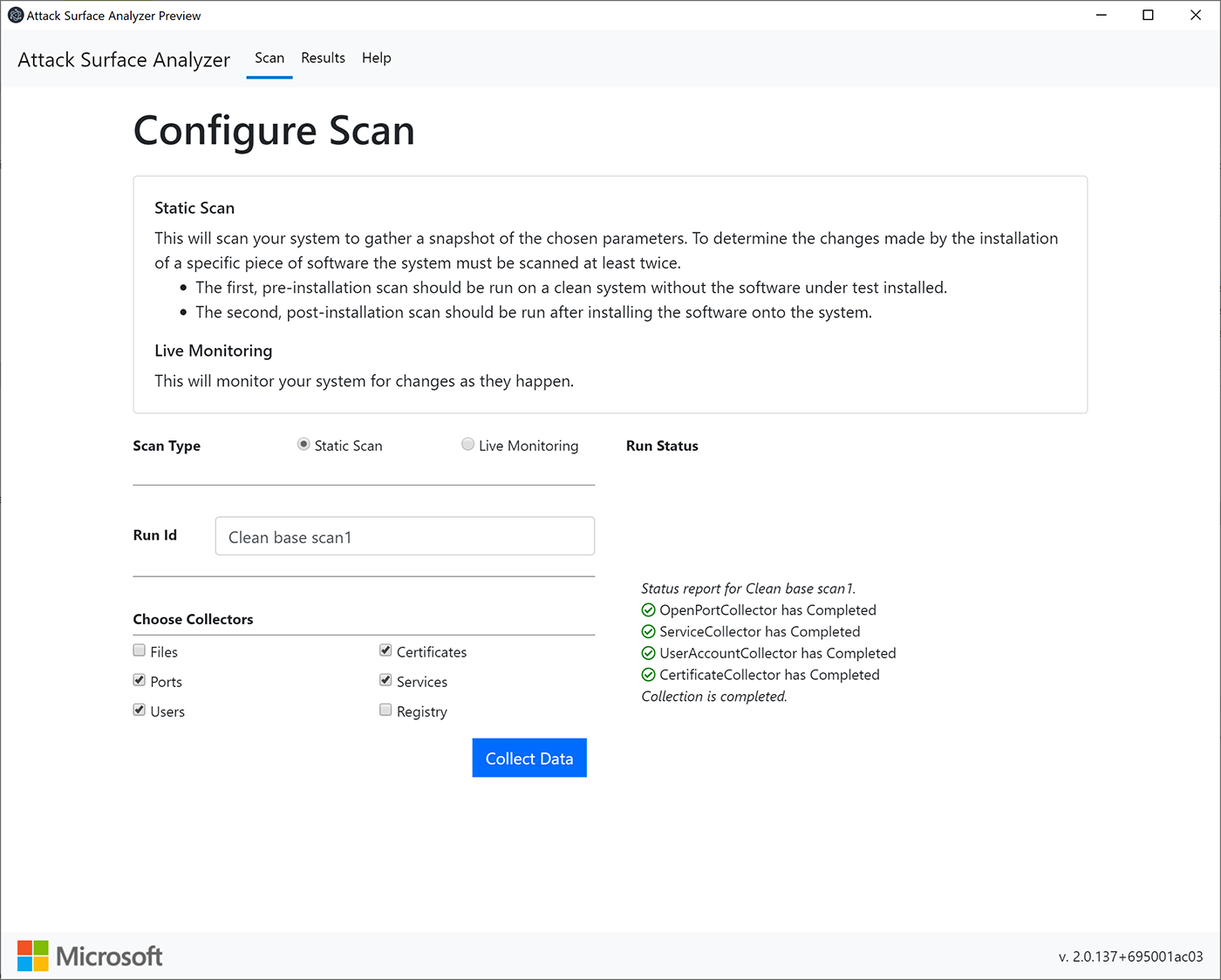
Image of a Configure Scan.

Results from the comparison analysis feature highlight relevant changes, which can be easily viewed or exported.
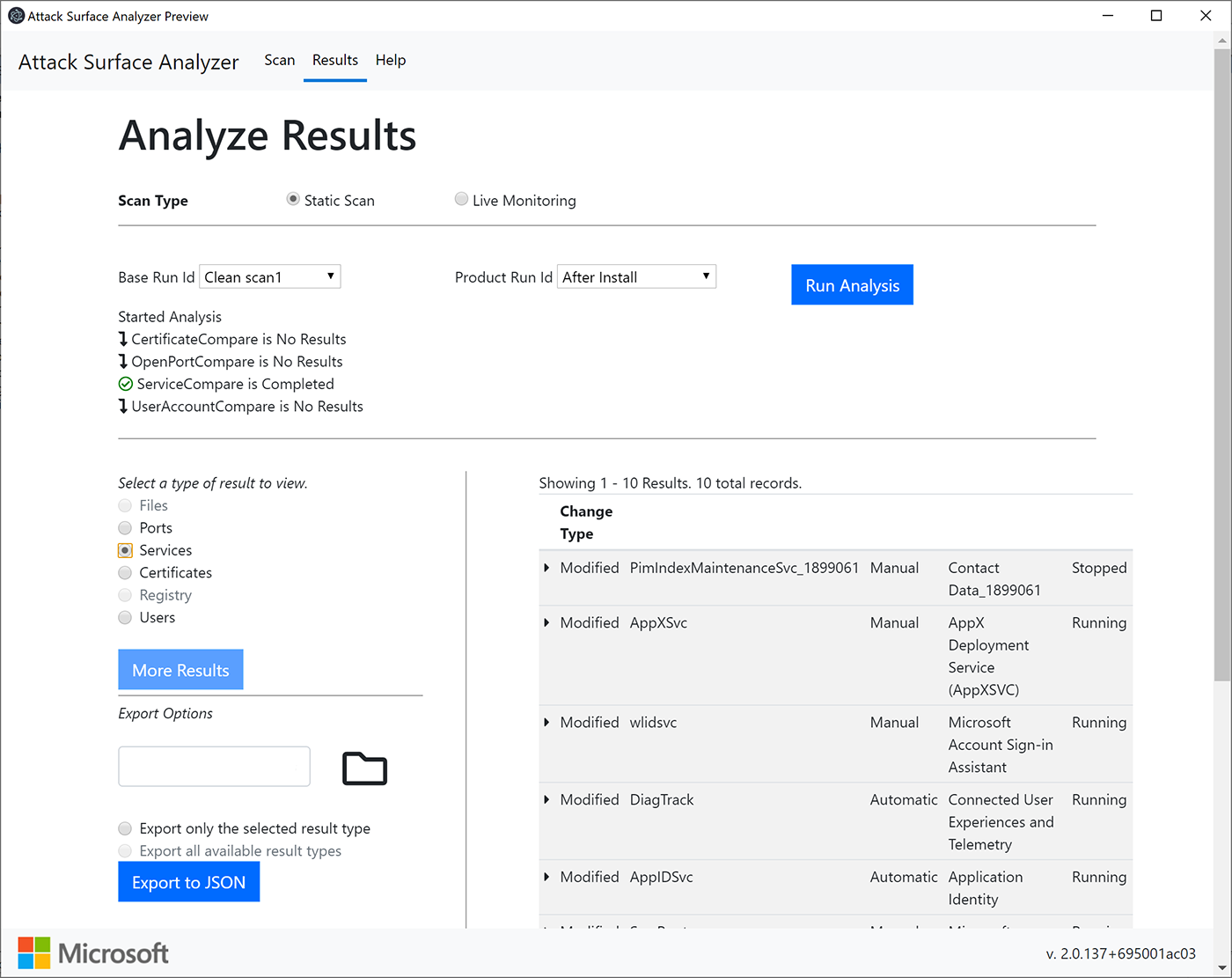
Results from the comparison analysis feature.

The tool includes both Electron and command line interface options. Results for the command line use option are written to a local HTML or JSON file, making it easy to include as part of your automated toolchain.
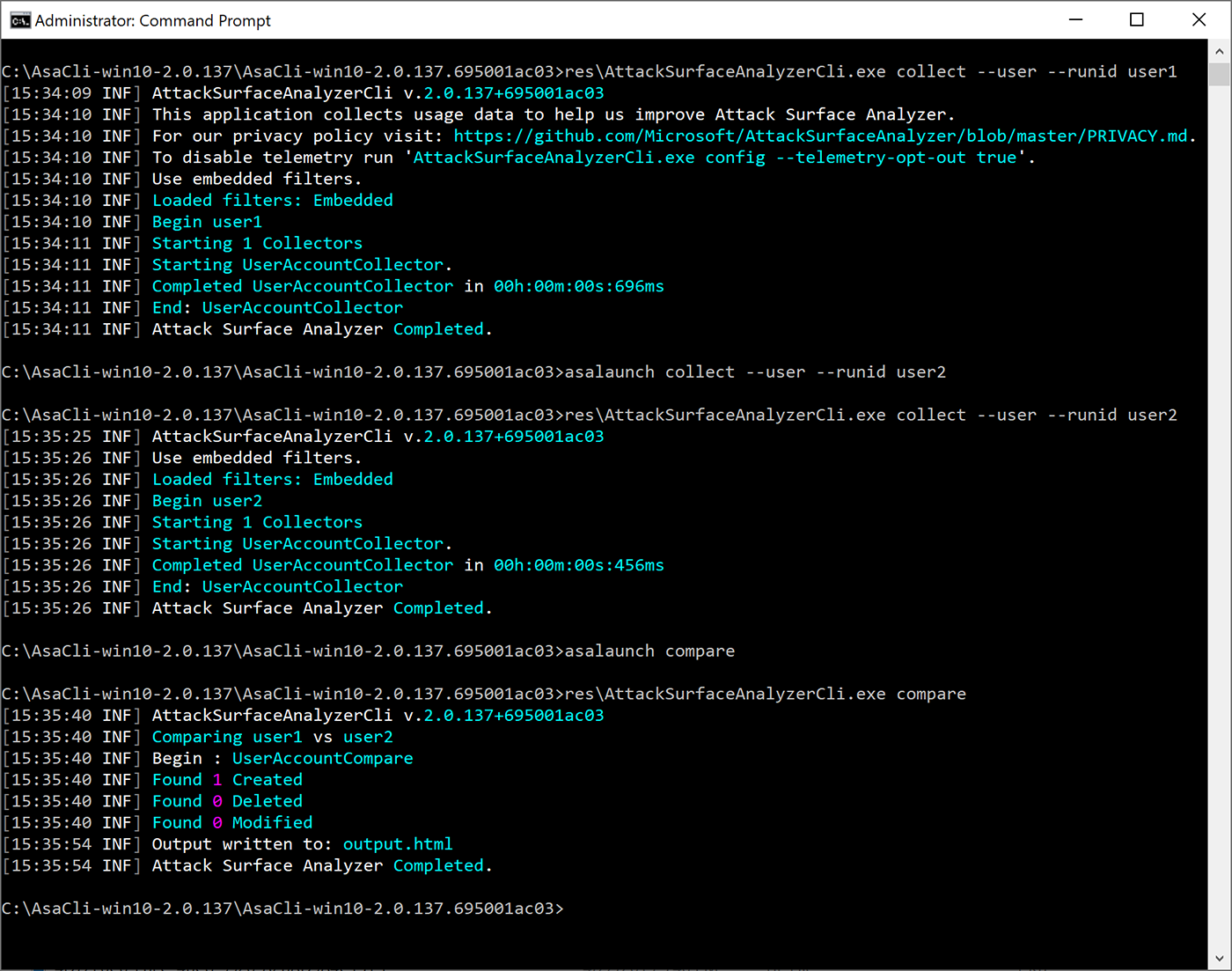
Results for the command line use option.

Detecting these types of changes can be error prone and time consuming. Attack Surface Analyzer 2.0 helps make it easy.

We look forward to your comments, ideas, and contributions for improving this tool. To learn more about Attack Surface Analyzer 2.0, please visit our GitHub project page at github.com/Microsoft/AttackSurfaceAnalyzer.

Related posts