
When hackers plan an attack, they often engage in a numbers game. They can invest significant time pursing a single, high-value target—someone in the C-suite for example and do “spear phishing.” Or if they just need low-level access to gain a foothold in an organization or do reconnaissance, they target a huge volume of people and spend less time on each one which is called “password spray.” Last December Seema Kathuria and I described an example of the first approach in Spear phishing campaigns—they’re sharper than you think! Today, I want to talk about a high-volume tactic: password spray.
In a password spray attack, adversaries “spray” passwords at a large volume of usernames. When I talk to security professionals in the field, I often compare password spray to a brute force attack. Brute force is targeted. The hacker goes after specific users and cycles through as many passwords as possible using either a full dictionary or one that’s edited to common passwords. An even more targeted password guessing attack is when the hacker selects a person and conducts research to see if they can guess the user’s password—discovering family names through social media posts, for example. And then trying those variants against an account to gain access. Password spray is the opposite. Adversaries acquire a list of accounts and attempt to sign into all of them using a small subset of the most popular, or most likely, passwords. Until they get a hit. This blog describes the steps adversaries use to conduct these attacks and how you can reduce the risk to your organization.
Three steps to a successful password spray attack
Step 1: Acquire a list of usernames
It starts with a list of accounts. This is easier than it sounds. Most organizations have a formal convention for emails, such as firstname.lastname@company.com. This allows adversaries to construct usernames from a list of employees. If the bad actor has already compromised an account, they may try to enumerate usernames against the domain controller. Or, they find or buy usernames online. Data can be compiled from past security breaches, online profiles, etc. The adversary might even get some verified profiles for free!
Step 2: Spray passwords
Finding a list of common passwords is even easier. A Bing search reveals that publications list the most common passwords each year. 123456, password, and qwerty are typically near the top. Wikipedia lists the top 10,000 passwords. There are regional differences that may be harder to discovery, but many people use a favorite sports teams, their state, or company as a password. For example, Seahawks is a popular password choice in the Seattle area. Once hackers do their research, they carefully select a password and try it against the entire list of accounts as shown in Figure 1. If the attack is not successful, they wait 30 minutes to avoid triggering a timeout, and then try the next password.
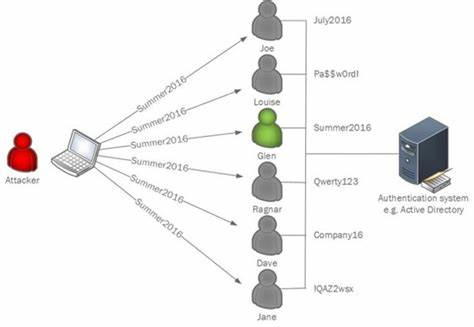
Figure 1: Password spray using one password across multiple accounts.
Step 3: Gain access
Eventually one of the passwords works against one of the accounts. And that’s what makes password spray a popular tactic—attackers only need one successful password + username combination. Once they have it, they can access whatever the user has access to, such as cloud resources on OneDrive. Or use the exploited account to do internal reconnaissance on the target network and get deeper into the systems via elevation of privilege.
Even if the vast majority of your employees don’t use popular passwords, there is a risk that hackers will find the ones that do. The trick is to reduce the number of guessable passwords used at your organization.
Configure Azure Active Directory (Azure AD) Password Protection
Azure AD Password Protection allows you to eliminate easily guessed passwords and customize lockout settings for your environment. This capability includes a globally banned password list that Microsoft maintains and updates. You can also block a custom list of passwords that are relevant to your region or company. Once enabled, users won’t be able to choose a password on either of these lists, making it significantly less likely that an adversary can guess a user’s password. You can also use this feature to define how many sign-in attempts will trigger a lockout and how long the lockout will last.
Simulate attacks with Office 365 Advanced Threat Protection (Office 365 ATP)
Attack Simulator in Office 365 ATP lets you run realistic, but simulated phishing and password attack campaigns in your organization. Pick a password and then run the campaign against as many users as you want. The results will let you know how many people are using that password. Use the data to train users and build your custom list of banned passwords.
Begin your passwordless journey
The best way to reduce your risk of password spray is to eliminate passwords entirely. Solutions like Windows Hello or FIDO2 security keys let users sign in using biometrics and/or a physical key or device. Get started by enabling Multi-Factor Authentication (MFA) across all your accounts. MFA requires that users sign in with at least two authentication factors: something they know (like a password or PIN), something they are (such as biometrics), and/or something they have (such as a trusted device).
Learn more
We make progress in cybersecurity by increasing how much it costs the adversary to conduct the attack. If we make guessing passwords too hard, hackers will reduce their reliance on password spray.
- Read about Azure AD Password Protection.
- Learn more about Attack Simulator in Office 365 ATP.
Bookmark the Security blog to keep up with our expert coverage on security matters. Also, follow us at @MSFTSecurity for the latest news and updates on cybersecurity. For more information about our security solutions visit our website. Or reach out to me on LinkedIn or Twitter.
Provide protection for third-party apps
Microsoft Cloud App Security (MCAS) monitors user sessions for third-party cloud apps, including G-Suite, AWS, and Salesforce. The MCAS detection engine looks for anomalous user activity for indicators of compromise. One indicator, “multiple failed login attempts,” can be used to create a dynamic baseline per user, across the tenant, and alert on anomalous login behavior that may represent an active brute force or password spray attack.